








Overview
The expected benefits
Let's build new, seamless payment journeys for our customers.

The connection is made through a secure device that complies with the requirements of the European regulator.

Streamline the journeys
Enable your clients to easily manage payments within their daily management processes.

Reduce risks
Avoid process interruptions and data re-entry, thereby minimizing operational risks of error or fraud.
By accessing this service, you will be able to offer our mutual clients new online journeys with the following key features:
- A PSD2-compliant system for authentication and client consent management;
- Selection of the payment account from which the transfer will be made;
- Choice of smooth or traditional journeys;
- Payment via immediate, one-time, bulk, and recurring transfers;
- Immediate access to the status of payments initiated by clients.
The different possible use cases
Integrated and secure payment transfer journeys

Other collections
Offer your clients payment journeys for collecting loan repayments, recoveries, rents, charges, taxes, etc.
Invoice Payments
Allow your corporate clients to pay suppliers directly within their management software.
Liquidity management
Provide your clients with cash flow management journeys between their accounts.
How to access the product ?
To access the Payment initiation API, developers and businesses must follow the steps below.
Contact
Get in touch with the product managers.
Access
Enroll directly through the dedicated process (regulated entities).
Integration & Testing
Integrate our service into your solution and share your use cases with us to help ensure the quality of our offering.
Go Live !
Documentation
Guides
Prerequisites
The TPP is accredited by the Prudential Control and Resolution Authority (ACPR) for the role of PISP.
You must then proceed to retrieve the credentials (Client_Id and Secret_key) related to your APP on our portal in order to continue the process.
An OAuth2 access token has been issued by the institution, obtained with the credentials.
The TPP and the institution have mutually authenticated each other (exchange of eIDAS QWAC certificates).
The TPP presented its OAuth2 access token to consume the services of the payment initiation API.
Initiating a Payment
Use cases for the payment initiation API :
- The PISP requests a payment on behalf of a merchant: The PSU purchases goods or services on an e-commerce site.
There is a contract between the e-merchant and the PISP. The e-merchant sends the details of the requested payment to the PISP and redirects the PSU to the PISP's portal.
The PISP prepares the payment request and sends it to the account-holding institution.
The beneficiary IBAN of the e-merchant, the amount, and the date of the transaction are specified in the payment initiation request.
- The PISP requests a transfer on behalf of the account holder. The PSU provides the PISP with the necessary information for the transfer.
The PISP prepares the transfer request and sends it to the institution that holds the PSU's account.
The authentication method supported by the institution is the REDIRECT mode.
The PISP provides one or two callback URLs during its initiation request. The first will be called by the institution in the event that the initiation request is processed and the PSU has given consent for the payment.
The second callback URL will be used by the institution in case of refused consent. This second URL is optional.

Obtain Payment Initiation Data (PISP)
This call allows the PISP to retrieve all the payment initiation data enriched with resource identifiers and the statuses of the initiation and the payment it contains.
The data is accessible for 35 days.
Cancel a Payment Initiation (PISP)
This call allows the PISP to cancel a payment initiation as long as the payment is not considered executed by the bank.
Confirm a Payment Initiation (PISP)
Service not available.
Regulatory publications
How to retrieve your OAUth2 access token ?
- You send a request directly to the authorization IT infrastructure of the account-holding bank; the details of the links and parameters are provided below:
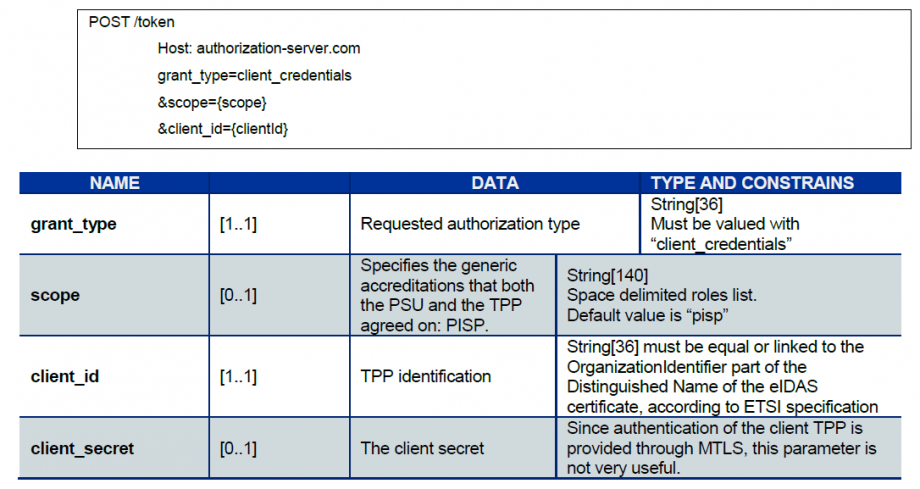
- The account-holding bank (ASPSP) will conduct checks related to your profile as a TPP (validity of certificates and your role in the registry, non-revocation of your profile, etc.).
- Once these checks are completed and if they are successful, the bank will respond with an HTTP code 200 (OK) and the following data:
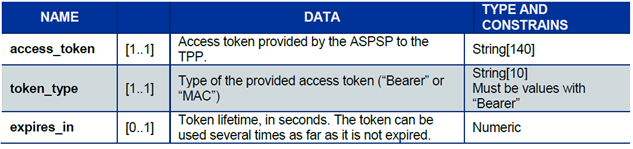
The access token must be used in all requests at the "Authorization" header, prefixed by the token type "Bearer."
If the token has expired, the request will be rejected with an HTTP code 400 and data indicating "Invalid Token."
This request can be resubmitted once a new access token of the Client Credential type has been requested and obtained.
Note that the maximum lifetime of an access token is 180 calendar days.
4 requests from the PISP
The payment service provider acting as a PISP can make 4 requests to the account-holding bank (ASPSP) of the debited customer (PAO).
POST /payment-requests
This method allows sending all the necessary information to the ASPSP to execute a payment. The payment may have been requested by the beneficiary (for example, the merchant or PSU) or by the account holder themselves (the PAO).
GET /payment-requests
This method allows retrieving payment initiation data enriched with the status of the initiation and the payment.
PUT /payment-requests
This method allows sending a request to the ASPSP to modify an already recorded payment initiation request, provided that the payment has not yet been executed. Since this method is not yet available, calling this request will return an HTTP 405 code.
POST /confirmation
This method, related to the authentication mode, allows confirming the payment request or canceling the payment request to the ASPSP by transmitting an authentication factor from the debited account holder so that the ASPSP can proceed with the request. Since this method is not yet available, calling this request will return an HTTP 405 code.
Using the fallback
Principle
In accordance with regulations, BPCE Group institutions have established a dedicated interface for payment service providers: this involves the published REST APIs for PSD2.
If the “API Live Developer Portal Gateway” production infrastructure exposing the PSD2 APIs fails, the payment service provider can use the solution covering the “emergency measures applicable to a dedicated interface” (or “fallback”), the principle of which is as follows:
This solution meets the regulatory requirements of PSD2 (Article 33 of the RTS). You can use it under the same conditions and prerequisites described in the "Eligibility" section.
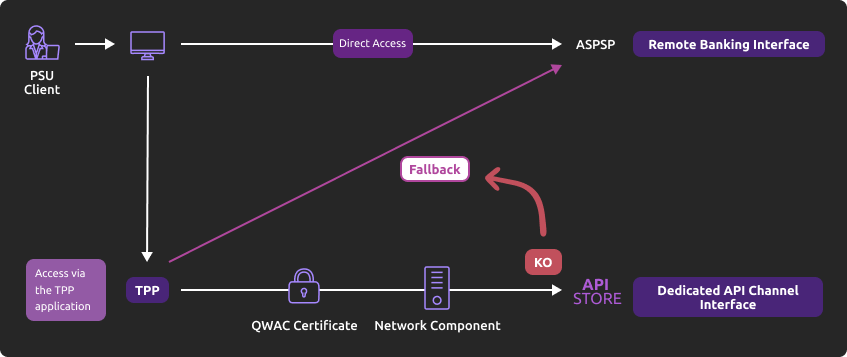
Roadmap
Find below the elements of our projected timeline:
| Version | Features | Sandbox Deployment Date | Live API Gateway Deployment Date |
|---|---|---|---|
| Any PSD2 API Version | Fallback (*) | Not applicable | End of September 2019 |
(*) Main Features:
- Use by the TPP of the same endpoint as the dedicated interface.
- A query parameter (header "fallback:1" present or absent) added by the TPP allows distinguishing a "Fallback" request from an API request via the dedicated interface, which must be used systematically.
- TPP authentication via mutual TLS authentication using an eIDAS certificate (QWAC).
- Security identical to that of access to the PSU's online banking (the same interface used by the PSU as in direct access, and the same customer authentication means).
- In the context of increasing use of the dedicated interface (API), no dynamic switch is implemented: the fallback solution is always active.
- The fallback solution is a backup solution that should not be used as the primary means of access to provide PSD2 services. Its use is monitored, and any abusive use by TPP(s) will be automatically reported to the competent national authority.
Example
- In the event that the PSD2 APIs become unexpectedly unavailable or the system crashes (see criteria in RTS Article 33), the TPP can then send the request:
POST https://www.18919.oba-bad-me-live-api.natixis.com/stet/psd2/oauth/token
with:
- its production eIDAS QWAC certificate
- the header parameter (fallback: "1")
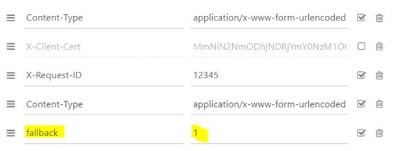
POST /stet/psd2/oauth/token HTTP/1.1
Content-Type: application/x-www-form-urlencoded
X-Request-ID: 1234
fallback: 1
User-Agent: PostmanRuntime/7.16.3
Accept: */*
Cache-Control: no-cache
Host: www.17515.live.api.caisse-epargne.fr
Accept-Encoding: gzip, deflate
Content-Length: 67
Connection: keep-alive
client_id=PSDFR-ACPR-12345&grant_type=client_credentials&scope=aisp
- If the checks are positive, we will return in the header a URL of the type to be used for redirection to the online banking environment, which contains a JWT token (field "&fallback=") that must also be used in this context:
HTTP/1.1 302 Found
Date: Tue, 25 May 2021 21:46:59 GMT
Location: https://www.caisse-epargne.fr/se-connecter/sso?service=dei&cdetab=17515&fallback=eyJ0eXAiOiJKV1QiLCJhbGciOiJSUzI1NiIsIng1dCI6ImhF…
Content-Length: 870
Connection: close
Content-Type: text/html; charset=iso-8859-1
</head><body>
<h1>Found</h1>
<p>The document has moved <a>here</a>.</p>
</body></html>
- Once redirected, the TPP must then use the PSU's credentials via its proprietary method.
For more details on the POST request, see STET specifications.
Limitations
The constraints of this solution are as follows:
- No reuse of the context of the dedicated interface, nor of the access token (currently valid for 180 days).
- Only the PSD2 functionalities present on the online banking platform (reference: remote banking via fixed internet) are accessible via the fallback. For example, online banking services do not offer e-commerce payment (this PISP functionality is therefore not available in fallback mode).
- The client user of the services (PSU) must be connected to the TPP's application (no possibility of batch processing AISP to retrieve the consented data from the client). PSD2 also requires a systematic strengthening of strong authentication means (AF/SCA) for access to remote/online banking, so the authentication means provided to PSU clients will be used (non-exhaustive list):
- Soft token Sécur'Pass
- OTP SMS
- Physical key (for businesses)
Initiate a payment
Send a request for a single payment initiation in €.
Context
This call allows sending a payment initiation request to the account-holding bank (ASPSP) of a client of a bank (PAO) to debit the PAO's account and credit the account of the payment service user (PSU) for which the payment service provider (PISP) is connected.
Initially, only one-time payment initiation in euros is accepted in our processes.
Upon submitting the request, if all data is correctly formatted, a response (HTTP 201) will be returned to you.
Prerequisites
To proceed with this request, it is necessary to meet the eligibility prerequisites for the TPP role "PISP" (see the "Eligibility" section) and to have obtained the OAuth2 access token.
POST Request
The endpoint will depend on the establishment code.
You must insert the same value for the parameter <cdetab> as that used for the access token.
As a reminder, the list of our establishments and the possible values for <cdetab>are specified in the "Limitations" section, see excerpt below:
| Establishment Code <cdetab> | Establishment Name |
|---|---|
| 18919 | Natixis Wealth Management |
For example:
POST https://www.18919.oba-bad-me-live-api.natixis.com/stet/psd2/v1.6.2/payment-requests (new URL to be considered from now on).
(Reminder: the existing URL www.<cdetab>.live.api.89C3.com is no longer available)
Mandatory or Optional Parameters in the Body
The structure of the body and the mandatory fields are described in the STET standard.
The following data must be included in the request as follows:
- The serviceLevel data must be set to SEPA.
- The currency data must be set to EUR (no currency transfers).
- The requestedExecutionDate must be equal to or greater than the current date.
- The request must contain a request for the initiation of a single payment.
- The numberOfTransactions data must be set to "1".
- The executionRule data must be set to "FWNG–following" (execution on the first working day following) to specify the corrections to the execution date of payments if the processing date falls on a weekend or a bank holiday.
- The frequency data must not be populated, as recurring transfers are not allowed.
- The localInstrument data must not be set, as only SCT is accepted for now.
- Only IBANs are supported for the data fields "Iban", "debtorAccount", and "creditorAccount".
- The successfullReportUrl data is mandatory for the REDIRECT authentication mode implemented.
- If the unsuccessfullReportUrl data is not provided, the value set for "successfullReportUrl" will be used.
- The supplementaryData data must be populated with the value "REDIRECT".
- The scaHint data is ignored for now => AF exemptions will not be possible in 2020.
The allowed format for the creationDateTime data is ISO8601 format. The three allowed regular expressions are:
- YYYY-MM-DDTHH:MM:SS.SSS+HH:MM
- YYYY-MM-DDTHH:MM:SS.SSS+HHMM
- YYYY-MM-DDTHH:MM:SS.SSS
Examples:- 2019-11-12T00:00:00.000+02:00
- 2019-11-12T00:00:00.000+0200
- 2019-11-12T00:00:00.000
Error codes
| Error Type | HTTP Code | Label | Reason |
|---|---|---|---|
| Generic, bad structure | 400 | Bad request | error code: FF01 message: RJCT |
| Bad format of BIC | 400 | Bad request | error code: FF01 message: RJCT error: the field creditorAgent.bicFi bicFi-Code allocated to a financial institution by the ISO 9362 Registration Authority as described in ISO 9362 |
| Bad format of serviceLevel | 400 | Bad request | error code: FF01 message: RJCT error: value not one of declared Enum instance names: [SEPA, NURG] |
| Bad format, chargeBearer other than SLEV | 400 | Bad request | error code: FF01 message: RJCT error: value not one of declared Enum instance names: [SLEV] |
| Bad format of schemeName | 400 | Bad request | error code: FF01 message: RJCT error: the field creditor.privateId.schemeName schemeName-Possible values BANK,COID,SREN,DSRET,NIDN,OAUT,CPAN |
| Bad format of purpose | 400 | Bad request | error code: FF01 message: RJCT error: value not one of declared Enum instance names: [TRPT, CASH, CPKC, ACCT, COMC] |
| Bad format of categoryPurpose | 400 | Bad request | error code: FF01 message: RJCT error: value not one of declared Enum instance names: [CASH, DVPM] |
| Bad access token, authentication issue | 403 | Forbidden | |
| Unknown request resource | 404 | Not Found | |
| Bad request or request out of authorized scope | 405 | Method not allowed | |
| Generic message | 500 | Internal server error | |
| Duplicate request | 500 | Internal server error | error: Database insertion issue, duplicate unique key |
Example
Request: POST /stet/psd2/v1.6.2/payment-requests
Body:
{ « creationDateTime »: « 2019-03-13T12:56:11.122Z », »numberOfTransactions »: 1, « paymentInformationId »: « 123456789ABCD », « paymentTypeInformation »: { « categoryPurpose »: « CASH », « instructionPriority »: « HIGH », « serviceLevel »: « SEPA », « localInstrument »: « INST » }, « purpose »: « ACCT », « beneficiary » : { « creditor »: { « name »: « John Doe », « postalAddress »: { « addressLine »: [ « 10 rue de la Rue », »75001 Paris » ], « country »: « FR » }, « privateId »: { « identification »: « 12345678900 », « issuer »: « FR », « schemeName »: « SREN » } }, « creditorAccount »: { « iban »: « FR7613825002000800000123456 »
},
« creditorAgent »: { « bicFi »: « CEPAFRPP670 » }, « id »: « string », « isTrusted »: false }, « debtor »: { « name »: « Janette Rees », « postalAddress »: { « addressLine »: [ « 12 rue de la DSP2″, »75006 Paris » ], « country »: « FR » }, « privateId »: { « identification »: « 1447114700 », « issuer »: « FR », « schemeName »: « COID » } }, « debtorAccount »: { « iban »: « FR353000799999A40166510BB25 » }, « debtorAgent »: { « bicFi »: « NATXFRPPXXX » }, « initiatingParty »: { « name »: « Small Heath », « organisationId »: { « identification »: « 00987654321 », « issuer »: « FR », « schemeName »: « BANK » }, « postalAddress »: { « addressLine »: [ « 92 rue de la Banque », »75000 Paris » ], « country »: « FR » } }, « booking »: false, « chargeBearer »: « SLEV », « requestedExecutionDate »: « 2023-03-13T12:56:11.122Z », « creditTransferTransaction »: [ { « instructedAmount »: { « amount »: « 100 », « currency »: « EUR » }, « paymentId »: { « endToEndId »: « 987654321DCBA », « instructionId »: « DCBA987654321 » }, « regulatoryReportingCodes »: [ « string » ], « remittanceInformation »: [ « Life always finds a way » ] } ], « supplementaryData »: { « acceptedAuthenticationApproach »: [ « REDIRECT » ], « appliedAuthenticationApproach »: « REDIRECT », « scaHint »: « noScaExemption », « successfulReportUrl »: « https://www.successful.fr« , « unsuccessfulReportUrl »: « https://www.unsuccessful.fr » }}
Results :
Status code HTTP 201
{ « appliedAuthenticationApproach »: « REDIRECT », « _links »: { « consentApproval »: { « href »: « TPPPISPurlConsentApproval/psuId.html?resourceId=0000000180-1551358254000131359238543&nonce=Id-2ed9775ce61639e9a3c94ecc », « templated »: null } }}
Sandbox assembly
Introduction – Details on Sandbox features
The sandbox developer API can be used directly through the TPP application by calling the "Payment Initiation" API of the developer API platform.
In the sandbox assembly, there are two types of calls:
- The first is to retrieve the authorization token (see the section "Documentation" > "How to retrieve your OAuth2 access token ?");
- The second is to make the call to the PSD2 API "Payment Initiation" (see the use cases "Initiate a payment," "Retrieve status," "Confirm an initiation," and "Cancel an initiation").
Prerequisites
The TPP must register its APP in the sandbox via our PSD2 Registration API.
Reminder: as a TPP, you must be accredited by one of the competent national authorities in Europe (ACPR in France) for the role of Payment Initiator ("PISP").
The entry point will depend on the establishment code
| Establishment Code | Establishment Name |
|---|---|
| 18919 | Natixis Wealth Management |
For example:
POST https://www.18919.oba-bad-me-live-api.natixis.com/stet/psd2/v1.6.2/payment-requests to initiate a payment for a NWM client in sandbox (new URL to be considered from now on).
(Reminder: the existing URL www.<codetab>.live.api.89C3.com is no longer available).
Limitations
- The use case "Cancel a payment initiation" is not fully testable in the sandbox environment because this method requires the crossing of dynamic data while our sandbox behaves statically.
- Consequently, cancellation requests for a payment initiation are accepted as long as the request format is correct (the payment initiation ID is assumed to exist).
The TPP application consuming the "Payment Initiation" API in the sandbox assembly will need to retrieve an access token via its authentication key from the AS (Authentication Server).
Thus, the TPP application will be able to consume the methods "POST /payment-requests", "GET /payment-requests/{paymentRequestResourceId}", "POST /payment-requests/{paymentRequestResourceId}/confirmation", and "PUT /payment-requests/{paymentRequestResourceId}" using its access token.
Test data
This page presents the data sets that allow for testing the API:
- The fictitious clients provided by Natixis Global Trade are corporate clients.
- The characteristics of their accounts are outlined (single account, multiple accounts, account balance).
- The expected useful input data for the APIs are listed (Natixis Global Trade Portal ID, IBAN).
Marc
Manage errors
Here is the list of error code descriptions for each method :
- Get the list of accounts: GET /accounts
- Get the list of balances: GET /accounts/{accountResourceId}/balances
- Get the list of transactions: GET /accounts/{accountResourceId}/transactions
| Error Code | Error Description |
|---|---|
| AC01 (CFONB) | IncorrectAccountNumber: the account number is incorrect or unknown |
| AC04 (CFONB) | ClosedAccountNumber: the account is closed |
| AC06 (CFONB) | BlockedAccount: the account is blocked / subject to a freeze |
| BE05 (CFONB) | UnrecognisedInitiatingParty: the AISP is unknown |
| BADS | BadScope: the service call was made with a PIISP token (AISP expected) |
| INTE | InternalError: there is an internal processing error |
| INTS | InternalServerError: there is an internal communication error with the information system |
| IPGN | InvalidPageNumber: the page number is invalid |
| NGAC | NotGrantedAccount: the account is not consented |
| NIMP | NotImplemented: the wrong verb is called (GET expected) |
| TMRQ | TooManyRequest: the number of permissible requests has been exceeded |
| IPSU | InvalidPSU: Unreferenced subscriber number or Cyber subscription terminated |
API version decommissioning policy
The decommissioning policy is based on the API lifecycle, which is aligned with the versions of the STET specifications.
This is illustrated below for version N:

Decommissioning of API Version N
The decommissioning of our API version takes place in several steps:
Day of Deployment of the New API Version (T0):
Version N+1 is deployed to the 89C3 Live gateway.
Three Months Post Deployment (T0 + 3 Months):
Version N of the API is decommissioned from all environments (sandbox and live).
Communication regarding the decommissioning of version N will occur on the deployment date of version N+1.
The preferred communication channel is this Groupe BPCE API Store portal, in the "Roadmap" section of the impacted API.
An additional communication via email to the contacts of the providers registered on the Groupe BPCE API Store portal may complement this process.
Planning for upcoming functional enhancements to the API
The Account Information API undergoes continuous improvements and developments throughout the year*.
(*) Note: Article 30 (4) of the RTS specifies that significant changes to the API may occur without delay. We apply this clause in the following cases:
- A blocking issue impacting at least one of the major customer segments (individuals, professionals, businesses),
- A security issue,
- Developments requested by the competent national authorities to comply with regulatory requirements.
Functional limits
The limitations of this PSD2 API are as follows:
- Applicable to all Natixis Wealth Management France clients with access to the ad-hoc online banking.
- Only applies to clients' cash accounts (see the text of the PSD2 Directive).
- Standing orders and recurring payments are not accepted.
- Payment requests beyond 30 days are not accepted.
- Only uses the redirection authentication mode (Strong Customer Authentication requested and managed via the bank).
- The chargeBearer field is mandatory and must be set to "SLEV."
- The categoryPurpose field is mandatory and must be set to "CASH," "DVPM," or "SALA."
- The creditorAccount field is mandatory and must provide an IBAN.
- The successfulReportUrl field is mandatory.
Limitations on data
The establishment code (see below) will allow addressing the correct backend via the access point https://www.18919.oba-bad-me-live-api.natixis.com (new URL to be considered from now on).
(Reminder: the existing URL www.<codetab>.live.api.89C3.com is no longer available.
| Establishment Code | Abbreviated Bank Name | Full Bank Name |
|---|---|---|
| 18919 | NWMF | Natixis Wealth Management France |
Eligibility
The resources of the "Payment Initiation" API can only be consumed by PSPs that have the role of Payment Initiation Service Providers (PISP). This status is granted by the financial authorities of the country in which the request is made; in France, it is the Prudential Control and Resolution Authority (ACPR), linked to the Banque de France.
Obtaining and maintaining an authorization involves rigorous procedures to provide strong guarantees to users of payment services, with the forms available on the ACPR website: https://acpr.banque-france.fr/autoriser/procedures-secteur-banque/tous-les-formulaires.
Once the authorization is granted, the format of this identifier (Organisation Identifier = OID) provided by the competent authority is:
PSDXX-YYYYYYYY-ZZZZZZZZ:
- "PSD"
- XX => ISO 3166 code of the country of the competent authority
- hyphen-minus "–" (0x2D (ASCII), U+002D (UTF-8))
- YYYYYYYY => 2-8 characters from the identifier of the competent authority (A-Z, no separator)
- hyphen-minus "–" (0x2D (ASCII), U+002D (UTF-8))
- ZZZZZZZZ => identifier of the PSP specified by the competent national authority (no restriction on the number - or type - of character used)
This OID identifier is important for two reasons:
- It will be used to identify you during calls in the STET API requests (via the parameter "client_id").
- It must be present in the eIDAS certificates you provide to the account holder (see below).
Additionally, you must have certificates issued by a recognized certification authority (Qualified Certification Service Providers – QTSP: https://webgate.ec.europa.eu/tl-browser/#/) in compliance with the eIDAS regulation (electronic IDentification And trust Services: https://www.ssi.gouv.fr/entreprise/reglementation/confiance-numerique/le-reglement-eidas/) and adhering to the ETSI standard (https://www.etsi.org/deliver/etsi_ts/119400_119499/119495/01.02.01_60/ts_119495v010201p.pdf).
To consume the DSP2 APIs offered on this portal, the TPP must register its app and provide us via our PSD2 Registration API with production certificates signed by an approved certification authority (CA):
- A first set of QWAC certificates (for mutual TLS authentication) and QSEALC (to be uploaded to our gateway via the PSD2 Registration API) for the sandbox.
- Another set of QWAC certificates (for mutual TLS authentication) and QSEALC (to be uploaded to our gateway via the PSD2 Registration API) for production.
IMPORTANT NOTE: In the event of certificate renewal, and if the certification authority (QTSP) is different (or it is the same QTSP company but using different root keys), the TPP must notify API support available via this site 2 months in advance to verify that the elements of the new CA are properly loaded onto our infrastructure.
A keyID identifier must also be provided in a format compliant with the STET specification, incorporating a SHA256 fingerprint after the character "_" (char), see example in the STET documentation Part 3 / Interaction Examples: keyId=https://path.to/myQsealCertificate_612b4c7d103074b29e4c1ece1ef40bc575c0a87e.
Only public keys in .pem format are required. Checks on the certificate data will be performed based on the French (REGAFI: https://www.regafi.fr) and European (ABE or EBA: https://euclid.eba.europa.eu/register/pir/disclaimer) registries.
History
Version history
This API complies with the STET specification (https://www.stet.eu/en/psd2/) with functional limitations to meet the regulatory requirements of the DSP2.
As a reminder:
- The texts of the Payment Services Directive No. 2 (PSD2, EU reference 2015/2366 of November 25, 2015) came into effect on January 13, 2018: http://eur-lex.europa.eu/legal-content/EN/TXT/?uri=CELEX:32015L2366
- They were complemented by the Regulatory Technical Standards (RTS, EU Delegated Regulation 2018/389) relating to strong customer authentication and common secure communication standards, which came into effect on September 14, 2019. These standards are the RTS (Regulatory Technical Standards): https://eur-lex.europa.eu/legal-content/EN/TXT/?toc=OJ%3AL%3A2018%3A069%3ATOC&uri=uriserv%3AOJ.L_.2018.069.01.0023.01.FRA
In France, Ordinance No. 2017-1252 of August 9, 2017 transposes the PSD2 directive into the legislative part of the Monetary and Financial Code. The ordinance is supplemented at the regulatory level by Decrees No. 2017-1313 and No. 2017-1314 of August 31, 2017, and the five orders of August 31, 2017.
| API Versions | STET Standard Version | Features | Sandbox Deployment Date API Dev Portal & Sandbox | Live Deployment Date Live API Gateway | Decommissioning |
|---|---|---|---|---|---|
| v1 | v1.4.0.47 |
| March 14, 2019 | September 14, 2019 | June 1, 2023 |
| v1.6.2 | v1.6.2.0 | Same as v1 |
You can consult the FAQ regarding the texts of the STET standard.
Major changes since the first version delivered
| Use case / Method | Effective date | Description |
|---|---|---|
| Guide | 22 October 2026 | Service URL update. |
| Functional limits | 20 October 2026 | Removal of two statements that no longer apply.
|