








Overview
The expected benefits
Let's build new, seamless payment journeys for our customers.

The connection is made through a secure device that complies with the requirements of the European regulator.

Streamline the journeys
Enable your clients to easily manage payments within their daily management processes.

Reduce risks
Avoid process interruptions and data re-entry, thereby minimizing operational risks of error or fraud.
By accessing this service, you will be able to offer our mutual clients new online journeys with the following key features:
- A PSD2-compliant system for authentication and client consent management;
- Selection of the payment account from which the transfer will be made;
- Choice of smooth or traditional journeys;
- Payment via immediate, one-time, bulk, and recurring transfers;
- Immediate access to the status of payments initiated by clients.
The different possible use cases
Integrated and secure payment transfer journeys

Other collections
Offer your clients payment journeys for collecting loan repayments, recoveries, rents, charges, taxes, etc.
Invoice Payments
Allow your corporate clients to pay suppliers directly within their management software.
Liquidity management
Provide your clients with cash flow management journeys between their accounts.
How to access the product ?
To access the Payment initiation API, developers and businesses must follow the steps below.
Contact
Get in touch with the product managers.
Access
Enroll directly through the dedicated process (regulated entities).
Integration & Testing
Integrate our service into your solution and share your use cases with us to help ensure the quality of our offering.
Go Live !
Documentation
Guides
Initiate a payment
One of our customers is carrying out a transaction on an e-commerce site or wants to make a single or multiple transfer.
Via this “Payment Initiation” API provided by our bank, you can submit a payment initiation request in real time.
The connected customer will be asked by their bank to validate the transaction.
As part of a traditional course :
- The PSU identifies and authenticates itself;
- They then select the payment account with a sufficient minute balance for the amount of the transaction;
- Finally, the bank seals the transaction after the customer has re-authenticated strongly to validate the transaction.
As part of a seamless process, the debtor account data is transmitted in the payment initiation request:
- The PSU identifies itself if its identifier is not transmitted in the request;
- It then checks the operation information;
- Finally, the bank seals the transaction after the customer has strongly authenticated himself to validate the transaction.
This API can only be used by service providers acting as payment initiators (“PISPs”), this prerequisite being described in the “Eligibility” section.
Once this prerequisite has been met, the overall process is as follows:
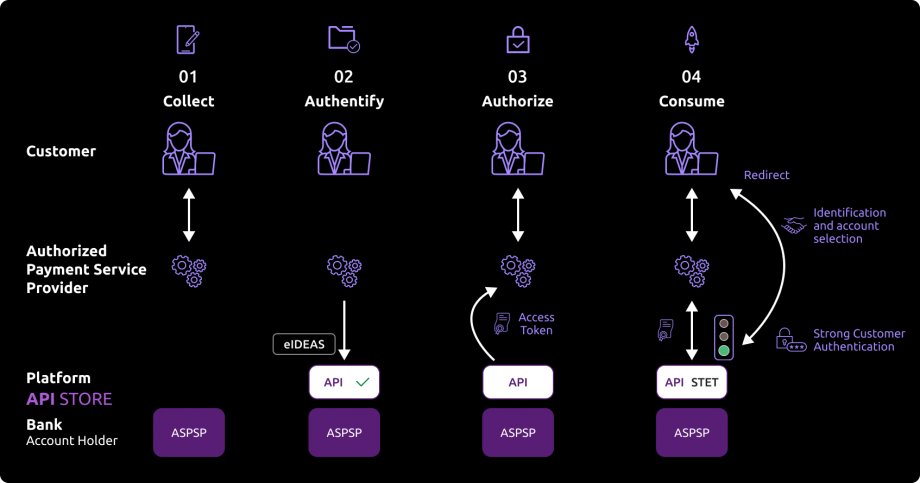
1- The customer wants to use your services to make a single or multiple transfer, or select your service when asked by an e-merchant to pay for a purchase on the e-merchant’s site. They tell you the bank where their account is held via your interfaces.
2- During the first exchange with the account holder’s infrastructure, you will request an authorisation token. The basic principle is that, as a TPP PISP, you must obtain this token BEFORE using the API. This token is generated by the account holder (ASPSP) AFTER you have been identified.
As account holder, we will :
- Check your certificates and approvals.
For this API, it is not necessary for us to identify and strongly authenticate the customer in order to retrieve their consent and generate the access token.
3- If we have been able to verify your identity and approvals, you will then be able to retrieve an OAUTH2 access token via secure exchanges with the 89C3 API platform (see “Use cases” > “Get your access token”).
4- By presenting this authorisation token, which is valid only for this transaction, you can then use the “Payment Initiation” API to :
- Initiate the payment (see “Use cases” > “Initiate a payment”) ;
- Retrieve the status of the payment initiation (see “Use cases” > “Retrieve the status of a payment initiation“) ;
- modify a payment initiation (see “Use cases” > “Cancel a payment initiation“) ;
- Confirm a payment initiation (see “Use cases” > “Confirm a payment initiation – confirmation method“).
Consume the API
The description of the services offered below is purely functional. The technical aspects are listed in the “Use cases” sections, which are more detailed.
You should also be familiar with DSP2 terminology and the abbreviations used. You can also use the frequently asked questions (FAQ).
Prerequisites
As a TPP, you must be accredited by the Autorité de Contrôle Prudentiel et de Résolution (ACPR) for the role of payment initiator (“PISP”).
To access the Payment Initiation API services, you need to retrieve an OAUTH2 access token issued by the PSU’s banking institution by querying it with your credentials.
As such, you must authenticate each other with the account holder (ASPSP) by exchanging eIDAS QWAC certificates.
You will then need to present your OAUTH2 access token in order to use the Payment Initiation API services.
Initiating a payment
There are two ways of using the Payment Initiation API:
1) The PISP requests payment on behalf of a merchant: the PSU customer buys goods or services on an e-commerce site (see top of diagram below).
There is a contract between the e-tailer and the PISP.
The e-merchant sends the requested payment details to the PISP and redirects the PSU customer to the PISP portal.
The PISP asks the PSU customer which bank he wishes to debit his account from. It then prepares the payment request and sends it to the customer’s bank.
The beneficiary (= the e-merchant) is indicated in the payment.
2) The PISP requests a single or multiple transfer on behalf of the PSU customer holding the account. The PSU provides the PISP with the information required for the transfer (see bottom of diagram below).
The PISP asks the PSU customer which bank he wishes to debit his account from. It then prepares the payment request and sends it to the PSU’s bank.
see STET specifications V1.6.2 / Part I / section 3.4.5.3 page 50
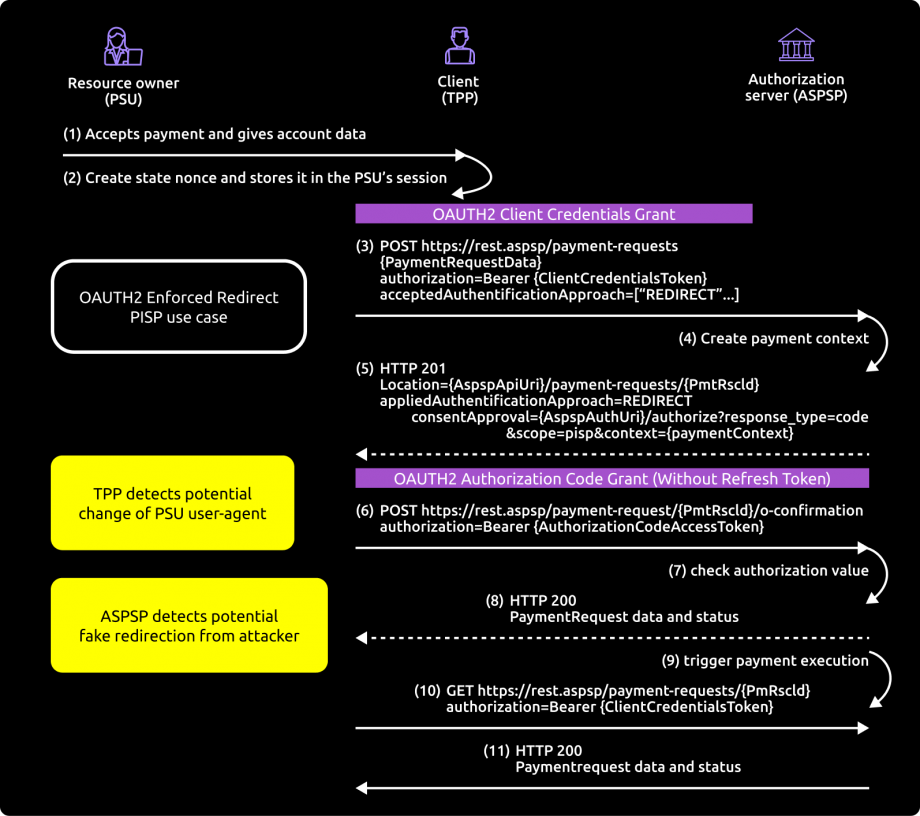
You send the payment initiation request using the POST /payment-requests method (see “Use cases” > “Initiating a payment”).
The authentication method supported by the bank is the reinforced REDIRECT mode:
- The PSU is redirected to an identification screen provided by their bank, where they enter their remote banking identifier.
- The PSU is redirected to an initial strong authentication screen proposed by their bank to validate their identity.
The kinematics of this stage depend on the strong authentication method made available to the PSU by the banking institution (SMS OTP, Secur’pass, etc.).
It also depends on the PSU equipment running the PISP application used by the PSU (PC or mobile/tablet).
- The PSU is redirected to a screen for selecting the account to be debited proposed by their bank.
- The PSU selects and validates the account to be debited.
- The PSU is redirected to a second strong authentication screen proposed by their establishment to validate their payment.
The kinematics of this stage depend on the strong authentication method made available to the PSU by the banking institution (SMS OTP, Secur’pass, etc.).
It also depends on the PSU’s banking equipment on which the PSU application runs (PC or mobile/tablet).
- The PSU is redirected to a transaction confirmation screen provided by their bank.
- The PSU is redirected to the PISP application.
- You send the payment initiation confirmation request using the POST method /payment-requests/{paymentRequestResourceId}/confirmation (see “Use cases” > “Confirm a payment initiation”), which triggers the bank to take the payment into account.
If the PISP provides the IBAN of the PSU to be debited in its request, the customer journey is simplified (“smooth PISP journey”):
- The PSU is redirected to a confirmation screen for the single or multiple transfer in which only the account corresponding to the PSU’s IBAN is offered to the PSU.
- The PSU validates the operation.
- The PSU is redirected to an identification and strong authentication screen proposed by their establishment to validate their payment.
The kinematics of this stage depend on the strong authentication method made available to the PSU by the banking institution (SMS OTP, Secur’pass, etc.).
It also depends on the PSU’s banking equipment on which the PSU application runs (PC or mobile/tablet).
- The PSU is redirected to a transaction confirmation screen provided by their bank.
- The PSU is redirected to the PISP application.
- You send the payment initiation confirmation request via the POST method /payment-requests/{paymentRequestResourceId}/confirmation (see “Use cases” > “Confirm a payment initiation”), which triggers the bank to take the payment into account.
When requesting initiation, the PISP provides one or two callback URLs:
- The first will be called by the bank if the initiation request is processed and the PSU has given its consent to the payment.
- The second callback URL will be used by the bank if consent is refused. This second URL is optional: the first call back URL will be used if the second is not filled in.
The PISP can fill in an indicator to indicate that it considers the payment request to be an SCA exemption case.
The final decision on whether or not to apply an SCA remains with the PISP: to date, no exemption has been accepted among the cases of derogation from the PSU’s strong authentication requirement, if the general authentication requirements are met, as described in article 2 of the PSD2 RTS.
Recover the status of a payment initiation
You retrieve the status of a payment initiation using the GET /payment-requests/{paymentRequestResourceId} method (see “Use cases” > “Retrieving the status of a payment initiation“).
This call enables you to retrieve all the data from the payment initiation, enriched with the resourceId and the status of the initiation and the payment(s) it contains.
The data is accessible for 35 days.
Cancelling a Payment Initiation
For a deferred unit credit transfer or multipleSCT that has not yet been executed, or for a standing SCT unit credit transfer for which the last due date has not been reached, you cancel a payment initiation using the PUT /payment-requests/{paymentRequestResourceId} method (see “Use cases” > “Cancel a payment initiation“).
The authentication method supported by the bank is REDIRECT mode:
- The PSU is redirected to an identification screen provided by their bank, where they enter their remote banking identifier.
- The PSU is redirected to a strong authentication screen offered by their bank to validate their identity.
- The PSU is redirected to a summary screen of the transaction being cancelled, as proposed by their bank.
- The PSU validates the cancellation of the payment initiation.
- The PSU is redirected to a transaction confirmation screen provided by their bank.
- The PSU is redirected to the TPP PISP application.
When requesting cancellation, the PISP provides one or two callback URLs:
The first will be called by the bank if the cancellation request is processed and if the PSU has given its consent for the transaction to be cancelled.
The second URL will be used by the bank if consent is refused or if there is a problem. This second URL is optional: the first call back URL will be used if the second is not filled in.
Confirming a payment initiation
You confirm a payment initiation using the POST method /payment-requests/{paymentRequestResourceId}/confirmation, enhanced REDIRECT approach (see “Use cases” > “Confirm a payment initiation“).
However, the payment request cancellation confirmation service will not be supported. The cancellation will be effective as soon as the request has been accepted.
Regulatory publications
Get your access token
Step-by-step development
1- The TPP sends a request directly to the authorisation IT infrastructure of the bank holding the account.
For live access, the entry point for retrieving the access token depends on the account-holding institution with the format
- www.<codetab>.oba-bad-me-live-api.89c3.com/stet/psd2/oauth/token (new URL to be taken into account from now on)
(As a reminder, the existing URL www.<codetab>.live.api.89C3.com will no longer be available as of 28/09/2025)
ou
- www.<cdetab>.oba-bad-me-live-api.<banque>/stet/psd2/oauth/token aligned with the <bank> direct access domain name.
NB: the list of our establishments and the possible values of the associated <cdetab> and <bank> are specified in the “Limitations” section.
In order to be able to query the correct backend in the customer journey, you therefore need to ask the customer for his or her account-holding institution beforehand.
NB: The PSU can have its accounts held at several Groupe BPCE banks. In this case, you will need a different token to access each of the account-holding institutions (ASPSP).
Details of the request parameters can be found below: POST /psd2/oauth/token?client_id={clientId}&scope={scope}[&grant-type=client_credentials]
| Name | Description | Type | |
|---|---|---|---|
| grant_type | [1..1] | Type of authorisation requested | Must be “client_credentials |
| client_id | [1..1] | Your identification as a TPP | If the TPP registration was carried out through the “GoLive” process via our 89C3 API portal: must be equal to the “OrganizationIdentifier” part of the “Distinguished Name” of the eiDAS certificate, in accordance with the ETSI specification => approval number given by your competent authority (PSDXX-YYYYYYY-ZZZZZZZZ) OR If the TPP was registered using the register API: must be equal to the client_id returned in the POST /register response. |
| scope | [1..1] | Specifies the service | Must be “pisp |
2- The account-holding institution (ASPSP) will carry out checks on the TPP’s profile (role, validity of certificates and your role, non-revocation of your profile, etc.).
3- If these checks are conclusive, the bank will respond to the TPP via an HTTP code 200 (OK) with the following data:
| Name | Description | Type | |
|---|---|---|---|
| access_token | [1..1] | Access token provided to the TPP by the ASPSP. | ex : “nACXdBo0fULg8fffadFDSGJZALKGEAaxfer72HGDHGx6kJHz” |
| token_type | [1..1] | Type of token supplied | Must be “Bearer |
| expires_in | [0..1] | Token lifetime (in seconds) can be used several times as long as it has not expired | Numeric=> e.g. “3600”. |
| scope | [1..1] | Specifies the service | Must be “pisp |
The access token must be used in all requests in the “Authorization” header prefixed by the “Bearer” token type.
If the token has expired, the request will be rejected with an HTTP code 403 and data indicating “Token invalid”. This request can be resent once a new Client Credential access token has been requested and obtained.
Initiate a payment
Use case
Send a payment initiation request for a single or multiple transfer in €.
Context
This call is used to send a customer’s bank (ASPSP) a payment initiation request to debit the customer’s account. In the case of a payment initiation initiated by an e-merchant (not by the end customer), the payment will credit the account of the Payment Service User (PSU) for whom the Payment Service Provider (PISP) has been mandated, i.e. the e-merchant.
The initiation of payment of a single transfer or a multiple transfer in euros is accepted in our processing.
When the request is submitted, and if all the data is correctly formatted, a response (HTTP 201) will be returned.
This response will contain the resourceId of the payment initiation, as well as the SCA Redirect authentication mode (the only mode available), the consent URL based on the payer’s bank (urlconsent_approval_URL) and the non-replay.
Prerequisites
To make this request, you must meet the eligibility requirements for the “PISP” TPP role (see the “Eligibility” section), and have retrieved the OAuth2 access token (see the “Use cases” > “Get your access token” section).
POST request
The entry point will depend on the establishment code.
You must insert the same value for the <cdetab> and <bank> parameters as that used for the access token.
As a reminder, the list of our establishments and the possible values for <cdetab> and <bank> are specified in the “Limitations” section.
Here is an extract from the list:
| ESTABLISHMENT CODE <CDETAB> | NAME OF ESTABLISHMENT | SHORT NAME | <BANK> |
|---|---|---|---|
| 13807 | B.P Grand Ouest | BPGO | banquepopulaire |
| 10548 | Banque de Savoie | BQSAV | banque-de-savoie |
| 40978 | Banque Palatine | BPAL | palatine |
As in test mode, the correct client repository can be addressed via an endpoint in www.<cdetab>.loba-bad-me-live-api.89c3.com or www.<cdetab>.oba-bad-me-live-api.<bank>.fr format (new URL to be taken into account from now on)
(As a reminder, the existing URL www.<codetab>.live.api.89C3.com will no longer be available as of 28/09/2025).
For example, our production URL is :
- POST https://www.13807.oba-bad-me-live-api.89c3.com/stet/psd2/v1.6.2/payment-requests or https://www.13807.oba-bad-me-live-api.banquepopulaire.fr/stet/psd2/v1.6.2/payment-requests to initiate a payment for a BPGO customer in production
Mandatory or optional bodysuit parameters required to call this service
The body structure and mandatory fields are described in the STET standard.
The following information must be valued in the query as follows:
- The serviceLevel data must be set to SEPA.
- The currency field must be set to EUR => international transfers in foreign currency are not available.
- The requestedExecutionDate data must be equal to or greater than the current date.
- The remittanceInformation data must include the “unstructured” tag, for example “remittanceInformation” : { “unstructured” : [ “test ” ] }.
- The requestedExecutionDate can be a weekend or a target 2 day for SCTs. For immediate SCTs only if requestedExecutionDate is the same day as the request; in this case, the payment will be transformed into a deferred SCT scheduled for the next business day. For standing SCT transfers, the first due date cannot be set:
- 30 days or more after today’s date ;
- The same day.
- The data executionRule is optional and ignored if present for immediate and deferred SCTs. For permanent SCT transfers, if it is populated, it can only be valued with the value “FWNG” (carried forward to the next day). The ASPSP does not change the execution date on its own initiative; the date set by the TPP must be acceptable to the bank (see notes on requestedExecutionDate data).
- The frequency field only needs to be filled in for standing SCT transfers, and is mandatory in this case. It accepts only the values MNTH (Monthly), QUTR (Quarterly) and YEAR (Annual). The endDate data item (last due date) must only be populated for standing SCT transfers:
- If it is entered, it must correspond to a valid deadline in the future:
- requestedExecutionDate + n months if frequency = MNTH;
- requestedExecutionDate + n quarters if frequency = QUTR;
- requestedExecutionDate + n years if frequency = YEAR;
- If not entered, it must be calculated :
- requestedExecutionDate with the year set to 2099
- requestedExecutionDate with the year set to 2099
- If it is entered, it must correspond to a valid deadline in the future:
- The localInstrument data item must be populated with the value “INST” to trigger a SEPA Instant Payment (SCT Inst).
- This type of transfer incurs charges billed to the customer according to the tariff conditions in force for his customer segment (IP PART or IP B2B);
- The beneficiary’s bank must be reachable by IP ;
- For professional and business customers, the sender accounts and the countries of the beneficiaries eligible for this type of transfer are defined in the IP B2B flow contract.
- The localInstrument data must not be present for immediate, delayed or permanent SCTs.
- Only full IBANs are supported for “Iban”, “debtorAccount” and “creditorAccount” data.
- The presence of lower case letters in IBANs (and especially for the creditorAccount data) is accepted for a payment initiation request to be taken into account. However, as far as the Banques Populaires, Banque de Savoie and Banque Palatine are concerned, although the customer journey will proceed normally until the transfer is validated by the PSU with strong authentication, the transfer will ultimately be refused by the Banques Populaires IS, which does not support IBANs with lower case letters. An error message will be displayed to the PSU on the last screen in the process, indicating that the transfer will not be executed.
- The presence of lower case letters in IBANs (and especially for the creditorAccount data) is accepted for a payment initiation request to be taken into account. However, as far as the Banques Populaires, Banque de Savoie and Banque Palatine are concerned, although the customer journey will proceed normally until the transfer is validated by the PSU with strong authentication, the transfer will ultimately be refused by the Banques Populaires IS, which does not support IBANs with lower case letters. An error message will be displayed to the PSU on the last screen in the process, indicating that the transfer will not be executed.
- If present, the data privateId.identification gives the Remote Banking customer identifier entered by the PSU and supplied to the TPP, with a view to authenticating with the ASPSP; this therefore avoids a screen on the ASPSP HMI side.
- For Banques Populaires, Banque Palatine and Banque Palatine, it is necessary to force this data into upper case.
- For Banques Populaires, Banque Palatine and Banque Palatine, it is necessary to force this data into upper case.
- The “successfulReportUrl” data item is mandatory for the REDIRECT authentication mode implemented and must contain :
- the redirect URL
- and the pkce: code_challenge = BASE64URL-ENCODE(SHA256(ASCII(code_verifier))) + code_challenge_method = S256
- and the “&” separator ( /!\ no “?”)
- If the “unsuccessfulReportUrl” data item is filled in, it can contain the “&” separator (no “?” ).
- If the “unsuccessfulReportUrl” field is not filled in, the “successfullReportUrl” field will be used.
- The supplementaryData value must be set to “REDIRECT”.
- scaHint data is ignored for the time being => strong authentication exemptions are not possible
- The authorised format for creationDateTime data is ISO8601.
- The three regular expressions allowed are :
- YYYY-MM-DDTHH:MM:SS.SSS+HH:MM
- YYYY-MM-DDTHH:MM:SS.SSS+HHMM
- YYYY-MM-DDTHH:MM:SS.SSS
- Z at the end of the format means that the time is in UTC
- Examples:
- 2019-11-12T00:00:00.000+02:00
- 2019-11-12T00:00:00.000+0200
- 2019-11-12T00:00:00.000
- The three regular expressions allowed are :
- The “state” data item is mandatory for the REDIRECT authentication mode implemented: it is propagated throughout the PISP path.
- The creditor.name data is limited to 35 characters.
Triggering fluid paths
By default, the PSU is asked to authenticate itself twice in order to trigger a payment request. It is possible to trigger two fluid runs when the request contains more precise information about the debtor account:
- The debtor IBAN (debtorAccount) only: triggers the identification of the PSU before a unique strong authentication at the end of the process to seal the payment.
- The debtor IBAN (debtorAccount) and the PSU identifier (privateId): triggering of a unique strong authentication at the end of the process to seal the payment.
Notion of cut-off – deadline for making an immediate SCT transfer
The CUT-OFF corresponds to the cut-off time at which an institution can execute a transfer. This cut-off time takes into account :
- Internal processing times
- The CUTOFFs of the various clearing systems, themselves subject to the CUT-OFFs of the various settlement systems (generally TARGET2).
In the case of SEPA CREDIT TRANSFER (SCT), execution must take place no later than the settlement date corresponding to that requested by the originator. This settlement date cannot be postponed.
Consequently, when the CUT-OFF time has passed, execution is postponed to the next possible date. The execution and settlement dates therefore depend on the arrival time of the request.
The cut-off time for requesting an SCT transfer on D with a settlement date on D is 11:00 a.m. French local time,
The deadline for requesting the execution of an SCT transfer on D with a settlement date of D+1 is 17:00 French local time.
As a reminder, local French time :
- Equal to GMT +2 during the summer,
- Equal to GMT +1 during winter
ARRIVAL TIME OF PAYMENT INITIATION REQUEST IN LOCAL FRENCH TIME CREATIONDATETIME FIELD VALUE | DATE EXECUTION REQUEST FIELD VALUE | RESULT OF THE PAYMENT INITIATION REQUEST BEING TAKEN INTO ACCOUNT | COMPLETION DATE | SETTLEMENT DATE |
|---|---|---|---|---|
| Before 11am | D-Day | OK | J | J |
| Between 11.00 am and 5.00 pm | D-Day | OK | J | J+1 |
| After 5 p.m. | D-Day | OK | J+1 | J+1 |
| Any time | >= Day D+1 or later | OK | requestedExecutionDate | requestedExecutionDate |
On the decision to make certain optional fields in the standard mandatory
The categoryPurpose field is used to prevent non-merchant transfers to unknown beneficiaries (not registered on the customer’s online bank) when the authentication method is not strong enough (except for Secur’pass): this field is needed to know whether the payment is an “on-the-fly” payment or not.
The chargeBearer field is mandatory for international payments (i.e. in currencies other than EUR) => international transfers in foreign currency are not available.
Control over the beneficiary
An additional control has been in place since 7 December 2020 to reject the payment initiation request:
- if the beneficiary is not on the list of beneficiaries registered by the customer in their online banking system;
- and if the categoryPurpose field = “CASH” or “SALA” ;
- and if the strong authentication method used is not Secur’Pass.
Unjustified rejection of an immediate SCT
Until now, for Banques Populaires, a payment initiation request for an immediate SCT (same-day transfer) was rejected on non-working days (Saturdays, Sundays, public holidays, days closed for TARGET2 purposes).
From the end of October 2020, these requests will no longer be rejected (for this reason at least) and will be transformed into deferred SCT for the next business day.
Rejection cases for SEPA Instant Payment (SCTInst)
The beneficiary’s bank must be accessible via Instant Payment.
For the Banques Populaires, a customer who identifies himself with his ENTREPRISE identifier must have subscribed to the IP B2B offer in order to issue a SEPA Instant Payment. In addition, the list of countries that can be reached by IP is defined in the IP B2B flow contract and the accounts eligible for debit are also defined in the same flow contract.
SEPA Instant Payment transactions are not reclassified as immediate SCT if at least one of these conditions is not met => the payment initiation is rejected.
Special features for single transfers
NumberOfTransactions is set to 1 for a single transfer.
The only permitted values in the categoryPurpose field are CASH, SALA and DVPM for a single transfer;
Special features for multiple transfers
The numberOfTransactions parameter is between 2 and 50 at most for a multiple transfer.
The only authorised values in the categoryPurpose field are CASH and SALA for a multiple transfer.
A multiple transfer is only possible on the same requestedExecutionDate for all transfers.
Validation of the multiple credit transfer by the PSU validates all the single credit transfers, whose transactionStatus changes in the same way for all the single credit transfers.
A multiple credit transfer closes with a single PSU debit for all the single credit transfers it generates and which are processed at the same time: the transactionStatus of all the credit transfers is the same and is set to “ACSP”, as is the paymentInformationStatus.
If one of these unit transfers is rejected by the beneficiary’s bank, the PSU is credited again with the amount of this transfer and the transactionStatus of this transfer changes to “RJCT”, the paymentInformationStatus changes to “PART”.
If all these single transfers are rejected by the beneficiaries’ bank, the PSU is credited again with the total amount of the multiple transfer, and the transactionStatus of all the single transfers is changed to “RJCT”, as is the paymentInformationStatus.
Error codes
| Type of error | HTTP code | Label | Reason |
|---|---|---|---|
| Generic, poor structure | 400 | Bad request | error code: FF01 message: RJCT |
| Wrong BIC format | 400 | Bad request | error code: FF01 message: RJCT error: the field creditorAgent.bicFi bicFi-Code allocated to a financial institution by the ISO 9362 Registration Authority as described in ISO 9362 |
| Wrong format for theLevel service | 400 | Bad request | error code : FF01 message : RJCT error : value not one of declared Enum instance names: [SEPA, NURG] |
| Wrong format, loadBearer other than SLEV | 400 | Bad request | error code: FF01 message: RJCT error: value not one of declared Enum instance names: [SLEV] |
| Wrong format for schemeName | 400 | Bad request | error code: FF01 message: RJCT error: the field creditor.privateId.schemeName schemeName-Possible values BANK,COID,SREN,DSRET,NIDN,OAUT,CPAN |
| Wrong purpose format | 400 | Bad request | error code: FF01 message: RJCT error: value not one of declared Enum instance names: [TRPT, CASH, CPKC, ACCT, COMC] |
| Wrong format for categoryPurpose | 400 | Bad request | error code: FF01 message: RJCT error: value not one of declared Enum instance names: [CASH, DVPM] |
| Wrong access token, authentication problem | 403 | Forbidden | |
| Request resource unknown | 404 | Not Found | |
| Wrong request or request outside authorised area | 405 | Method not allowed | |
| Generic message | 500 | Internal server error | |
| Duplicate requests | 500 | Internal server error | error: Database insertion problem, duplicate unique key |
Recover the statut of a payment initiation
Use case
This method allows the PISP to obtain the status of a payment initiation request previously sent to the ASPSP, for a given PSU, via a POST /payment-requests type request.
Prerequisites
To make this request, you must meet the eligibility requirements and have recovered the OAUTH2 access token (see the “Get your access token” section).
The TPP has already sent a request which has been saved by the ASPSP and to which the ASPSP has responded with a location link to the saved payment initiation or transfer request.
GET request
The entry point will depend on the establishment code.
You must insert the same value for the <cdetab> and <bank> parameters as that used for the access token.
As a reminder, the list of our establishments and the possible values for <cdetab> and <bank> are specified in the “Limitations” section.
Here is an extract from the list:
| ESTABLISHMENT CODE <CDETAB> | NAME OF ESTABLISHMENT | SHORT NAME | <BANK> |
|---|---|---|---|
| 13807 | B.P Grand Ouest | BPGO | banquepopulaire |
| 10548 | Banque de Savoie | BQSAV | banque-de-savoie |
| 40978 | Banque Palatine | BPAL | palatine |
As in test mode, the correct client repository can be addressed via an endpoint in www.<cdetab>.live.api.89c3.com or www.<cdetab>.live.api.<bank>.fr format.
For example, our production URL is :
- GET https://www.13807.live.api.89c3.com/stet/psd2/v1.6.2/payment-requests/{paymentRequestResourceId} or https://www.13807.live.api.banquepopulaire.fr/stet/psd2/v1.6.2/payment-requests/{paymentRequestResourceId} to retrieve the status of a payment for a BPGO customer in production
Mandatory or optional bodysuit parameters required to call this service
Mandatory parameter paymentRequestResourceId: identifier of the payment initiation request for which the status is to be accessed.
Result returned
When the request is submitted and all the data is correctly formatted, a response (HTPP 200) will be returned.
This response will contain the payment initiation data enriched with the status of the initiation request and the associated payment.
The possible values for the status of the payment request are as follows (values for version STET v1.6.2.0) :
| CODE | DESCRIPTION |
|---|---|
| ACCO | Customer validation (AcceptedCustomerCOnfirmed): The customer has validated the payment order |
| ACCP | AcceptedCustomerProfile : The previous technical validation check was successful. The customer profile check was also successful. |
| CCAA | AcceptedSettlementCompleted: Settlement on the debtor’s account is complete. |
| CHPCA | AcceptedSettlementInProcess: All previous checks, such as technical validation and customer profile, have been successful. The dynamic risk assessment was also successful and the payment request was therefore accepted for execution. |
| ACTC | AcceptedTechnicalValidation: Authentication and syntactic and semantic validation have been successfully completed. |
| ACWC | Accepted with change (AcceptedWithChange): The instructions are accepted but a change will be made, such as the date or unsent instalment. |
| ACWP | Accepted without posting (AcceptedWithoutPosting): The payment instructions included in the transfer are accepted without being posted to the creditor customer’s account. |
| CANC | Cancelled: the payment initiation has been cancelled following receipt of a cancellation request. |
| PART | PartiallyAccepted: a certain number of transactions have been accepted, while another number have not yet reached “accepted” status. |
| PATC | PartiallyAcceptedTechnicalCorrect: several authentications are required and some have been carried out, but not all. The semantic and syntax checks are correct. |
| RCVD | Received: the payment has been initiated by the recipient agent. |
| PDNG | Pending: A payment request or an individual transaction included in the payment request is pending. Further checks and a status update will be carried out. |
| RJCT | Rejected : The payment request has been rejected. |
The following table shows the possible values for the status of the payment initiation and the associated payment transaction (values for version STET v1.6.2.0) following a payment initiation request:
STEP FOR PROCESSING AN INITIATION CONTAINING A PAYMENT
| STAGE RESULT | VALUE OF PAYMENTINFORMATIONSTATUS AT THE END OF THE STEP | VALUE OF CREDITRANSFERTRANSACTION / TRANSACTIONSTATUS AT THE END OF THE STAGE | |
|---|---|---|---|
Checking and recording the initiation request (receiving and responding to the paymentRequest from the DSP2 API) | OK | ACTC | – |
| KO | RJCT | – | |
Consent (start of consumption of URL consentAproval | OK | ACCP | – |
| KO | RJCT | – | |
Payment execution request (just before REDIRECT back to the TPP application) | OK | CHPCA (or PDNG only in sandbox environment) | PDNG if transfer executed on D ACSP otherwise (forced to PDNG in sandbox environment) |
| KO | RJCT | RJCT | |
| If the PSU does not take any consent action (validation or refusal) within 30 minutes of the initiation request | RJCT (NOAS reason) | RJCT (NOAS reason) | |
| Payment execution day before status update at night | CHPCA | CHPCA | |
| Payment execution day after status update at night (excluding permanent payments except on the day of their last due date) | OK | CCAA | CCAA |
| KO | RJCT | RJCT | |
| Payment execution day after status update at night (permanent payment except on the day of its last due date) | OK | CHPCA | CHPCA |
| KO | RJCT | RJCT |
The following table shows the possible values for the status of the payment initiation and the associated payment transaction (values for version STET v1.6.2.0) following a request to cancel a payment initiation:
STEP FOR PROCESSING AN INITIATION CONTAINING A PAYMENT
| STAGE RESULT | VALUE OF PAYMENTINFORMATIONSTATUS AT THE END OF THE STEP | VALUE OF CREDITRANSFERTRANSACTION / TRANSACTIONSTATUS AT THE END OF THE STAGE | |
|---|---|---|---|
| Before receipt of the payment cancellation request | ACTC/ACCP/ACSP | -/PDNG (if paymentInformationStatus = ACSP) | |
Checking and recording initiation request cancellations Just before the response to the cancellation request | OK | RJCT/RJCT/ACSP | -/PDNG (if paymentInformationStatus = ACSP) |
| KO | ACTC/ACCP/ACSP | -/PDNG (if paymentInformationStatus = ACSP) | |
| Consent | OK | CHPCA | PDNG |
| KO | CHPCA | PDNG | |
Calling the payment cancellation service Just before the redirection to the TPP application | OK | CANC (DS02, DUPL, FRAD, TECH) | CANC (DS02, DUPL, FRAD, TECH) |
| KO | CHPCA | PDNG |
Special features for multiple transfers
- Validation of the multiple credit transfer by the PSU validates all the single credit transfers, whose transactionStatus changes in the same way for all the single credit transfers.
- A multiple credit transfer closes with a single PSU debit for all the single credit transfers it generates and which are processed at the same time: the transactionStatus of all the credit transfers is the same and is set to “ACSP”, as is the paymentInformationStatus.
- If one of these unit transfers is rejected by the beneficiary’s bank, the PSU is credited again with the amount of this transfer and the transactionStatus of this transfer changes to “RJCT”, the paymentInformationStatus changes to “PART”.
- If all these single transfers are rejected by the beneficiaries’ bank, the PSU is credited again with the total amount of the multiple transfer, and the transactionStatus of all the single transfers is changed to “RJCT”, as is the paymentInformationStatus.
Examples of changes in transfer status
Example 1:
- A payment initiation request is made at 4pm on a business day,
- As the request is received before 5pm, the transfer is executed the same day (even if the settlement date is D+1) => an immediate SCT is requested for execution on D,
- The creditTransferTransaction / transactionStatus data item is set to PDNG as soon as the payment has been initialised.
Example 2:
- A payment initiation request is made on a working day at 6pm,
- As the request arrives after 5pm, the transfer is not scheduled to be executed the same day => it is transformed into a deferred SCT and scheduled for the next business day, i.e. D+1,
- The creditTransferTransaction / transactionStatus data item is set to ACSP as soon as the payment has been initialised,
- The daily batch for updating the status of transfers that are in a non-terminal state is run at 8:00 pm. This batch sets the transfers scheduled for the same day to PDNG status:
- On the day D of the payment initiation request (from its creation to 24:00), the payment remains in ACSP status because it is scheduled for day D+1,
- On D+1, the data item creditTransferTransaction / transactionStatus remains in the ACSP state until the batch passes through at 20:00. At that time, the transaction could change to PDNG status.
- However, as the transfer has been executed in the meantime, it is possible (even probable) that the status of the transaction has in fact changed directly from ACSP to ACSC.
Example 3:
- A payment initiation request for a monthly standing payment is submitted on Wednesday 26/02/2020 (2020-02-26T14:00:00.000+02:00) with :
- A requestedExecutionDate on Wednesday 04/03/2020 (2020-03-04T14:00:00.000+02:00) ;
- An endDate on Monday 04/05/2020 (2020-05-04T14:00:00.000+02:00);
- A non-powered executionRule
- The different statuses obtained would be, for example
| DATE OF STATUS QUERY | STEP FOR PROCESSING THE INITIATION CONTAINING A PAYMENT | REQUESTEDEXECUTIONDATE VALUE | VALUE OF PAYMENTINFORMATIONSTATUS AND CREDITRANSFERTRANSACTION / TRANSACTIONSTATUS AT THE END OF THE STAGE |
|---|---|---|---|
| 2020-02-26T14:00:00.000+02:00 | Payment execution request (just before REDIRECT back to the TPP application) | 2020-03-04T14:00:00.000+02:00 | ACSP / ACSP |
| 2020-02-27T14:00:00.000+02:00 | Before day 1ère deadline | 2020-03-04T14:00:00.000+02:00 | ACSP / ACSP |
| 2020-03-04T14:00:00.000+02:00 | Day of execution of the 1ère deadline before night-time status update | 2020-03-04T14:00:00.000+02:00 | ACSP / ACSP |
| 2020-03-04T21:30:00.000+02:00 | Day of execution of the 1ère deadline after status update at night | 2020-04-06T14:00:00.000+02:00 (date recalculated on the first working day, Monday 6 April, after the 4 April deadline which falls on a Saturday) | ACSP / ACSP |
| 2020-03-29T14:00:00.000+02:00 | Before day 2ème deadline | 2020-04-06T14:00:00.000+02:00 | ACSP / ACSP |
| 2020-03-06T14:00:00.000+02:00 | Day of execution of the 2ème deadline before night-time status update | 2020-04-06T14:00:00.000+02:00 | ACSP / ACSP |
| 2020-03-06T21:30:00.000+02:00 | Day of execution of the 2ème deadline after status update at night | 2020-05-04T14:00:00.000+02:00 (date recalculated on Monday 4 May) | ACSP / ACSP |
| 2020-04-02T14:00:00.000+02:00 | Before day 3ème and final deadline | 2020-05-04T14:00:00.000+02:00 | ACSP / ACSP |
| 020-04-04T14:00:00.000+02:0 | Day of execution of the 3ème and last deadline before status update at night | 2020-05-04T14:00:00.000+02:00 | ACSP / ACSP |
| 2020-04-04T21:30:00.000+02:00 | Day of execution of the 3ème and last deadline after status update at night | 2020-05-04T14:00:00.000+02:00 | CCAA / ACSC |
Example 4:
- A payment initiation request for a SEPA Instant Payment is made,
- The creditTransferTransaction / transactionStatus data item is set to ACSP as soon as the payment initialisation has been validated. Within 10 seconds the transfer is executed and the payee is credited to their account after submission of the POST /paymentRequests/confirmation request, the creditTransferTransaction / transactionStatus data item changes to ACSC status within 20 seconds of the POST /paymentRequests/confirmation
Example 5:
- For Banque Palatine’s PRO and ENTREPRISE customers who use the signature pad functionality (Cyber or mobile) to validate their orders, immediate, permanent or deferred SCT transfers that have been submitted via a payment initiation, will only be executed once the corresponding order has been validated in the signature pad in their remote bank.
- After submitting the POST request /paymentRequests/confirmation, the creditTransferTransaction / transactionStatus data is changed to “ACSP“.
Return of the IBAN of the debited account
Since the end of October 2020, the IBAN of the debited account is systematically returned by this request, even if this data was not present in the initial payment initiation request.
Example
Request :
GET /stet/psd2/v1.6.2/payment-requests/0000000386-155532845000030007970322
Result:
Status code : 200
Body
{
“paymentRequest”: {
“resourceId”: “0000000386-155532845000030007970322”,
“paymentInformationId”: “TestBP041501C”,
“creationDateTime”: “2019-04-15T12:56:11.122Z”,
“numberOfTransactions”: 1,
“initiatingParty”: {
“name”: “Mon marchand”,
“postalAddress”: {
“country”: “FR”,
“addressLine”: [
“Copé Choux”,
“44850 Mouzeil”
]
},
“organisationId”: {
“identification”: “00987654321”,
“schemeName”: “BANK”,
“issuer”: “FR”
},
“privateId”: null
},
“paymentTypeInformation”: {
“instructionPriority”: “HIGH”,
“serviceLevel”: “SEPA”,
“localInstrument”: null,
“categoryPurpose”: “CASH”
},
“debtor”: {
“name”: “Gaby Gallet Fourcade”,
“postalAddress”: {
“country”: “FR”,
“addressLine”: [
“25 rue de la Grange aux Loups”,
“44000 Nantes”
]
},
“organisationId”: null,
“privateId”: {
“identification”: “D0999993I0”,
“schemeName”: “COID”,
“issuer”: “FR”
}
},
“debtorAccount”: {
“iban”: “FR7613807008060732183304150”,
“other”: null
},
“debtorAgent”: {
“bicFi”: “CCBPFRPPNAN”,
“clearingSystemMemberId”: null,
“name”: null,
“postalAddress”: null
},
“beneficiary”: {
“id”: “string”,
“isTrusted”: false,
“creditorAgent”: {
“bicFi”: “CCBPFRPPNAN”,
“clearingSystemMemberId”: null,
“name”: null,
“postalAddress”: null
},
“creditor”: {
“name”: “Camille Foucher”,
“postalAddress”: {
“country”: “FR”,
“addressLine”: [
“23 rue Fructidor”,
“44000 Nantes”
]
},
“organisationId”: null,
“privateId”: {
“identification”: “D0371101”,
“schemeName”: “COID”,
“issuer”: “FR”
}
},
“creditorAccount”: {
“iban”: “FR7613807000343142150215863”,
“other”: null
}
},
“ultimateCreditor”: null,
“purpose”: null,
“chargeBearer”: “SLEV”,
“paymentInformationStatus”: “ACTC”,
“statusReasonInformation”: null,
“fundsAvailability”: null,
“booking”: false,
“requestedExecutionDate”: “2019-04-15T12:56:11.122Z”,
“creditTransferTransaction”: [
{
“paymentId”: {
“resourceId”: “0000000386-155532845000130007219679”,
“instructionId”: “TestBP041501C”,
“endToEndId”: “TestBP041501C”
},
“requestedExecutionDate”: null,
“endDate”: null,
“executionRule”: null,
“frequency”: null,
“instructedAmount”: {
“currency”: “EUR”,
“amount”: “150”
},
“beneficiary”: null,
“ultimateCreditor”: null,
“regulatoryReportingCodes”: [
“string”
],
“remittanceInformation”: [
“my remittance”
],
“transactionStatus”: null,
“statusReasonInformation”: null
}
],
“supplementaryData”: {
“acceptedAuthenticationApproach”: [
“REDIRECT”
],
“appliedAuthenticationApproach”: “REDIRECT”,
“scaHint”: “noScaExemption”,
“successfulReportUrl”: “https://www.successful.fr”,
“unsuccessfulReportUrl”: “https://www.unsuccessful.fr”
}
},
“_links”: null
}
Error codes
| Error type | HTTP code | Label | Reason |
|---|---|---|---|
| Wrong access token, authentication problem | 403 | Forbidden | |
| Request resource unknown | 404 | Not Found | Unknown resource |
| Wrong request or request outside authorised area | 405 | Method not allowed | |
| Generic message | 500 | Internal server error | |
| Duplicate requests | 500 | Internal server error | error: Database insertion problem, duplicate unique key |
Cancel a payment initiation
Use case
This method allows the PISP to cancel a payment initiation request that has already been registered:
- For a deferred SCT unit transfer, provided that the transfer has not yet been executed and that its execution date has not been reached (i.e. execution date scheduled at least D+1 in relation to the cancellation request date).
- For a deferred SCT multiple transfer, provided that none of the unit transfers has yet been executed and its execution date has not been reached (i.e. execution date scheduled at least D+1 in relation to the cancellation request date).
- For a standing SCT unit credit transfer, provided that the current payment due date has not yet been reached (requestedExecutionDate recalculated each time a payment due date has been processed) and that its end date (endDate) has not been reached (i.e. execution date scheduled at least D+1 in relation to the cancellation request date).
In other words, this call is used to send a customer’s bank (ASPSP) a request to cancel a single transfer or a multiple transfer) which has been initiated using the POST /payment-requests method (see the “Use cases” > “Initiating a payment” section) and which is not yet due.
It is only possible to cancel a deferred SCT single or multiple transfer or a SCT single transfer in euros.
Conversely, a payment initiation for a single or multiple SCT initiated via the DSP2 PISP API (whatever the version) can only be cancelled via the DSP2 PISP API. In other words, an SCT initiated via DSP2 cannot be cancelled via the bank’s internet application (Cyber) or the bank’s mobile application.
Prerequisites
To make this request, you must meet the eligibility requirements for the “PISP” TPP role (see the “Eligibility” section), and have retrieved the OAUTH2 access token (see the “Use case” > “Get your access token” section).
The TPP has already sent a DSP2 API PISP request in version 1.6.2 which has been saved by the ASPSP and to which the ASPSP has replied with a location link to the saved payment / transfer request.
Corollary:
- To cancel a payment initiation initiated by the DSP2 API in version 1.4.0, a DSP2 PISP request in version 1.4.0 must also be used (i.e. PUT /stet/psd2/v1/payment-requests/{resourceId}).
- To cancel a payment initiation initiated by the DSP2 API in version 1.4.2, a DSP2 PISP request in version 1.4.2 must also be used (i.e. PUT /stet/psd2/v142/payment-requests/{resourceId}).
PUT request
The entry point will depend on the establishment code.
You must insert the same value for the <cdetab> and <bank> parameters as that used for the access token.
As a reminder, the list of our establishments and the possible values for <cdetab> and <bank> are specified in the “Limitations” section.
Here is an extract from the list:
| Bank code <cdetab> | Name of establishment | Short name | <bank> |
|---|---|---|---|
| 13807 | B.P Grand Ouest | BPGO | banquepopulaire |
| 10548 | Banque de Savoie | BQSAV | banque-de-savoie |
| 40978 | Banque Palatine | BPAL | palatine |
As in test mode, the correct client repository can be addressed via an endpoint in www.<cdetab>.oba-bad-me-live-api.89c3.com or www.<cdetab>.oba-bad-me-live-api.<bank>.fr format (new URL to be taken into account from now on)
(As a reminder, the existing URL www.<codetab>.live.api.89C3.com will no longer be available as of 28/09/2025)
For example, our production URL is :
- PUT https://www.13807.oba-bad-me-live-api.89c3.com/stet/psd2/v1.6.2/payment-requests/{paymentRequestResourceId} or https://www.13807.oba-bad-me-live-api.banquepopulaire.fr/stet/psd2/v1.6.2/payment-requests/{paymentRequestResourceId} to cancel a payment for a BPGO customer in production
Mandatory or optional bodysuit parameters required to call this service
Mandatory parameter paymentRequestResourceId: identifier of the payment initiation request for which the transfer is to be cancelled.
The structure of the body and the mandatory fields are described in the STET standard. The Paying Party can and must retrieve the information about its transfer using the GET/stet/psd2/v1.6.2/payment-requests/{paymentRequestResourceId} method in order to check that the payment is in cancelable status.
To determine whether a transfer is eligible, the following information must be entered in the query as follows :
- The paymentInformationStatus data item must have one of the following values:
- ACTC/ACCP/ACSP
- The transactionStatus data item (at transaction level in the creditTransferTransaction object) must have the value :
- PDNG (if paymentInformationStatus = ACSP) otherwise it must be left blank
- The serviceLevel data must be set to SEPA (only deferred SEPA transfers can be cancelled).
- The currency field must be set to EUR => international transfers in foreign currency are not available.
- Frequency data need only be entered for standing orders.
- The localInstrument data must not be valued, as only SCTs are accepted for cancellation.
- The requestedExecutionDate must be in the future: at least D+1.
Special features for single transfers
- The numberOfTransactions data item is set to 1 for a single credit transfer => the request must contain the single credit transfer transmitted in the original payment initiation request.
Specific features for multiple transfers (this functionality will be available in February 2023)
- The numberOfTransactions data item is between 2 and 50 at most for a multiple transfer => the request must contain the multiple transfer transmitted in the original payment initiation request.
- Cancelling a multiple transfer cancels all the single transfers it contains.
To enable the bank to understand that the request is a request to cancel a payment initiation, certain information must be modified in the request as follows (API DSP2 STET_V1.6.2.0 Part 3 Interaction Examples p.27):
- The transactionStatus data item (at transaction level in the creditTransferTransaction object) must be set to “CANC” (Cancelled).
- The paymentInformationStatus data item must have the value “CANC” (Cancelled).
- The statusReasonInformation data item (at transaction level in the creditTransferTransaction object and at payment initiation level) must be set to one of the following values:
| statusReasonInformation | Meaning |
|---|---|
| DS02 | Cancellation at the customer’s request |
| DUPL | Cancellation at the request of the PISP in the event of duplication of a previous payment/transfer |
| FRAD | Cancellation at the request of the PISP if the origin of the payment/transfer is fraudulent |
| TECH | Cancellation at the request of the PISP due to a technical problem on its side |
- You also need to remove all the _links
- Finally, we need to remove the “paymentRequest” parent heading: {” and the closing brace at the bottom of the “}” flow.
The other data in the request must be identical to that retrieved using the GET method.
Result returned
When the request is submitted, and if all the data is correctly formatted, a response (HTPP 200) will be returned. This response will contain the resourceId of the payment, as well as the SCA Redirect authentication mode (the only mode available), the consent URL based on the payer’s bank (urlconsent_approval_URL) and the non-replay.
Remarks :
- The paymentRequestResourceId, which is essential for cancelling a payment, is included as a parameter in the “consentApproval” consent URL returned during payment initiation.
- The same applies to non-replay: this is the nonce parameter in the consent URL.
Error codes
| Type of error | HTTP code | Wording | Design |
|---|---|---|---|
| Generic, poor structure | 400 | Bad request | error code: FF01 message: RJCT |
| Wrong BIC format | 400 | Bad request | error code: FF01 message: RJCT error: the field creditorAgent.bicFi bicFi-Code allocated to a financial institution by the ISO 9362 Registration Authority as described in ISO 9362 |
| Wrong format for theLevel service | 400 | Bad request | error code : FF01 message : RJCT error : value not one of declared Enum instance names: [SEPA, NURG] |
| Wrong format, loadBearer other than SLEV | 400 | Bad request | error code: FF01 message: RJCT error: value not one of declared Enum instance names: [SLEV] |
| Wrong format for schemeName | 400 | Bad request | error code: FF01 message: RJCT error: the field creditor.privateId.schemeName schemeName-Possible values BANK,COID,SREN,DSRET,NIDN,OAUT,CPAN |
| Wrong purpose format | 400 | Bad request | error code: FF01 message: RJCT error: value not one of declared Enum instance names: [TRPT, CASH, CPKC, ACCT, COMC] |
| Wrong format for categoryPurpose | 400 | Bad request | error code: FF01 message: RJCT error: value not one of declared Enum instance names: [CASH, DVPM] |
| Wrong access token, authentication problem | 403 | Forbidden | |
| Request resource unknown | 404 | Not Found | |
| Wrong request or request outside authorised area | 405 | Method not allowed | |
| Generic message | 500 | Internal server error |
Example
Request :
PUT /stet/psd2/v1.6.2/payment-requests/00000032fa-159127166900013807464584
Cancellation request body v1.6.2
{
“resourceId”: “00000032fa-159127166900013807464584”,
“paymentInformationId”: “azertyui”,
“creationDateTime”: “2020-06-04T13:54:29.148+02:00”,
“numberOfTransactions”: 1,
“initiatingParty: {
“name”: “Pisp Name”,
“postalAddress”: {
“country”: “FR”,
“addressLine”: [
“512 rue Reaumur,
“75512 PARIS
]
},
“organisationId: {
“identification”: “12FR5”,
“schemeName”: “COID”,
“issuer”: “ACPR
},
“privateId: null
},
“paymentTypeInformation”: {
“instructionPriority”: null,
“serviceLevel”: “SEPA”,
“localInstrument”: null,
“categoryPurpose”: “DVPM”
},
“debtor”: {
“name”: “Customer Name”,
“postalAddress”: {
“country”: “FR”,
“addressLine”: [
“512 rue Leclerc,
“94512 Charenton-le-Pont
]
},
“organisationId”: null,
“privateId: {
“identification”: “D8183250I0”,
“schemeName”: “BANK”,
“issuer”: “BICXYYTT512”
}
},
“debtorAccount”: {
“iban”: “FR7613685749843054784158595”,
“other”: null
},
“debtorAgent”: {
“bicFi”: “CCBPFRPP512”,
“clearingSystemMemberId: {
“clearingSystemId”: “clearingSystemId”,
“memberId”: “memberId”
},
“name”: “Cpy Name”,
“postalAddress”: {
“country”: “FR”,
“addressLine”: [
“512 rue De Gaulle,
“85000 LRSY
]
}
},
“beneficiary”: {
“id: null,
“isTrusted”: null,
“creditorAgent”: {
“bicFi”: “CCBPFRPP512”,
“clearingSystemMemberId: {
“clearingSystemId”: “clearingSystemId”,
“memberId”: “memberId!”
},
“name”: “Creditor Name”,
“postalAddress”: {
“country”: “FR”,
“addressLine”: [
“512 rue de la primaube,
“12512 RODEZ
]
}
},
“creditor”: {
“name”: “Amazon SA”,
“postalAddress”: {
“country”: “FR”,
“addressLine”: [
“512 avenue Maupassant,
“75512 PARIS
]
},
“organisationId: {
“identification”: “852126790”,
“schemeName”: “BANK”,
“issuer”: “FR
},
“privateId: null
},
“creditorAccount”: {
“iban”: “FR7613825002000400000041717”,
“other”: null
}
},
“ultimateCreditor”: null,
“purpose”: “COMC”,
“chargeBearer”: “SLEV”,
“paymentInformationStatus”: “ACSP”,
“statusReasonInformation”: null,
“fundsAvailability”: null,
“booking”: null,
“requestedExecutionDate”: “2020-06-04T13:54:29.148+02:00”,
“creditTransferTransaction”: [
{
“paymentId”: {
“resourceId”: “00000032fa-159127166900113807942902”,
“instructionId”: “instructionId 1591271669”,
“endToEndId”: “endToEndId 1591271669”
},
“requestedExecutionDate”: null,
“endDate”: null,
“executionRule”: null,
“frequency”: null,
“instructedAmount: {
“currency”: “EUR”,
“amount”: “2.12”
},
“beneficiary”: null,
“ultimateCreditor”: null,
“regulatoryReportingCodes”: [],
“remittanceInformation”: [
“remittanceInformation01
],
“transactionStatus”: “RJCT”,
“statusReasonInformation”: “DS02”
}
],
“supplementaryData”: {
“acceptedAuthenticationApproach”: [
“REDIRECT
],
“appliedAuthenticationApproach”: “REDIRECT”,
“scaHint”: “scaExemption”,
“successfulReportUrl”: “https://www.successful.fr”,
“unsuccessfulReportUrl”: “https://www.unsuccessful.fr”
}
}
Result:
Status code : 200
Body of the answer :
{
“appliedAuthenticationApproach”: “REDIRECT”,
“_links”: {
“consentApproval”: {
“href”: “https://www.13807.live.api.89c3.com/89C3api/accreditation/v1.6.2/cancellation?paymentRequestResourceId=00000032fa-159127166900013807464584&nonce=RFxE0ywQmzW0Z68xJloN&creditorName=QW1hem9uIFNB&creditorAccount=RlI3NjEzODI1MDAyMDAwNDAwMDAwMDQxNzE3&amount=Mi4xMg%3D%3D¤cy=RVVS&successfulReportUrl=aHR0cHM6Ly93d3cuYXBpLjg5YzMuY29tLmZy&unsuccessfulReportUrl=aHR0cHM6Ly93d3cuYXBpLjg5YzMuY29tLmZyL25vdXMtY29udGFjdGVy&debtorAccount=RlI3NjEzODA3MDA4MDQzMDAxOTY1NDA1MTU4&privateId=RDgxODMyNTBJMA%3D%3D&requestedExecutionDate=MjAyMC0wNi0yNFQwOTowMTozMy44NTQrMDI6MDA%3D&method=UFVU”,
“templated”: true
}
}
Confirm a payment initiation
Use case
This method, linked to the “redirect” authentication mode, enables the PISP to confirm to the ASPSP :
- Either a payment initiation request
- Either a request to cancel a payment initiation
… by transmitting an authentication factor for the holder of the debited account so that the ASPSP can continue with the request.
Only the POST method /payment-requests/{paymentRequestResourceId}/confirmation, which corresponds to the “enhanced redirect” authentication mode, is implemented.
This call is used to send a customer’s bank (ASPSP) a request for confirmation of a payment which has been initiated using the POST /payment-requests method (see “Use cases” > “Initiating a payment”) and which has been validated by the PSU.
The following methods are not implemented:
- POST /confirmation of “simple REDIRECT” (returns HTTP 405).
- Confirmation of the cancellation of a payment request because it is implicitly supported by the PSU’s acceptance of the cancellation request itself.
Prerequisites
To make this request, you must meet the eligibility requirements for the “PISP” TPP role (see the “Eligibility” section), and have retrieved the OAUTH2 access token (see the “Use cases” > “Get your access token” section).
The TPP has already sent a request which has been recorded by the ASPSP and to which the ASPSP has replied with a location link to the payment / transfer request saved after the PSU has validated the payment.
POST request
The entry point will depend on the establishment code. You must insert the same value for the <cdetab> and <bank> parameters as that used for the access token.
As a reminder, the list of our establishments and the possible values for <cdetab> and <bank> are specified in the “Limitations” section. Here is an extract from this list:
| Bank code <cdetab> | Name of establishment | Short name | <bank> |
|---|---|---|---|
| 13807 | BP Grand Ouest | BPGO | banquepopulaire.fr |
| 17515 | CE Ile de France | CEIDF | caisse-epargne.fr |
As in test mode, the correct client repository can be addressed via an endpoint in www.<cdetab>.oba-bad-me-live-api.89c3.com or www.<cdetab>.oba-bad-me-live-api.<bank>.fr format (new URL to be taken into account from now on)
(As a reminder, the existing URL www.<codetab>.live.api.89C3.com will no longer be available as of 28/09/2025)
For example, our production URL is :
- POST https://www.17515.oba-bad-me-live-api.89c3.com/stet/psd2/v1.6.2/payment-requests/{paymentRequestResourceId}/confirmation
or
Mandatory or optional bodysuit parameters required to call this service
Mandatory parameter paymentRequestResourceId: identifier of the payment initiation request for which the transfer is to be confirmed.
The structure of the body and the mandatory fields are described in the STET standard:
- nonce => challenge to be returned by the TPP to avoid replaying the authentication process
- psuAuthenticationFactor => authentication factor sent by the TPP to the bank to finalise the strong authentication process
The third-party payment processor can and must retrieve the transfer information using the GET /stet/psd2/v1.6.2/payment-requests/{paymentRequestResourceId} method in order to verify that the payment has been validated by the customer:
- The paymentInformationStatus data item must have the value: ACSP
- The transactionStatus data item (at transaction level in the creditTransferTransaction object) must have the value: PDNG
Special case of the signature pad :
For Banque Palatine’s PRO and ENTREPRISE customers who use the signature pad functionality (Cyber or mobile) to validate their orders, immediate, permanent or deferred SCT transfers that have been submitted via a payment initiation will only be executed once the corresponding order has been validated in the signature pad in their remote bank. SEPA Instant Payment transfers (SCTInst) resulting from a payment initiation are not currently covered by the initiator.
Result returned
When the request is submitted, and if all the data is correctly formatted, a response (HTTP 200) will be returned.
This response will contain the payment’s resourceId, as well as the SCA Redirect authentication mode (the only mode available), the consent URL based on the payer’s bank (urlconsent_approval_URL) and the non-replay.
Remarks :
- The paymentRequestResourceId, which is essential for confirming a payment, is included as a parameter in the “consentApproval” consent URL returned during payment initiation.
- The same applies to non-replay: this is the nonce parameter in the consent URL.
Error codes
| Type of error | HTTP code | Wording | Design |
|---|---|---|---|
| Generic, poor structure | 400 | Bad request | error code: FF01 message: RJCT |
| Wrong BIC format | 400 | Bad request | error code: FF01 message: RJCT error: the field creditorAgent.bicFi bicFi-Code allocated to a financial institution by the ISO 9362 Registration Authority as described in ISO 9362 |
| Wrong format for theLevel service | 400 | Bad request | error code : FF01 message : RJCT error : value not one of declared Enum instance names: [SEPA, NURG] |
| Wrong format, loadBearer other than SLEV | 400 | Bad request | error code: FF01 message: RJCT error: value not one of declared Enum instance names: [SLEV] |
| Wrong format for schemeName | 400 | Bad request | error code: FF01 message: RJCT error: the field creditor.privateId.schemeName schemeName-Possible values BANK,COID,SREN,DSRET,NIDN,OAUT,CPAN |
| Wrong purpose format | 400 | Bad request | error code: FF01 message: RJCT error: value not one of declared Enum instance names: [TRPT, CASH, CPKC, ACCT, COMC] |
| Wrong format for categoryPurpose | 400 | Bad request | error code: FF01 message: RJCT error: value not one of declared Enum instance names: [CASH, DVPM] |
| Wrong access token, authentication problem | 403 | Forbidden | |
| Request resource unknown | 404 | Not Found | |
| Wrong request or request outside authorised area | 405 | Method not allowed | |
| Generic message | 500 | Internal server error |
Example
Request :
POST /stet/psd2/v1.6.2/payment-requests/0000000a22-156688979900016807956016/confirmation
Body :
{ “nonce”: “00000032fa-159127166900013807464584”, “psuAuthenticationFactor”: “azertyui”}
Result:
Status code : 200
Body of the answer :
{
“paymentRequest”: {
“resourceId”: “0000000a22-156688979900016807956016”,
“paymentInformationId: “MyPmtInfld123”,
“creationDateTime”: “2019-07-22T09:25:22.527+02:00”,
“numberOfTransactions”: 1,
“debtorAgent” : {
“bicFi: “CCBPFRPP512”,
“name: “B.P Grand Ouest”,
“postalAddress” : {
“country”: “FR”,
“addressLine” : [
“15 Boulevard de la Boutière,
“CS 26858 35768 SAINT GREGOIRE CEDEX
]
}
},
“initiatingParty” : {
“name”: “MyPispName”,
“postalAddress” : {
“country”: “FR”,
“addressLine” : [
“5 avenue Anatole France
“75007 PARIS
]
},
“organisationId: {
“identification”: “12FR5”,
“schemeName”: “COID”,
“issuer”: “ACPR
}
},
“paymentTypeInformation” : {
“serviceLevel”: “SEPA”,
“categoryPurpose: “CASH
},
“debtor”: {
“name”: “Marc “,
“postalAddress” : {
“country”: “FR”,
“addressLine” : [
“512 rue de la coupe du monde,
“94512 Charenton-le-Pont
]
},
“privateId : {
“identification”: “D0999990I0”,
“schemeName”: “BANK”,
“issuer” : “BICXYYTT512”
}
},
“debtorAccount”: {
“iban”: “FR7613807008043001965405255”.
},
“beneficiary”: {
“creditorAgent” : {
“bicFi: “CCBPFRPP512”,
“name: “B.P Grand Ouest”,
“postalAddress” : {
“country”: “FR”,
“addressLine” : [
“15 Boulevard de la Boutière,
“CS 26858 35768 SAINT GREGOIRE CEDEX
]
}
},
“creditor”: {
“name”: “myMerchant”,
“postalAddress” : {
“country”: “FR”,
“addressLine” : [
“Place Charles de Gaulle,
“75008 PARIS
]
},
“organisationId: {
“identification”: “852126790”,
“schemeName”: “BANK”,
“issuer” : “FR
}
},
“creditorAccount”: {
“iban”: “FR7613807008043001965406128”.
}
},
“purpose”: “COMC”,
“chargeBearer”: “SLEV”,
“paymentInformationStatus”: “PDNG”,
“statusReasonInformation”: null,
“fundsAvailability”: null,
“booking”: null,
“requestedExecutionDate”: “2020-09-23T13:25:22.527+04:00”,
“creditTransferTransaction”: [
{
“paymentId: {
“resourceId”: “0000000a22-146329369000016907660677”,
“instructionId”: “MyInstrId123”,
“endToEndId”: “MyEndToEndId123”.
},
“instructedAmount” : {
“currency”: “EUR”,
“amount” : “327.12”
},
“remittanceInformation” : [
“MyRemittanceInformation123”
],
“transactionStatus: “PDNG
}
],
“supplementaryData” : {
“appliedAuthenticationApproach” : “REDIRECT”,
“scaHint”: “scaExemption”,
“successfulReportUrl”: “https://www.api.89c3.com”,
“unsuccessfulReportUrl”: “https://www.api.89c3.com”
}
}
}
Result in the event of a request processing error (error 500):
Status code : 500
Response body with error details:
HTTP/1.1 500 Internal Server Error
{
“timestamp”: “2023-03-07T17:34:20.183+01:00”,
“status: 500,
“error”: “Error calling API transfer”,
“message”: “Internal error while performing confirmation”,
“path”: “/stet/psd2/v1.6.2/payment-requests/000001abf7-167820677600013825610187/confirmation”,
“details”: [
{
“message”: “Functional error message”.
},
{
“message”: “Operation impossible, please contact your advisor (244)”
},
{
“message”: “bpce.Business
}
]
}
Another example with details of the error:
HTTP/1.1 500 Internal Server Error
{
“timestamp”: “2023-03-07T17:34:20.183+01:00”,
“status: 500,
“error”: “Error calling API transfer”,
“message”: “Internal error while performing confirmation”,
“path”: “/stet/psd2/v1.6.2/payment-requests/000001abf7-167820677600013825610187/confirmation”,
“details”: [
{
“message”: “Balance problem”.
},
{
“message”: “Your account balance is insufficient.”
},
{
“message”: “bpce.balance
}
]
}
Retrieving error details:
On confirmation of a PISP 1.6.2 payment initiation, our PISP API can provide a more precise reason for the error encountered with the ASPSP IS.
This error detail is contained in the “details” table data type in the response body.
When present, this table data type contains the following three elements:
| Index in the “details” table | Field name | Type of field | Meaning |
|---|---|---|---|
| 0 | message | string | Description of the error category. Gives a more comprehensible description of the data in index 2 of this table. |
| 1 | message | string | Error details |
| 2 | message | string | Error category code |
Recover the history of a payment initiation
Use case
This use case describes the GET /payment-requests/{paymentRequestResourceId}/transactions method that the STET standard provides for retrieving the history of a payment initiation request.
This method is not available. Calling this request will return an HTTP 501 code.
Sandbox assembly
Introduction – details of the sandbox functionality
The 89C3 API sandbox can be used directly via the TPP application by calling the “Payment Initiation” API of the 89C3 API platform.
In sandbox assembly, there are two types of call:
- The first is to retrieve the authorisation token (see “Use cases” > “Get your access token”);
- The second is to make a call to the “Payment Initiation” API (see the “Initiate a payment“, “Retrieve the status of a payment initiation“, “Confirm a payment initiation” and “Cancel a payment initiation” use cases).
Limitations in sandbox environments
- The “Cancel payment initiation” use case is not fully testable in the sandbox environment because this method requires dynamic data cross-referencing, whereas our sandbox has static behaviour.
- Consequently, requests to cancel a payment initiation are accepted as soon as the format of the request is correct (the payment initiation identifier is assumed to exist).
- Your application that uses the “Payment Initiation” API in sandbox assembly will need to retrieve an access token via its authentication key from the AS (Authentication Server).
- The TPP application using the “Payment Initiation” API in sandbox assembly will need to retrieve an access token via its authentication key from the AS (Authentication Server).
- The TPP application will be able to use the “POST /payment-requests“, “GET /payment-requests/{paymentRequestRessourceId}“, “POST /payment-requests/{paymentRequestRessourceId}/confirmation” and “PUT /payment-requests/{paymentRequestRessourceId}” methods thanks to its access token.
- API method calls can be chained together:
- By executing the “POST /payment-requests” payment creation request.
- Then, by executing the request to retrieve the status of the payment “GET /payment-requests/{paymentRequestRessourceId} passing as a parameter the “paymentRequestRessourceId” retrieved from the result of the first request.
- Then, by executing the payment confirmation request “POST /payment-requests/{paymentRequestRessourceId}/confirmation“, passing the “paymentRequestRessourceId” retrieved from the result of the first request as a parameter.
- Then, by executing the “PUT /payment-requests/{paymentRequestResourceId}” request to cancel the payment, passing as parameters the “paymentRequestRessourceId” and the modified body retrieved from the result of the second request.
The data used to carry out the tests will come from the persona (see “How to test the API ?” > “Test our persona“), which will make it possible to choose specific profiles for the tests in order to gain a better understanding of the results obtained.
Prerequisites
The TPP must declare its APP in sandbox via our Register API.
Reminder: as a TPP, you must be accredited by one of the competent European national authorities (ACPR in France) for the role of payment initiator (“PISP”).
Sequence of steps for testing access to the PISP API from your APP
Step 1: Retrieve an access token
This call allows you to retrieve the token forged by the ASPSP API gateway, and is a prerequisite for each access to one of the payment initiation API methods.
A description of the functionality and fields of the request is given in the “Use cases” > “Get your access token” section.
In order to query the correct backend in the customer journey, the TPP must first ask the customer for his or her account-holding institution.
For access to the sandbox assembly, the entry point depends on the establishment code: www.<cdetab>.sandbox.api.89c3.com
The only banking institutions that can be used in sandbox assembly for this API are the following (institution code <cdetab> used in URLs):
| Establishment code | Name of establishment | Short name |
|---|---|---|
| 13807 | B.P Grand Ouest | BPGO |
| 17515 | Caisse d’Epargne Ile De France | CEIDF |
Request :
POST https://www.13807.sandbox.api.89C3.com/stet/psd2/oauth/token
In the headers :
Content-Type : application/x-www-form-urlencoded; charset=utf-8
In the settings :
client_id : PSDFR-ACPR-12345
grant_type : client_credentials
scope: pisp
Notes on field feeding :
<cdetab> => establishment code of the two banks available in this environment, i.e. :
13807 (Banque Populaire Grand Ouest) ;
17515 (Caisse d’Epargne Ile de France).
client_id :
If the TPP was registered using the “GoLive” process via our 89C3 API portal.
=> approval number issued by your competent authority (PSDXX-YYYYYYY-ZZZZZZZZ)
Or if the TPP was registered using the registerclient_id API returned in the POST /register response.
=> client_id returned in response to POST /register
grant_type => non-modifiable = “client_credentials
Response:
{
“access_token“: “firstAccessToken_ABCXdBobTpdwRRaYy2H3w7pP5Xe61e1R9rwxMuhk7G0fULg8x6kJHz“,
“token_type“: “Bearer”,
“expires_in“: “3600”,
“scope” : “pisp
}
Notes on field feeding :
access_token => tokenCredential to be transmitted in the authorization header of Payment Initiation API requests after Bearer XX.
expires_in => token validity time in seconds.
Step 2: Initiate a payment
This call allows you to initiate a payment by asking the connected PSU to consent to the payment.
The description of the functionality and fields of the request is described in the “Initiate a payment” use case.
Reminder: the authentication method supported by the bank is the reinforced REDIRECT mode => the sequences of identification and strong authentication screens described below correspond to this authentication mode.
Request :
POST https://www.13807.sandbox.api.89C3.com/stet/psd2/v1.6.2/payment-requests
Authorization : Bearer firstAccessToken_ABCXdBobTpdwRRaYy2H3w7pP5Xe61e1R9rwxMuhk7G0fULg8x6kJHz
Headers :
Content-Type: application/json
Signature : keyId=\”https://<www.myUrlPath.to>/myQsealCertificate_<print-sha256>\“, algorithm=\”rsa-sha256\”, headers=\”(request-target) psu-ip-address psu-ip-port psu-http-method psu-date psu-user-agent psu-referer psu-accept psu-accept-charset psu-accept-encoding psu-accept-language digest\”, signature=”LbkxgICM48J6KdWNaF9qT7OWEorNlAwWNo6R+KkP7cP4TIGkk8wxcsGQXJ9ZnC+ZiA8mjL5S8WQyL41M7iPt+vJX4xh679gdGwmlKzn7E+ZtZ1I4qalRxcdLp4gBL7fll+C2lVBNJrViMJBezFK7AYVjnSWH7t1QxiMVg3CmoRM=\\”
X-Request-ID : MyXrequestId123
Body :
{
“paymentInformationId: “MyPmtInfld123”,
“creationDateTime”: “2022-09-05T09:25:22.527+02:00”,
“numberOfTransactions”: 1,
“requestedExecutionDate”: “2022-09-06T14:10:10.109+01:00”,
“debtorAgent”: {
“clearingSystemMemberId: {
“clearingSystemId”: “clearingSystemId”,
“memberId”: “memberId”
},
“bicFi”: “CCBPFRPP512”,
“name”: “Cpy Name”,
“postalAddress”: {
“country”: “FR”,
“addressLine”: [
“512 rue De Gaulle,
“85000 LRSY
]
}
},
“initiatingParty: {
“name”: “Pisp Name”,
“postalAddress”: {
“country”: “FR”,
“addressLine”: [
“512 rue Reaumur,
“75512 PARIS
]
},
“organisationId: {
“identification”: “12FR5”,
“schemeName”: “COID”,
“issuer”: “ACPR
}
},
“paymentTypeInformation”: {
“serviceLevel”: “SEPA”,
“categoryPurpose”: “DVPM”
},
“debtor”: {
“name”: “Customer Name”,
“postalAddress”: {
“country”: “FR”,
“addressLine”: [
“512 rue Leclerc,
“94512 Charenton-le-Pont
]
}
},
“beneficiary”: {
“creditor”: {
“name”: “Amazon SA”,
“postalAddress”: {
“country”: “FR”,
“addressLine”: [
“512 avenue Maupassant,
“75512 PARIS
]
},
“organisationId: {
“identification”: “852126790”,
“schemeName”: “BANK”,
“issuer”: “FR
}
},
“creditorAgent”: {
“name”: “Creditor Name”,
“bicFi”: “CCBPFRPP512”,
“postalAddress”: {
“country”: “FR”,
“addressLine”: [
“512 rue de la primaube,
“12512 RODEZ
]
},
“clearingSystemMemberId: {
“clearingSystemId”: “clearingSystemId”,
“memberId”: “memberId!”
}
},
“creditorAccount”: {
“iban”: “FR7613825002000400000541718”
}
},
“chargeBearer”: “SLEV”,
“creditTransferTransaction”: [
{
“purpose”: “COMC”,
“paymentId”: {
“instructionId”: “instructionId 1630919339”,
“endToEndId”: “endToEndId 1630919339”
},
“instructedAmount: {
“currency”: “EUR”,
“amount”: “2.41
},
“remittanceInformation”: {
“unstructured” : [ “remittanceInformation01” ]
}
}
],
“supplementaryData”: {
“acceptedAuthenticationApproach”: [
“REDIRECT
],
“scaHint”: “scaExemption”,
“successfulReportUrl“: https://extensions.bpce.fr/OAuth2Callback.aspx&state=OK- 12345&challenge_code_method=S256&challenge_code=ABCD
}
}
Notes on field feeding :
Authorization : Bearer => access_token retrieved for the tokenCredential
The following data must be unique, otherwise the request will be rejected as a duplicate (replay is not authorised):
– paymentInformationId ;
– instructionId ;
– endToEndId ;
– x-request-id.
debtor/privateId/identification => remote bank access identifier for the PSU: when this is filled in and debtorAccount is filled in, the PSU identification screen is not called up.
debtorAccount => IBAN of the PSU: when this is entered, the only account that can be selected for the PSU is the one corresponding to this IBAN, provided that the account is eligible for PISP transfers.
The functionalities implemented may differ between the Banques Populaires and the Caisses d’Epargne (see “Initiating a payment” use case).
Response:
{
“appliedAuthenticationApproach” : “REDIRECT”,
“_links : {
“consentApproval” : {
“href” : “https://www.13807.sandbox.api.89c3.com/89C3api/accreditation/v2/identificationPisp?paymentRequestRessourceId=00000000a22-156688979900016807956016&nonce=qJammuGI0OGCwznaZ0YO”,
“templated : true
}
}
}
Headers :
X-Request-ID : MyXrequestId123
Status code : 201 OK
Notes on field feeding :
paymentRequestRessourceId => identifier to pass to the GET /payment-requests request to retrieve the status of the payment initiation
appliedAuthenticationApproach” = “REDIRECT” => only authorised value
href => URL of the page redirecting to the bank's identification and authentication screens
nonce => anti-technical replay
currency => retrieved from the body passed as input
successfulReportUrl => retrieved from the body passed as input
unsuccessfulReportUrl => retrieved from the body passed as input
iban => retrieved from the body passed as input
creditorName => retrieved from the body passed as input
X-Request-ID: transmitted as input
Step 3: redirect to the ASPSP screens so that the PSU can validate the operation
Nominal kinematics of identification and strong authentication screen sequences
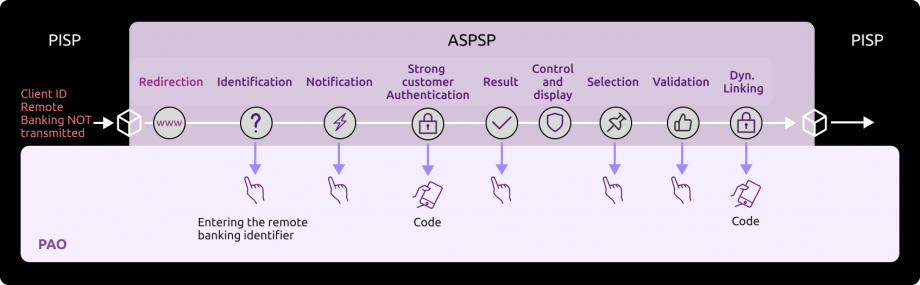
Sequence of identification and strong authentication screens :
From the URI returned in “consentApproval“, it is possible to play the sequence of screens.
1) The PSU is redirected to an identification screen provided by their bank, where they enter their remote banking identifier.
Please note: this screen can only be called up once.
=> the nonce transmitted in the URL giving access to this screen can only be used once (it is then burnt out by the anti-replay)
=> if the TPP or PSU application does not complete the entire process at once, a new payment initiation request (paymentRequest) will be required.
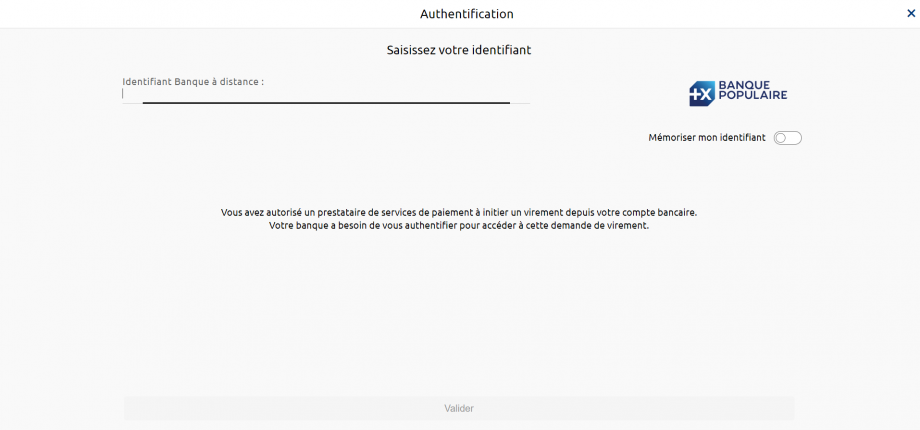
Enter the PSU’s remote banking identifier (see “How to test the API ?” > “Test our persona” for the institution’s datasets), for example for the “Marc” persona of Banques Populaires :
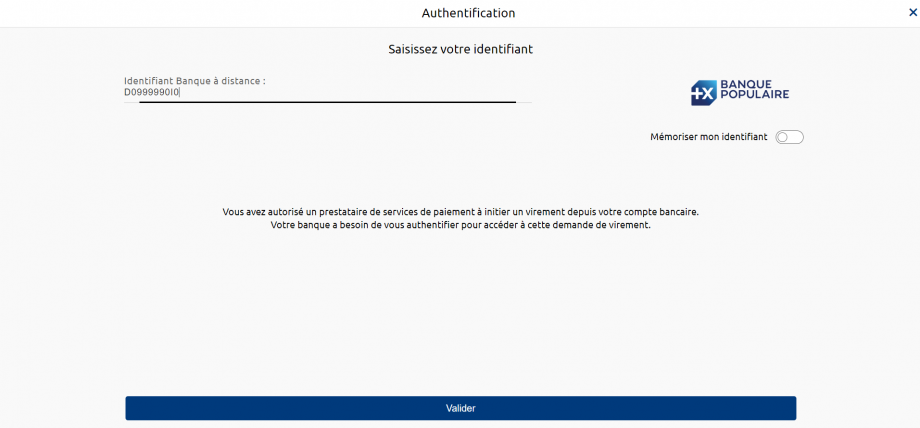
Note: The “Remember me” button is not operational. Activating it serves no purpose.
For Caisses d’Epargne, if the PSU is a professional or a company, they will need to enter their user number in addition to their remote banking identifier.
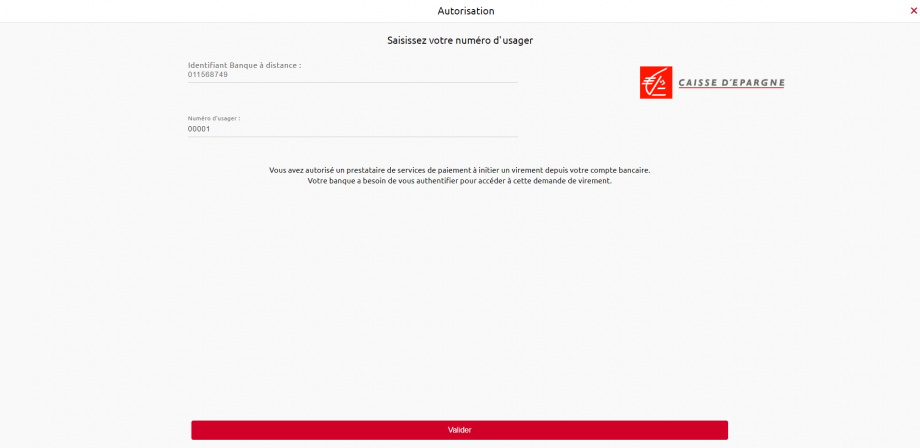
2) The PSU is redirected to an initial strong authentication screen proposed by their bank to validate their identity.

The SMS code for authentication must be entered (see “How to test the API ? > “Test our persona” for the institution’s datasets), for example for the “Marc” persona of Banques Populaires:

In live production: The kinematics of this stage depend on the strong authentication method made available to the PSU by the banking institution (SMS OTP, secur’pass, etc.).
It also depends on the PSU equipment running the PISP application used by the PSU (PC or mobile/smartphone/tablet).
Note: in a sandbox environment, the SMS code to be entered is always “12345678”.
3) The PSU is redirected to a screen for selecting the account to be debited proposed by their bank.
Example of output for the persona “Marc” from Banques Populaires, who has 4 accounts (see “How to test the API ?” > “Test our persona” for the bank’s datasets):
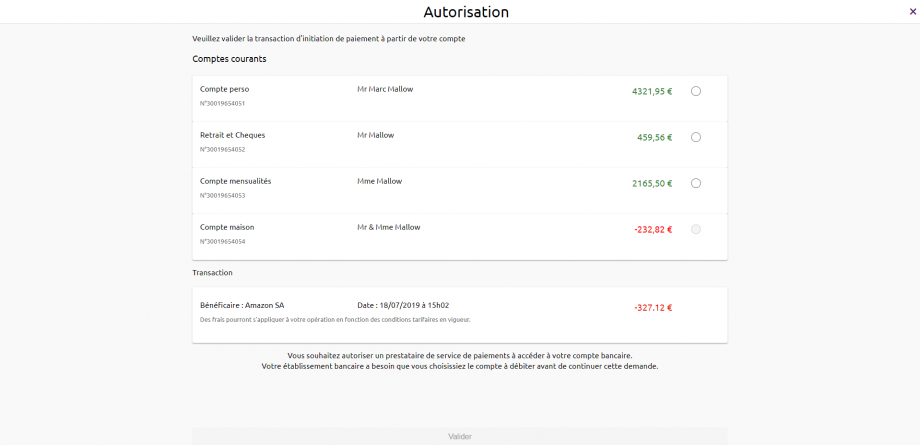
NB: If the PISP provides the IBAN of the PSU to be debited in its request (“debtorAccount” field), only the corresponding account will be selectable and proposed to the PSU: example below for the persona Tech’n Co des Banques Populaires.
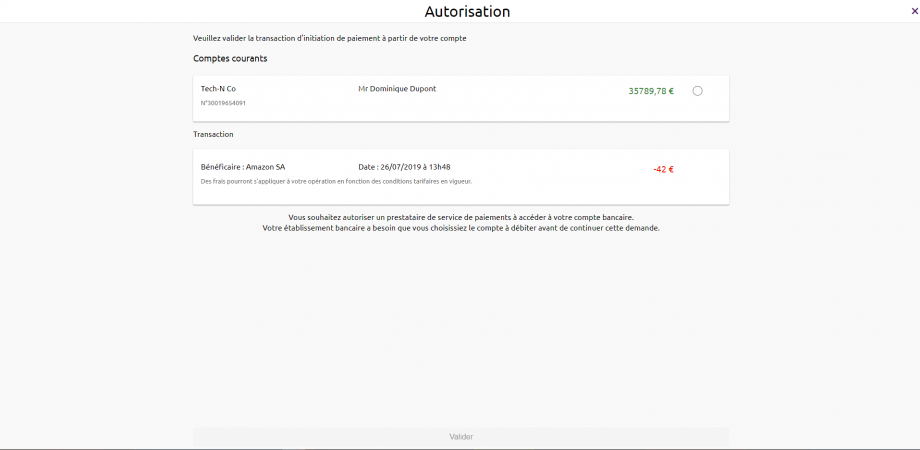
NB: If the PSU does not have an account, the payment initiation request will not succeed and the PSU will be redirected to your APP. Example for the persona “Thomas” from Banques Populaires.
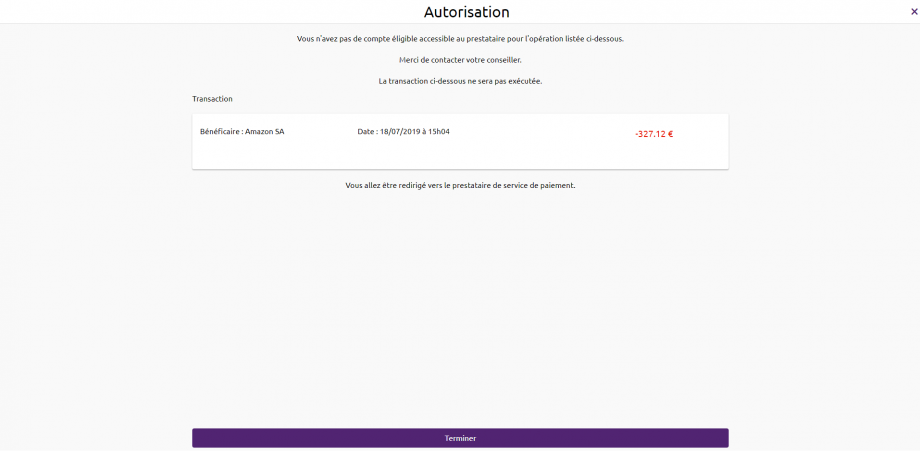
4) The PSU selects and validates the account to be debited.
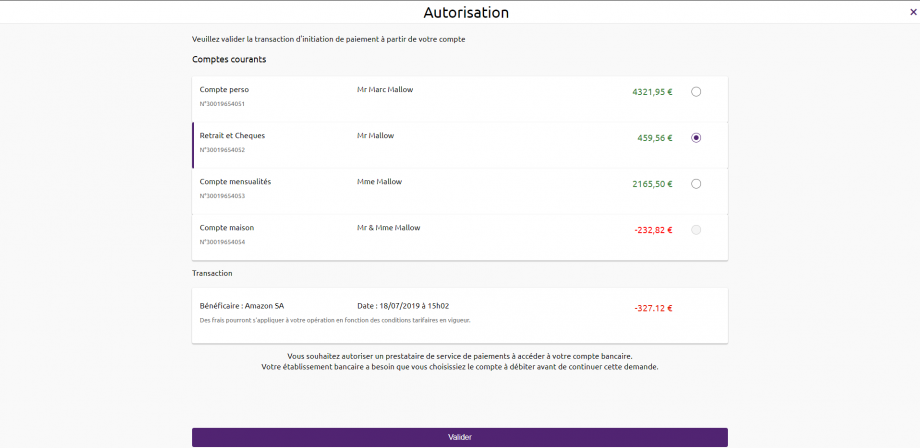
5) The PSU is redirected to a second strong authentication screen proposed by their establishment to validate their payment.
Screens identical to the strong authentication screen in step (2) for validating the PSU’s identity, except for the password entry screen which is not shown.
Exemptions are possible for the AF step to validate payment => this option is not available.
The PISP can set an indicator to indicate that it considers the payment request to be a case of exemption from strong authentication. The final decision as to whether or not to apply a strong authentication exemption remains at the discretion of the PISP.
The cases in which the PSU’s strong authentication requirement may be waived if the general authentication requirements are met are described in Article 2 of the PSD2 RTS.
6) The PSU is redirected to the PISP APP.
When requesting initiation, the PISP provides one or two callback URLs:
The first (successfulReportUrl) will be called by the bank if the initiation request is processed and if the PSU has given its consent to the payment. A code parameter is added to the successfulReportUrl.
Example: https://<yourSuccessfulReportUrl>?code=GbmTn1ZZ76bibgvCRLxD4lNp8wMzkd
This information is important because it is needed to obtain the token for access to the o-confirmation method.
The second URL (unsuccessfulReportUrl) will be used by the bank if consent is refused or if the payment initiation validation process is interrupted at any stage (e.g. timeout on the identification screen, on the screen for selecting the account to be debited or on the strong authentication screens). This second URL is optional: the first call back URL (successfulReportUrl) will be used if the second is not filled in, but without adding a “code” parameter.
Alternative step 3: Redirection to the screens so that the PSU can validate the payment in the event of a smooth run
Nominal kinematics of identification and strong authentication screen sequences
By default, the PSU is asked to authenticate itself twice in order to trigger a payment request. It is possible to trigger two fluid runs when the request contains more precise information about the debtor account:
- Bis Fluid Path: the debtorAccount is entered in the payment initiation request
- Fluid path: the debtorAccount and privateId (*) are entered in the payment initiation request.
Fluid Bis path
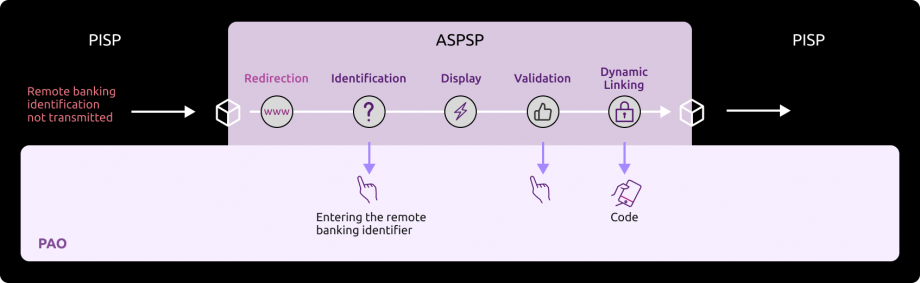
Fluid path
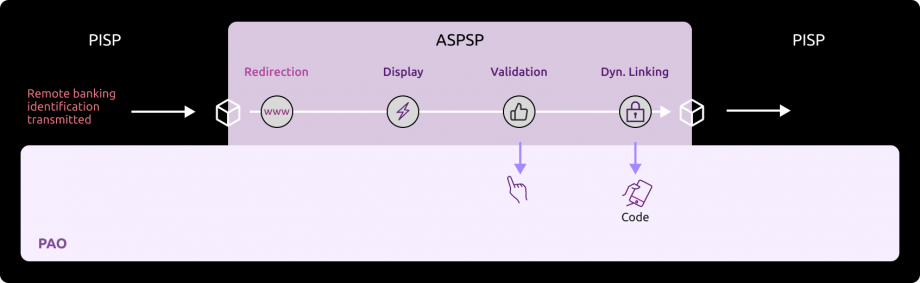
NB (*) For the Caisses d’Epargne, Banque BCP, Crédit Coopératif and BTP Banque and for the PRO and ENT customer segments: this is the subscriber number separated from the user number by a hyphen “-“.
Triggering the Bis fluid path redirects the PSU to the identifier entry screen, which is the same as in the conventional path. The sequence that follows is the same regardless of the type of fluid path.
1 ) The PSU is redirected to a screen summarising the operation, and can validate or cancel it.
Example of output for the persona “Marc” from Banques Populaires, who has 4 accounts including account number 30019654051, (see the “How to test the API ?" > “Test our persona" for the bank’s datasets):
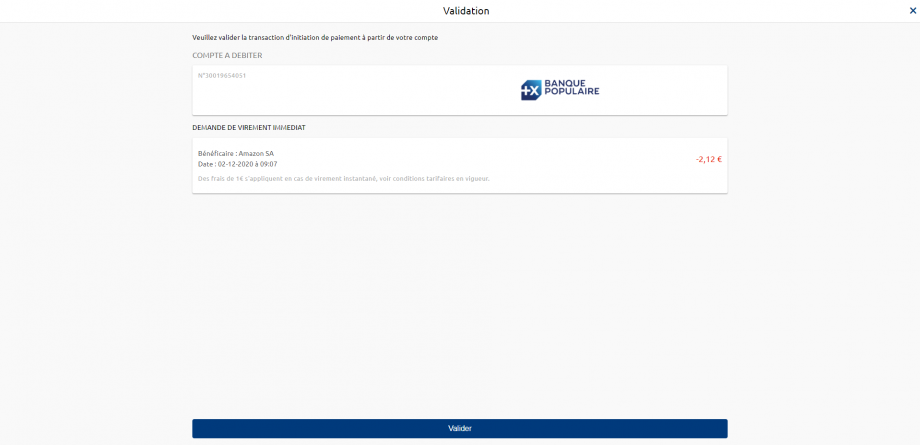
2) The PSU is redirected to an initial strong authentication screen proposed by their bank to validate their identity.
The SMS code for authentication must be entered (see “How to test the API ? > “Test our persona” for the institution’s datasets), example for the persona “Marc” from Banques Populaires:
The kinematics of this stage depend on the strong authentication method made available to the PSU by the banking institution (password + SMS OTP, secur’pass, etc.).
It also depends on the PSU equipment running the PISP application used by the PSU (PC or mobile/smartphone/tablet).
Note: in a sandbox environment, the SMS code to be entered is always “12345678”.
3 ) The PSU is then redirected to the PISP’s APP, with the “code” parameter being supplied.
Step 4: Recover the status of a payment initiation
This GET /payment-requests/{paymentRequestResourceId} call enables you to retrieve all the data from the payment initiation, enriched with the resourceId and the status of the initiation and the payment it contains. The description of the functionality and the fields of the request are described in the “Recover the status of a payment initiation” use case. The data is accessible for 35 days.
For access to the sandbox assembly, the entry point is identical to the previous requests:
Request :
Headers :
Authorization : Bearer firstAccessToken_ABCXdBobTpdwRRaYy2H3w7pP5Xe61e1R9rwxMuhk7G0fULg8x6kJHz
Content-Type: application/json
Signature : keyId=\”https://<www.myUrlPath.to>/myQsealCertificate_<print-sha256>\“, algorithm=\”rsa-sha256\”, headers=\”(request-target) psu-ip-address psu-ip-port psu-http-method psu-date psu-user-agent psu-referer psu-accept psu-accept-charset psu-accept-encoding psu-accept-language digest\”, signature=”LbkxgICM48J6KdWNaF9qT7OWEorNlAwWNo6R+KkP7cP4TIGkk8wxcsGQXJ9ZnC+ZiA8mjL5S8WQyL41M7iPt+vJX4xh679gdGwmlKzn7E+ZtZ1I4qalRxcdLp4gBL7fll+C2lVBNJrViMJBezFK7AYVjnSWH7t1QxiMVg3CmoRM=\\”
X-Request-ID : MyXrequestId123
Notes on field feeding :
Authorization : Bearer => access_token retrieved for the tokenCredential.
x-request-id => must be the same as for the payment initiation request
The paymentRequestResourceId is retrieved in response to the payment initiation request, when the payment initiation has been processed and the PSU has given its consent for payment.
Response:
{
“paymentRequest”: {
“resourceId”: “0000000a22-156688979900016807956016”,
“paymentInformationId”: “azertyui 1630919339”,
“creationDateTime”: “2022-09-05T09:25:22.527+02:00”,
“numberOfTransactions”: 1,
“initiatingParty: {
“name”: “Pisp Name”,
“postalAddress”: {
“country”: “FR”,
“addressLine”: [
“512 rue Reaumur,
“75512 PARIS
]
},
“organisationId: {
“identification”: “12FR5”,
“schemeName”: “COID”,
“issuer”: “ACPR
}
},
“paymentTypeInformation”: {
“serviceLevel”: “SEPA”,
“categoryPurpose”: “DVPM”
},
“debtor”: {
“name”: “Customer Name”,
“postalAddress”: {
“country”: “FR”,
“addressLine”: [
“512 rue Leclerc,
“94512 Charenton-le-Pont
]
}
},
“debtorAccount”: {
“iban”: “FR7613807000243021933556300”
},
“debtorAgent”: {
“bicFi”: “CCBPFRPP512”,
“clearingSystemMemberId: {
“clearingSystemId”: “clearingSystemId”,
“memberId”: “memberId”
},
“name”: “Cpy Name”,
“postalAddress”: {
“country”: “FR”,
“addressLine”: [
“512 rue De Gaulle,
“85000 LRSY
]
}
},
“beneficiary”: {
“isTrusted”: false,
“creditorAgent”: {
“bicFi”: “CCBPFRPP512”,
“clearingSystemMemberId: {
“clearingSystemId”: “clearingSystemId”,
“memberId”: “memberId!”
},
“name”: “Creditor Name”,
“postalAddress”: {
“country”: “FR”,
“addressLine”: [
“512 rue de la primaube,
“12512 RODEZ
]
}
},
“creditor”: {
“name”: “Amazon SA”,
“postalAddress”: {
“country”: “FR”,
“addressLine”: [
“512 avenue Maupassant,
“75512 PARIS
]
},
“organisationId: {
“identification”: “852126790”,
“schemeName”: “BANK”,
“issuer”: “FR
}
},
“creditorAccount”: {
“iban”: “FR7613825002000400000541718”
}
},
“chargeBearer”: “SLEV”,
“paymentInformationStatus”: “ACCP”,
“requestedExecutionDate”: “2022-09-06T14:10:10.109+01:00”,
“creditTransferTransaction”: [
{
“paymentId”: {
“resourceId”: “0000006537-163091934100113807153727”,
“instructionId”: “instructionId 1630919339”,
“endToEndId”: “endToEndId 1630919339”
},
“requestedExecutionDate”: “2022-09-06T15:10:10.109+02:00”,
“instructedAmount: {
“currency”: “EUR”,
“amount”: “2.41
},
“purpose”: “COMC”,
“regulatoryReportingCodes”: [],
“remittanceInformation”: {
“unstructured”: [
“remittanceInformation01
]
}
}
],
“supplementaryData”: {
“acceptedAuthenticationApproach”: [
“REDIRECT
],
“appliedAuthenticationApproach”: “REDIRECT”,
“scaHint”: “scaExemption”,
“successfulReportUrl“: “https://extensions.bpce.fr/OAuth2Callback.aspx&state=OK-12345&code_challenge_method=S256&code_challenge=ABCD”
}
},
“_links: {
“request”: {
“href”: “/stet/psd2/v1.6.2/payment-requests/00000000a22-156688979900016807956016”,
“templated: false
},
“confirmation”: {
“href”: “/stet/psd2/v1.6.2/payment-requests/00000000a22-156688979900016807956016/confirmation”,
“templated: false
}
}
Headers :
X-Request-ID : MyXrequestId123
Status code : 200 OK
Notes on field feeding :
resourceId => uses the paymentRequestResourceId
paymentInformationStatus => shows the status of the payment initiation
transactionStatus => shows the status of the resourceId transaction
X-Request-ID: transmitted as input
Step 5: Confirm a payment initiation (only in production, NOT in sandbox)
This POST call /payment-requests/{paymentRequestResourceId}/o-confirmation allows you to confirm a payment initiation. The description of the functionality and the fields of the request are described in the “Confirm a payment initiation” use case.
The POST method /payment-requests/{paymentRequestResourceId}/confirmation is not implemented.
Before the o-confirmation service can be used, a specific access token must be obtained via the following request:
Request :
POST https://www.13807.oba-bad-me-live-api.89C3.com/stet/psd2/oauth/token
In the Headers :
Content-Type : application/x-www-form-urlencoded; charset=utf-8
In the body :
grant_type : authorization_code
client_id : PSDFR-ACPR-12345
code: the code retrieved as a parameter from the successfulReportUrl call at the end of step 3
code_verifier: based on your PKCE elements
redirect_uri: https://myAPP.fr/Home/OAuth2Callback
Notes on field feeding :
<cdetab> => establishment code of the two banks available in this environment, i.e. :
13807 (Banque Populaire Grand Ouest) ;
17515 (Caisse d’Epargne Ile de France).
client_id :
If the TPP was registered using the “GoLive” process via our 89C3 API portal:
=> this is the approval number given by your competent authority (PSDXX-YYYYYYY-ZZZZZZZZ)
OR
if the TPP was registered using the register API, client_id returned in the response to the POST /register :
=> this is the client_id returned in the response to the POST /register
redirect_uri: pre-declared redirect URL in your consuming application AND to be communicated to the ASPSP:
- during the GO Assembly stage (or GO Live in production) if the TPP has been registered using the current procedure;
- via the API Register if the TPP has registered using the automated procedure.
grant_type => non-modifiable = “authorization_code
Response:
{
“access_token“: “secondAccessToken_NBVcxwwmLkjhgfdspoie00OIuyTRPFs“,
“token_type“: “Bearer”,
“expires_in“: “3600”,
“refresh_token“: “1ji8KA9RJ5eXeJV1xKSDj1WDp8wwg3pRgDO2j0WhtbMsWz”,
“scope“: “pisp”,
“state“: “OK-12345”
}
Notes on field feeding :
access_token => second token to be transmitted in the header of the next method near Bearer XX.
expires_in => token validity time in seconds.
refresh_token => to be memorised: is used to obtain a new access token if the validity period of the first token has expired (lasting a few minutes). The token is refreshed using grant-type= refresh_token.
state => The ASPSP restores the “state” value that was present in the initial payment initiation request (value set by the TPP).
Once the access token has been obtained, you can call up the payment initiation confirmation request below (“Authorization” field).
Request:
POST https://www.13807.oba-bad-me-live-api.89C3.com/stet/psd2/v1.6.2/payment-requests/0000000a22-156688979900016807956016/confirmation
Headers :
Authorization : Bearer secondAccessToken_NBVcxwwmLkjhgfdspoie00OIuyTRPFs
Content-Type: application/json
Signature : keyId=\”https://<www.myUrlPath.to>/myQsealCertificate_<print-sha256>\“, algorithm=\”rsa-sha256\”, headers=\”(request-target) psu-ip-address psu-ip-port psu-http-method psu-date psu-user-agent psu-referer psu-accept psu-accept-charset psu-accept-encoding psu-accept-language digest\”, signature=”LbkxgICM48J6KdWNaF9qT7OWEorNlAwWNo6R+KkP7cP4TIGkk8wxcsGQXJ9ZnC+ZiA8mjL5S8WQyL41M7iPt+vJX4xh679gdGwmlKzn7E+ZtZ1I4qalRxcdLp4gBL7fll+C2lVBNJrViMJBezFK7AYVjnSWH7t1QxiMVg3CmoRM=\\”
X-Request-ID : MyXrequestId123
Body :
{
}
Notes on field feeding :
Authorization : Bearer => second access_token retrieved for the tokenCredential
{paymentRequestResourceId} : this is the identifier transmitted by the payment service at the time of initiation and used for the GET.
Response :
{ “paymentRequest” : {
“resourceId”: “0000000a22-156688979900016807956016”,
“paymentInformationId: “MyPmtInfld123”,
“creationDateTime”: “2021-09-05T09:25:22.527+02:00”,
“numberOfTransactions”: 1,
“debtorAgent” : {
“bicFi: “CCBPFRPP512”,
“name”: “Cpy Name”,
“postalAddress” : {
“country”: “FR”,
“addressLine” : [
“512 rue De Gaulle,
“85000 LRSY
]
}
},
“initiatingParty” : {
“name”: “Pisp Name”,
“postalAddress” : {
“country”: “FR”,
“addressLine” : [
“512 rue Reaumur,
“75512 PARIS
]
},
“organisationId: {
“identification”: “12FR5”,
“schemeName”: “COID”,
“issuer”: “ACPR
}
},
“paymentTypeInformation” : {
“serviceLevel”: “SEPA”,
“categoryPurpose: “DVPM
},
“debtor”: {
“name”: “Customer Name”,
“postalAddress” : {
“country”: “FR”,
“addressLine” : [
“512 rue Leclerc,
“94512 Charenton-le-Pont
]
},
“privateId : {
“identification”: “D0999990I0”,
“schemeName”: “BANK”,
“issuer” : “BICXYYTT512”
}
},
“debtorAccount”: {
“iban”: “FR7613807000243021933556300
},
“beneficiary”: {
“creditorAgent” : {
“bicFi: “CCBPFRPP512”,
“name”: “Creditor Name”,
“postalAddress” : {
“country”: “FR”,
“addressLine” : [
“512 rue de la primaube,
“12512 RODEZ
]
}
},
“creditor”: {
“name”: “Amazon SA”,
“postalAddress” : {
“country”: “FR”,
“addressLine” : [
“512 avenue Maupassant,
“75512 PARIS
]
},
“organisationId: {
“identification”: “852126790”,
“schemeName”: “BANK”,
“issuer” : “FR
}
},
“creditorAccount”: {
“iban”: “FR7613825002000400000541718”.
}
},
“purpose”: “COMC”,
“chargeBearer”: “SLEV”,
“paymentInformationStatus”: “PDNG”,
“statusReasonInformation”: null,
“fundsAvailability”: null,
“booking”: null,
“requestedExecutionDate”: “2021-09-06T14:10:10.109+01:00”,
“creditTransferTransaction”: [
{
“paymentId: {
“resourceId”: “0000000a22-146329369000016907660677”,
“instructionId”: “instructionId 1630919339”,
“endToEndId” : “endToEndId 1630919339”
},
“instructedAmount” : {
“currency”: “EUR”,
“amount” : “2.41
},
“remittanceInformation”: {
“unstructured”: [
“remittanceInformation01
]
},
“transactionStatus: “PDNG
}
],
“supplementaryData” : {
“appliedAuthenticationApproach” : “REDIRECT”,
“scaHint”: “scaExemption”,
“successfulReportUrl”: https://extensions.bpce.fr/OAuth2Callback.aspx&state=OK- 12345&challenge_code_method=S256&challenge_code=T3LPv9JWu_HtyEQOkDCo4YYRmZJXTjJ0Ng9jfq_UBBg
}
}
}
Headers :
X-Request-ID : MyXrequestId123
Status code : 200 OK
Notes on field feeding :
paymentRequestResourceId => identifier to pass to the POST/payment-requests request to confirm payment initiation
appliedAuthenticationApproach” = “REDIRECT” => only authorised value
href => URL of the page redirecting to the bank’s identification and authentication screens
nonce => anti-technical replay
Step 6: Cancel a Payment Initiation
This call allows you to cancel a payment initiation by asking the connected PSU to give its consent to the cancellation. The description of the functionality and the fields of the request are described in the “Cancel a payment initiation” use case.
Reminder: the authentication method supported by the bank is the REDIRECTsimple mode => the kinematics of the identification and strong authentication screen sequence described below correspond to this authentication mode.
For access to the sandbox assembly, the entry point is identical: www.<cdetab>.sandbox.api.89c3.com
Request :
Headers :
Authorization : Bearer secondAccessToken_NBVcxwwmLkjhgfdspoie00OIuyTRPFs
Content-Type: application/json
Signature : keyId=\”https://<www.myUrlPath.to>/myQsealCertificate_<print-sha256>\“, algorithm=\”rsa-sha256\”, headers=\”(request-target) psu-ip-address psu-ip-port psu-http-method psu-date psu-user-agent psu-referer psu-accept psu-accept-charset psu-accept-encoding psu-accept-language digest\”, signature=”LbkxgICM48J6KdWNaF9qT7OWEorNlAwWNo6R+KkP7cP4TIGkk8wxcsGQXJ9ZnC+ZiA8mjL5S8WQyL41M7iPt+vJX4xh679gdGwmlKzn7E+ZtZ1I4qalRxcdLp4gBL7fll+C2lVBNJrViMJBezFK7AYVjnSWH7t1QxiMVg3CmoRM=\\”
X-Request-ID : MyXrequestId123
Body :
{
“resourceId”: “0000000a22-156688979900016807956016”,
“paymentInformationId: “MyPmtInfld123”,
“creationDateTime”: “2022-09-05T09:25:22.527+02:00”,
“numberOfTransactions”: 1,
“initiatingParty: {
“name”: “Pisp Name”,
“postalAddress”: {
“country”: “FR”,
“addressLine”: [
“512 rue Reaumur,
“75512 PARIS
]
},
“organisationId: {
“identification”: “12FR5”,
“schemeName”: “COID”,
“issuer”: “ACPR
}
},
“paymentTypeInformation”: {
“serviceLevel”: “SEPA”,
“categoryPurpose”: “DVPM”
},
“debtor”: {
“name”: “Customer Name”,
“postalAddress”: {
“country”: “FR”,
“addressLine”: [
“512 rue Leclerc,
“94512 Charenton-le-Pont
]
}
},
“debtorAccount”: {
“iban”: “FR7613807000243021933556300”
},
“debtorAgent”: {
“bicFi”: “CCBPFRPP512”,
“clearingSystemMemberId: {
“clearingSystemId”: “clearingSystemId”,
“memberId”: “memberId”
},
“name”: “Cpy Name”,
“postalAddress”: {
“country”: “FR”,
“addressLine”: [
“512 rue De Gaulle,
“85000 LRSY
]
}
},
“beneficiary”: {
“isTrusted”: false,
“creditorAgent”: {
“bicFi”: “CCBPFRPP512”,
“clearingSystemMemberId: {
“clearingSystemId”: “clearingSystemId”,
“memberId”: “memberId!”
},
“name”: “Creditor Name”,
“postalAddress”: {
“country”: “FR”,
“addressLine”: [
“512 rue de la primaube,
“12512 RODEZ
]
}
},
“creditor”: {
“name”: “Amazon SA”,
“postalAddress”: {
“country”: “FR”,
“addressLine”: [
“512 avenue Maupassant,
“75512 PARIS
]
},
“organisationId: {
“identification”: “852126790”,
“schemeName”: “BANK”,
“issuer”: “FR
}
},
“creditorAccount”: {
“iban”: “FR7613825002000400000541718”
}
},
“chargeBearer”: “SLEV”,
“paymentInformationStatus”: “ACCP”,
“creditTransferTransaction”: [
{
“paymentId”: {
“resourceId”: “0000000a22-156688979900016807956016”,
“instructionId”: “instructionId 1630919339”,
“endToEndId”: “endToEndId 1630919339”
},
“requestedExecutionDate”: “2022-09-06T14:10:10.109+01:00”,
“instructedAmount: {
“currency”: “EUR”,
“amount”: “2.41
},
“purpose”: “COMC”,
“regulatoryReportingCodes”: [],
“remittanceInformation”: {
“unstructured”: [
“remittanceInformation01
]
},
“transactionStatus”: “RJCT”,
“statusReasonInformation”: “DS02”
}
],
“supplementaryData”: {
“acceptedAuthenticationApproach”: [
“REDIRECT”,
“DECOUPLED
],
“appliedAuthenticationApproach”: “REDIRECT”,
“scaHint”: “scaExemption”,
“successfulReportUrl“: “https://extensions.bpce.fr/OAuth2Callback.aspx&state=OK-12345&code_challenge_method=S256&code_challenge=T3LPv9JWu_HtyEQOkDCo4YYRmZJXTjJ0Ng9jfq_UBBg”
}
}
Notes on field feeding :
Authorization : Bearer => second access_token retrieved
{paymentRequestResourceId} : this is the identifier transmitted by the payment service at the time of initiation and used for the GET.
The data in the body must be identical to that retrieved at the time of the GET, except for the following at the level of the transaction to be cancelled:
– the transactionStatus of the creditTransferTransaction object, which must be set to “RJCT”.
– set the statusReasonInformation of the creditTransferTransaction object to “DS02”.
– the _links part must be deleted
– the object envelope of the “paymentRequest” parent: {must be deleted, along with the associated closing brace at the end of the flow.
Response:
{
“appliedAuthenticationApproach”: “REDIRECT”,
“_links”: {
“consentApproval”: {
“href”: “https://www.13807.sandbox.api.89c3.com/89C3api/accreditation/v1.6.2/cancellation?paymentRequestRessourceId=0000000a22-156688979900016807956016&nonce=Ij4VifKlm4QICq12345”,
“templated”: true
}
}
Headers :
X-Request-ID : MyXrequestId123
Status code : 200 OK
Notes on field feeding :
paymentRequestResourceId => identifier to pass to the GET /payment-requests request to retrieve the status of the payment initiation
appliedAuthenticationApproach” = “REDIRECT” => only authorised value
href => URL of the page redirecting to the bank’s identification and authentication screens
nonce => anti-technical replay
currency => retrieved from the body passed as input
successfulReportUrl => retrieved from the body passed as input
unsuccessfulReportUrl => retrieved from the body passed as input
creditorAccount => retrieved from the body passed as input
creditorName => retrieved from the body passed as input
amount => retrieved from the input body
successfulReportUrl => retrieved from the body passed as input
debtorAccount => retrieved from the body passed as input
debtorName => retrieved from the body passed as input
privateId => retrieved from the body passed as input
requestedExecutionDate=> retrieved from the body passed as input
method => UFVU is equal to PUT in base64 + URL
X-Request-ID: transmitted as input
Step 7: The customer is redirected to the screens to confirm the cancellation of a payment initiation.
Nominal kinematics of identification and strong authentication screen sequences
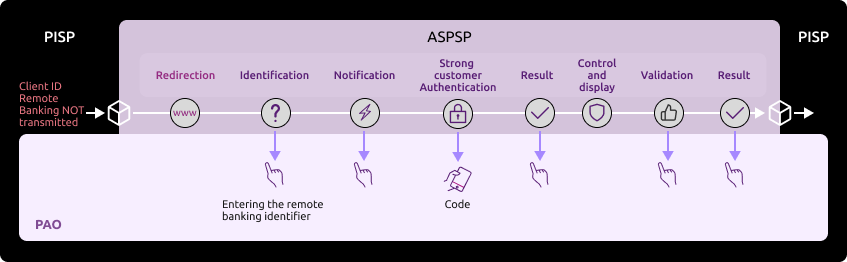
Sequence of identification and strong authentication screens :
The URI returned in consentApproval can be used to sequence the screens.
1) The PSU is redirected to an identification screen provided by their bank, where they enter their remote banking identifier.
Please note: this screen can only be called up once.
=> the nonce transmitted in the URL giving access to this screen can only be used once (it is then burnt out by the anti-replay)
=> a new DSP2 transfer cancellation request (via PUT PaymentRequest ) is required to recover a new nonce token if necessary.
The PSU’s remote banking identifier must be entered (see the “How to test the API ?” section). > “Test our persona” for the institution’s datasets), example for the persona “Marc” from Banques Populaires :
For Caisses d’Epargne, if the PSU is a professional or a company, they will need to enter their user number in addition to their remote banking identifier:
2) The PSU is redirected to a strong authentication screen offered by their bank to validate their identity.
The SMS code for authentication must be entered (see the section “How to test the API ?” > “Test our persona” for the institution’s datasets), example for the persona “Marc” from Banques Populaires:
The kinematics of this stage depend on the strong authentication method made available to the PSU by the banking institution (SMS OTP, secur’pass, etc.).
It also depends on the PSU equipment running the PISP APP used by the PSU (PC or mobile/smartphone/tablet).
Note: in a sandbox environment, the SMS code is systematically “12345678”.
3) The PSU is redirected to a summary screen of the transaction being cancelled, as proposed by their bank.
Example of a refund for the persona “Marc” from Banques Populaires who wants to cancel his transaction of 2.12 euros issued from his Personal Account. He can cancel or validate his cancellation transaction.
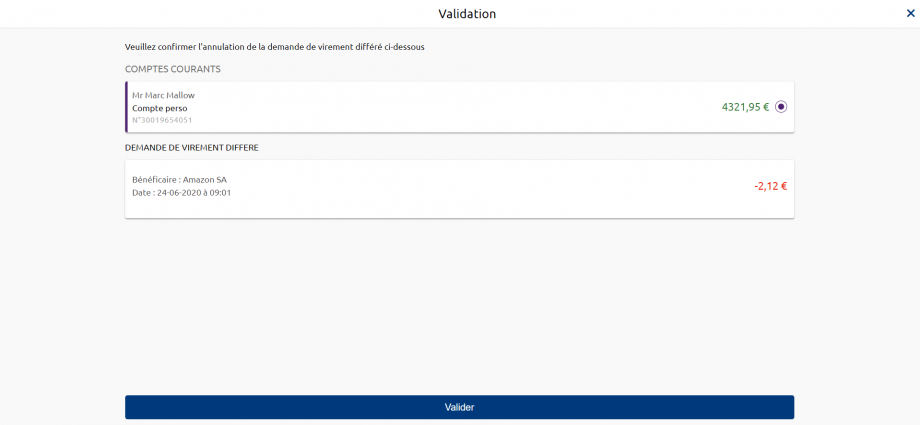
4) The PSU validates the cancellation of the transfer.
5) The PSU is redirected to a transaction confirmation screen provided by their bank.
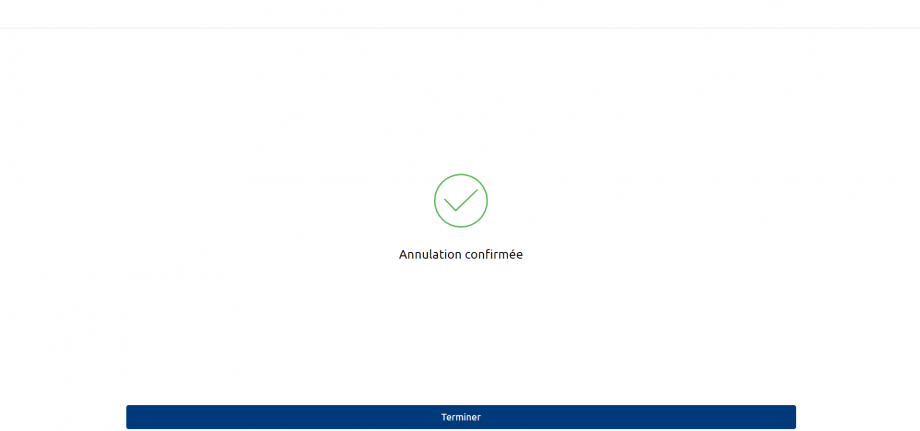
NB: if the PSU does not confirm the payment cancellation (or if there is a timeout on the transaction summary page, for example), the PSU is redirected to the next page,

6) The PSU is redirected to the TPP PISP application.
When requesting cancellation, the PISP provides one or two callback URLs:
The first (successfulReportUrl) will be called by the bank if the cancellation request is processed and if the PSU has given its consent for the transaction to be cancelled.
The second URL (unsuccessfulReportUrl) will be used by the bank if consent is refused or if the payment cancellation validation process is interrupted at any stage (e.g. timeout on the identification screen, on the transaction summary screen or on the strong authentication screens). This second URL is optional: the first call back URL (successfulReportUrl) will be used if the second is not filled in.
NB: confirmation of the cancellation of a payment request will not be implemented: confirmation will be implicitly carried by the PSU’s acceptance of the cancellation request itself.
Test our persona
In accordance with PSD2 regulations (cf. RTS Art. 30 (5)), as an ASPSP we must provide a test facility including support and enabling connection and function tests, so that TPPs who have applied for the necessary authorisation can test the software and applications they use to offer a payment service to users.
This page presents the datasets for testing the API :
- Fictitious customers are proposed by customer segment (student, executive, company, etc.) which cover PART, PRO and ENT customer cases:
- The private individual (PART) is a natural person categorised as a “capable adult”. A PART may also carry out activities as part of a sole proprietorship (EI) = a business run by a single person, which has no legal personality, even though it is registered in the Trades Register or the Trade and Companies Register (RCS). Examples: craftsman or liberal profession. In this case, the IE is considered to be a PART.
- The “professional” (PRO) and “company” (ENT) categories cover legal entities.
- The characteristics of their accounts and deferred debit cards are listed (single-account, multi-account, multi-bank, presence of a deferred debit card, account balance).
- The useful data expected as input by the APIs is listed (remote bank identifier, SMS code for strong authentication, IBAN).
The identifiers and data below are fictitious and cannot be used in production.
| Persona | Segment | Remote banking identifier | SMS code for authentication | Bank code | IBAN | Account number | Balance | Currency |
|---|---|---|---|---|---|---|---|---|
| Marc | Senior executive (individual) | D0999990I0 | 12345678 | 13807 | FR7613807008043001965405158 | 30019654051 | 4 321.95 | EUR |
| FR7613807008043001965405255 | 30019654052 | 459.56 | EUR | |||||
| FR7613807008043001965405352 | 30019654053 | 2 165.50 | EUR | |||||
| FR7613807008043001965405449 | 30019654054 | -232.82 | EUR | |||||
| Marie | Retiree (individual) | D0999991I0 | 12345678 | 13807 | FR7613807008043001965406128 | 30019654061 | 1 754.03 | EUR |
| FR7613807008043001965406225 | 30019654062 | 11 429.00 | EUR | |||||
| FR7613807008043001965406322 | 30019654063 | 429.00 | EUR | |||||
| Thomas | Student (individual) | D0999980 | 12345678 | 13807 | No account usable for a payment | |||
| Alix | Executive (individual) | D0999992I0 | 12345678 | 13807 | FR7613807008043001965408165 | 30019654081 | -12.35 | EUR |
| FR7613807008043001965408262 | 30019654082 | 395.45 | EUR | |||||
| FR7613807008043001965408359 | 30019654083 | 298.19 | EUR | |||||
| Tech’n Co | Company (professional) | D0999993I0 | 12345678 | 13807 | FR7613807008043001965409135 | 30019654091 | 35 789.78 | EUR |
| Adam | Entrepreneur (individual and professional) | D0999994I0 | 12345678 | 13807 | FR7613807008063031966574122 | 30319665741 | 8 008.03 | EUR |
| FR7613807008063031966574219 | 30319665742 | -2 894.05 | EUR | |||||
| Lea | Executive (individual) | 755238649 | 12345678 | 13807 | FR7613807008063001965400181 | 30019654001 | 11 282.56 | EUR |
| FR7613807008063001965400278 | 30019654002 | 527.54 | EUR | |||||
| FR7617515000920400430518020 | 30019654003 | -378.28 | EUR | |||||
| SARL UNIPERSONNELLE 2640 | Merchant (business) | D0999995I0 | 12345678 | 13807 | FR7613807008063042100847972 | 30421008479 | 0.00 | EUR |
| FR7613807008060602191786661 | 06021917866 | 139 613 054.35 | EUR | |||||
| FR7613807002353032165639297 | 30321656392 | 701 246 591.14 | EUR | |||||
| FR7613807002353092101653050 | 30921016530 | 99 792.13 | EUR | |||||
| FR7613807002353092152355047 | 30921523550 | 1 015 745.35 | EUR | |||||
| Alienore | Cadre (PART) | D0990001I0 | 12345678 | 13807 | FR7613807008043099888880199 | 30998888801 | 2 165.5 | EUR |
| FR7613807008043099888880299 | 30998888802 | 170.0 | EUR | |||||
| FR7613807008043099888880399 | 30998888803 | 3.05 | EUR | |||||
| FR7613807008043099888880499 | 30998888804 | 4.15 | EUR | |||||
| FR7613807008043099888880599 | 30998888805 | 5.45 | EUR | |||||
| FR7613807008043099888880699 | 30998888806 | 6.78 | EUR | |||||
| FR7613807008043099888880799 | 30998888807 | 7.6 | EUR | |||||
| FR7613807008043099888880899 | 30998888808 | 8.8 | EUR | |||||
| FR7613807008043099888880999 | 30998888809 | 9.9 | EUR | |||||
| FR7613807008043099888881099 | 30998888810 | 10.10 | EUR | |||||
FR761380700804309988881199 | 30998888811 | 11.11 | EUR | |||||
| James | Employee (PART) | D0999996I0 | 12345678 | 13807 | LU050250065020765162 (BCP Customer) | 65020765162 | 1 131.77 | EUR |
Marc 42 years old – Nantes Single – Executive in the public Service – 18 years experience 4 current accounts Life / History / Work
Goals
| Use practices
Brakes and potential frustrations
What might influence
The good surprise
|
Marie 73 years old – Nantes Married – Retired from the private sector 3 current accounts Life / History / Work
Goals
| Use practices
Brakes and potential frustrations
What might influence
The good surprise
|
Thomas 21 years old – Nantes Student – Ecole d’ingénieur informatique privée No account usable for a payment Life / History / Work
Goals
| Use practices
Brakes and potential frustrations/span>
What might influence
The good surprise
|
Alix 32 years old – Nantes Married – 3 children Executive – Private sector employee 3 current accounts Life / History / Work
Goals
| Use practices
Brakes and potential frustrations
What might influence
The good surprise
|
Tech’n Co Created by Dominique – Nantes 37 years old – Married – 2 children 3 current accounts Life / History / Work
Goals
| Use practices
Brakes and potential frustrations
What might influence
The good surprise
|
Adam 29 years old– Montpellier Single – Contractor – 4 years experience 2 current accounts 2 delayed debit cards Life / History / Work
Goals
| Use practices
Brakes and potential frustrations
What might influence
The good surprise
|
Léa 35 ans – Lyon Married – Executive in an insurance company- 10 years experience 1 current account Life / History / Work
Goals
| Use practices
Brakes and potential frustrations
What might influence
The good surprise
|
SARL UNIPERSONNELLE 2640 Dijon 5 current accounts 1 delayed debit card Life / History / Work
Goals
| Use practices
Brakes and potential frustrations
What might influence
The good surprise
|
Alienor 50 years old – Executive 11 current accounts Her life / Her history / Her work
Her goals
| Use practices
Potential obstacles and frustrations
What can influence it
A pleasant surprise
|
James Luxembourg 1 current account His life / His history / His work
His goals
| Use practice
Potential obstacles and frustrations
What can influence it
A pleasant surprise
|
Deprecation process
The decommissioning policy is based on the API lifecycle, which is aligned with the versions of the STET specifications.
This is illustrated below for version N:

Decommissioning of API Version N
The decommissioning of our API version takes place in several steps:
Day of Deployment of the New API Version (T0):
Version N+1 is deployed to the 89C3 Live gateway.
Three Months Post Deployment (T0 + 3 Months):
Version N of the API is decommissioned from all environments (sandbox and live).
Communication regarding the decommissioning of version N will occur on the deployment date of version N+1.
The preferred communication channel is this Groupe BPCE API Store portal, in the "Roadmap" section of the impacted API.
An additional communication via email to the contacts of the providers registered on the Groupe BPCE API Store portal may complement this process.
Schedule of future functional changes to the API
The Account Information API is subject to continuous improvement and development throughout the year*.
(*) NB: article 30 (4) of the RTS specifies that significant changes to the API may be made without delay. We apply this clause in the following cases:
- blocking problem having a widespread impact on at least one of the major customer segments (individuals, professionals, businesses),
- safety issues,
- changes requested by the competent national authorities to meet the regulatory trajectory.
See below for our projected roadmap.
| API version | STET standard version | Features | Sandbox Deployment date 89C3 API Dev Portal & Sandbox | Live Deployment date 89C3 Live API Gateway | Decommissioning date |
|---|---|---|---|---|---|
| v1 | v1.4.0.47 |
| 14 March 2019 (1st version) 7 October 2019 (REDIRECT mode) | 7 October 2019 | April 2023 (to be confirmed) |
| v1 | v1.4.0.47 |
| 24 August 2020 | 24 August 2020 | April 2023 (to be confirmed) |
| v1 | v1.4.0.47 | · Initiate a single transfer in euros (SCT immediate / SCT deferred)
· Retrieve the status of a payment initiation for a single credit transfer (SCT immediate / SCT delayed) · Cancel a payment initiation for a single credit transfer (deferred SCT) · Smooth customer process for initiating a payment (1 single AF if the customer ID and the accounts to be debited and credited are transmitted) | 7 December 2020 | 7 December 2020 | April 2023 (to be confirmed) |
| v1.4.2 | v1.4.2.17 |
| 30 May 2021 | 30 May 2021 | |
| v1.4.2 | v1.4.2.17 |
| 30 June 2021 | 30 June 2021 | |
| v1.4.2 | v1.4.2.17 |
| 30 March 2022 | 30 March 2022 | |
| v1.6.2 | v.1.6.2.0 |
| 20 October 2022 | 8 February 2023 | |
| v1.6.2 | v.1.6.2.0 |
| 22 February 2023 | 22 February 2023 |
Functional limits
Limitations of this DSP2 API in version 1.6.2
- Applies to Banques Populaires, Banque Palatine and Banque de Savoie
- Applies only to euro payment accounts that are active and accessible online (see text of the PSD2 Directive);
- Uses only the REDIRECTenforced authentication mode (calls the confirmation method so that the TPP can confirm the payment after Strong Authentication of the PSU has been requested and managed via the bank: the ASPSP sends an OAUTH2 authorisation code to the TPP, which must send it back to the ASPSP to confirm the payment).
NB: the TPP cannot provide the ASPSP with the customer’s personalised security data for authentication purposes, and therefore only the ASPSP’s redirection and strong authentication (SCA) screens must be used (encapsulation of these screens by the TPP is prohibited under PSD2 #97.5 and RTS #31).
- Only processes payment initiation requests in €uro
- So no initiation of foreign currency transfers
- Immediate, standing or deferred SEPA SCT single credit transfers, or SEPA Instant Payment (SCTInst).
- Immediate or deferred SEPA SCT multiple credit transfers.
- The chargeBearer field is mandatory for the POST /payment-requests method and must be SLEV for international payments (i.e. in currencies other than EUR) => international transfers in foreign currency are not available.
- The categoryPurpose field is mandatory for the POST /payment-requests method:
- CASH, SALA and DVPM are available for single transfers;
- CASH and SALA are available for multiple transfers.
- The following methods are available:
- POST /payment-requests and POST /payment-requests/{paymentRequestResourceId}/confirmation to initiate a payment for a single or multiple transfer
- GET /payment-requests/{paymentRequestResourceId} to retrieve the status of a payment initiation for a single transfer or a multiple transfer
- The PUT /payment-requests/{paymentRequestResourceId} method is only supported for cancelling a payment initiation for a single transfer (deferred or standing SCT transfer) or a multiple transfer (deferred SCT).
- The POST method /payment-requests/{paymentRequestResourceId}/o-confirmation is no longer supported in v1.6.2
- The GET /payment-requests/{paymentRequestResourceId}/transactions method is not supported.
- Remote bank identifier of the bank customer taken into account (via the debtor/privateId/identification data) to trigger a fluid PISP path (a single strong authentication) if the debtorAccount is also entered in the request.
- A transfer initiated via the Payment Initiation API cannot be cancelled by the PSU via its direct access to online banking.
- If no action is taken by the user after 30 minutes (or 04 minutes on redirection screens), this is considered to be a disconnection with no redirection back to the TPP.
Limitations linked to customer segments
- The individual (PART) is a natural person categorised as a “capable adult”.
- The “professional” (PRO) and “company” (ENT) categories cover legal entities.
Limitations on the types of accounts accessible
- The accounts accessible via the PISP API to be debited are those available on the remote bank for initiating a SEPA transfer to an external beneficiary.
- It should be noted that, in accordance with the regulations, the ASPSP may apply business processes (anti-fraud, etc.) which may lead to the rejection of the execution of a payment initiation.
Limitations linked to strong authentication methods
- Private customer (PART): equipment with password + SMS OTP and/or Sécur’pass (triggered as a priority if necessary)
- Professional customers (PRO) and companies (ENT): Certificate and/or Sécur’Pass and/or CAP reader and/or Password + SMS OTP equipment
NB: There is no strong authentication exemption (scaHint data ignored).
Access to production data
In accordance with the regulations, the Try-it and Assemble test modes only use fictitious data. This test data is described in the “How to test the API ?” use cases.
To access production data, you need to use our “API Register” self-enrolment API (see the dedicated product sheet).
The weekly Sunday morning slot from 2am to 6am is used if necessary for backend / gateway maintenance and may generate KO requests until all the servers concerned have been updated for the establishment concerned.
As in test mode, the institution code (see the list of banks accessible below) will enable you to address the correct customer repository via the endpoint www.10548.oba-bad-me-live-api.89c3.com or www.10548.oba-bad-me-live-api.banque-de-savoie.fr aligné on the direct access domain namewww.banque-de-savoie.fr (new URL to be taken into account from now on)
(As a reminder, the existing URL www.<codetab>.live.api.89C3.com will no longer be available as of 28/09/2025).
Once chosen, this access point must be retained for all underlying requests.
| Establishment code | Name of establishment | Short name | Available in Try-it and Assemblage | Available in Production |
|---|---|---|---|---|
| 10807 | B.P Bourgogne Franche Comté | BPBFC | Yes | |
| 16807 | B.P AUvergne and Rhône-Alpes | BPAURA | Yes | |
| 10207 | B.P RIves de Paris + BICS | BPRI | Yes | |
| 18707 | B.P Val de France | BPVF | Yes | |
| 13507 | B.P du Nord | BPN | Yes | |
| 16607 | B.P Sud | BPS | Yes | |
| 10907 | B.P Aquitaine Centre Atlantique | BPACA | Yes | |
| 10907 | CMM Littoral du Sud OUest | CMSOU | Yes | |
| 14707 | B.P Alsace Lorraine Champagne | BPALC | Yes | |
| 17807 | B.P OCcitane | BPOC | Yes | |
| 13807 | B.P Grand Ouest | BPGO | Yes | Yes |
| 13807 | CMM Grand Ouest | CMMGO | Yes | Yes |
| 14607 | B.P. MEDiterranée | BPMED | Yes | |
| 10548 | Banque de SAVoie | BQSAV | Yes | |
| 40978 | Banque Palatine | BPAL | No (End Q1 2021) |
Eligibility
The resources of the “Payment Initiation” API can only be used by PSPs who are Payment Initiation Service Providers (PISPs). This status is issued by the financial authorities of the country in which the request is made; in France this is the Autorité de Contrôle Prudentiel et de Résolution (ACPR), linked to the Banque de France.
Obtaining and maintaining authorisation is subject to rigorous procedures designed to provide strong guarantees to users of payment services. The forms are available on the ACPR website: https://acpr.banque-france.fr/autoriser/procedures-secteur-banque/tous-les-formulaires.
Once approval has been given, the format of this identifier (Organisation Identifier = OID) provided by the competent authority is :
PSDXX-YYYYYYY-ZZZZZZZZ:
- XX =>ISO 3166 country code of the competent authority
- hyphen-minus “-” (0x2D (ASCII), U+002D (UTF-8))
- YYYYYYYY => 2-8 character identifier of the competent authority (A-Z, no separator)
- hyphen-minus “-” (0x2D (ASCII), U+002D (UTF-8))
- ZZZZZZZZ => PSP identifier specified by the competent national authority (no restriction on the number – or type – of characters used)
This OID identifier is important for 2 reasons:
- it will be used to identify you in STET API request calls (via the “client_id” parameter)
- it must be included in the eIDAS certificates that you provide to the account holder (see below)
In addition, you must have certificates issued by a recognised certification authority (Qualified Certification Service Providers – QTSP: https://webgate.ec.europa.eu/tl-browser/#/) that comply with the eIDAS regulation (electronic IDentification And trust Services: https://www.ssi.gouv.fr/entreprise/reglementation/confiance-numerique/le-reglement-eidas/) and comply with the ETSI standard (https://www.etsi.org/deliver/etsi_ts/119400_119499/119495/01.02.01_60/ts_119495v010201p.pdf).
In order to use the DSP2 APIs offered on this portal, the TPP must register its app and send us production certificates signed by an approved certification authority via our API Register:
- an initial set of QWAC (for mutual TLS authentication) and QSEALC (to be loaded onto our gateway via the Register API) certificates for the sandbox
- another set of QWAC certificates (for mutual TLS authentication) and QSEALC certificates (to be loaded onto our gateway via the Register API) for production purposes
IMPORTANT NB: in the event of certificate renewal, and if the certification authority (QTSP) is different (or it is the same QTSP company but using different root keys), the TPP must notify the API support available via this site 2 months in advance in order to check that the elements of the new certification authority have been loaded onto our infrastructures.
A keyID identifier must also be provided in a format that complies with the STET specification integrating a SHA256 fingerprint after the “_” char character, see example in the STET Part 3 / Interaction Examples documentation: keyId=https://path.to/myQsealCertificate_612b4c7d103074b29e4c1ece1ef40bc575c0a87e.
Only public keys in .pem format are required. Checks on certificate data will be carried out using the French (REGAFI: https://www.regafi.fr) and European (ABE or EBA: https://euclid.eba.europa.eu/register/pir/disclaimer) registers.
History
Version of the STET standard used for the API
This REST API complies with the French interbank specification STET (https://www.stet.eu/en/psd2/), version v.1.6.2.0, in order to meet the regulatory requirements of PSD2. It takes into account the functional limitations specific to Banques Populaires, Banque Palatine and Banque de Savoie described in the “Limitations” section.

As a reminder:
- the texts of Payment Directive number 2 (PSD2, EU reference 2015/2366 of 25/11/2015) came into force on 13 January 2018: http://eur-lex.europa.eu/legal-content/FR/TXT/?uri=CELEX:32015L2366
- They have been supplemented by regulatory technical standards (RTS, EU Delegated Regulation 2018/389) relating to strong customer authentication and common secure open communication standards, which will come into force on 14 September 2019. These standards are the RTS (Rules Technical Standards): https://eur-lex.europa.eu/legal-content/FR/TXT/?toc=OJ%3AL%3A2018%3A069%3ATOC&uri=uriserv%3AOJ.L_.2018.069.01.0023.01.FRA
In France, Order 2017-1252 of 9 August 2017 transposes the PSD2 Directive into the legislative part of the Monetary and Financial Code. The Order is supplemented at regulatory level by Decrees 2017-1313 and 2017-1314 of 31 August 2017 and the five Orders of 31 August 2017.
Description of the support
According to Article 30 (5) of the RTS, a support for third-party providers is available.
This support can be joined via the form on this Groupe BPCE API Store.
Responses are sent during office opening hours (09:00 – 18:00 Central European Local Time). However, there is a 24/7 monitoring process for our IT systems.
The general principle of TPP support is outlined below, taking into account delays of Article 30 (4) of the RTS :
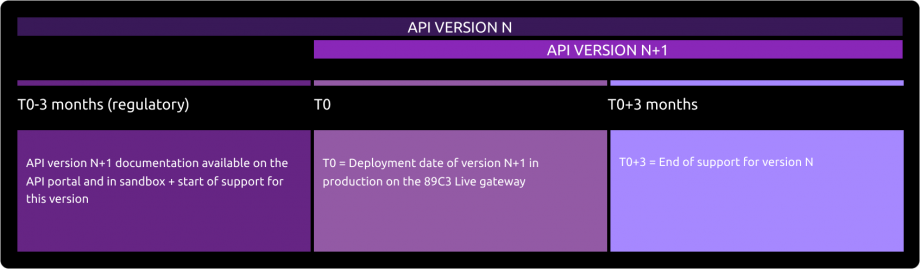
Deployment of API Version N+1
The deployment of the new version of our API takes place in several stages:
Before Deployment (T0 - 3 months):
The documentation for API version N+1 is available on the API Store.
Version N+1 is accessible in the testing environment (sandbox).
Support for the new version is activated.Day of Deployment (T0):
Version N+1 is deployed on the 89C3 Live gateway.
Three Months After Deployment (T0 + 3 months):
Support for API version N is discontinued.
To query an API, the API version includes the version number in the URI called, for example: /stet/psd2/v1.6.2/payment-requests.
The “Roadmap” use case gives the correspondence table between the API version and the version of the specification used, for example API v1 corresponds to version V1.4.0.47 of the STET specifications, v1.4.2 corresponds to version v1.4.2.17 of the STET specifications and v1.6.2 corresponds to version v1.4.6.0 of the STET specifications.
API versioning
| Our API versions | STET standard version |
|---|---|
| v1 | v1.4.0.47 |
| v1.4.2 | v1.4.2.17 |
| v1.6.2 | v1.6.2.0 |
Major changes since the first version delivered
| Use case / Method(s) | Effective date | Description of the evolution |
|---|---|---|
POST /payment-requests GET /payment-requests/{paymentRequestResourceId} | 17 May 2019 | Portal documentation :
|
| All | 31 July 2019 | Portal documentation :
|
| Roadmap | 18 September 2019 | Portal documentation :
|
| Eligibility | 1st October 2019 | Portal documentation :
|
| Initiating a payment | 19 November 2019 | Portal documentation:
|
| How to use fallback | 21 November 2019 | Portal documentation :
|
| Recover the status of a payment initiation | 9 December 2019 | Portal documentation :
|
| Testing our personas | 23 December 2019 | Portal documentation :
|
| Initiating a payment | 24 December 2019 | Enable the IBAN transmitted in the debtorAccount => PSU IBAN field to be taken into account: when it is entered, the only account that can be selected for the PSU is the one corresponding to this IBAN. |
| Version history / roadmap | 30 December 2019 | Portal documentation :
|
| Limitations / Version history / roadmap | 25 February 2020 | Activation of the API for BPs other than BPGO. Modification of API versioning. |
| Cancelling a payment initiation / sandbox / limitations | 10 September 2020 | Activate the method for cancelling a payment initiation. |
| POST /payment-requests | 2 December 2020 | Portal documentation :
|
| Initiate a payment / Recover the status of a payment initiation / Sandbox / Roadmap | 22 December 2020 | Since 7 December :
|
| All | 4 January 2021 | Portal documentation :
|
| All | 19 July 2021 | Portal documentation :
|
| Initiating a payment | 22 July 2021 | Portal documentation :
|
| Sandbox / Try-IT | 23 September 2021 | Portal documentation :
|
| Initiating a payment | 27 September 2021 | Portal documentation :
|
| All | 22 March 2022 | Portal documentation :
|
| Initiating a payment / limitations | 20 April 2022 | Portal documentation :
|
| All | 26 September 2022 | Portal documentation :
|
| Confirmation / Limitations | 21 March 2023 | Portal documentation :
|
| All | January 26, 2026 | Portal documentation : Change URL from www.<cdetab>.oba-bad-me-live.api.89c3.com to www.<cdetab>.oba-bad-me-live-api.89c3.com |