








Overview
The expected benefits
Let's build new, seamless payment journeys for our customers.

The connection is made through a secure device that complies with the requirements of the European regulator.

Streamline the journeys
Enable your clients to easily manage payments within their daily management processes.

Reduce risks
Avoid process interruptions and data re-entry, thereby minimizing operational risks of error or fraud.
By accessing this service, you will be able to offer our mutual clients new online journeys with the following key features:
- A PSD2-compliant system for authentication and client consent management;
- Selection of the payment account from which the transfer will be made;
- Choice of smooth or traditional journeys;
- Payment via immediate, one-time, bulk, and recurring transfers;
- Immediate access to the status of payments initiated by clients.
The different possible use cases
Integrated and secure payment transfer journeys

Other collections
Offer your clients payment journeys for collecting loan repayments, recoveries, rents, charges, taxes, etc.
Invoice Payments
Allow your corporate clients to pay suppliers directly within their management software.
Liquidity management
Provide your clients with cash flow management journeys between their accounts.
How to access the product ?
To access the Payment initiation API, developers and businesses must follow the steps below.
Contact
Get in touch with the product managers.
Access
Enroll directly through the dedicated process (regulated entities).
Integration & Testing
Integrate our service into your solution and share your use cases with us to help ensure the quality of our offering.
Go Live !
Documentation
Guides
How to initiate a payment ?
One of our customers makes a transaction on an e-commerce website or wants to initiate a transfer.
Through this API “Payment initiation” available for Crédit Coopératif customers, you can submit a real time payment initiation request.
The connected customer will be requested by his bank to validate this transaction :
- He identifies and authenticates himself
- Then, he selects his bank account with a sufficient balance for the transaction amount
- Finally, the bank seals the transaction after the client has strongly authenticated himself to validate the transaction (some exemptions of this authentication process exist)
In addition, this version brings a single SCA flow if the debtor IBAN is forwarded in the PIS request :
- PSU verifies the displayed transaction information
- Finally, the bank seals the transaction after the client has strongly authenticated himself to validate the transaction (some exemptions of this authentication process exist)
You can only use this API if you are a Payment Initiation Service Provider (“PISP”), this prerequisite is described in “Eligibility” use case.
Once this prerequisite has been fulfilled, the global process will be the following one :
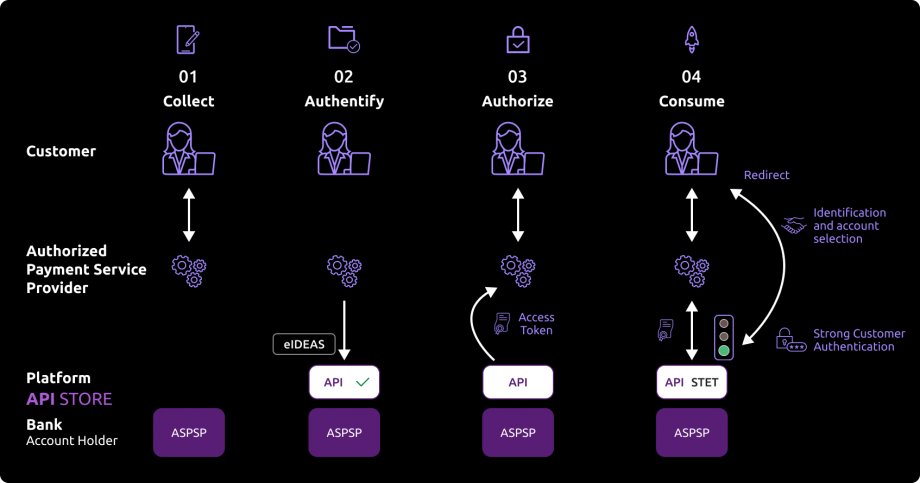
01- As a PISP provider, you can propose funds transfer services to customers, or allow them to pay their purchases on an e-merchant web site you have contractualized with. Thru your interfaces, the customer selects in which bank (ASPSP) his account(s) is/are domiciliated and you collect the transaction information (purchase amount, IBAN creditor, …).
02- During the first exchange with ASPSP’s infrastructures, you will have to request an authorization token. As PISP, you have to get this token BEFORE you can use resources of the API. This token is generated by the ASPSP AFTER you authenticate as a PISP service provider using your eIDAS certificates.
As banking account holder (ASPSP), we will verify if your certificates and national agreements are valid.
For this step, it is not necessary that we identify and authenticate the customer before generating the access token.
03- If all above checks are correct, you will be able as PISP to get theOAuth2 access token thru a secure exchange with BPCE API platform (see “Get your token” use case).
04- By presenting this access token valid only for this transaction, you can then use resources of the “payment initiation” API in order to :
- Initiate a payment/transfer (see “Send a PIS request” use case);
- Retrieve the status of a payment/transfer initiation request (see “Retrieve a PIS status“);
- Confirm a payment/transfer initiation request or a payment/transfer cancellation request (see “Confirm a PIS request”)
Consume the API
Prerequites
As TPP you have to be accredited by a national competent authority for this Payment Initiation Service Provider (“PISP”) role.
To access payment initiation API methods, you have to get an OAUTH2 access token provided by customer’s banking institution, obtained with your credentials.
You and the customer’s banking institution have successfully processed a mutual check and authentication (exchange of eIDAS QWAC certificates).
Then, you present your OAUTH2 access token to consume the payment initiation API’s methods.
Initiate a payment
Two use cases exist for a payment initiation :
1) The PISP forwards a payment request on behalf of a merchant : the customer (PSU) purchases goods or services on an e-commerce website (see top of the diagram below).
There is a contract between the merchant and the PISP.
The merchant forwards the requested payment characteristics to the PISP and redirects the customer to the PISP portal.
The PISP asks the customer in which banking institution (ASPSP) is located his account. Then he prepares the payment initiation request and sends this request to customer’s bank.
The beneficiary, as being the merchant, is set at the payment level.
2) The PISP forwards a transfer request on behalf of the owner of the account. The customer provides the PISP with all information requied for the transfer.
The PISP asks the customer in which banking institution (ASPSP) is located his account. Then he prepares the transfer request and sends this request to customer’s bank.

As a PISP, you forward to the ASPSP the request for payment initiation via the POST /paymentRequests method (see “Send a PIS request” use case).
The authentication method supported by the ASPSP is the REDIRECT approach :
1) The customer is redirected to identification screen proposed by his banking institution and he will enter his online banking identifier
If the PISP provides client’s online banking identifier directly in this request, this step will be skipped.
2) The customer is redirected to an authentication screen proposed by his banking institution in order to validate its identity
3) The customer is redirected to account selection screen proposed by his banking
If there is only one eligible IBAN, or if the PISP has already collected customer’s account to be debited and include it in the request, it will be automatically selected and displayed.
4) The customer selects (if applicable) and validates his account to be debited
5) The customer is redirected to a strong customer authentication (SCA) screen proposed by his banking institution to validate is payment/transfer
The process for this step depends on SCA method provided to the PSU by his bank institution (OTP SMS, secur’pass, etc.).
It also depends on PSU’s device (PC, mobile, smartphone, tablet).
6) The customer is redirected to a payment request confirmation screen proposed by his banking institution
7) The customer accepts or declines the transaction and is redirected to PISP app using call back URLs
In order to do so, the payment initiation request posted by the PISP includes one or two call back URLs :
The first one will be called by the customer’s banking institution if the payment request is processed without any error or rejection by the PSU (the PSU has given his consent for the payment)
The second one is to be used by the customer’s banking institution in case of processing error or rejection by the PSU (refusal of consent). This second URL is optional : the first url will be used if the second one is not transmitted
8) the TPP has to forwed a last confirmation request using POST /payment-requests/{paymentRequestResourceId}/confirmation for executing the PIS operation.
In addition, this version brings a single SCA flow if the debtor IBAN is forwarded in the PIS request :
1) The customer is redirected to a payment request confirmation screen proposed by his banking institution
2) The customer accepts or declines the transaction
3) The customer is redirected to an identification screen proposed by his banking institution in order to validate its identity
4) The customer is redirected to PISP app using call back URLs
5) the TPP has to forwed a last confirmation request using POST /payment-requests/{paymentRequestResourceId}/confirmation for executing the PIS operation
Retrieve the status of a payment of a payment request initiation
You may recover ay anytime the status of an initiation of payment via the method GET /paymentRequests (see “Retrieve a PIS status” use case).
This call allows you to retrieve all the payment initiation data enriched with the resource identifiers and the status of the payment initiation request and the payment it contains.
The data is available for 35 days.
Cancellation of a payment/transfer request
You may cancel an initiation of payment via the method PUT /paymentRequests (see “Cancel a PIS request“) effective as soon as it has been processed.
The SCA is performed using REDIRECT mode.
Confirmation of a payment request
You may confirm a payment initiation request or payment initiation cancellation via the method POST /paymentRequests/{paymentRequestResourceId}/confirmation (see “Confirm a PIS request” use case).
There are no confirmations for a PIS cancellation.
How to use the fallback mode ?
Principle
In order to comply with PSD2 regulations, banks available on this BPCE API developer portal have setup contingency measures in case of unplanned unavailability of the dedicated API interface.
The principle of this « fallback » solution is explained below:
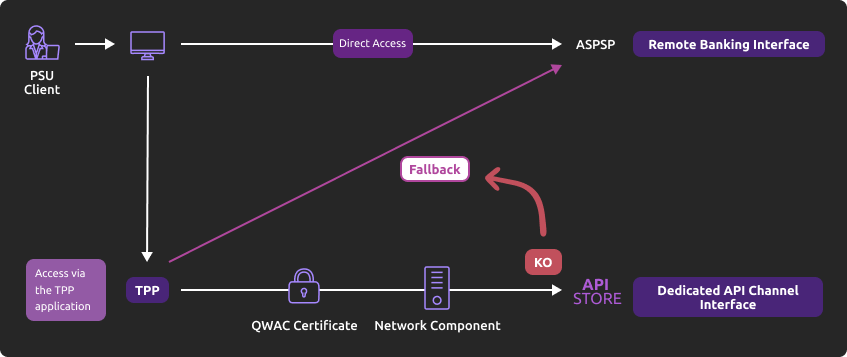
This fallback mechanism meets PSD2 regulatory requirements (article 33/RTS). It can be used with the same conditions and prerequisites applicable for the dedicated API interface which are specified in the “Eligibility” use case.
Roadmap
Please do find below our estimated roadmap :
| Features | Sandbox Deployment BPCE API Dev Portal & Sandbox | Live Deployment BPCE Live API Gateway |
|---|---|---|
| Fallback (*) | Not applicable | September 2019 |
(*) Main features :
- Use the same API dedicated interface endpoint. The list of our banking institutions and the possible values of <bkcode> are specified in the “Limitations” use case ;
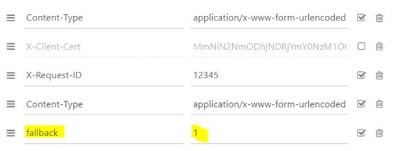
- A parameter (header ‘fallback:1’ present or absent) managed directly by the TPP allows to differentiate any « Fallback » request from dedicated interface PSD2 API requests ;
- Use of same TPP eIDAS certificate (QWAC) to be presented for mutual TLS authentication ;
- Use the same PSU authentication procedure and means for accessing online banking services ;
- This fallback solution is always active, even so the dedicated interface API must be used systematically in first priority. Its usage is subject to strict conditions as described in Article 33 of RTS, and can’t be used as the main access for PSD2 features. It will be monitored as such and every abuse will be automatically reported to our national competent authority.
Example
- If PSD2 API are not available due to unplanned unavailability or systems breakdown (see RTS Art. 33), TPP should use the following request with <codetab>=17515 as an example :
POST www.17515.oba-bad-me-live-api.89c3.com/stet/psd2/oauth/token (new URL to be taken into account from now on)
(As a reminder, the existing URL www.<codetab>.live.api.89C3.com will no longer be available as of 28/09/2025)
with :
- its live eIDAS QWAC certificate
- fallback:”1″ parameter in the header
2. If all checks are successful, the TPP will receive in the header of the response with url online (allowing to access banking login web page) as well as the JWT token.
3. TPP can then apply its proprietary login process using PSU credentials.
For more details about POST request, see STET V1.4.0.47 / Part I / section 3.4.3.2 / page 22 or STET V1.4.2.17 / Part I / section 3.4.3
Note
Please note the following constraints which apply on this fallback mechanism :
- No re-use of the API dedicated interface context, neither any of 180-day validity access token generated for AISP role
- Only online internet banking features are used as a reference (excl’d mobile banking features) and are accessible thru the fallback mode. As an example, online banking doesn’t propose any e-commerce transactions to customers, so PISP could NOT propose this feature in fallback mode
- The user of payment services (PSU) must be connected to the TPP PSP app, so no AISP batch process is possible
- PSD2 also imposes a reinforcement of strong customer authentication (SCA) for accessing direct online banking services. Therefore fallback mechanism leverages on reinforced PSU online banking authentication procedures and means such as (non exhaustive list) :
- Soft token
- OTP SMS
- Physical token (corporate market)
Trigger App2pp feature
Introduction
This service allows you to activate automatically (without PSU action) the banking app on PSU smartphone for identification and authentification process.
Prerequisites
The PSU has to load and to use at leat once the latest retail banking mobile app (V6.4.0 and higher) available on Android and Apple app stores.
Note : PRO & ENT customer segments are not yet activated
The callback universal link (same principe as url callback) shall be definied in advance by the TPP :
- if this link/url already exists on our BPCE API gateways, there is nothing else to do
- otherwise the TPP shall declare it using our API Register
Our “Universal links” links have been declared on iOS & Android platforms. It is not worthwhile to access to them e. g. using https://www.<codetab>.oba-bad-me-live-api.caisse-epargne.fr/89C3api/accreditation/v2/.well-known/apple-app-site-association which sends back an error code.
Request
PSU banking app activation (with webview in the banking app) can be achieved in live production using a current STET API requests sequence (initiated by the TPP app on the same smartphone device) with the following endpoints (e.g. for Caisse d’Epargne :
- www.<codetab>.oba-bad-me-live-api.caisse-epargne.fr/stet/psd2/oauth/token
- www.<codetab>.oba-bad-me-live-api.caisse-epargne.fr/stet/psd2/v1.6.2/payment-requests
- App2App activated via ASPSP redirect url : www.<codetab>.oba-bad-me-live-api.caisse-epargne.fr/89C3api/accreditation/v2/…
- (As a reminder, the existing URL www.<codetab>.live.api.89C3.com will no longer be available as of 28/09/2025)
Otherwise, the webview will be displayed on PSU smartphone web browser if :
- the banking app is not present on PSU device nor App2App compliant (not the latest version uploaded, see prerequisites)
or
- the other endpoint format is used www.<codetab>.oba-bad-me-live-api.89c3.com/stet/psd2/oauth/authorize (can be used as a backup in case of App2App problem)
Regulatory publications
Get your token
Principle
Access to PSD2 API features is granted by the bank with an authorization token (or access token) issued using OAuth2 standardized process.
How it works
See also STET / Part I

1- The customer (PSU) provides the identity of the bank which holds his accounts (ASPSP) to the TPP.
2- The TPP initiates an OAuth2 access token request sequence by redirecting the customer to the ASPSP’s authorization infrastructure using GET /authorize.
3- ASPSP will :
- Identify and authenticate the PSU
- Check your role and validity of your eIDAS certificates and agreement
4- Once checks are done and correct, ASPS will redirect the PSU to your site using “call-back” URL given in the GET /authorize and to ASPSP for the Go Live process.
You will find in the response of this request a one-time-token with a short life period.
5- You can then call the ASPSP in order to request the OAuth2 token (and refresh one) using POST /token with previously received data (incl’d the one-time-token).
Note : these /token requests for getting the Authorization Code flow shall be sent WITHOUT the « scope » parameter.
6- ASPSP will :
- Check your role and validity of your eIDAS certificates and agreement
- Checks the direct or indirect matching between the Authorization Number within the eIDAS certificate and the [client_id] value
7- Once checks are done and correct, ASPSP returns a response HTTP 200 (OK) with data including the access token.
8- As soon as you get the OAuth2 access token (and a 180-day valid refresh token) issued by the bank, you can use it for each API request within the “Authorization” header, prefixed by the token type “Bearer”.
The [client_id] that is linked to the access token must directly or indirectly match with the Authorisation Number that is located within the TPP’s eIDAS certificate (QWAC).
If the access token is expired, the request will be rejected with HTTP 401 with an error equal to “invalid_token”.
The request can be replayed once the access token has been refreshed using the use case “Refresh your token“.
If your refresh token is about to expire, you will have to perform again all this process, meaning also redirect to ASPSP for customer’s strong authentication (PSU SCA).
For more details, see also OAuth 2.0 Authorization Framework : https://tools.ietf.org/html/rfc6749#section-4.1
Example
You can find an example of this request in section “How to test the API ?” and then “Sandbox Assembly“.
Send a PIS request
Context
This call is used to send to the account-holding bank (ASPSP) of a customer (PAO) a request for payment initiation in order to debit the PAO account and to credit the account of the payment service user (PSU) for which the Payment Service Provider (PISP) is connected.
The initiation of single payment in euros is only accepted in our treatments. When submitting the request and if all the fields are correctly formatted, a response (HTTP 201) will be returned. This response will contain the resourceID of the payment initiation request, as well as the SCA Redirect authentication mode (sole mode available), the consent URL depending on the payer’s bank (urlconsent_approval_URL ) and nonce.Diffferent types of fund transfers operations are available (SCT Core immediate, diferred, recurring, Instant Payment PIS, bulk payment) –> see restrictions in the “Limits” use case.
WARNING : all requests won’t be cleared and settled as business rules apply and could reject the PIS (e.g. business and anti-fraud rules). A STET code is returned in these cases.
Prerequisites
In order to process this request it’s needed to fill the eligibility (see “Eligibility” use case), and to get the OAuth2 access token (see “Get your token” use case).
Request
The entry point depends on the bank code <bkcode>.
You need to insert the same <bkcode> parameter as the one used for requesting the access token.
As a reminder, the list of our banking institutions and the possible values of <bkcode> are specified in the “Limits” use case.
For example, the url to be used to access to a PSU from the Caisse d’Epargne Ile de France is :
- POST https://www.<codetab>.oba-bad-me-live-api.89c3.com/stet/psd2/v1.6.2/payment-requests (new URL to be taken into account from now on)
(As a reminder, the existing URL www.<codetab>.live.api.89C3.com will no longer be available as of 28/09/2025)
Mandated parameters
Body structure and mandatory fields are described in the STET standard.
The parameters below must be setup at the following values :
- serviceLevel => mandatory and shall be filled with “SEPA”
- amount => mandatory and shall be filled with min/max values as applied on the online banking and they can be different per ASPSP and/or per requested processing (SCT CORE or INST) and/or per customer segment or contract
- currency => mandatory and shall be filled with “EUR”
- numberOfTransactions => mandatory and shall be filled with values as decribed below
- frequency ==> mandatory only for recurring SCT (values as decribed below)
- executionRule => optional “FWNG” (following = payment execution the next working day)
- localInstrument shall be setup at « INST » only for SEPA Instant Payment (SCT Inst) :
- fees can apply depending on ASPSP and customer segment
- beneficiary IBAN shall be elligible to accept SCT Inst
- remittanceInformation ==> mandatory and shall integrate “unstructured” label e.g. “remittanceInformation” : { “unstructured” : [ “test ” ] }
- “Iban“, “debtorAccount“, “creditorAccount” => a valid normalized IBAN issued by a credit institution (mandatory field : creditorAccount)
- chargeBearer field is mandatory (= “SLEV” in euro zone)
- successfulReportUrl => mandatory parameter for the REDIRECT mode, and it shall contain the redirect URL as well as pkce (code_challenge = BASE64URL-ENCODE(SHA256(ASCII(code_verifier))) & code_challenge_method = S256) with “&” separator in the url (/!\ no “?” char)
- unsuccessfulReportUrl => if not filled, the data in “successfulReportUrl” will be used
- supplementaryData => mandatory and shall be filled with “REDIRECT”
- scaHint => mandatory field but the value will be ignored whatever value is set
- state => mandatory field (REDIRECT mode)
- endToEndId => mandatory field and shall not be empty
- categoryPurpose => mandatory for differenciating funds transfer from merchant-based operations (value “DVPM”) to non registered IBAN (value “CASH” or “SALA”), and allowing different business rules and SCA means to apply (a non secure enough SCA mean will not trigger the func transfer operation)
- requestedExecutionDate=> shall be greater than the current PIS request transaction datecreationDateTime
- creationDateTime => shall be compliant with ISO8601, the three regular expressions allowed are :
- YYYY-MM-DDTHH:MM:SS.SSS+HH:MM
- YYYY-MM-DDTHH:MM:SS.SSS+HHMM
- YYYY-MM-DDTHH:MM:SS.SSS
Note : char “Z” at the end means UTC
Example : 2019-11-12T00:00:00.000+02:00
Single SCA UX
If the PISP transmits to the ASPSP all the information necessary to initiate the payment, including the account number/IBAN of the account to be debited, ASPSPs supports a single SCA for a single payment initiation :
- Debtor IBAN (debtorAccount) only : a screen for PSU identification is still requested before the unique SCA (for dynamic linking)
- Debtor IBAN (debtorAccount) + PSU identification : no need ti identify the PSU before the unique SCA (for dynamic linking)
Cut-off for Immediate SCT Core
The CUT-OFF time means the deadline for fund transfer execution, and takes into account :
- internal processing (execution and clearing on the samle day)
- CUT-OFF from various interbank schemes (incl’d clearing house, see TARGET2 banking business days calendar and SCT rulebook)
In case of SEPA CREDIT TRANSFER (SCT), originator Banks are obliged to ensure that the amount of the SEPA Credit Transfer is credited to the account of the Beneficiary Bank within one Banking Business Day following the point in time of receipt of the Credit Transfer Instruction in accordance with the provisions of the Payment Services Directive.
A shorter execution time for SEPA Credit Transfers, knowing that operations may not be open for business on certain days of the year for the purpose of executing SEPA Credit Transfers.
It is not authorized to postpone the initial PSU order date except if it has been overriden. Execution time will be then reported to the following authorized date if it not a bank holiday. The execution process is triggered depending on the full timestamp of the PIS request.
For this ASPSP, CUT-OFF for SCT Core is fixed at 01:30 pm continental time (GMT+2 in summer, GMT+1 in winter).
| creationDateTime | requestedExecutionDate | Résult | Actual Clearing date | Actual Settlement date |
|---|---|---|---|---|
| Week day | ||||
| Before 1:30 pm CET | D Day | OK | D Day | D Day if not a bank holiday, otherwise the following day if not a bank holiday |
| As of 1:30 pm CET (incl’d) up to 11h59:59:999 pm | D Day | OK | D Day | D+1 Day if not a bank holiday, otherwise the following day if not a bank holiday |
| Week -end or bank holiday | ||||
| Before 1:30 pm CET | D Day | OK | D Day | Monday if not a bank holiday, otherwise the following day if not a bank holiday |
| As of 1:30 pm CET (incl’d) up to 11h59:59:999 pm | D Day | OK | D Day | Monday if not a bank holiday, otherwise the following day if not a bank holiday |
Unitary SCT Core
The PIS request shall contain the numberOfTransactions field (mandatory) with value “1”.
Differed and recurrent SCT Core
The execution date (data requestedExecutionDate) for a differed SCT Core (or the first occurrence of a recurrent SCT Core) shall be setup at +72 hours like on online banking environment, otherwise it will be rejected.
For recurrent SCT, allowed frequencies (data frequency) are the following ones :
- weekly
- every two weeks
- monthy
- quaterly
- every six months
- yearly
The last settlement date (endDate) is mandatory ans shall be a valid date in future.
Bulk payment
This type of PIS request correspond to an operation from one corporate account to N creditor IBAN. If all execution criteria are filled, this will result in N fund transfer (different unitary amounts are allowed).
- numberOfTransactions => mandatory data and shall be valued between 2 (min) and 25 (max)
- categoryPurpose => mandatory data and shall be valued with “CASH” et “SALA”
- requestedExecutionDate=> mandatory data and shall be valued with the same date for the bulk payment (NO multi-date).
The PSU applies a single dynamic linking SCA for validating the bulk payment (a fisrt SCA may occur in order to display eligible accounts according to TPP requests).
If all conditions are met for a succesful operation :
- a unique debit (corresponding to the overvall bulk payment amount) will apply to PSU account
- the transactionStatus & paymentInformationStatus evolve in this case for the overall N unitary fund transfers
Conditions are NOT met in case of :
- If one of the unitary fund tranfer is rejected by the ASPSP before settlement –> the bulk payment is rejected and its PIS transactionStatus will be setup at RJCT » / paymentInformationStatus will be setup at « PART »
- If one of the unitary fund tranfer is rejected by the creditor bank –> PSU account will be credited from this unitary fund transfer amount, and its unitary PIS transactionStatus will be setup at « RJCT » / paymentInformationStatus will be « PART »
- If all unitary fund tranfers are rejected by the creditor bank –> PSU account will be credited from the global bulk payment amount, and all unitary fund transfer PIS transactionStatus will be « RJCT » / paymentInformationStatus will be setup at « RJCT »
Creditor IBAN control
A temporary control for NOT allowing PISP initiaitions has been added since December 7th, 2020 (alignment on direct access security features for funds transfer) :
- If the Creditor IBAN is NOT included in preregistered list done through the direct access
- AND if the field categoryPurpose = “CASH”
- AND if the SCA is NOT peformed by the PSU using the most secure authentication means (e.g. Sécur’Pass for retail PSU)
Error codes
| Error type | HTTP code | Description | Reason |
|---|---|---|---|
| Generic, bad structure | 400 | Bad request | error code : FF01 message : RJCT |
| Wrong format for BIC | 400 | Bad request | error code : FF01 message : RJCT error : the field creditorAgent.bicFi bicFi-Code allocated to a financial institution by the ISO 9362 Registration Authority as described in ISO 9362 |
| Wrong format for serviceLevel | 400 | Bad request | error code : FF01 message : RJCT error : value not one of declared Enum instance names: [SEPA, NURG] |
| Wrong format for chargeBearer different from SLEV | 400 | Bad request | error code: FF01 message: RJCT error: value not one of declared Enum instance names: [SLEV] |
| Wrong format for schemeName | 400 | Bad request | error code: FF01 message : RJCT error : the field creditor.privateId.schemeName schemeName-Possible values BANK,COID,SREN,DSRET,NIDN,OAUT,CPAN |
| Wrong format for purpose | 400 | Bad request | error code: FF01 message: RJCT error: value not one of declared Enum instance names: [TRPT, CASH, CPKC, ACCT, COMC] |
| Wrong format for categoryPurpose | 400 | Bad request | error code: FF01 message: RJCT error: value not one of declared Enum instance names: [CASH, DVPM] |
| Wrong access token, authentication issue | 403 | Forbidden | |
| Unknown request resource | 404 | Not Found | |
| Wrong request, or request out of authorized scope | 405 | Method not allowed | |
| Generic message | 500 | Internal server error | |
| Duplicate request | 500 | Internal server error | error : Database insertion problem, duplicate unique key |
Confirm a PIS request
Use case
This mandated method allows the PISP to confirm a payment initiation request previously sent to the ASPSP for a given PSU using a POST /paymentRequests
The only implemented method is POST /payment-requests/{paymentRequestResourceId}/confirmation also known as “reinforced” authentication mode. It has to be used following a PIS operation validated by the PSU, and not yet cleared.
Please note that a cancellation operation doesn’t need to be confirmed.
Prerequisites
In order to be able to use this request, the TPP needs to fulfill eligibility criteria as “PISP” role (see “Eligibility” section), and must get beforehand an OAuth access token (see use case “Documentation” > “Get your token”).
The PISP has already sent a request which has been temporarily stored, and the ASPSP has given back a link to this saved request.
Request
The entry point depends on bank code parameter (<bkcode>) used for requesting the access token.
The list of current available bank institutions in sandbox is detailed below (see overall <bkcode> in “Limits” section).
For example, the following URL to be used in production is the following :
- POST https://www.<bkcode>.oba-bad-me-live-api.89c3.com/stet/psd2/v1.6.2/payment-requests/{paymentRequestResourceId}/confirmation (new URL to be taken into account from now on)
(As a reminder, the existing URL www.<codetab>.live.api.89C3.com will no longer be available as of 28/09/2025)
Mandated parameters
The mandated parameter is paymentRequestResourceId.
The structure of the body and mandated fields are described in STET specifications :
- nonce => challenge to be sent back by the TPP
- psuAuthenticationFactor => authentification factor
The TPP can extract the payment inititation information using the method GET /stet/psd2/v1.6.2/payment-requests/{paymentRequestResourceId} with :
- Data paymentInformationStatus shall be “ACSP“
- Data transactionStatus (in the creditTransferTransaction object) shall have the value “PDNG“
Returned Result
If all data are correct, a HTTP 200 will be returned, as well as the ressourceId & SCA authentication mode & consent URL (urlConsent_approval_URL) & nonce.
Please note that :
- data paymentRequestResourceId is included as a parameter inside consent URL sent back during the payment initiation
- same as nonce challenge parameters
Retrieve a PIS status
Use case
This method allows the PISP to obtain the status of a payment initiation request previously sent to the ASPSP for a given PSU through a POST /paymentRequests request.
Prerequisites
In order to process this request some eligibility prerequisites are needed, like to get an OAUTH2 access token beforehand (see “Get your token” use case).
The TPP has already sent a request that has been saved by the ASPSP and to which the ASPSP responded with a location link to the saved payment/transfer request.
Request
The entry point depends on the bank code <bkcode>.
You need to insert the same <bkcode> parameter as the one used for requesting the access token.
As a reminder, the list of our banking institutions and the possible values of <bkcode> are specified in the “Limits” use case.
For example, the url to be used to access to a PSU from the Caisse d’Epargne Ile de France is :
- GET https://www.<bkcode>.live.api.89c3.com/stet/psd2/v1.6.2/payment-requests/{paymentRequestResourceId}
Mandatory or facultative body parameters
Mandatory parameter paymentRequestResourceId: Identification of the payment request resource.
Returned result
When submitting the request and if all the data is correctly formatted, a response HTTP 200 will be returned.
This response will contain the payment initiation data enriched with the status of the initiation request and the associated payment.
The possible values for the status of the payment request are as follows (see STET specifications) :
| Code | Description |
|---|---|
| ACCO | AcceptedCustomerConfirmed : the customer has confirmed the payment request during his/her authentication. |
| ACCP | AcceptedCustomerProfile : Preceding check of technical validation was successful. Customer profile check was also successful. |
| ACSC | AcceptedSettlementCompleted : Settlement on the debtor’s account has been completed. |
| ACSP | AcceptedSettlementInProcess : All preceding checks such as technical validation and customer profile were successful and therefore the payment initiation has been accepted for execution. |
| ACTC | AcceptedTechnicalValidation : Authentication and syntactical and semantical validation are successful. |
| ACWC | AcceptedWithChange : Instruction is accepted but a change will be made, such as date or remittance not sent. |
| ACWP | AcceptedWithoutPosting : Payment instruction included in the credit transfer is accepted without being posted to the creditor customer’s account. |
| CANC | Payment initiation has been successfully cancelled after having received a request for cancellation. |
| PART | PartiallyAccepted : A number of transactions have been accepted, whereas another number of transactions have not yet achieved ‘accepted’ status. |
| PATC | PartiallyAcceptedTechnicalCorrect |
| RCVD | Received : Payment initiation has been received by the receiving agent. |
| PDNG | Pending : Payment request or individual transaction included in the payment request is pending. Further checks and status update will be performed. |
| RJCT | Rejected : Payment request has been rejected. |
The following table shows the possible values for the status of the payment initiation and the associated payment transaction :
| Processing an initiation containing a payment | Result | paymentInformationStatus value | creditTransferTransactionStatus value |
|---|---|---|---|
| Check and record the initiation request | OK | ACTC | – |
| KO | RJTC | – | |
| Consent | OK | ACCP | – |
| KO | RJCT | – | |
| Request for payment execution | OK | ACSP | PDNG if executed on the same day |
| OK | ACSP | ACSP | |
| KO | RJCT | RJCT | |
| If the PSU doesn’t perform any action within 30 mns starting form the payment initiation reception | – | RJCT (NOAS reason) | RJCT (NOAS reason) |
| Payment execution before clearing | – | ACSP | ACSP |
| Single payment execution after clearing | OK | ACSC | ACSC |
| KO | RJCT | RJCT | |
| Recurrent payment execution after clearing | OK | ACSP | ACSP |
| KO | RJCT | RJCT |
The following table shows the possible values following a status of the payment initiation cancellation :
| Processing an initiation containing a payment | Result | paymentInformationStatus value | creditTransferTransactionStatus value |
|---|---|---|---|
| Before cancellation request | – | ACTC/ACCP/ACSP | -/PDNG (ifpaymentInformationStatus = ACSP) |
| Control of the cancellation request | OK | RJCT/RJCT/ACSP | -/PDNG (ifpaymentInformationStatus = ACSP) |
| KO | ACTC/ACCP/ACSP | -/PDNG (ifpaymentInformationStatus = ACSP) | |
| PSU Consent | OK | ACSP | PDNG |
| KO | ACSP | PDNG | |
| Execution of the cancellation | OK | CANC (DS02, DUPL, FRAD, TECH) | CANC (DS02, DUPL, FRAD, TECH) |
| KO | ACSP | PDNG |
Availability of the debitor IBAN
The debitor IBAN is returned in the ASPSP response even if this data was not included in the PIS request sent by the TPP.
Error codes
| Error type | HTTP code | Description | Reason |
|---|---|---|---|
| Bad access token, authentication problem | 403 | Forbidden | |
| Unknown request resource | 404 | Not Found | Unknown ressource |
| Bad request or request outside the authorized scope | 405 | Method not allowed | |
| Generic message | 500 | Internal server error | |
| Duplicate query | 500 | Internal server error | error : Database insertion problem, duplicate unique key |
Cancel a PIS request
Use case
This method allows the PISP to cancel a payment initiation request previously sent to the ASPSP for a given PSU through a POST /paymentRequests request when the payment has not been executed yet.
Only SCT CORE differed operations in euros can be cancelled.
On the other way, and only for, a SCT operation initiated using PSD2 PISP API (whatever the version) can be cancelled by the PSU using his direct access.
Prerequisites
In order to be able to use this request, the TPP needs to fulfill eligibility criterias as “PISP” role (see “Eligibility” section), and must get OAuth access token (see use case “Documentation” > “Get your token“).
The PISP has already sent a PSD2 PIP V1.4.2 request which has been temporarly stored, the ASPSP has given back a link to this saved request.
In other words, to cancel a PIS operation shall be done using the same version used for the payment initiation.
Only differed and recurrent SCT can be cancelled.
Request
he entry point depends on the bank code <codetab>.
You need to insert the same <codetab> parameter as the one used for requesting the access token.
As a reminder, the list of our banking institutions and the possible values of <codetab> are specified in the “Limits” use case.
For example, the url to be used to access to a PSU from the Caisse d’Epargne Ile de France is :
- PUT https://www.17515.oba-bad-me-live-api.89c3.com/stet/psd2/v1.4.2/payment-requests/{paymentRequestResourceId} (new URL to be taken into account from now on)
As a reminder, the existing URL www.<codetab>.live.api.89C3.com will no longer be available as of 28/09/2025)
Mandatory or optional parameters in the request body
he mandated parameter is “paymentRequestResourceId” : identification of the PISP initiation to cancel.
Please refer to the STET specifications for the other format and optional parameters. Before sending the cancel request, the TPP can check previously the status of the PISP operation using GET /stet/psd2/v1.4.2/payment-requests/{paymentRequestResourceId}. A PISP operation can be cancelled if the following data have the values as described below :
Pour savoir si un virement est éligible les informations suivantes doivent être valorisées dans la requête comme suit :
- paymentInformationStatus : “ACTC” / “ACCP” / “ACSP”
- transactionStatus (in “creditTransferTransaction” object) shall be “PDNG” (if paymentInformationStatus = “ACSP”), otherwise not filled
- serviceLevel : “SEPA”
- currency : “EUR”
- localInstrument : shall not be filled
- requestedExecutionDate : shall be at least the next day (D+1)
In order to be taken into accont, the cancel request sent to the ASPSP shall include the following data and values as described below (see API PSD2 STET_V1.4.2.17 Part 3 Interaction Examples p.23) :
- transactionStatus (in “creditTransferTransaction” object) : “RJCT”
- statusReasonInformation (in “creditTransferTransaction” object) : “DS02”
| statusReasonInformation | Signification |
|---|---|
| DS02 | Cancellation process requested by the PSU |
| DUPL | Cancellation process requested by the PISP in case of redundant operation |
| FRAD | Cancellation process requested by the PISP in case of fraudulent operation |
| TECH | Cancellation process requested by the PISP in case of technical problem |
- All _links shall not be included
- “paymentRequest” parent label shall not be included as well as the final brace “}“.
The other data of the request shall be the same as the ones retrieved using the GET method.
In case of recurrent payment initiation
Such SCT recurrent payment initiation can be cancelled if it is still processed (ACSP) until the clearing of the last occurrence.
If all occurences have been cleared, csuch cancellation is not possible.
Result
If all data sent are correctly formatted, a HTTP 200 response will be returned, and will include PISP operation ressourceId, SCA mode (redirect), consent URL (urlconsent_approval_URL) and nounce.
Please note that the data “paymentRequestRessourceId” is included as a parameter in the URL consentement “consentApproval” sent back during the PISP initial operation (same for the nounce).
Error codes
| Error | HTTP Code | Label | Reason |
|---|---|---|---|
| Generic, wrong format (strcuture) | 400 | Bad request | error code : FF01 message : RJCT |
| Wrong format (BIC) | 400 | Bad request | error code : FF01 message : RJCT error : le champ creditorAgent.bicFi bicFi-Code allocated to a financial institution by the ISO 9362 Registration Authority as described in ISO 9362 |
| Wrong format (Service Level) | 400 | Bad request | error code : FF01 message : RJCT error : value not one of declared Enum instance names: [SEPA, NURG] |
| Wrong format (chargeBearer other than SLEV) | 400 | Bad request | error code: FF01 message: RJCT error: value not one of declared Enum instance names: [SLEV] |
| Wrong format (schemeName) | 400 | Bad request | error code: FF01 message : RJCT error : le champ creditor.privateId.schemeName schemeName-Possible values BANK,COID,SREN,DSRET,NIDN,OAUT,CPAN |
| Wrong format (purpose) | 400 | Bad request | error code: FF01 message: RJCT error: value not one of declared Enum instance names: [TRPT, CASH, CPKC, ACCT, COMC] |
| Wrong format (categoryPurpose) | 400 | Bad request | error code: FF01 message: RJCT error: value not one of declared Enum instance names: [CASH, DVPM] |
| Wrong access token, TLS authentification problem | 403 | Forbidden | |
| Request resource unknown | 404 | Not Found | |
| Bad request or not allowed | 405 | Method not allowed | |
| Generic | 500 | Internal server error |
Sandbox assembly
Introduction : detailed features of the Sandbox
You can use the BPCE API sandbox directly through your application by calling the payment initiation API of the BPCE-API platform (sandbox assembly).
In sandbox assembly, there are two types of requests:
- A first request to retrieve the authorization token (see “Get your token“) ;
- A second one to send a request to the payment initiation API (see “Send a PIS request” and “Retrieve a PIS status“).
Your application must request the AS (authentication server) to get an access token via its authentication key.
This access token will enable your application to submit the POST /payment-requests and the GET /payment-requests methods of the payment Initiation API.
You can perform a series of requests :
- Submit POST /payment-requests method to initiate a payment
- Then, submit GET /payment-requests/{paymentRequestResourceId} with the parameter paymentRequestResourceIdgot in response of the first request, to get the payment status
The data used in the tests are based on persona (see “Test with persona” use case). This will enable you to choose specific profiles according to the tests.
The list of current available bank institutions for sandbox assembly for this API is detailed below (“bkcode” parameter used in URLs) :
| Bank code | Bank name | Bank short name |
|---|---|---|
| 17515 | Caisse d’Epargne Ile De France | CEIDF |
Sequence stets to test access to the PISP API from your APP
Prerequisites
You must declare your APP on BPCE API portal (see “My apps” menu) and have your app registered using our API Register.
Please note that as a TPP, you must be accredited by any european competent authority (ACPR in France) for this Payment Initiation Service Provider role (“PISP”).
STEP #1 : Retrieve your access token
This call allows you to retrieve the access token from the institution’s authentication server, which is a prerequisite for each access to one of the payment initiation API methods. The description of this feature and the fields of the request are given in the “Get your token“.
The entry point for accessing to the sandbox assembly is : www.<bkcode>.sandbox.api.89c3.com
Request :
POST https://www.17515.sandbox.api.89C3.com/stet/psd2/oauth/token
Headers :
Content-Type : application/x-www-form-urlencoded; charset=utf-8
Params :
client_id : PSDFR-ACPR-12345
grant_type : client_credentials
scope : pisp
Notes on parameters :
<bkcode> => bank code available in this environment : 17515 (Caisse d’Epargne Ile de France)
client_id : your agreement number as defined by your national competent authority. (PSDXX-YYYY-ZZZZZ)
grant_type => unchangeable = “client_credentials”
Response :
{
“access_token” : “firstAccessToken_ABCXdBobTpdwRRaYy2H3w7pP5Xe61e1R9rwxMuhk7G0fULg8x6kJHz”,
“token_type” : “Bearer”,
“expires_in” : “3600”,
“scope” : “pisp”
}
Notes on parameters :
access_token => tokenCredential to transmit in the header authorization of payment initiation API requests, next to Bearer XX.
expires_in => period of validity of the token in seconds
STEP #2 : Send a payment initiation request
This call method post /payment-requests/ allows you to initiate a payment by asking the connected customer to give his consent for the payment.
The description of this feature and the fields of the request is given in the “Send a PIS request” use case.
Reminder: the authentication method supported by the bank is the REDIRECT authentication approach => the sequence of PSU identification and strong authentication (SCA) screens described below correspond to this authentication mode.
The entry point for accessing to the sandbox assembly is identical : www.<bankcode>.sandbox.api.89c3.com
Request :
POST https://www.17515.sandbox.api.89C3.com/stet/psd2/v1.6.2/payment-requests
Headers :
Authorization: Bearer firstAccessToken_ABCXdBobTpdwRRaYy2H3w7pP5Xe61e1R9rwxMuhk7G0fULg8x6kJHz
Content-Type: application/json
Signature: keyId=\”https://<www.myUrlPath.to>/myQsealCertificate_<footprint-sha256>\“, algorithm=\”rsa-sha256\”, headers=\”(request-target) psu-ip-address psu-ip-port psu-http-method psu-date psu-user-agent psu-referer psu-accept psu-accept-charset psu-accept-encoding psu-accept-language digest\”, signature=\”LbkxgICM48J6KdWNaF9qT7OWEorNlAwWNo6R+KkP7cP4TIGkk8wxcsGQXJ9ZnC+ZiA8mjL5S8WQyL41M7iPt+vJX4xh679gdGwmlKzn7E+ZtZ1I4qalRxcdLp4gBL7fll+C2lVBNJrViMJBezFK7AYVjnSWH7t1QxiMVg3CmoRM=\”
X-Request-ID : MyXrequestId123
Body :
{
“paymentInformationId” : “MyPmtInfld123”,
“creationDateTime” : “2019-07-22T09:25:22.527+02:00”,
“numberOfTransactions” : 1,
“debtorAgent” : {
“bicFi” : “CEPAFFRPP515”,
“name” : “CE Ile de France”,
“postalAddress” : {
“country” : “FR”,
“addressLine” : [
“15 Boulevard de la PI”,
“75001 Paris”
]
}
},
“initiatingParty” : {
“name” : “MyPispName”,
“postalAddress” : {
“country” : “FR”,
“addressLine” : [
“5 avenue Anatole France “,
“75007 PARIS”
]
},
“organisationId” : {
“identification” : “12FR5”,
“schemeName” : “COID”,
“issuer” : “ACPR”
}
},
“paymentTypeInformation” : {
“serviceLevel” : “SEPA”,
“categoryPurpose” : “DVPM”
},
“debtor” : {
“name” : “Marc “,
“postalAddress” : {
“country” : “FR”,
“addressLine” : [
“512 rue de la coupe du monde”,
“94512 Charenton-le-Pont”
]
},
“privateId” : {
“identification” : “D0999990I0”,
“schemeName” : “BANK”,
“issuer” : “BICXYYTT512”
}
},
“debtorAccount” : {
“iban” : “FR7617515008043001965405255”
},
“beneficiary” : {
“creditor” : {
“name” : “myMerchant”,
“postalAddress” : {
“country” : “FR”,
“addressLine” : [
“Place Charles de Gaulle”,
“75008 PARIS”
]
},
“organisationId” : {
“identification” : “852126790”,
“schemeName” : “BANK”,
“issuer” : “FR”
}
},
“creditorAgent” : {
“bicFi” : “CCBPFRPP512”,
“name” : “B.P Grand Ouest”,
“postalAddress” : {
“country” : “FR”,
“addressLine” : [
“15 Boulevard de la Boutière”,
“CS 26858 35768 SAINT GREGOIRE CEDEX”
]
}
},
“creditorAccount” : {
“iban” : “FR7617515008043001965406128”
}
},
“purpose” : “COMC”,
“chargeBearer” : “SLEV”,
“requestedExecutionDate” : “2019-07-23T13:25:22.527+04:00”,
“creditTransferTransaction” : [
{
“paymentId” : {
“instructionId” : “MyInstrId123”,
“endToEndId” : “MyEndToEndId123”
},
“instructedAmount” : {
“currency” : “EUR”,
“amount” : “327.12”
},
“remittanceInformation” : [
“MyRemittanceInformation123”
]
}
],
“supplementaryData” : {
“acceptedAuthenticationApproach” : [
“REDIRECT”
],
“scaHint” : “scaExemption”,
“successfulReportUrl” : “https://extension.bpce.fr/calback.aspx&state=OK_12345&code_challenge_method=256&code_challenge=ABCD”
}
}
Notes on parameters :
Authorization : Bearer => access_token recovered for the tokenCredential
Following data must be unique, otherwise the request is rejected because of duplicate (the replay is not allowed):
– paymentInformationId ;
– instructionId ;
– endToEndId ;
– x-request-id.
debtor/privateId/identification => customer remote banking identifier : when filled, the identification screen of the customer is not displayed.
debtorAccount => customer’s IBAN : when it is filled, the only account selectable for the customer is the one that corresponds to this IBAN.
The implemented features may differ between the Banques Populaires and the Caisses d’Epargne (see “Send a PIS request” use case).
Response :
{
“appliedAuthenticationApproach” : “REDIRECT”,
“_links” : {
“consentApproval” : {
“href” : “https://www.17515.sandbox.api.89c3.com/89C3api/accreditation/v1/identificationPisp?paymentRequestResourceId=0000000a22-156688979900016807956016&nonce=s7m9KD6UerBT1F5gPL3m”,
“templated” : true
}
}
}
Headers :
X-Request-ID : MyXrequestId123
Status code : 201 OK
Notes on parameters :
paymentRequestResourceId => identifier to pass to the GET /payment-requests request to recover the status of the payment initiation request.
appliedAuthenticationApproach” = “REDIRECT” => only allowed value
href => URL of the redirection page to the identification and authentication screens of the banking institution
nonce => technical anti-replay
currency => recovered from the body given as input
successfulReportUrl => recovered from the body given as input
unsuccessfulReportUrl => recovered from the body given as input
iban => recovered from the body given as input
creditorName => recovered from the body given as input
X-Request-ID => transmitted as input
STEP #3: Nominal sequence of PSU identification & SCA
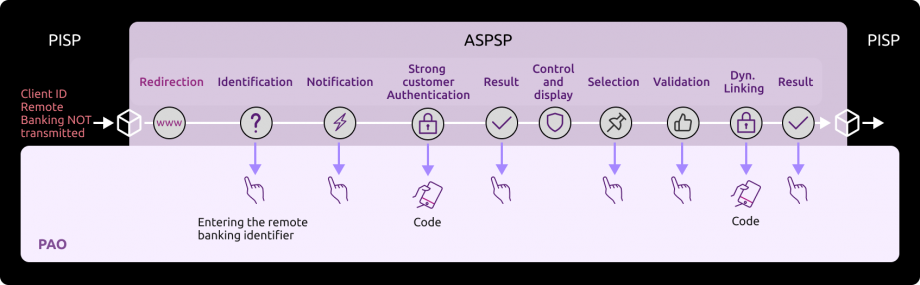
Sequence of identification and strong authentication screens:
Using the URI returned in consentApproval, it is possible to play the sequence of screens.
1) The PSU is redirected to an identification screen presented by his ASPSP (redirection mode) in which he will enter his remote banking identifier.
Warning : only one call to this screen can be made
=> the “nonce” parameter in the URL that gives access to this screen can only be used once (any second call with this nonce will rejected)
=> if necessary, a new call to PaymentRequests is required to get a new token
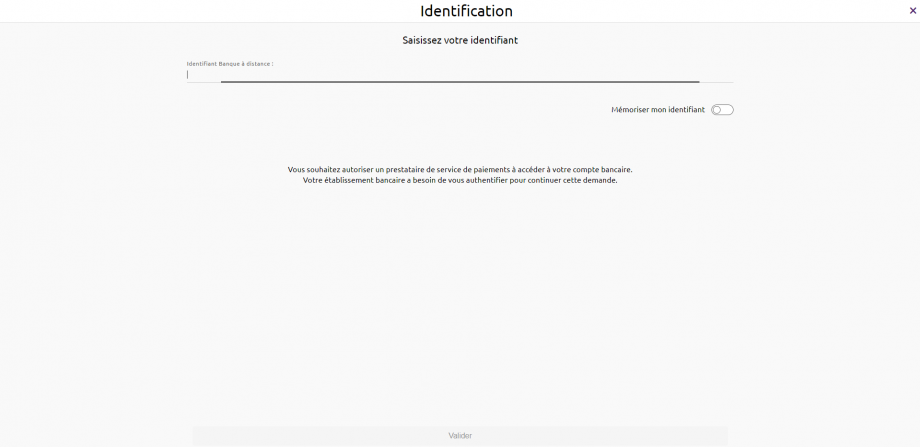
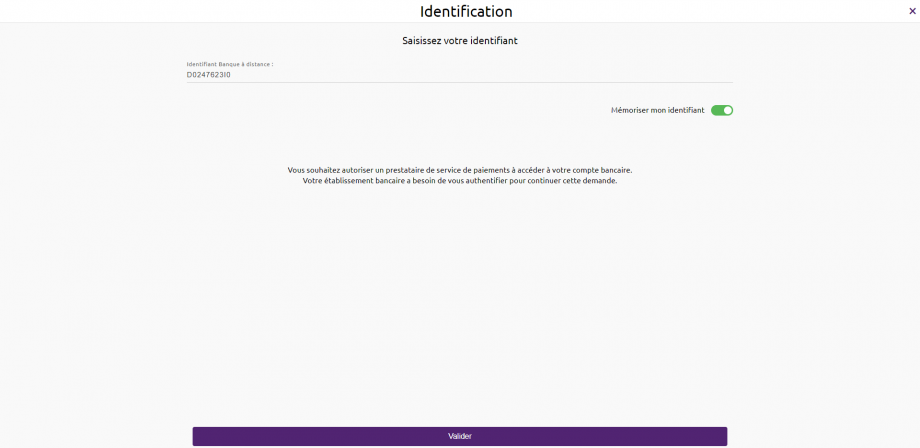
The remote banking identifier of the customer is to be entered (see “Test data” use case for the data sets of the banking institution) :
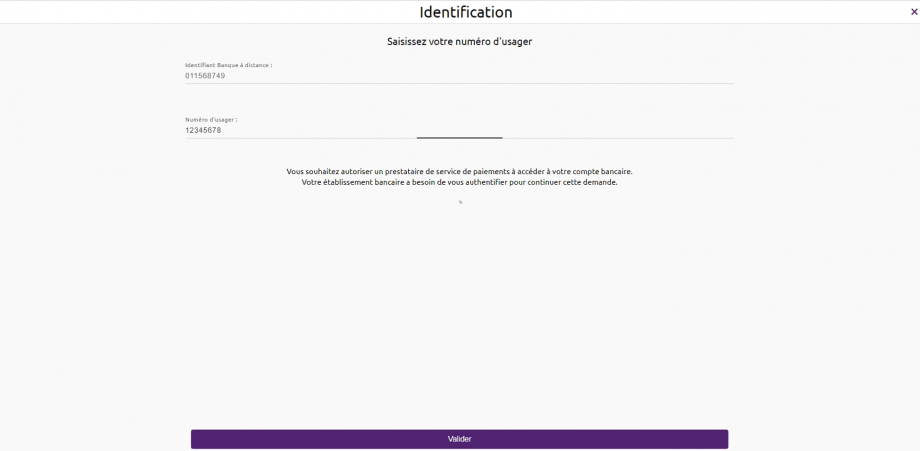
For Caisses d’Epargne, Banque BCP, Crédit Coopératif & BTP Banque, if the customer is a professional or a corporate, he will have to enter is user number in addition to his remote banking identifier.
Note: If the PISP provides the remote banking identifier of the customer in its request (field “debtor/privateId/identification“), the first step is skipped & step 2) is automatically triggered.
2) The customer is redirected to a first authentication screen proposed by its ASPSP in order to validate his/her identity:

The SMS code for authentication is to be entered (see “Test data” use case for the data sets of the banking institution) :

This step depends on the strong authentication means proposed to the customer by the bank (SMS OTP, soft token, etc…).
It also depends on the equipment connected to the PISP APP used by the customer (PC or mobile / smartphone / tablet).
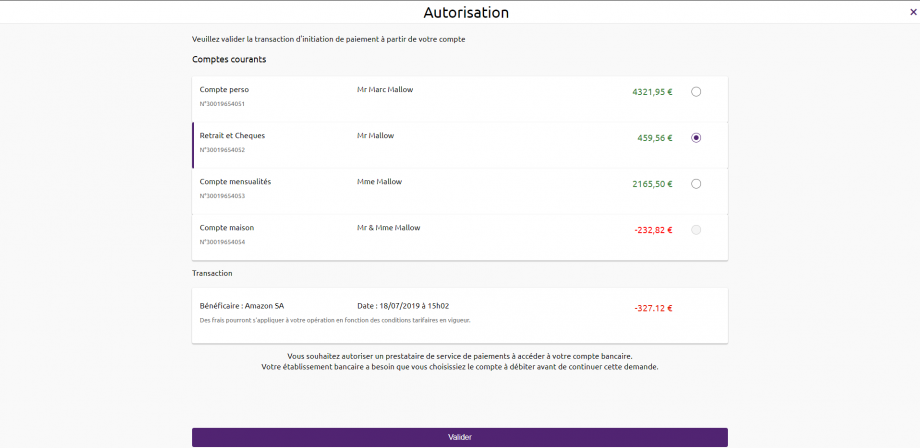
3) The customer is redirected to a screen where he will have to select its account to be debited.
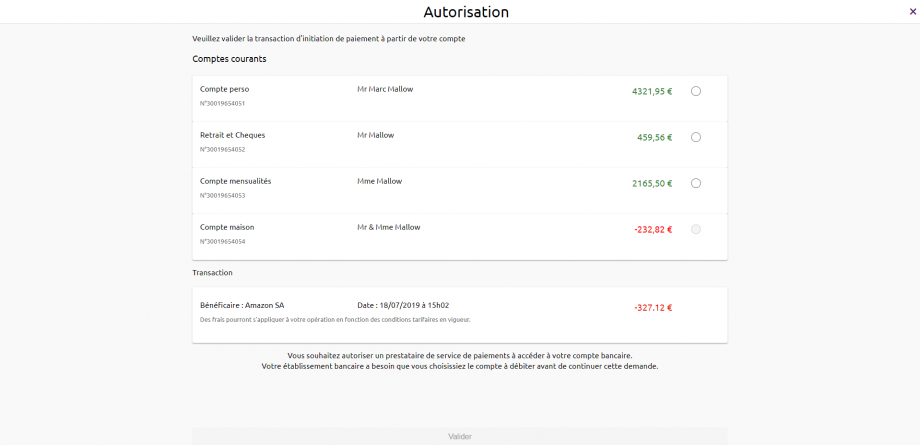
IMPORTANT NOTE : If the PISP provides the IBAN of the customer to be debited in its request (field “debtorAccount“), only the corresponding account will be selectable and proposed to the customer :
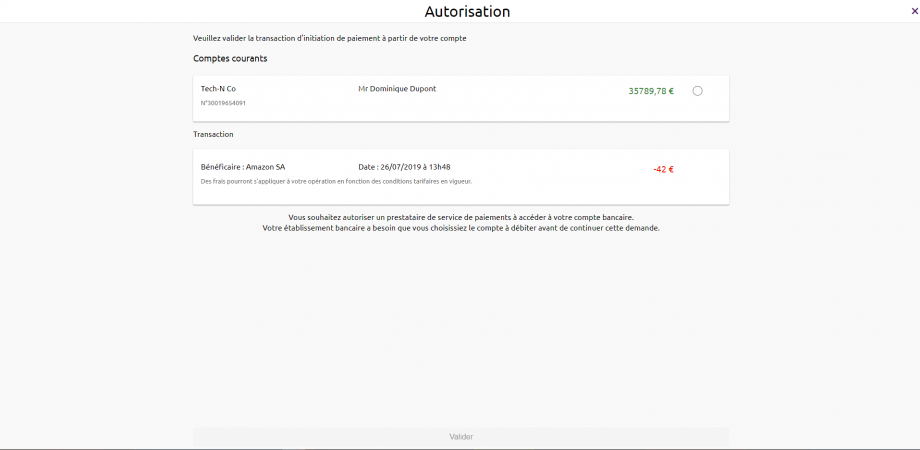
Note: If the customer does not have an eligible PSD2 account, the request for payment initiation will not succeed and the customer will be redirected to your APP.
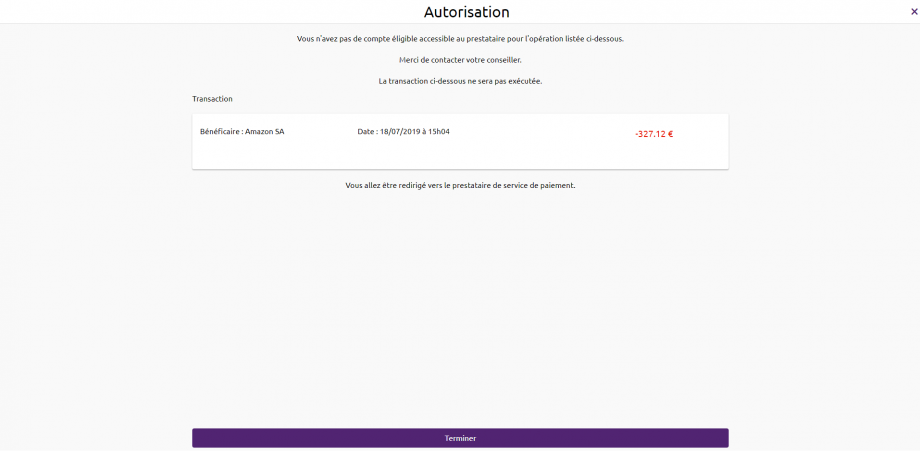
4) The customer selects and validates the account to be debited :
5) The customer is redirected to a second strong authentication screen proposed by his banking institution to validate his payment (dynamic linking).
Screens are identical to the strong authentication screen of step 2) to validate the customer’s identity.
The final decision whether or not to apply an authentication exemption is still at the discretion of the ASPSP as described in article 2 of the RTS of the DSP2.
For this ASPSP, exemptions are not possible for dynamic linking.
6) The PSU is redirected to a confirmation screen of the transaction proposed by its ASPSP.
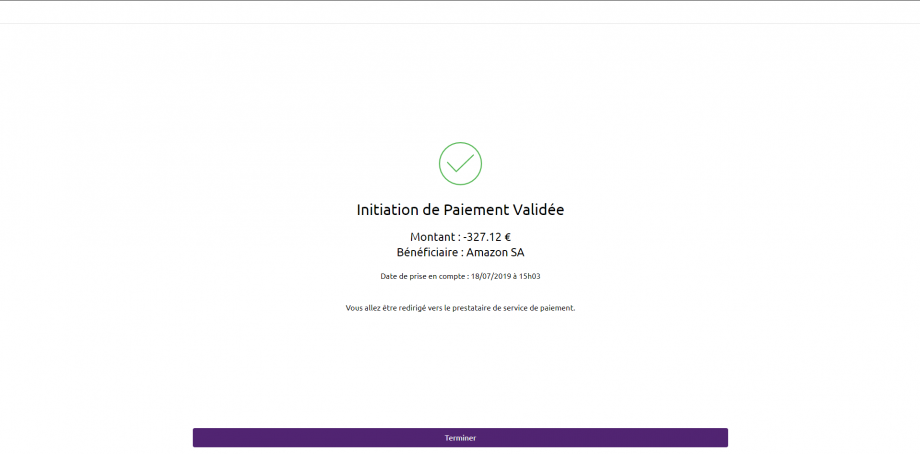
Note: when the customer does not validate the payment initiation (or in the event of a timeout on the account selection page for example) the customer is redirected to the next page :
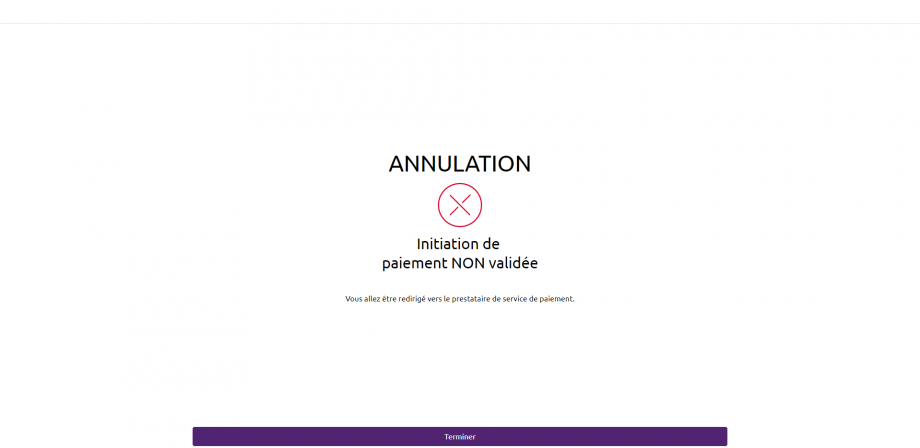
The customer is redirected to the PISP APP which provides in its first initiation request one or two call back URLs:
The first (successfulReportUrl) will be called by the banking institution in case the payment initiation request is processed and if the customer has given its consent for the payment.
A “code” parameter is added to this successfulReportUrl which is mandated to request the access token for the /confirmation method :
Example : https://<votre SuccessfulReportUrl>?code=GbmTn1ZZ76bibgvCRLxD4lNp8wMzkd
The second one (unsuccessfulReportUrl) will be used by the bank in case of refusal of consent or if the validation kinematics of the payment initiation is interrupted at one of its stages (example: timeout on the identification screen, on the account selection screen to be debited or the strong authentication screens). This second URL is optional : the first URL call back (successfulReportUrl) will be used if the second is not filled.
Sequence of the identification and strong authentication screens when the remote bank identifier of the customer (*) is transmitted in the request:
When the access identifier for the remote bank for the customer (debtor/privateId/identification field in the payment initiation request) is filled in, the call to the identification screen of the customer is not performed, cf. drawing below :

(*) for Caisses d’Epargne, Banque BCP, Crédit Coopératif et BTP Banque : the PSU segments PRO & ENT require having the PSU direct access identifier separated from the usage number by a “-“.
STEP #4 : Retrieve the Status of a payment initiation request (only available in live production)
This method get/payment-requests/{paymentRequestResourceId} allows you to retrieve all the payment initiation data enriched with the resource identifiers and the status of the payment initiation it contains.
The description of this feature and fields of the request is described in the use case “Retrieve a PIS status“. The data is accessible for 35 days.
For accessing to the sandbox assembly, the entry point is identical :
Request :
Headers :
Authorization: Bearer firstAccessToken_ABCXdBobTpdwRRaYy2H3w7pP5Xe61e1R9rwxMuhk7G0fULg8x6kJHz
Content-Type: application/json
Signature: keyId=\”https://<www.myUrlPath.to>/myQsealCertificate_<footprint-sha256>\“, algorithm=\”rsa-sha256\”, headers=\”(request-target) psu-ip-address psu-ip-port psu-http-method psu-date psu-user-agent psu-referer psu-accept psu-accept-charset psu-accept-encoding psu-accept-language digest\”, signature=\”LbkxgICM48J6KdWNaF9qT7OWEorNlAwWNo6R+KkP7cP4TIGkk8wxcsGQXJ9ZnC+ZiA8mjL5S8WQyL41M7iPt+vJX4xh679gdGwmlKzn7E+ZtZ1I4qalRxcdLp4gBL7fll+C2lVBNJrViMJBezFK7AYVjnSWH7t1QxiMVg3CmoRM=\”
X-Request-ID : MyXrequestId123
Notes on parameters :
Authorization:Bearer => access_token retrieved for tokenCredential.
x-request-id => must be the same as for the payment initiation request.
The paymentRequestResourceId is retrieved in response to the payment initiation request, when the payment initiation has been processed and the PSU has given its consent for the payment.
Response :
{
“paymentRequest” : {
“resourceId” : “0000000a22-146329369000016907660677”,
“paymentInformationId” : “MyPmtInfld123”,
“creationDateTime” : “2019-07-22T09:25:22.527+02:00”,
“numberOfTransactions” : 1,
“debtorAgent” : {
“bicFi” : “CEPAFRPP515512”,
“name” : “CE Ile de France”,
“postalAddress” : {
“country” : “FR”,
“addressLine” : [
“15 Boulevard de la PI”,
“75001 Paris”
]
}
},
“initiatingParty” : {
“name” : “MyPispName”,
“postalAddress” : {
“country” : “FR”,
“addressLine” : [
“5 avenue Anatole France “,
“75007 PARIS”
]
},
“organisationId” : {
“identification” : “12FR5”,
“schemeName” : “COID”,
“issuer” : “ACPR”
}
},
“paymentTypeInformation” : {
“serviceLevel” : “SEPA”,
“categoryPurpose” : “DVPM”
},
“debtor” : {
“name” : “Marc “,
“postalAddress”: {
“country” : “FR”,
“addressLine” : [
“512 rue de la coupe du monde”,
“94512 Charenton-le-Pont”
]
},
“privateId” : {
“identification” : “D0999990I0”,
“schemeName” : “BANK”,
“issuer” : “BICXYYTT512”
}
},
“debtorAccount” : {
“iban” : “FR76175157008043001965405255”
},
“beneficiary” : {
“creditorAgent” : {
“bicFi” : “CCBPFRPP512”,
“name” : “B.P Grand Ouest”,
“postalAddress” : {
“country” : “FR”,
“addressLine” : [
“15 Boulevard de la Boutière”,
“CS 26858 35768 SAINT GREGOIRE CEDEX”
]
}
},
“creditor” : {
“name” : “myMerchant”,
“postalAddress” : {
“country” : “FR”,
“addressLine”: [
“Place Charles de Gaulle”,
“75008 PARIS”
]
},
“organisationId” : {
“identification” : “852126790”,
“schemeName” : “BANK”,
“issuer” : “FR”
}
},
“creditorAccount” : {
“iban” : “FR761175153807008043001965406128”
}
},
“purpose” : “COMC”,
“chargeBearer” : “SLEV”,
“paymentInformationStatus” : “PDNG”,
“statusReasonInformation” : null,
“fundsAvailability” : null,
“booking”: null,
“requestedExecutionDate” : “2019-07-23T13:25:22.527+04:00”,
“creditTransferTransaction” : [
{
“paymentId” : {
“resourceId” : “0000000a22-146329369000016907660677”,
“instructionId” : “MyInstrId123”,
“endToEndId” : “MyEndToEndId123”
},
“instructedAmount” : {
“currency” : “EUR”,
“amount” : “327.12”
},
“remittanceInformation” : [
“MyRemittanceInformation123”
],
“transactionStatus” : “PDNG”
}
],
“supplementaryData” : {
“appliedAuthenticationApproach” : “REDIRECT”,
“scaHint” : “scaExemption”,
“successfulReportUrl” : “https://extension.bpce.fr/calback.aspx&state=OK-12345&code_challenge_method=256&code_challenge=ABCD”
}
}
}
Headers :
X-Request-ID : MyXrequestId123
Status code : 200 OK
Notes on parameters :
resourceId => equals to paymentRequestResourceId
paymentInformationStatus => gives payment initiation status
transactionStatus => gives transaction status
X-Request-ID => transmitted as input
STEP #5 : Confirm payment initiation status (only available in live production, NOT in sandbox)
This mandated method POST/payment-requests/{paymentRequestResourceId}/confirmationallow to confirm a payment status for security reasons.
Please note that the method POST /payment-requests/{paymentRequestResourceId}/confirmation is not implemented.
The TPP needs to request a specific access token beforehand :
Request :
POST https://www.17515.oba-bad-me-live-api.89C3.com/stet/psd2/oauth/token
Headers :
Content-Type : application/x-www-form-urlencoded; charset=utf-8
Body :
grant_type : authorization_code
client_id : the one generated if the TPP is enrolled using our API Register
code : code extracted from previous call in the successful URL at the end of STEP #3
code_verifier : depends on your PKCE data
redirect_uri: :predeclared uri communicated to ASPSP in the enrolment process
Response :
{
“access_token” : “secondAccessToken_NBVcxwwmLkjhgfdspoie00OIuyTRPFs”,
“token_type” : “Bearer”,
“expires_in” : “3600”,
“refresh_token“: “1ji8KA9RJ5eXeJV1xKSDj1WDp8wwg3pRgDO2j0WhtbMsWz”,
“scope” : “pisp”,
“state“: “OK-12345”
}
Notes :
access_token => tokenCredential to be included in the next method Authorization field after the Bearer
It is now possible to use the confirmation method (in live production environment only)
POST https://www.17515.oba-bad-me-live-api.89C3.com/stet/psd2/v1.6.2/payment-requests/0000000a22-156688979900016807956016/confirmation
Headers :
Authorization: Bearer secondAccessToken_NBVcxwwmLkjhgfdspoie00OIuyTRPFs
Content-Type: application/json
Signature: keyId=\”https://<www.myUrlPath.to>/myQsealCertificate_<footprint-sha256>\“, algorithm=\”rsa-sha256\”, headers=\”(request-target) psu-ip-address psu-ip-port psu-http-method psu-date psu-user-agent psu-referer psu-accept psu-accept-charset psu-accept-encoding psu-accept-language digest\”, signature=\”LbkxgICM48J6KdWNaF9qT7OWEorNlAwWNo6R+KkP7cP4TIGkk8wxcsGQXJ9ZnC+ZiA8mjL5S8WQyL41M7iPt+vJX4xh679gdGwmlKzn7E+ZtZ1I4qalRxcdLp4gBL7fll+C2lVBNJrViMJBezFK7AYVjnSWH7t1QxiMVg3CmoRM=\”
X-Request-ID : MyXrequestId123
Body :
{
}
Authorization : Bearer => access_token extracted in the response of the previous POST /token method (the second one)Notes :
{paymentRequestResourceId} : same id used in previous GET /payments-requests
Response :
{ “paymentRequest” : {
“resourceId” : “0000000a22-156688979900016807956016”,
“paymentInformationId” : “MyPmtInfld123”,
“creationDateTime” : “2021-09-05T09:25:22.527+02:00”,
“numberOfTransactions” : 1,
“debtorAgent” : {
“bicFi” : “CEPAFRPP515512”,
“name” : “CE Ile de France”,
“postalAddress” : {
“country” : “FR”,
“addressLine” : [
“15 Boulevard de la PI”,
“75001 Paris”
]
}
},
“initiatingParty” : {
“name” : “Pisp Name”,
“postalAddress” : {
“country” : “FR”,
“addressLine” : [
“512 rue Reaumur”,
“75512 PARIS”
]
},
“organisationId” : {
“identification” : “12FR5”,
“schemeName” : “COID”,
“issuer” : “ACPR”
}
},
“paymentTypeInformation” : {
“serviceLevel” : “SEPA”,
“categoryPurpose” : “DVPM”
},
“debtor” : {
“name” : “Customer Name”,
“postalAddress” : {
“country” : “FR”,
“addressLine” : [
“512 rue Leclerc”,
“94512 Charenton-le-Pont”
]
},
“privateId” : {
“identification” : “D0999990I0”,
“schemeName” : “BANK”,
“issuer” : “BICXYYTT512”
}
},
“debtorAccount” : {
“iban” : “FR7617515000243021933556300”
},
“beneficiary” : {
“creditorAgent” : {
“bicFi” : “CCBPFRPP512”,
“name” : “Creditor Name”,
“postalAddress” : {
“country” : “FR”,
“addressLine” : [
“512 rue de la primaube”,
“12512 RODEZ”
]
}
},
“creditor” : {
“name” : “Amazon SA”,
“postalAddress” : {
“country” : “FR”,
“addressLine” : [
“512 avenue Maupassant”,
“75512 PARIS”
]
},
“organisationId” : {
“identification” : “852126790”,
“schemeName” : “BANK”,
“issuer” : “FR”
}
},
“creditorAccount” : {
“iban” : “FR7613825002000400000541718”
}
},
“purpose” : “COMC”,
“chargeBearer” : “SLEV”,
“paymentInformationStatus” : “PDNG”,
“statusReasonInformation” : null,
“fundsAvailability” : null,
“booking” : null,
“requestedExecutionDate” : “2021-09-06T14:10:10.109+01:00”,
“creditTransferTransaction” : [
{
“paymentId” : {
“resourceId” : “0000000a22-146329369000016907660677”,
“instructionId” : “instructionId 1630919339”,
“endToEndId” : “endToEndId 1630919339”
},
“instructedAmount” : {
“currency” : “EUR”,
“amount” : “2.41”
},
“remittanceInformation”: {
“unstructured”: [
“remittanceInformation01”
]
},
“transactionStatus” : “PDNG”
}
],
“supplementaryData” : {
“appliedAuthenticationApproach” : “REDIRECT”,
“scaHint” : “scaExemption”,
“successfulReportUrl” : “https://extension.bpce.fr/calback.aspx&state=OK-12345&code_challenge_method=256&code_challenge=ABCD”
}
}
}
Headers :
X-Request-ID : MyXrequestId123
Status code : 200 OK
Test with persona
Introduction
As required by PSD2 regulation (see RTS Art. -30 (5)), we deliver a testing facility, including support, for connection and functional testing using non-real test data. These personna are gathered using banking segments (retail, corporate) and customer segmentation (student, young active, professionnal, retired, etc…).
Expected API input data are listed (PSU id, IBAN). PSU consent has already been recorded. These data included the accounting balance are static (no changes).
Please note that this test dataset will evolve overtime with additional profiles and data history (volume, depth). So stay informed and visit this dev portal regularly!
PSU ID & TEST DATA AS DESCRIBED BELOW CANNOT BE USED IN PRODUCTION LIVE ENVIRONMENT.
Persona
LEA SANDBOXA

- Student
- only one payment account
CLAIRE RECETTEB

- Young active and entrepreneur
- 2 payment accounts (1 individual, one professional)
GEORGES PERSONAC

- Active
- 1 joint payment account (Mr OR Mrs)
- more than 200 transactions on FR7617515000920400085945890
GILLES TESTUNID

- Retired
- 3 payment accounts (Mr, Mr OR Mrs, Mr AND Mrs)
Please note that in the assembly mode, you’ll have to enter OTP SMS = « 12345678 » for all persona whenever the authentication screen is proposed.
WARNING : NEW ID NUMBER
| Persona | Segment | New
Id | Bank code | IBAN | Payment account holder | PSU consent : balance/ Transactions / Identity | Balance | Currency |
|---|---|---|---|---|---|---|---|---|
| LEA SANDBOXA | Individual | 9999999901 | 17515 | FR7617515000920400430518020 | LEA SANDBOXA | TRUE TRUE FALSE | -150.00 | EUR |
| CLAIRE RECETTEB | Individual | 9999999902 | 17515 | FR7617515900000400358074026 | CLAIRE RECETTEB | TRUE TRUE FALSE | 0.00 | EUR |
| Professional / Entrepreneur individuel | 9999999902 | 17515 | FR7617515900000800358074006 | CLAIRE RECETTEB | TRUE TRUE FALSE | +23766.98 | EUR | |
| GEORGES PERSONAC | Individual | 9999999903 | 17515 | FR7617515000920400085945890 | Mr et MME GEORGES PERSONAC | TRUE TRUE FALSE | +10.00 | EUR |
| GILLES TESTUNID | Individual | 9999999904 | 17515 | FR7617515000920440878790811 | Mr GILLES TESTUNID | TRUE TRUE FALSE | +11880.30 | EUR |
| 9999999904 | 17515 | FR7617515000920402428687756 | Mr OU MME GILLES TESTUNID | TRUE TRUE FALSE | 0.00 | EUR | ||
| 9999999905 | 17515 | FR7617515000920402428748381 | MR ET MME GILLES TESTUNID | TRUE TRUE FALSE | +5879.22 | EUR |
Deprecation process
The decommissioning policy is based on the API lifecycle, which is aligned with the versions of the STET specifications.
This is illustrated below for version N:

Decommissioning of API Version N
The decommissioning of our API version takes place in several steps:
Day of Deployment of the New API Version (T0):
Version N+1 is deployed to the 89C3 Live gateway.
Three Months Post Deployment (T0 + 3 Months):
Version N of the API is decommissioned from all environments (sandbox and live).
Communication regarding the decommissioning of version N will occur on the deployment date of version N+1.
The preferred communication channel is this Groupe BPCE API Store portal, in the "Roadmap" section of the impacted API.
An additional communication via email to the contacts of the providers registered on the Groupe BPCE API Store portal may complement this process.
Planning
This API can evolve. Please note that API modifications can occur out of the three-month regulatory notice period (art. 30 des RTS / paragraphe 4). We apply this in case of :
- urgent functional issue to solve impacting all PSU of at least one major customers segment
- security issue
- evolutions requested by the national competent authority
Please do find below our roadmap :
| Our API version | Features | Deployment date Dev Portal & Sandbox | Deployment date BPCE Live API Gateway | Deprecation date BPCE Live API Gateway |
|---|---|---|---|---|
| v1.6.2 | API version 1 :
API version 1.4.2 = API version 1 +
API version 1.6.2 = API version 1.4.2 +
| November 16, 2022 | February 28, 2023 | To be announced |
| v1.6.2 | Features above plus :
| June, 2023 | June, 2023 | – |
Functional limits
General limits
- Apply only to eligible accessible online payment accounts (the determining criterion for the purposes of that categorisation lies in the ability to perform daily payment transactions from such accounts), and to PIS requests between two different accounts which are don’t belong to the same PSU ID / same ASPSP
- NO international currency transfers are available (just PIS requests in € are allowed)
- Use the authentication with redirect reinforced mode only (Strong Customer Authentication required and handled by the bank, which IS NOT an obstacle according to french national competent authority) & call for o-confirmation method
Note : TPP are not allowed to send to ASPSP the PSU credentials, and only ASPSP SCA redirect screens can be used (no embeding process as clarified by European Banking Authority based on articles PSD2 #95.5 & RTS #31)
- Manage payment initiation requests only in euro (not other currency allowed) either in :
- SCT CORE (immediate or difffered or recurrent) for all customer segments
- Bulk Payments (immediate from 1 debtor account to N creditor IBAN leading to N unitary operations with different amounts allowed) for corporate customers only for “CASH” & “SALA” PIS request category purposes
- Instant Payment for all customers segments
- The following methods are available :
- POST /payment-requests et POST /payment-requests/{paymentRequestResourceId}/confirmation
- GET /payment-requests/{paymentRequestResourceId}
- PUT /payment-requests/{paymentRequestResourceId} only for cancelling a unitary SCT Core deferred or recurring
- BIC is mandatory only for PIS in non eurozone (still in euro currency)
- Cancellation of PIS operations by the PSU is possible through his/her direct access (as well as via API before the same dead line applied for online banking environment)
- Different PIS requests having the identical parameters as an already executed one (same date, same debtor & creditor IBAN, same amount, …) will be rejected aligned on direct access behavior
- If the PSU doesn’t perform any action during 04 mns on redirect screens (or 30 mns overall), the PSU will be considered as disconnected and no redirection will be provided back to the TPP
- If the PSU has many PSD2 eligible payment accounts, it will be displayed to the customer a list of 10 accounts max for allowing the choice of the account to be debited
- creditor.name length is 32 char max
Customer segments limitations
- PART segment is retail segment (adult & autonomous customers, also includes “individual entrepreneur”)
- PRO segment gathers small companies
- ENT segment gathers medium to large corporations having online banking subscriptions (as CE Net Comptes or equivalent) allowing unitary funds transfers
Note : it doesn’t apply to legal guardians managing tutorships
Payment account limitations
- Payment accounts are those PSD2 eligible & available through the online banking / direct access
- Some business rules can apply (anti-fraud rules, …) and may reject fund tranfer operations before settlement
SCA limitations
- PART : [soft token Sécur’Pass] and/or [password + CAP reader] and/or [password + OTP SMS]
- PRO : [soft token Sécur’Pass] and/or [password + CAP reader] and/or [password + OTP SMS]
- ENT : [certificate on physical token] and/or [soft token Sécur’Pass] and/or [password + CAP reader] and/or [password + OTP SMS]
Note 1 : no SCA exemptions apply
Note 2 : PIS requests with “CASH” & “SALA” categoryPurpose will be rejected IF PSU SCA is not performed using Sécur’Pass (or the physical token for “PRO & ENT” customer segment) AND if the creditor IBAN is not registered before (> 72 hours) by PSU using direct access / online banking
Note 3 : the physical certificate won’t be proposed to the PSU when using a mobile device
Access to live data
According to PDS2 regulation, the data set available thru this dev portal, Try-it mode and sandbox are based on fictive data (or non-real ones). These data are described in the use case “Test with persona“.
In order to access to live data, please use first our API Register (see product data sheet www.api.89c3.com/en/component/bpceportal/products/543/usecases/533).
IMPORTANT NOTE : a weekly slot is reserved for a programmed maintenance (all IT infrastructure incl’d backends and API gateways) Monday morning from midnight to 06:00 am CET, and could generate some perturbations during this period (as well as banking processes at the end of the day/month/quarter/year).
For live operations, the parameter “bank code” allows TPP to send API requests to the right ASPSP backend thru a dedicated « endpoint » www.<bank code>.oba-bad-me-live-api.89c3.com(or www.<bank code>.oba-bad-me-live-api.caisse-epargne.fr aligned on direct access domain name www.caisse-epargne.fr) (new URL to be taken into account from now on)
(As a reminder, the existing URL www.<codetab>.live.api.89C3.com will no longer be available as of 28/09/2025)
Once chosen, this entry point shall also be used for all subsequent requests.
| Bank code | ASPSP name | Bank short name | Available in Try-it and Sandbox | Available in production |
|---|---|---|---|---|
| 11315 | Caisse d’Epargne Provence Alpes Corse | CEPAC | – | Yes |
| 11425 | Caisse d’Epargne Normandie | CEN | – | Yes |
| 12135 | Caisse d’Epargne Bourgogne Franche-Comté | CEBFC | – | Yes |
| 14445 | Caisse d’Epargne Bretagne-Pays De Loire | CEBPL | – | Yes |
| 13135 | Caisse d’Epargne Midi-Pyrénées | CEMP | – | Yes |
| 13335 | Caisse d’Epargne Aquitaine Poitou-Charentes | CEAPC | – | Yes |
| 13485 | Caisse d’Epargne Languedoc-Roussillon | CELR | – | Yes |
| 13825 | Caisse d’Epargne Rhône Alpes | CERA | – | Yes |
| 14265 | Caisse d’Epargne Loire Drôme Ardèche | CELDA | – | Yes |
| 14505 | Caisse d’Epargne Loire-Centre | CELC | – | Yes |
| 17515 | Caisse d’Epargne Ile De France | CEIDF | Yes | Yes |
| 18315 | Caisse d’Epargne Côte d’Azur | CECAZ | – | Yes |
| 18715 | Caisse d’Epargne Auvergne et Limousin | CEPAL | – | Yes |
| 15135 | Caisse d’Epargne Grand Est Europe | CEGEE | – | Yes |
| 16275 | Caisse d’Epargne Hauts de France | CEHDF | – | Yes |
| 42559 | Crédit Coopératif | CCOOP | - | Yes |
| 12579 | Banque BCP | BBCP | - | Yes |
| 30258 | BTP Banque | BTPB | - | Yes |
Eligibility
The “Payment initiation” API resources can only be used by Payment Service Providers (PSP) having a Payment Initiation Service Provider (PISP) role.
In order to provide a service to users of payment informations services under PSD2 directive, you must be a licenced PSP such as credit institution, electronic money institution, and payment institution. This status is delivered by the national competent authority of the country where the request is made ; in France it is the “Autorité de Contrôle Prudentiel et de Résolution (ACPR), under the supervision of the Banque de France regulatory body :
Obtaining and maintaining such agreement require rigorous procedures in order to give strong guarantees to the account informations services users. The forms are provided on the ACPR website : https://acpr.banque-france.fr/en/authorisation/banking-industry-procedures/all-forms
Once the agrement is granted, the Organisation Identifier (OID) given by the national authority has the following format :
PSDXX-YYYYYYYY-ZZZZZZZZ
- “PSD” as 3 character legal person identity type reference
- 2 character ISO 3166 country code representing the NCA country
- hyphen-minus “-” (0x2D (ASCII), U+002D (UTF-8))
- 2-8 character NCA identifier (A-Z uppercase only, no separator)
- hyphen-minus “-” (0x2D (ASCII), U+002D (UTF-8))
- PSP identifier (authorization number as specified by NCA)
This OID is very important to identify yourself as a TPP :
- using STET API requests as OID is included in the parameter “client_ID”
- using mutual authentication (TLS) as OID is included in eIDAS certificates to be delivered to the bank (see below)
Please note that if you are using our API “PSD2 Registration”, an internal OID will be generated & shall be used for subsequent API requests.
You also need eIDAS (electronic IDentification And trust Services) compliant certificates delivered by a Qualified Certification Service Provider (QTSP, see list available on https://webgate.ec.europa.eu/tl-browser/#/).
In order to be able to consume PSD2 API published on our BPCE Portal, the TPP has to enroll its app and to use live certificates signed by a QTSP while sending API PSD2 Registration requests :
- a set of QWAC (for securing the TLS) and QSEALC (to be stored in our gateway) certificates for the sandbox
- another set of (for securing the TLS) and QSEALC (to be stored in our gateway) certificates for the live environment
A keyID shall also be provided with a correct STET format integrating the SHA256 certificate fingerprint after “_” char, see example STET V1.4.2 / Documentation Part 3: Interaction Examples / section 6. AISP Use cases / Signature : keyId=https://path.to/myQsealCertificate_612b4c7d103074b29e4c1ece1ef40bc575c0a87e.
Please embed only public keys. Controls on other data will be based on European Banking Association TPP register (https://euclid.eba.europa.eu/register/pir/disclaimer).
You can also consult the FAQ.
History
STET specifications
This REST-based API is compliant with the STET standard developed by the french market initiative (https://www.stet.eu/en/psd2/) in order to comply with PSD2 regulatory requirements. It takes into account functional limitations specific to Crédit Coopératif savings banks network.

As a reminder :
- payment services directive (PSD2, (UE) 2015/2366 of 25/11/2015) went into force on january 13, 2018 : http://eur-lex.europa.eu/legal-content/FR/TXT/?uri=CELEX:32015L2366
- it is supplemented by regulatory technical standards for strong customer authentication (RTS, Commission Delegated Regulation (EU) No 2018/389) and common and secure open standards of communication that will apply on september14, 2019. These standards are called RTS (Rules Technical Standards) : https://eur-lex.europa.eu/legal-content/FR/TXT/?toc=OJ%3AL%3A2018%3A069%3ATOC&uri=uriserv%3AOJ.L_.2018.069.01.0023.01.FRA
In France, the ordinance n° 2017-1252 of August 9, 2017 implements the PSD2 directive into the regulatory section of the monetary and financial code. This ordinance has been supplemented by two decrees (n° 2017-1313 and n° 2017-1314 on August 31, 2017), and five orders that were published on August 31, 2017
| Our API version | STET standard version |
|---|---|
| v1.6.2 | v1.6.2.0 |
Description of TPP support
According to Article 30 (5) of the RTS, a support for third-party providers is available.
This support can be joined via the form on this Groupe BPCE API Store.
Responses are sent during office opening hours (09:00 – 18:00 Central European Local Time). However, there is a 24/7 monitoring process for our IT systems.
The general principle of TPP support is outlined below, taking into account delays of Article 30 (4) of the RTS :
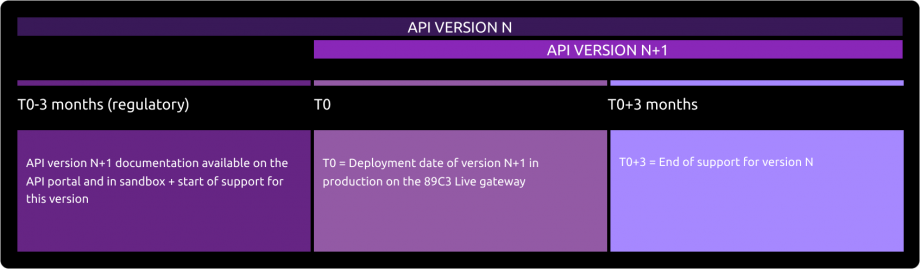
Deployment of API Version N+1
The deployment of the new version of our API takes place in several stages:
Before Deployment (T0 - 3 months):
The documentation for API version N+1 is available on the API Store.
Version N+1 is accessible in the testing environment (sandbox).
Support for the new version is activated.Day of Deployment (T0):
Version N+1 is deployed on the 89C3 Live gateway.
Three Months After Deployment (T0 + 3 months):
Support for API version N is discontinued.
Release notes
Important changes made since the first version was delivered :
| Method(s) | Effective date | Description of the evolution |
|---|---|---|
| All | November 16, 2022 | Alignment on PSD2 API STET v1.6.2.0 |
| All | January 27, 2026 | Portal documentation : change URL from www.<cdetab>.oba-bad-me-live.api.89c3.com to www.<cdetab>.oba-bad-me-live-api.89c3.com |