








Overview
The expected benefits
Together, let’s harness the full potential of the European payment account information opening.

This AISP PSD2 API product allows you to securely access transaction data for customer payment accounts from all institutions within the Banques Populaires network.

Secure Data Access
Access customers' payment account information through a secure and regulatory-compliant device.

Value Creation
Enhance your offerings and products to better serve your clients through innovative use cases.
The connection is made through a secure device compliant with European regulatory requirements. By accessing this account information service, your customers will be able to view their payment account information within your environment: account list, balances, transactions (date, description, and amount), etc.
You will thus be able to enhance the added value of your products/services to serve your clients through innovative use cases: account consolidation, accounting reconciliation, customer knowledge enrichment, budget analysis and forecasting, etc.
The different possible use cases
Together, let's create value for our shared clients.

Consolidation
Allow your clients to aggregate their payment accounts to have a consolidated and real-time view of their transactions.
Accounting Reconciliation
Enable your corporate clients to reconcile their invoices and business expenses with their payment transactions.
Customer Insights
Understand and learn from the payment behavior of your individual or corporate clients.
Business Management
Leverage customer payment data to build high-value management dashboards.
How to access the product ?
To access the Account Information Services API, developers and businesses must follow the steps below.
Contact
Get in touch with the product managers.
Access
Enroll directly through the dedicated process (regulated entities).
Integration & Testing
Integrate our service into your solution and share your use cases with us to help ensure the quality of our offering.
Go Live !
Documentation
Guides
Data aggregation
A multi-bank customer wants access to all his data so that he can have a consolidated view.
Via this “Account Information Services” API made available by the account holders, you can request access in real time to any or all of the data that the customer has authorised WITHOUT asking them for their online login details.
You can retrieve this customer’s current accounts from the bank where they are located. For these current accounts, depending on the customer’s consent that you have obtained and sent to us, you can retrieve their balances, transactions, authorised overdraft, associated deferred debit cards, outstandings and invoices for these deferred debit cards.
You can access this API in batch mode in order to prepare the output to the customer on your application (up to a maximum of 4 times per day). At the request of the customer connected to their application, you can refresh this data (without limitation).
This API can only be used if you have obtained the role of Account Information Service Provider (“TPP AISP”), this prerequisite being described in the “Eligibility” section.
The overall process is as follows:
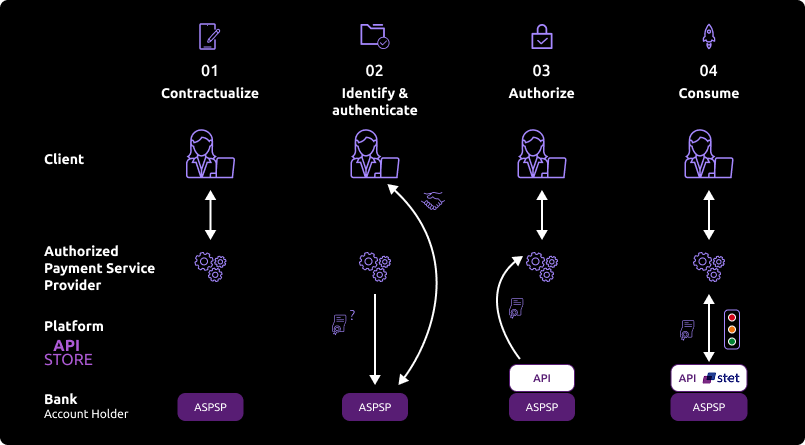
The customer wants to use your services to consolidate information from one or more payment accounts held with banks, one of which is the customer’s bank. He will therefore indicate this bank to you through your interfaces.
During this first exchange, you will request an authorisation token (and a refresh token). The basic principle is that, as an AISP TPP, you must obtain these tokens BEFORE consuming API resources. This token is generated by the account holder (ASPSP) AFTER identifying and authenticating the client.
As account holder :
- we will check your certificates and approvals
- and via the redirection game, we will identify and strongly authenticate the client in order to generate the access token
If authorisation is granted by the customer, you will then be able to retrieve the OAuth2 tokens via secure exchanges with the 89C3 API platform (see “Use cases” > “Get your access token”).
By presenting this authorisation token, you can then consume the resources of the “Account Information Services” API in order to :
- request a list of eligible accounts
- send us customer consent
- secure access to data to which access has been authorised (see “Consume the API”).
At the end of the 180-day regulatory period, this process will have to be repeated (see “Use cases” > “Refresh your access token”).
NB: the ASPSP account manager may refuse you access for various justified reasons (API not compliant, account blocked in the meantime, etc.).
Consume the API
The description of the services offered below is purely functional. The technical aspects are listed in the “Use cases” sections, which are more detailed.
You should also be familiar with PSD2 terminology and the abbreviations used. You can also use the frequently asked questions (FAQ).
Introduction – mixed AISP consent vs. full AISP consent
The STET standard offers two consent management modes: full AISP consent and mixed AISP consent. Only the mixed AISP consent mode has been developed.
The kinematics below describe how it is implemented, and in particular the use of the PUT /consents method, which enables you to transmit the accounts granted by the customer.
It summarises the sequence of calls to the various methods of the AISP API, from token recovery to the recovery of current accounts and deferred debit cards and their balances / transactions / authorised overdraft / account owners and outstandings / invoices respectively, as well as the recovery of the customer’s identity.
Prerequisites
As a TPP, you must be accredited by the Autorité de contrôle prudentiel et de résolution (ACPR) for the role of account aggregator (“AISP”).
To access the "Account Information Services" API, you need to retrieve an OAuth2 access token issued by the customer’s bank by querying it with your credentials. This token is valid for 180 days.
You and the customer’s bank must authenticate each other by exchanging Eidas QWAC certificates.
You then present your OAuth2 access token to use the "Account Information Services" API.
Aggregating data
Use of the "Account Information Services" API :
The AISP asks the customer (PSU) which bank(s) he wishes to consult his accounts from.

The authentication method supported by the bank is REDIRECT mode:
Access authorisation as an AISP given to you by the connected client – recovery of the initial access token valid for 180 days and the refresh token
- The customer is redirected to an identification screen proposed by their bank, where they enter their remote banking identifier. If the AISP provides the customer’s remote banking identifier in its request, the next stage is triggered directly.
- The customer is redirected to a strong authentication screen offered by their bank to validate their identity. The kinematics of this stage depend on the strong authentication method made available to the customer by the bank (SMS OTP, secur’pass, etc.). It also depends on the customer’s equipment running the AISP APP used by the customer (PC or mobile/tablet).
- The customer is redirected to the AISP APP. When requesting token recovery, the AISP provides a call back URL: this will be called by the bank.
First access to retrieve the customer’s list of current accounts
You retrieve the list of the client’s sight accounts via an initial access to the GET /accounts method by providing your access token for this client (see the “Get the list of accounts” use case).
You do not have access to the following information:
- current account balances
- URIs to the
GET /accounts/transactionsmethod - URIs to the
GETmethod/accounts/transactions/details=>this service is not available - URIs to the
GET /accounts/balancesmethod - URIs to the
GET /accounts/overdraftsmethod - URIs to
GET /accounts/owners - URIs to the
GET /end-user-identitymethod - the URI to the
GET /trustedBeneficiaries method=>this service is not available
As long as you have not transmitted the accounts granted by the customer using the PUT /consents method :
- you can still retrieve the list of the client’s sight accounts using the
GET /accountsmethod, but you won’t have any more information than when you first accessed them using this method - if you try to use the
GET /accounts/transactionsmethod, the request will be rejected - if you try to use the
GET /accounts/transactions/detailsmethod, the request will be rejected=> this service is not available for Banques Populaires: HTTP error code 501. - if you try to use the
GET /accounts/balancesmethod, the request will be rejected - if you try to use the
GET /accounts/overdraftsmethod, the request will be rejected. - if you try to use the
GET /accounts/ownersmethod, the request will be rejected - if you try to use the
GET /accounts/end-user-identitymethod, the request will be rejected - if you try to use the
GET /trustedBeneficiariesmethod, the request will be rejected > this service is not available for Banques Populaires: HTTP error code 501.
The customer selects the accounts to which he agrees to give you access on your APP
You ask the customer to select the current accounts and the possible operations on their accounts (balance recovery, transaction recovery, overdraft authorisation recovery, etc.).
Transmission of consent
You send us the list of current accounts that the customer has consented to via the PUT /consents method by providing your access token for this customer (see “Send the list of accounts” use case). The code HTTP 201 : created is returned.
You specify the list of current accounts (IBAN) for which the customer has agreed to transmit balances and/or transactions and/or authorised overdrafts and/or account holders.
You specify whether the customer has consented to the recovery of trusted beneficiaries and to the recovery of their first and last names.
If you have already transmitted the accounts consented to via the PUT /consents method, and the customer subsequently changes their consent, you will transmit the new list of accounts consented to via the PUT /consents method, which will have the effect of cancelling and replacing the previous consent.
If you send an empty list of authorised current accounts for balances and transactions, and set the psuIdentity and trustedBeneficiaries indicators to FALSE, this means that there is no authorised account.
You can send a list of agreed current accounts without first using the GET /accounts method, for example if the customer has sent you the IBANs of their current accounts directly.
Second access to retrieve a customer’s list of current accounts
You retrieve the list of the customer’s sight accounts with their details via a second access to the GET /accounts method by providing your access token for this customer (see the “Get the list of accounts” use case).
You will receive the following information:
- agreed and unagreed current accounts
- deferred debit cards linked to current accounts
- balances on current accounts granted
- URIs to the
GET /accounts/balancesmethod for current accounts granted - URIs to the
GET /accounts/transactionsmethod for current accounts granted - URIs to the
GET /accounts/overdraftsmethod for current accountsgranted - URIs to the
GET /accounts/ownersmethod for current accountsgranted - the URI to the
GET /end-user-identitymethod if the “psuIdentity” flag = TRUE has been passed via the “PUT /consents” method
The following information will not be recovered:
- the URI to the
GET /trustedBeneficiariesmethod > this service is not available. - URIs to the GET
/accounts/transactions/detailsmethod > this service is not available.
Recovery of balances, transactions, name of owner(s) and overdraft authorisations for current accounts, and recovery of outstandings and invoices for deferred debit cards linked to current accounts.
For each authorised current account, you retrieve the account balances via access to the GET /accounts/balances method by providing your access token for this customer (see “Get accounting balances” use case) and using the URI previously communicated by the GET /accounts method for the “_links” “balances”.
For each deferred debit card in an agreed current account, you retrieve the card’s balances by accessing the GET /accounts/balances method, providing your access token for this customer (see “Get accounting balances” use case) and using the URI previously communicated by the GET /accounts method for the “_links” “balances”.
For each sight account granted, you retrieve the account transactions by accessing the GET /accounts/transactions method, providing your access token for this client (see “Get transactions history” use case) and using the URI previously communicated by the GET /accounts method for the “transactions” “_links”.
For each deferred debit card in a consented current account, you retrieve the bills for the account by accessing the GET /accounts/transactions method by providing your access token for this customer (see “Get transactions history” use case) and using the URI previously communiqué par le GET /accounts method for the “transactions” “_links”.
For each authorised current account, you retrieve the account’s authorised overdraft by accessing the GET /accounts/overdrafts method, providing your access token for this customer (see “Obtain authorised overdrafts” use case) and using the URI previously communicated by the GET /accounts method for the “_links” “overdrafts”.
For each authorised current account, you retrieve the account’s owner(s) name by accessing the GET /accounts/owners method, providing your access token for this customer (see “Obtain authorised overdrafts” use case) and using the URI previously communicated by the GET /accounts method for the “_links” “owners”.
If you try to use the GET /accounts/transactions method for a non-consensual current account or for a deferred debit card backed by a non-consensual current account, the request will be rejected.
If you try to use the GET /accounts/balances method for a non-consensual current account or for a deferred debit card backed by a non-consensual current account, the request will be rejected.
If you try to use the GET /accounts/overdrafts method for a non-consensual current account, the request will be rejected.
If you try to use the GET /accounts/owners method for a non-consensual current account, the request will be rejected.
Customer identity recovery
You retrieve the identity of the connected PSU by accessing the GET /end-user-identity method.
Batch refresh of account information
For each customer and for each authorised current account or deferred debit card attached to a current account for that customer, you can refresh the customer’s data (same as steps “Second access to retrieve the list of a customer’s current accounts“, “Retrieve balances, transactions, etc. for authorised current accounts“).
There is a limit of 4 daily batch accesses per PSU for GET /accounts per access page.
There is a limit of 4 daily batch accesses per PSU/account for GET /balances.
There is a limit of 4 daily batch accesses per PSU/account for GET /transactions per access page.
There is a limit of 4 daily batch accesses per PSU/account for GET /overdrafts per access page.
There is a limit of 4 daily batch accesses per PSU/account for GET /owners per access page.
There is a limit of 4 daily batch accesses per PSU/card for GET /balances.
There is a limit of 4 daily batch accesses per PSU/card for GET /transactions per access page.
There is a limit of 4 daily batch accesses per PSU for GET /end-user-identity per access page.
Refreshment of account information at the request of customers connected on their mobile, for the customer and for each of the customer’s consented accounts
For each customer and for each authorised current account or deferred debit card linked to that customer’s current account, the customer can ask to refresh their data from your application (see steps “Second access to retrieve the list of a customer’s current accounts” and “Retrieving balances, transactions, etc. for authorised current accounts“).
Unlike batch access, there is no access limitation in this case.
If the 180-day token has expired, you must request a token refresh for the connected client
- With the client connected to your application, you submit a token refresh request for this client (see “Refresh your access token” use case).
- The customer is redirected to an identification screen proposed by their bank, where they enter their remote banking identifier. If the AISP provides the customer’s remote banking identifier in its request, the next stage is triggered directly.
- The customer is redirected to a strong authentication screen provided by their bank to validate their identity. The kinematics of this stage depend on the strong authentication method made available to the customer by the bank (SMS OTP, secur’pass, etc.). It also depends on the customer’s equipment running the PISP APP used by the customer (PC or mobile/tablet).
- The customer is redirected to the AISP APP. When requesting token recovery, the AISP provides a call back URL: this will be called by the bank.
- You recover the refreshed token for this customer and you can again access the customer’s data for 180 days using the methods in this API.
Use fallback
Principle
In accordance with the regulations, Groupe BPCE institutions have set up a dedicated interface for payment service providers: the published PSD2 REST APIs.
If the exposed PSD2 APIs fail, the payment service provider can use the “fallback” solution, which is based on the following principle:
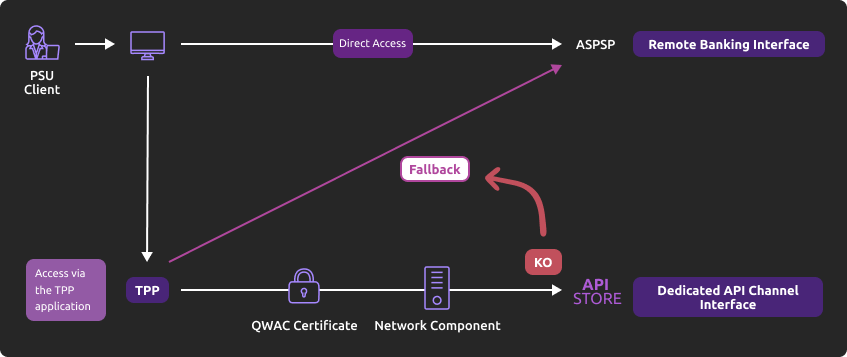
This solution meets the regulatory requirements of PSD2 (article 33 of the RTS). You can use it under the same conditions and prerequisites described in the “Eligibility” section.
Roadmap
Below are the elements of our forecast trajectory:
| Version | Features | Sandbox Deployment date 89C3 API Dev Portal & Sandbox | Live Deployment date 89C3 Live API Gateway |
| v1.0 | Fallback (*) | Not applicable | End of September 2019 |
(*) Main functions:
- The TPP uses the same endpoint as the dedicated interface. It therefore depends on the establishment code <cdetab = 13807> which is used to address the correct client repository.
- A request parameter (header “fallback:1” present or absent) added by the TPP makes it possible to distinguish a “Fallback” request from an API request via the dedicated interface, which must be used systematically.
- TPP authentication via mutual TLS authentication using an eIDAS certificate (QWAC)
- Security identical to that for access to the PSU’s online bank (same interface used by the PSU as for direct access, and same means of customer authentication)
- As the use of the dedicated interface (API) ramps up, there is no dynamic switchover: the fallback solution is still active.
- The fallback solution is a back-up solution which must not be used as the main means of access for offering PSD2 services. Its use is monitored and any misuse by one or more TPPs will automatically be reported to the competent national authority.
Example
- In the event that the DPS2 APIs are unexpectedly unavailable or the system fails (see criteria in RTS Art. 33), the TPP can send the request :
POST https://www.<codetab>.oba-bad-me-live-api.89c3.com/stet/psd2/oauth/token
(new URL to be taken into account from now on)
(As a reminder, the existing URL www.<codetab>.live.api.89C3.com will no longer be available as of 28/09/2025)
for example <codetab> =
- 13807 for BPGO
- 10548 for Banque de Savoie
- 40978 for Banque Palatine
with :
- its eIDAS QWAC production certificate
- the header parameter (fallback: “1″)
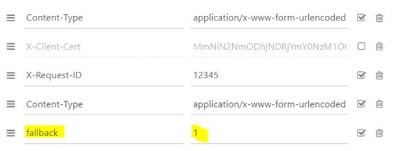
POST /stet/psd2/oauth/token HTTP/1.1
Content-Type: application/x-www-form-urlencoded
X-Request-ID: 1234
fallback: 1
User-Agent: PostmanRuntime/7.16.3
Accept: */*
Cache-Control: no-cache
Host: www.13807.oba-bad-me-live-api.banquepopulaire.fr
Accept-Encoding: gzip, deflate
Content-Length: 67
Connection: keep-alive
client_id=PSDFR-ACPR-12345&grant_type=client_credentials&scope=aisp
- If the checks are positive, we will return a header url of the type to be used as part of the redirection to the online banking environment, and which contains a JWT token (“&fallback=” fields) which must also be used in this context:
HTTP/1.1 302 Found
Date: Tue, 25 May 2021 21:46:59 GMT
Location: https://www.ibps.bpgo.banquepopulaire.fr/se-connecter/sso?service=cyber&cdetab=13807&fallback=eyJ0eXAiOiJKV1QiLCJhbGciOiJSUzI1NiIsIng1dCI6ImhF…
</head><body>
<h1>Found</h1>
<p>The document has moved <a >here</a>.</p>
</body></html>
- Once redirected, the TPP must then use the PSU’s identifiers via its proprietary method
For more details on the POST request, see STET V1.6.2.0 / Part I / section 3.4.3
Limits
The constraints of this solution are as follows:
- No reuse of the context of the dedicated interface, or of the access token valid for 180 days (AISP)
- Following the introduction of the new online banking solution, fallback allows you to stay on the old online banking screens
- Only the PSD2 functionalities present in online banking (reference: fixed internet remote banking – not mobile banking) are accessible via fallback. For example, online banking services do not offer e-commerce payments. This PISP functionality is therefore not available in fallback mode.
- The service user customer (PSU) must be connected to the TPP application (no possibility of AISP batch processing to retrieve the customer’s consented data). As PSD2 also imposes a systematic strengthening of strong authentication means (AF/SCA) for remote/online banking access, the authentication means provided to PSU customers will be used (non-exhaustive list):
- Soft token
- SMS OTP
- Physical key (for companies)
Activate App2App
Introduction
This feature automatically activates the customer’s banking app for identification and authentication purposes.
Prerequisites
The customer must have loaded and used the latest version of the banking application on the Android and Apple application shops at least once (version V6.4.0 and above).
Note: PRO & ENT customer segments are not activated
The return link (Universal link) must be defined in advance by the TPP on the same principle as a callback url:
- if this link/url has already been declared on our 89C3 API gateway, there’s nothing else to do
- otherwise the TPP must declare it using our PSD2 Registration API
Our “Universal links” have been declared on iOS and Android platforms. There is no need to access them via, for example, https://www.<codetab>.oba-bad-me-live-api.banquepopulaire.fr/89C3api/accreditation/v2/.well-known/apple-app-site-association, which will return an error.
(new URL to be taken into account from now on)
(As a reminder, the existing URL www.<codetab>.live.api.89C3.com will no longer be available as of 28/09/2025)
Request
The App2App functionality will be activated in production by the TPP app sending a request in the following STET format:
| Brand | App2App endpoint |
|---|---|
| Banque Palatine | http://www.40978.oba-bad-me-live-api.palatine.fr/stet/psd2/oauth/authorize |
| Banque Populaire | http://www.<codetab>.live.api.banquepopulaire.fr/stet/psd2/oauth/authorize (see the list of <codetab> on the Banque Populaire API product sheet) |
| Banque de Savoie | http://www.10548.live.api.banque-de-savoie.fr/stet/psd2/oauth/authorize |
| Caisse d'Epargne | http://www.<codetab>.live.api.caisse-epargne.fr/stet/psd2/oauth/authorize (see the list of <codetab> on the API Caisse d’Epargne product sheet) |
| Banque BCP | http://www.12579.live.api.banquebcp.fr/stet/psd2/oauth/authorize |
| Crédit Coopératif | http://www.42559.live.api.credit-cooperatif.coop/stet/psd2/oauth/authorize |
| BTP Banque | http://www.30258.live.api.btp-banque.fr/stet/psd2/oauth/authorize |
| Natixis Wealth Management | http://www.18919.live.api.natixis.com/stet/psd2/oauth/authorize |
Alternatively, a webview will be displayed via the customer’s smartphone browser in the following cases:
- if the banking app is not loaded on the customer’s smartphone
or
- if the banking app loaded is not compatible with App2App (see prerequisites)
or
- if the other access point call format has been used http://www.<codetab>.oba-bad-me-live-api.89c3.com/stet/psd2/oauth/authorize (which can be useful as a backup in the event of a problem with the App2App
Regulatory Publications
Get your access token
Principle
Your access to the “Account Information Services” APIs is authorised via an access token (access_token) which can be obtained by applying the OAuth2 place standard.
Authorisation token recovery kinematics
- Our customer (PSU) tells you the identity of his account-holding bank.
- You initiate the OAuth2 access token recovery sequence by redirecting the client (PSU), via its Internet browser, to the account-holding bank’s authorisation IT infrastructure (ASPSP) using the command: GET /authorize.
See also STET place specification V1.6.2.0 / Part I / section 3.4.3
- The account-holding bank (ASPSP) will:
- Identify and authenticate its customer using one of the strong authentication methods it offers and presents to the customer;
- Carry out checks related to your profile as an AISP or CBPII (validity of your QWAC and QSEALC certificates and your role, non-revocation of your profile, etc.).
Once these checks have been carried out and if they are conclusive, the bank will redirect the customer (PSU) to your site using your “call-back” URL (redirection) that you will have sent us when you registered as a TPP consumer of our APIs,
- Or during the “GO Live” process via our 89c3 API portal (old procedure);
- Or via the API PSD2 Registration (current procedure).
The AISP must specify a URL for its APP, which will be called up by the bank:
- If the customer has authorised the recovery of their data by AISP
- Or if consent is refused
- Or if the identification and authentication process is interrupted at one of its stages (e.g. timeout on the identification screen or on the strong authentication screen).
If the PSU has authorised you to retrieve its data from its account holder, you will find a short-lived one-time use code in the response to this call.
- Via a POST /token call, you can then ask the account holder directly for your OAuth2 access token (access_token) with the elements received previously, including the single-use code.
NB: /token requests in the Authorization Code flow must be sent WITHOUT the “scope” parameter.
See also STET place specification V1.6.2.0 / Part I / section 3.4.3
- The account-holding bank (ASPSP) will:
- Carry out checks related to your profile as an AISP or CBPII (validity of certificates and your authorisation, non-revocation of your profile, etc.).
- Identify and authenticate yourself as an AISP or CBPII via your certificate, which you will make available to secure the mutual exchange.
- Once these checks have been carried out and if they are conclusive, the bank holding the account will send you an HTTP200 (OK) response containing, among other things, the OAuth2 access token (access_token).
See also STET place specification V1.6.2.0 / Part I / section 3.4.3
- Once you have retrieved the OAuth2 access token (access_token) issued by the bank, you can present it to consume the API resources.
This token is accompanied by a refresh_token valid for 180 days, which you must keep. When your access_token expires, you can request a new one by going to “Use cases” > “Refresh your access token“.
After 180 days, your refresh_token will expire. To retrieve a new one, you will have to repeat the “Retrieve your token” process and go through a new stage of strong customer authentication with their bank (see point 3. above).
For more details, see also OAuth 2.0 Authorization Framework: https://tools.ietf.org/html/rfc6749#section-4.1
Example
An example request is provided in the section “How to test the API" > “Sandbox assembly”.
For more details on the data exchanged, see the “How to test the API” section.
Get the list of accounts
Principle
Get a list of current accounts and deferred debit cards.
Use cases
This service can be used to retrieve a list of the customer’s current accounts, currency account and deferred debit cards (*).
Each account or card is returned with links to view its balances or outstandings and the transactions associated with it.
The resourceId supplied for each account and card will be used as a parameter for requests to retrieve balances and transactions.
The list returned can be paginated if there are a large number of accounts or cards. In this case, links to the first, previous, next and last pages will make it easier to consult the results.
Access to this method is limited to a maximum of 4 batch accesses per calendar day, for a given client, excluding pagination.
In short, this service allows you to:
- list all current accounts and the deferred debit cards linked to them;
- recover current account balances (balances TP, balances in value and balances comptable)
- recover (i.e. : « balances TP » renamed in « minute balance » ) for currency account
- recover outstanding amounts on deferred debit cards (*)
- retrieve the URI for the “GET /end-user-identity” method
- retrieve the URIs for the “GET /accounts/owners”, “GET /accounts/overdraft”, “GET /accounts/balances” and “GET /accounts/transactions” if these methods are consented for associated account
(*) This API only lists active deferred debit cards that have been used (presence of a CB receipt on the card account) at least once in the last two months.
Prerequisites
To make this request, you must meet the eligibility requirements and have retrieved the OAuth2 access token (see “Use case” > “Get your access token”).
Request
GET /accounts
See also the STET place specification V1.6.2.0 / Part II / section 4.2 / page 28
Mandatory or optional bodysuit parameters required to call this service
Optional parameter: PSU-IP-ADDRESS => to be fed if the client is connected.
Result returned
In v1.6.2, all accounts will be systematically retrieved each time they are accessed via the GET /accounts method, whether or not the customer has given consent for each of their accounts. On the other hand, transactions, account owners, balances and authorised overdrafts for each account will only be retrieved on the basis of the consent given for the account (unchanged rule). This makes it possible to retrieve new customer accounts when consent has already been given for another account, without having to reset all the customer’s consents.
In v1.6.2, the schemeName “CPAN” is replaced by “TPAN” to specify that the card number is encoded.
In v1.6.2, it is possible to retrieve the types of PISP transfers possible for the account in the details data valued with “features:” followed by the values “IP” and/or “SCT” and/or “SCT_MULT”.
- Ex: “details”: “features:IP,SCT,SCT_MULT” for a PRO or ENT customer account eligible for SCT (immediate, standing or deferred) or IP (SEPA Instant Payment) single credit transfers and SCT (immediate or deferred) multiple credit transfers.
- Ex: “details”: “features:IP,SCT” for a PART customer account eligible for SCT (immediate, standing or deferred) or IP (SEPA Instant Payment) single credit transfers.
This call allows you to
- retrieve a list of all the customer’s non-consensual accounts without their balances and without the URIs for the GET /accounts/balances, GET /accounts/transactions, GET /accounts/owners, GET /accounts/overdrafts and GET /end-user-identity methods
- retrieve a list of all the customer’s accounts with :
- their balances if the account is part of the “balances” list transmitted via the PUT /consents method
- the URI for the GET /accounts/balances method if the account is part of the “balances” list sent via the PUT /consents method
- the URI for the GET /accounts/transactions method if the account is part of the “transactions” list sent via the PUT /consents method
- the URI for the GET /accounts/overdrafts method if the account is part of the “overdrafts” list sent via the PUT /consents method
- the URI for the GET /accounts/owners method if the account is part of the “owners” list sent via the PUT /consents method
- retrieve the list of all deferred debit cards (*) associated with the accounts granted (including joint accounts) with :
- their outstanding amounts if the deferred debit card is linked to a current account that is part of the “balances” list transmitted using the PUT /consents method
- the URI for the GET /accounts/balances method if the deferred debit card is backed by a current account that is part of the “balances” list sent via the PUT /consents method
- the URI for the GET /accounts/transactions method if the deferred debit card is backed by a current account that is part of the “transactions” list sent via the PUT /consents method
- the URI for the GET /accounts/owners method if the deferred debit card is backed by a current account that is part of the “owners” list sent via the PUT /consents method
- retrieve the URI for the “GET /end-user-identity” method if the “psuIdentity” item has been populated with the value TRUE via the PUT /consents method
- This call does not allow you to recover deferred debit cards for unauthorised current accounts.
The list returned may be paginated if there are a large number of sight accounts or deferred debit cards. In this case, navigation links to the first, previous, next and last pages will make it easier to consult the results.
A link will also be provided to return to the page obtained just after the request has been executed.
Your access to this method is limited to a maximum of 4 batch accesses per calendar day, for a given customer (including any pagination). On the other hand, when the connected customer queries his current accounts directly, the number of accesses is not limited.
The “psuStatus” property is set to “Account Co-Holder” if the customer is not the only account holder.
(*) The API AISP of the Banques Populaires, Banque de Savoie and Banque Palatine only retrieves deferred debit cards that are active and have been used (presence of a CB receipt on the card account) at least once in the last two months: active deferred debit cards that have no card outstandings in the current month or in the previous month are not retrieved by the “GET /accounts” request.
Example without consent given via PUT /consents
Request
GET /stet/psd2/v1.6.2/accounts/
Results
Status code : 200
Body
{
“_links”: { “last”: { “href“: “https://www.rs-sandbox.api.89c3.com/stet/psd2/v1.6.2/accounts?page=last” }, “self”: { “href“: “https://www.rs-sandbox.api.89c3.com/stet/psd2/v1.6.2/accounts” }, “first”: { “href“: “https://www.rs-sandbox.api.89c3.com/stet/psd2/v1.6.2/accounts” }, “endUserIdentity”: { “href“: “https://www.rs-sandbox.api.89c3.com/stet/psd2/v1.6.2/end-user-identity” } }, “accounts”: [ { “cashAccountType”: “CACC”, “accountId”: { “iban”: “FR7613807008043001965409135” “currency”: “EUR”, }, “resourceId”: “038-CPT30019654091”, “product”: “CURRENT ACCOUNT”, “_links”: {}, “usage”: “ORGA”, “psuStatus”: “Account Holder”, “name”: “Tech-N Co”, “bicFi”: “CCBPFRPPNAN”, “details”: “CURRENT ACCOUNT” } ]}
Example with consent given via PUT /consents and return of deferred debit card
Request
GET /stet/psd2/v1.6.2/accounts/
Results
Status code : 200
Body
{
“_links: {
“last”: { “href”: “https://www.rs-sandbox.api.89c3.com/stet/psd2/v1.6.2/accounts?page=last” }, “self”: { “href”: “https://www.rs-sandbox.api.89c3.com/stet/psd2/v1.6.2/accounts” }, “first”: { “href”: “https://www.rs-sandbox.api.89c3.com/stet/psd2/v1.6.2/accounts” }, “endUserIdentity”: { “href”: “https://www.rs-sandbox.api.89c3.com/stet/psd2/v1.6.2/end-user-identity” } }, “accounts”: [ { “cashAccountType”: “CACC”, “accountId”: { “iban”: “FR7613807008063031966574122”, “currency”: “EUR” }, “resourceId”: “038-CPT30319665741”, “product”: “CHEQUE ACCOUNT”, “balances”: [ { “balanceType”: “VALU”, “name”: “Value Balance”, “balanceAmount”: { “amount”: “0”, “currency”: “EUR” }, “referenceDate”: “2020-06-05” }, { “balanceType”: “CLBD”, “name”: “Account Balance”, “balanceAmount”: { “amount”: “0”, “currency”: “EUR” }, “referenceDate”: “2020-06-04” }, { “balanceType”: “OTHR”, “name”: “Solde TP”, “balanceAmount”: { “amount”: “0”, “currency”: “EUR” } ], “_links”: { “balances”: { “templated”: false, “href”: “https://www.rs-sandbox.api.89c3.com/stet/psd2/v1.6.2/accounts/038-CPT30319665741/balances” }, “transactions”: { “templated”: false, “href”: “https://www.rs-sandbox.api.89c3.com/stet/psd2/v1.6.2/accounts/038-CPT30319665741/transactions” } }, “usage”: “PRIV”, “psuStatus”: “Account Holder”, “name”: “BARDE ADAM”, “bicFi”: “CCBPFRPPNAN”, “details”: “COMPTE CHEQUE” }, { “cashAccountType”: “CACC”, “accountId”: { “iban”: “FR7613807008063031966574219”, “currency”: “EUR” }, “resourceId”: “038-CPT30319665742”, “product”: “CURRENT ACCOUNT”, “balances”: [ { “balanceType”: “VALU”, “name”: “Balance in Value”, “balanceAmount”: { “amount”: “-2894.05”, “currency”: “EUR” }, “referenceDate”: “2020-06-05” }, { “balanceType”: “CLBD”, “name”: “Account Balance”, “balanceAmount”: { “amount”: “-2894.05”, “currency”: “EUR” }, “referenceDate”: “2020-06-04” }, { “balanceType”: “OTHR”, “name”: “Solde TP”, “balanceAmount”: { “amount”: “-2894.05”, “currency”: “EUR” } } ],”_links”: { “balances”: { “templated”: false, “href”: “https://www.rs-sandbox.api.89c3.com/stet/psd2/v1.6.2/accounts/038-CPT30319665742/balances” }, “transactions”: { “templated”: false, “href”: “https://www.rs-sandbox.api.89c3.com/stet/psd2/v1.6.2/accounts/038-CPT30319665742/transactions” } }, “usage”: “ORGA”, “psuStatus”: “Account Holder”, “name”: “SARL UNI PICCOLO”, “bicFi”: “CCBPFRPPNAN”, “details”: “CURRENT ACCOUNT” }, { “cashAccountType”: “CARD”, “accountId”: { “other”: { “identification”: “C01WcBfYTK70wJJ5LpsMI3EGQ==”, “schemeName”: “TPAN”, “issuer”: “13807” }, “currency”: “EUR” }, “resourceId”: “038-GFCC01WcBfYTK70wJJ5LpsMI3EGQ”, “product”: “Visa Classic”, “balances”: [ { “balanceType”: “ITAV”, “name”: “Outstanding”, “balanceAmount”: { “amount”: “0”, “currency”: “EUR” }, “referenceDate”: “2020-06-30” }, { “balanceType”: “PRCD”, “name”: “Last amount drawn”, “balanceAmount”: { “amount”: “78.65”, “currency”: “EUR” }, “referenceDate”: “2020-05-31” } ], “_links”: { “balances”: { “templated”: false, “href”: “https://www.rs-sandbox.api.89c3.com/stet/psd2/v1.6.2/accounts/038-GFCC01WcBfYTK70wJJ5LpsMI3EGQ/balances” }, “transactions”: { “templated”: false, “href”: “https://www.rs-sandbox.api.89c3.com/stet/psd2/v1.6.2/accounts/038-GFCC01WcBfYTK70wJJ5LpsMI3EGQ/transactions” } }, “usage”: “PRIV”, “psuStatus”: “Account Holder”, “name”: “M ADAM BARDE XX9351”, “linkedAccount”: “038-CPT30319665741”, “bicFi”: “CCBPFRPPNAN”, “details”: “CB VISA FACELIA DEBIT DIFFERE” }, { “cashAccountType”: “CARD”, “accountId”: { “other”: { “identification”: “C01mS9kXqK80z5X19/E7WmZjw==”, “schemeName”: “TPAN”, “issuer”: “13807” }, “currency”: “EUR” }, “resourceId”: “038-GFCC01mS9kXqK80z5X19_E7WmZjw”, “product”: “Visa Classic”, “balances”: [ { “balanceType”: “ITAV”, “name”: “Outstanding”, “balanceAmount”: { “amount”: “0”, “currency”: “EUR” }, “referenceDate”: “2020-06-30” }, { “balanceType”: “PRCD”, “name”: “Last amount drawn”, “balanceAmount”: { “amount”: “156.27”, “currency”: “EUR” }, “referenceDate”: “2020-05-31” } ], “_links”: { “balances”: { “templated”: false, “href”: “https://www.rs-sandbox.api.89c3.com/stet/psd2/v1.6.2/accounts/038-GFCC01mS9kXqK80z5X19_E7WmZjw/balances” }, “transactions”: { “templated”: false, “href”: “https://www.rs-sandbox.api.89c3.com/stet/psd2/v1.6.2/accounts/038-GFCC01mS9kXqK80z5X19_E7WmZjw/transactions” } }, “usage”: “PRIV”, “psuStatus”: “Account Holder”, “name”: “M ADAM BARDE XX4620”, “linkedAccount”: “038-CPT30319665741”, “bicFi”: “CCBPFRPPNAN”, “details”: “VISA INTERNATIONALE DB DIFFERE” } ]}
(Adam persona case – D0999994I0)
Example of pagination
Request
GET /stet/psd2/v1.6.2/accounts?page=1
Results
Status code : 200
Body
“accounts”: [ { “cashAccountType”: “CACC”, “accountId”: { “iban”: “FR7613807008043099888880699″, “currency”: “EUR” }, “resourceId”: “038-CPT30998888806″, “product”: “CHEQUE ACCOUNT”, “balances”: [ { “balanceType”: “VALU”, “name”: “Value Balance”, “balanceAmount”: { “amount”: “6.78”, “currency”: “EUR” }, “referenceDate”: “2020-06-05”}, { “balanceType”: “CLBD”, “name”: “Account Balance”, “balanceAmount”: { “amount”: “6.78”, “currency”: “EUR” }, “referenceDate”: “2020-06-04”}, { “balanceType”: “OTHR”, “name”: “Solde TP”, “balanceAmount”: { “amount”: “6.78”, “currency”: “EUR” } } ],”_links”: { “balances”: { “templated”: false, “href“: “https://www.rs-sandbox.api.89c3.com/stet/psd2/v1.6.2/accounts/038-CPT30998888806/balances” }, “transactions”: { “templated”: false, “href“: “https://www.rs-sandbox.api.89c3.com/stet/psd2/v1.6.2/accounts/038-CPT30998888806/transactions” } }, “usage”: “PRIV”, “psuStatus”: “Nominee”, “name”: “Compte mensualités”, “bicFi”: “CCBPFRPPNAN”, “details”: “COMPTE CHEQUE” }, { “cashAccountType”: “CACC”, “accountId”: { “iban”: “FR7613807008043099888880799”, “currency”: “EUR” }, “resourceId”: “038-CPT30998888807”, “product”: “CHEQUE ACCOUNT”, “balances”: [ { “balanceType”: “VALU”, “name”: “Balance in Value”, “balanceAmount”: { “amount”: “7.6”, “currency”: “EUR” }, “referenceDate”: “2020-06-05” }, { “balanceType”: “CLBD”, “name”: “Balde Comptable”, “balanceAmount”: { “amount”: “7.6”, “currency”: “EUR” }, “referenceDate”: “2020-06-04” }, { “balanceType”: “OTHR”, “name”: “Solde TP”, “balanceAmount”: { “amount”: “7.6”, “currency”: “EUR” } } ],”_links”: {“balances”: { “templated”: false, “href“: “https://www.rs-sandbox.api.89c3.com/stet/psd2/v1.6.2/accounts/038-CPT30998888807/balances” }, “transactions”: { “templated”: false, “href“: “https://www.rs-sandbox.api.89c3.com/stet/psd2/v1.6.2/accounts/038-CPT30998888807/transactions” } }, “usage”: “PRIV”, “psuStatus”: “Successor On Death”, “name”: “Compte perso”, “bicFi”: “CCBPFRPPNAN”, “details”: “COMPTE CHEQUE” }, { “cashAccountType”: “CACC”, “accountId”: { “iban”: “FR7613807008043099888880899”, “currency”: “EUR” }, “resourceId”: “038-CPT30998888808”, “product”: “CHEQUE ACCOUNT”, “balances”: [ { “balanceType”: “VALU”, “name”: “Balance in Value”, “balanceAmount”: { “amount”: “8.8”, “currency”: “EUR” }, “referenceDate”: “2020-06-05” }, { “balanceType”: “CLBD”, “name”: “Account Balance”, “balanceAmount”: {“amount”: “8.8”, “currency”: “EUR”}, “referenceDate”: “2020-06-04”},{“balanceType”: “OTHR”, “name”: “Solde TP”, “balanceAmount”: { “amount”: “8.8”, “currency”: “EUR” } } ],”_links”: { “balances”: { “templated”: false, “href“: “https://www.rs-sandbox.api.89c3.com/stet/psd2/v1.6.2/accounts/038-CPT30998888808/balances” }, “transactions”: { “templated”: false, “href“: “https://www.rs-sandbox.api.89c3.com/stet/psd2/v1.6.2/accounts/038-CPT30998888808/transactions” }}, “usage”: “PRIV”, “psuStatus”: “Trustee”, “name”: “Retrait et Cheques”, “bicFi”: “CCBPFRPPNAN”, “details”: “COMPTE CHEQUE 8” }, { “cashAccountType”: “CACC”, “accountId”: { “iban”: “FR7613807008043099888880999”, “currency”: “EUR” }, “resourceId”: “038-CPT30998888809”, “product”: “CHEQUE ACCOUNT”, “balances”: [ { “balanceType”: “VALU”, “name”: “Balance in Value”, “balanceAmount”: { “amount”: “9.9”, “currency”: “EUR” }, “referenceDate”: “2020-06-05” }, { “balanceType”: “CLBD”, “name”: “Account Balance”, “balanceAmount”: { “amount”: “9.9”, “currency”: “EUR” }, “referenceDate”: “2020-06-04”},{ “balanceType”: “OTHR”, “name”: “Solde TP”, “balanceAmount”: { “amount”: “9.9”, “currency”: “EUR” } } ],”_links”: { “balances”: { “templated”: false, “href“: “https://www.rs-sandbox.api.89c3.com/stet/psd2/v1.6.2/accounts/038-CPT30998888809/balances” }, “transactions”: { “templated”: false, “href“: “https://www.rs-sandbox.api.89c3.com/stet/psd2/v1.6.2/accounts/038-CPT30998888809/transactions” } }, “usage”: “PRIV”, “psuStatus”: “Trustee”, “name”: “Retrait et Cheques”, “bicFi”: “CCBPFRPPNAN”, “details”: “COMPTE CHEQUE 9” }, { “cashAccountType”: “CACC”, “accountId”: {“iban”: “FR7613807008043099888881099″, “currency”: “EUR”}, “resourceId”: “038-CPT30998888810″, “product”: “CHEQUE ACCOUNT”, “balances”: [ { “balanceType”: “VALU”, “name”: “Balance in Value”, “balanceAmount”: { “amount”: “10.10”, “currency”: “EUR” }, “referenceDate”: “2020-06-05” }, { “balanceType”: “CLBD”, “name”: “Account Balance”, “balanceAmount”: { “amount”: “10.10”, “currency”: “EUR” }, “referenceDate”: “2020-06-04” }, { “balanceType”: “OTHR”, “name”: “Solde TP”, “balanceAmount”: { “amount”: “10.10”, “currency”: “EUR” } } ], “_links”: { “balances”: { “templated”: false, “href“: “https://www.rs-sandbox.api.89c3.com/stet/psd2/v1.6.2/accounts/038-CPT30998888810/balances” }, “transactions”: { “templated”: false, “href“: “https://www.rs-sandbox.api.89c3.com/stet/psd2/v1.6.2/accounts/038-CPT30998888810/transactions” } }, “usage”: “PRIV”, “psuStatus”: “Trustee”, “name”: “Withdrawal and Cheques”, “bicFi”: “CCBPFRPPNAN”, “details”: “ACCOUNT CHEQUE 10” } ], “_links”: { “next”: { “href“: “https://www.rs-sandbox.api.89c3.com/stet/psd2/v1.6.2/accounts?page=3” }, “last”: { “href“: “https://www.rs-sandbox.api.89c3.com/stet/psd2/v1.6.2/accounts?page=last” }, “prev”: { “href“: “https://www.rs-sandbox.api.89c3.com/stet/psd2/v1.6.2/accounts” }, “self”: { “href“: “https://www.rs-sandbox.api.89c3.com/stet/psd2/v1.6.2/accounts?page=2” }, “first”: { “href“: “https://www.rs-sandbox.api.89c3.com/stet/psd2/v1.6.2/accounts” }, “endUserIdentity”: { “href“: “https://www.rs-sandbox.api.89c3.com/stet/psd2/v1.6.2/end-user-identity” } }
Example with a currency account
Request
GET /stet/psd2/v1.6.2/accounts/
Result
Status code : 200
Body
{« _links »: {« last »: {« href »: « https://www.rs-sandbox.api.89c3.com/stet/psd2/v1.6.2/accounts?page=last »},« self »: {« href »: « https://www.rs-sandbox.api.89c3.com/stet/psd2/v1.6.2/accounts »},« first »: {« href »: « https://www.rs-sandbox.api.89c3.com/stet/psd2/v1.6.2/accounts »},« endUserIdentity »: {« href »: « https://www.rs-sandbox.api.89c3.com/stet/psd2/v1.6.2/end-user-identity »}},« accounts »: [{« cashAccountType »: « CACC »,« accountId »: {« iban »: « FR7613807008063031966574122 »,« currency »: « EUR »},« resourceId »: « 038-CPT30319665741 »,« product »: « COMPTE CHEQUE »,« balances »: [{« balanceType »: « VALU »,« name »: « Solde en Valeur »,« balanceAmount »: {« amount »: « 0 »,« currency »: « EUR »},« referenceDate »: « 2020-06-05 »},{« balanceType »: « CLBD »,« name »: « Solde Comptable »,« balanceAmount »: {« amount »: « 0 »,« currency »: « EUR »},« referenceDate »: « 2020-06-04 »},{« balanceType »: « OTHR »,« name »: « Solde TP »,« balanceAmount »: {« amount »: « 0 »,« currency »: « EUR »}}],« _links »: {« balances »: {« templated »: false,« href »: « https://www.rs-sandbox.api.89c3.com/stet/psd2/v1.6.2/accounts/038-CPT30319665741/balances »},« transactions »: {« templated »: false,« href »: « https://www.rs-sandbox.api.89c3.com/stet/psd2/v1.6.2/accounts/038-CPT30319665741/transactions »}},« usage »: « PRIV »,« psuStatus »: « Account Holder »,« name »: « BARDE ADAM »,« bicFi »: « CCBPFRPPNAN »,« details »: « COMPTE CHEQUE »},{« cashAccountType »: « CACC »,« accountId »: {« iban »: « FR7613807008063031966574219 »,« currency »: « EUR »},« resourceId »: « 038-CPT30319665742 »,« product »: « COMPTE COURANT »,« balances »: [{« balanceType »: « VALU »,« name »: « Solde en Valeur »,« balanceAmount »: {« amount »: « -2894.05 »,« currency »: « EUR »},« referenceDate »: « 2020-06-05 »},{« balanceType »: « CLBD »,« name »: « Solde Comptable »,« balanceAmount »: {« amount »: « -2894.05 »,« currency »: « EUR »},« referenceDate »: « 2020-06-04 »},{« balanceType »: « OTHR »,« name »: « Solde TP »,« balanceAmount »: {« amount »: « -2894.05 »,« currency »: « EUR »}}],« _links »: {« balances »: {« templated »: false,« href »: « https://www.rs-sandbox.api.89c3.com/stet/psd2/v1.6.2/accounts/038-CPT30319665742/balances »},« transactions »: {« templated »: false,« href »: « https://www.rs-sandbox.api.89c3.com/stet/psd2/v1.6.2/accounts/038-CPT30319665742/transactions »}},« usage »: « ORGA »,« psuStatus »: « Account Holder »,« name »: « SARL UNI PICCOLO »,« bicFi »: « CCBPFRPPNAN »,« details »: « COMPTE COURANT »},{« cashAccountType »: « CARD »,« accountId »: {« other »: {« identification »: « C01WcBfYTK70wJJ5LpsMI3EGQ== »,« schemeName »: « TPAN »,« issuer »: « 13807 »},« currency »: « EUR »},« resourceId »: « 038-GFCC01WcBfYTK70wJJ5LpsMI3EGQ »,« product »: « Visa Classic »,« balances »: [{« balanceType »: « ITAV »,« name »: « Encours »,« balanceAmount »: {« amount »: « 0 »,« currency »: « EUR »},« referenceDate »: « 2020-06-30 »},{« balanceType »: « PRCD »,« name »: « Dernier encours prélevé »,« balanceAmount »: {« amount »: « 78.65 »,« currency »: « EUR »},« referenceDate »: « 2020-05-31 »},],« _links »: {« balances »: {« templated »: false,« href »: « https://www.rs-sandbox.api.89c3.com/stet/psd2/v1.6.2/accounts/038-GFCC01WcBfYTK70wJJ5LpsMI3EGQ/balances »},« transactions »: {« templated »: false,« href »: « https://www.rs-sandbox.api.89c3.com/stet/psd2/v1.6.2/accounts/038-GFCC01WcBfYTK70wJJ5LpsMI3EGQ/transactions »}},« usage »: « PRIV »,« psuStatus »: « Account Holder »,« name »: « M ADAM BARDE XX9351 »,« linkedAccount »: « 038-CPT30319665741 »,« bicFi »: « CCBPFRPPNAN »,« details »: « CB VISA FACELIA DEBIT DIFFERE »},{« cashAccountType »: « CARD »,« accountId »: {« other »: {« identification »: « C01mS9kXqK80z5X19/E7WmZjw== »,« schemeName »: « TPAN »,« issuer »: « 13807 »},« currency »: « EUR »},« resourceId »: « 038-GFCC01mS9kXqK80z5X19_E7WmZjw »,« product »: « Visa Classic »,« balances »: [{« balanceType »: « ITAV »,« name »: « Encours »,« balanceAmount »: {« amount »: « 0 »,« currency »: « EUR »},« referenceDate »: « 2020-06-30 »},{« balanceType »: « PRCD »,« name »: « Dernier encours prélevé »,« balanceAmount »: {« amount »: « 156.27 »,« currency »: « EUR »},« referenceDate »: « 2020-05-31 »}],« _links »: {« balances »: {« templated »: false,« href »: « https://www.rs-sandbox.api.89c3.com/stet/psd2/v1.6.2/accounts/038-GFCC01mS9kXqK80z5X19_E7WmZjw/balances »},« transactions »: {« templated »: false,« href »: « https://www.rs-sandbox.api.89c3.com/stet/psd2/v1.6.2/accounts/038-GFCC01mS9kXqK80z5X19_E7WmZjw/transactions »}},« usage »: « PRIV »,« psuStatus »: « Account Holder »,« name »: « M ADAM BARDE XX4620 »,« linkedAccount »: « 038-CPT30319665741 »,« bicFi »: « CCBPFRPPNAN »,« details »: « VISA INTERNATIONALE DB DIFFERE »},{« cashAccountType »: « CACC »,« accountId »: {« iban »: « FR7613807008063031966574316 »,« currency »: « USD »},« resourceId »: « 038-CDV30319665743USD »,« product »: « COMPTE EN DEVISE 049USD »,« balances »: [{« name »: « Encours minute »,« balanceAmount »: {« currency »: « USD »,« amount »: « 1500.00 »},« balanceType »: « OTHR »}],« _links »: {« balances »: {« href »: « https://www.rs-sandbox.api.89c3.com/stet/psd2/v1.6.2/accounts/038-CDV30319665743USD/balances »},« transactions »: {« href »: « https://www.rs-sandbox.api.89c3.com/stet/psd2/v1.6.2/accounts/038-CDV30319665743USD/transactions »}},« usage »: « PRIV »,« psuStatus »: « Account Holder »,« name »: « BARDE ADAM »,« bicFi »: « CCBPFRPPNAN »,« details »: « »}]}
(Adam persona case – D0999994I0)
A more complete example of a request is provided in the section “How to test the API” > “Sandbox assembly”.
Error codes
Here is the list of error code descriptions for this service.
| Error | Description of error |
|---|---|
| AC01 (CFONB) | IncorrectAccountNumber: the account number is incorrect or unknown |
| AC04 (CFONB) | ClosedAccountNumber: the account is closed |
| AC06 (CFONB) | BlockedAccount: the account is blocked / subject to an objection |
| BE05 (CFONB) | UnrecognisedInitiatingParty: the AISP is unknown |
| BADS | BadScope: the call to the service was made with a CBPII token (AISP expected) |
| INTE | InternalError: there is an internal processing error |
| INTS | InternalServerError: there is an internal error communicating with the IS |
| IPGN | InvalidPageNumber: the page number is invalid |
| NAAC | No available accounts: no eligible or approved accounts |
| NGAC | NotGrantedAccount: the account is not granted |
| ISPM | NotImplemented: the wrong verb is called (GET expected) |
| TMRQ | TooManyRequest: the number of possible requests has been exceeded |
| IPSU | InvalidPSU: Subscriber number not listed or remote banking subscription cancelled |
Acceptance testing
The aim of these test cases is to enable you to carry out a minimum number of tests to get to grips with this API and access it from your application.
| Test description | Dataset |
|---|---|
Retrieve all a customer’s accounts (at least 2 must be present at ASPSP level) => Check the links in the query result (self link, balances and transactions) | Persona : Alix – D0999992I0 Prerequisites : scope OAuth2 = aisp Result: HTTP 200 response => OK return of three payment accounts and three deferred debit cards |
Recover several accounts linked to the client and check that the ASPSP manages the paging mechanism correctly => Check for optional links: first, previous, next, last. | Persona : Marc – D0999990I0 Prerequisites : scope OAuth2 = aisp Result: HTTP 200 response => OK all three accounts on the same page |
Recover several accounts and cards linked to the customer and check that the ASPSP correctly manages the paging mechanism => Check for optional links: first, previous, next, last. | Persona : Adam – D0999994I0 Prerequisites : scope OAuth2 = aisp Result: HTTP 200 response => OK return of two accounts and two deferred debit cards |
| HTTP request with an unauthorised access token for the resource (incorrect scope) | Persona : Marc – D0999990I0 Prerequisites : scope OAuth2 <> aisp Result: HTTP403 response => access to the resource refused error message: BADS |
| Passing an HTTP POST request | Persona : Marc – D0999990I0 Prerequisites : scope OAuth2 = aisp Result: HTTP405 response => unauthorised method |
Send the list of accounts
Principle
Manage and transmit the list of current accounts granted by the PSU for consultation of balances and/or transactions and/or overdraft authorisation.
Use cases
This service enables the customer’s consent to be recorded.
This consent contains details of the access granted by the customer.
Four types of access can be defined:
- “balances” ⇒ access to the balances of one or more customer accounts
- “transactions” ⇒ access to transactions on one or more customer accounts
- “overdrafts” ⇒ access to authorised overdrafts on one or more customer accounts
- “owners” ⇒ access to holders of one or more customer accounts
- “psuIdentity” ⇒ access to customer identity data (first and last name)
- “trustedBeneficiaries” ⇒ access to the customer’s list of trusted beneficiaries: this functionality is not available (see “Limitations”).
Consent is recorded for a given customer.
Each new call to the consent registration service for a given customer will cancel and replace the previous consent where applicable.
Furthermore, at the customer’s request, consent can be subsequently modified by type of transaction: for example, consent for access to transaction history can be revoked while consent for balances remains active.
Consent on an account for a specific currency gives consent of this same account on any currency supported by this account.
Consent is checked each time a request is made.
In short, this service enables you to transmit the IBANs of current accounts for which the customer has authorised you to consult details of balances and/or transactions and/or the authorised overdraft and/or the account’s owner(s), as well as the customer’s identity.
Prerequisites
You can retrieve the list of the customer’s current accounts after calling the GET /accounts request once: you will find the IBAN associated with each current account, i.e. as “accountId“: {“iban”:”” }.
However, if you already know the IBAN(s) of the customer’s current accounts, you can send them to us directly using the PUT /consents method. In this case, you must meet the eligibility requirements and have recovered the OAuth2 access token (see “Use cases” > “Get your access token”).
Request
PUT /consents
Mandatory or optional bodysuit parameters required to call this service
balances: compulsory table but may be empty: list of accounts accessible for the “balances” function ⇒ iban – compulsory: International Bank Account Number (IBAN)
transactions: mandatory table, which may be empty: list of accounts accessible for the “transactions” functionality ⇒ iban – mandatory: International Bank Account Number (IBAN)
overdrafts: compulsory table but can be empty: list of accounts accessible for the “overdrafts” functionality ⇒ iban – compulsory: International Bank Account Number (IBAN)
owners: compulsory table but can be empty: list of accounts accessible for the “owners” function ⇒ iban – compulsory: International Bank Account Number (IBAN)
trustedBeneficiaries: mandatory: value (true or false) indicating whether access to the list of trusted beneficiaries is authorised for the AISP by the client.
psuIdentity: mandatory: value (true or false) indicating whether access to the client’s identity (first name, surname) is authorised for the AISP by the client.
Optional parameter: PSU-IP-ADDRESS ⇒ to be fed if the client is connected
Result returned
This call is used to record the sight accounts that the customer has granted you.
The customer can grant you 6 types of access:
- “psuIdentity” ⇒ access to the customer’s identity (surname and first name for a “private individual” customer)
- The client’s identity can only be accessed via the GET /end-user-identity method if the client has consented to it.
- “transactions” ⇒ access to the transactions of one or more current accounts and the related deferred debit card invoices
- Current account transactions and related deferred debit card invoices are accessible via the GET /accounts method and via the GET /accounts/transactions method for authorised accounts only.
- “balances” ⇒ access to the balances of one or more current accounts and the associated deferred debit cards :
- Sight account balances and related deferred debit card outstandings can be accessed via the GET /accounts method and via the GET /accounts/balances method for authorised accounts only.
- “overdrafts ⇒ access to authorised overdrafts on one or more current accounts
- Authorised overdrafts on current accounts can be accessed via the GET /accounts method and via the GET /accounts/overdrafts method for authorised accounts only.
- “owners ⇒ access to holders of one or more current accounts
- Account owner(s) and related deferred debit card outstandings can be accessed via the GET /accounts method and via the GET /accounts/owners method for authorised accounts only.
- If you do not transmit any accounts using the PUT /consents method, even though accounts were granted using the last call to this method, this means that the customer has revoked all the accounts granted.
If no current account has been granted or if the customer has revoked all the accounts granted, the GET /accounts method allows you to retrieve the list of all current accounts, but access to the balances, transactions, account owner(s) and authorised overdraft of current accounts and access to deferred debit cards and their outstandings, owner(s) and invoices is not/no longer possible.
Example
Request
PUT /stet/psd2/v1.6.2/consents/
A more complete example of a request is provided in the section “How to test the API” > “Sandbox assembly”.
See also STET place specification V1.6.2.0 / Part III / section 6.2 / page 6
Results
Status code : 201
The consent service returns a code “201 – Created” when registering consent
The consent service returns a “403 – Forbidden” code if registration fails
Body
{“balances”: [{“iban”: “FR7613807008043001965405158”},{“iban”: “FR7613807008043001965405255”},{“iban”: “FR7613807008043001965405352”}],
“transactions”: [{“iban”: “FR7613807008043001965405158”},{“iban”: “FR7613807008043001965405255”},{“iban”: “FR7613807008043001965405352”}],
“owners”: [ { “iban”: “FR7613807008043001965405158” } ], “overdrafts”: [ { “iban”: “FR7613807008043001965405158″ } ], “trustedBeneficiaries”: true, “psuIdentity”: true}
Note: (case of persona Marc – D0999990I0)
- the “currency” field has been added to the “AccountIdentification” field
Example with currency account
Request
PUT /stet/psd2/v1.6.2/consents/
Results
Status code : 201
Body
{“balances”: [{“iban”: “FR761380700806303196657431”, “currency”: “USD”}],
“transactions”: [{“iban”: “FR761380700806303196657431”, “currency”: “USD”}],
“owners”: [{“iban”: “FR761380700806303196657431”, “currency”: “USD”}],
“overdrafts”: [{“iban”: “FR761380700806303196657431”, “currency”: “USD”}
],
“trustedBeneficiaries”: true,
“psuIdentity”: true
}
(case of persona Adam – D0999994I0)
Error codes
Here is the list of error code descriptions for this service.
| Error | Description of error |
|---|---|
| AC01 (CFONB) | IncorrectAccountNumber: IBAN is incorrect or unknown |
| AC04 (CFONB) | ClosedAccountNumber: the account is closed |
| AC06 (CFONB) | BlockedAccount: the account is blocked / subject to an objection |
| BE05 (CFONB) | UnrecognisedInitiatingParty: the AISP is unknown |
| BADS | BadScope: the call to the service was made with a CBPII token (AISP expected) |
| ENDE | EntriesDatesError: one or more dates are wrong |
| IPGN | InvalidPageNumber: the page number is invalid |
| INTE | InternalError: there is an internal processing error |
| INTS | InternalServerError: there is an internal error communicating with the IS |
| NGAC | NotGrantedAccount: the account is not granted |
| ISPM | NotImplemented: the wrong verb is called (GET expected) |
| TQMR | TooManyRequest: the number of possible requests has been exceeded |
| RENF | ReferenceNotFound: the transaction reference does not exist |
| IPSU | InvalidPSU: Subscriber number not listed or remote banking subscription cancelled |
| FF01 | Incorrect body format (empty body, missing mandatory data) |
| NAAC | NotAvailableAccounts: absence of eligible accounts |
| CDNA | CardNotAvailable: the deferred debit card is not or no longer accessible |
Acceptance testing
The aim of these test cases is to enable you to carry out a minimum number of tests to get to grips with this API and access it from your application.
| Test description | Data set and expected result |
|---|---|
| Recording of customer consent data | Persona : Marc – D0999990I0 Prerequisites : scope OAuth2 = aisp IBANs : FR7613807008043001965405158 FR7613807008043001965405255 FR7613807008043001965405352 Result: HTTP response 201 => OK, consent recorded |
| Recording of customer consent data | Persona : Adam – D0999994I0 Prerequisites : scope OAuth2 = aisp IBANs : FR7613807008063031966574122 FR7613807008063031966574219 Result: HTTP response 201 => OK, consent recorded |
| HTTP request passed with an unauthorised access token for the resource (incorrect scope) | Persona : Marc – D0999990I0 Prerequisites : scope OAuth2 <> aisp IBANs : FR7613807008043001965405158 FR7613807008043001965405255 FR7613807008043001965405352 Result: HTTP 403 response => access to the resource refused error message: BADS |
| Passing an HTTP POST request | Persona : Marc – D0999990I0 Prerequisites : scope OAuth2 = aisp IBANs : FR7613807008043001965405158 FR7613807008043001965405255 FR7613807008043001965405352 Result: HTTP 405 response => unauthorised method |
Get accounting balances
Principle
Obtain current account balances or deferred debit card outstandings!
Use cases
This service can be used to retrieve a list of balances on a current account or the amounts outstanding on a customer’s deferred debit card.
This service follows on from the return of the list of a customer’s accounts and cards: a resourceId corresponding to an account or card must be supplied to obtain the list of balances or outstandings.
3 types of balance will be returned for an account in EURO passed as a parameter:
- Value balance (“VALU” in the STET standard) ⇒ balance displayed in relation to a value date
- Accounting balance (“CLBD” in the STET standard) ⇒ accounting balance at end of period (end of week, end of month, end of quarter, end of half-year, end of year)
- TP balance (“OTHR” in the STET standard) ⇒ instantaneous balance (changes in real time with each entry on the account)
1 unique type of balance will be returned for an account in currency (i.e. : except EURO, ex. USD / JPY / …) passed as a parameter:
- Minute balance (“OTHR” in the STET standard) ⇒ instantaneous balance (changes in real time with each entry on the account)
3 types of outstandings will be returned if a card is passed as a parameter:
- Outstanding amounts (“ITAV” in the STET standard) ⇒ amount of invoices carried over to the following month
- Finished outstanding amount (“ITAV” in the STET standard) ⇒ corresponds to the amount of the current month’s invoices not yet booked
- Outstanding amounts drawn down (“PRCD” in the STET standard) ⇒ corresponds to the amount of the previous month’s invoices
In v1.6.2, the amount of card outstandings has been made negative (it was positive in v1.4.2 and v1.4.0).
The list returned can be paginated if there is a lot of data to display, in which case links to the first, previous, next and last pages will make it easier to consult the results.
Access to this method is limited to a maximum of 4 batch accesses per calendar day, for a given customer and account/debit card.
In short, this service can be used to list the balances on a customer’s current account or to list the amounts outstanding on a deferred debit card attached to that current account.
Prerequisites
To make this request, you must meet the eligibility requirements and have retrieved the OAuth2 access token (see “Use cases” > “Get your acccess token”).
To recover the balance on a current account:
- The account IBAN must have been sent to us in the “balances” list in the PUT /consents method and must not have been revoked since then (<= no cancel and replace via PUT /consents without this IBAN in the “balances” list).
- The “accountResourceId” used to query this method for this current account is retrieved via the result of the GET /accounts request in the “resourceId” field for the current account corresponding to this IBAN, i.e. such that “accountId”: {“iban”:””}
- The URI for accessing this method is given in the “_links” field: {“balances”:”{“href”: …}} as the result of the GET /accounts request for the “resourceId” of the current account.
To recover amounts outstanding on a deferred debit card attached to a current account:
- The IBAN of the current account to which the deferred debit card is linked must have been sent to us in the “balances” list in the PUT /consents method and must not have been revoked since (<= no cancel and replace via PUT /consents without this IBAN in the “transactions” list).
- The “accountResourceId” used to query this method for the deferred debit card is retrieved via the result of the GET /accounts request in the “resourceId” field for the deferred debit card, i.e. : such as “accountId”: {“other”:”{“schemeName”: TPAN}} with “linkedAccount” which corresponds to the “resourceId” of the current account with the “resourceId” of the current account retrieved via the GET /accounts request and such as “accountId”: {“iban”:””}
- The URI for accessing this method is given via the “_links” heading: {“balances”:”{“href”: …}} in the result of the GET /accounts request for the “resourceId” of the deferred debit card.
Request
GET /accounts/{accountResourceId}/balances request
See also STET place specification V1.6.2.0 / Part II / Section 4.4.4 / page 33
Mandatory or optional bodysuit parameters required to call this service
Parameter accountResourceId: current account for which you want to view balances or deferred debit card for which you want to view outstandings. This data corresponds to the “resourceId” item obtained in the results page of the GET /accounts request.
Optional parameter: PSU-IP-ADDRESS ⇒ to be fed if the PSU is connected.
Result returned
This call retrieves:
- the list of balances for the current account passed in parameter
- or the list of outstandings for the deferred debit card passed as a parameter.
3 types of balance will be returned if a current account (in EURO) is passed as a parameter:
| Value balance (“VALU” in the STET standard) | ⇒ balance displayed in relation to a value date. The value balance is not available while the accounting batch is running (in principle between 9pm and 9.50pm). |
| Accounting balance (“CLBD” in the STET standard) | ⇒ accounting balance at the end of the period (end of week, end of month, end of quarter, end of half-year, end of year). For a newly created account, the accounting balance is not available until the first accounting batch is run. |
| TP balance (“OTHR” in the STET standard) | ⇒ instant balance (changes in real time with each entry to the account) |
1 unique type of balance will be returned if a current account in currency (i.e. : except EURO, ex. USD / JPY / …) is passed as a parameter:
| TP balance (“OTHR” in the STET standard) | ⇒ instant balance (changes in real time with each entry to the account) |
3 types of outstandings can be returned for a card passed as a parameter:
| Outstanding amounts (“ITAV” in the STET standard) | ⇒ amount of invoices carried over to the following month |
| Finished outstanding amount not drawn down (“ITAV” in the STET standard) | ⇒ corresponds to the amount of the current month’s invoices not yet booked |
| Finished amount drawn down (“PRCD” in the STET standard) | ⇒ corresponds to the amount of the previous month’s invoices |
A self link will also be present to return to the page obtained after executing the request.
Your accesses to this method are limited to a maximum of 4 batch accesses per calendar day, for a given customer and for a given current account or deferred debit card (modulo any pagination). On the other hand, when it is the connected customer who queries his current accounts directly, the number of accesses is not limited.
Example
Request
“GET /stet/psd2/v1.6.2/accounts/038-CPT30019654051/balances”
An example request is provided in the “How to test the API“ > “Sandbox assembly“.
The test datasets are described in the section “How to test the API“ > “Test data“.
See also the STET specification V1.6.2.0 / Part III / Section 6.5 / page 9
Results
Status code : 200
Body
{ “balances”: [ { “balanceType”: “VALU”, “name”: “Value Balance”, “balanceAmount”: { “amount”: “2165.5”, “currency”: “EUR” }, “referenceDate”: “2020-06-08” }, { “balanceType”: “CLBD”, “name”: “Accounting Balance”, “balanceAmount”: { “amount”: “2165.5”, “currency”: “EUR” }, “referenceDate”: “2020-06-07” }, { “balanceType”: “OTHR”, “name”: “Solde TP”, “balanceAmount”: { “amount”: “2165.5”, “currency”: “EUR” } } ], “_links”: { “self”: { “href”: “https://www.rs-sandbox.api.89c3.com/stet/psd2/v1.6.2/accounts/038-CPT30019654051/balances” }, “transactions”: { “href”: “https://www.rs-sandbox.api.89c3.com/stet/psd2/v1.6.2/accounts/038-CPT30019654051/transactions” }, “parent-list”: { “href”: “https://www.rs-sandbox.api.89c3.com/stet/psd2/v1.6.2/accounts” }}
(case of persona Marc – D0999990I0)
Example with a currency account
Request
“GET /stet/psd2/v1.6.2/accounts/038-CDV30319665743USD/balances”
Results
Status code : 200
Body
{
“balances”: [{“name”: “Encours minute”,”balanceAmount”: {“currency”: “USD”,”amount”: “1500.00”},”balanceType”: “OTHR”}],
“_links”: {
“self”: {“href”: “http://localhost:8082/stet/psd2/v1.6.2/accounts/038-CDV30319665743USD/balances”},
“transactions”: {“href”: “http://localhost:8082/stet/psd2/v1.6.2/accounts/038-CDV30319665743USD/transactions”},
“overdrafts”: {“href”: “http://localhost:8082/stet/psd2/v1.6.2/accounts/038-CDV30319665743USD/overdrafts”},
“parent-list”: {“href”: “http://localhost:8082/stet/psd2/v1.6.2/accounts”}
}
}
(case of persona Adam – D0999994I0)
Error codes
Here is the list of error code descriptions for this service.
| Error | Description of error |
|---|---|
| AC01 (CFONB) | IncorrectAccountNumber: the account number is incorrect or unknown |
| AC04 (CFONB) | ClosedAccountNumber: the account is closed |
| AC06 (CFONB) | BlockedAccount: the account is blocked / subject to an objection |
| BE05 (CFONB) | UnrecognisedInitiatingParty: the AISP is unknown |
| BADS | BadScope: the call to the service was made with a CBPII token (AISP expected) |
| INTE | InternalError: there is an internal processing error |
| INTS | InternalServerError: there is an internal error communicating with the IS |
| IPGN | InvalidPageNumber: the page number is invalid |
| NGAC | NotGrantedAccount: the account is not granted |
| ISPM | NotImplemented: the wrong verb is called (GET expected) |
| TMRQ | TooManyRequest: the number of possible requests has been exceeded |
| IPSU | InvalidPSU: Subscriber number not listed or remote banking subscription cancelled |
| FF01 | Bad Request: the format of the request is incorrect |
| ENDE | EntriesDateError: incorrect date format |
| RENF | ReferenceNotFound: movement not referenced |
| NAAC | NotAvailableAccounts: absence of eligible accounts |
| CDNA | CardNotAvailable: the deferred debit card is not or no longer accessible |
Acceptance testing
The aim of these test cases is to enable you to carry out a minimum number of tests in order to get to grips with this API and access it from your application. They must be validated before the application is deployed in production.
| Test description | Data set and expected result |
|---|---|
Recovering an account balance ⇒ Check the links in the query result (self, balances and transactions links) | Persona: Marc – 038-CPT30019654051 Prerequisite: OAuth2 scope = aisp Result: HTTP 200 response ⇒ OK return of the three payment account balances |
Retrieve all account balances, with balances at 0 ⇒ Check the links in the query result (self, balances and transactions links) | Persona: Adam – 038-CPT30319665741 Prerequisite: OAuth2 scope = aisp Result: HTTP 200 response ⇒ OK return of the three payment account balances sales are at 0 |
| Recovering balances linked to an unknown account | Persona: Unknown – 038-CPT30014684067 Prerequisite: OAuth2 scope = aisp Result: HTTP 404 response ⇒ unknown account error message: AC01 |
| HTTP request with an unauthorised access token for the resource (incorrect scope) | Persona: Marc – 038-CPT30019654051 Prerequisite: OAuth2 scope = aisp Result: HTTP 403 response ⇒ access to the resource refused error message: BADS |
| Passing an HTTP POST request | Persona: Marc – 038-CPT30019654051 Prerequisite: OAuth2 scope = aisp Result: HTTP 405 response ⇒ unauthorised method |
Get transactions history
Principle
Get a history of future transactions and direct debits from a current account, or invoices for deferred debit cards linked to it.
Use cases
This service can be used to retrieve the list of transactions on a current account or the list of bills for a customer’s deferred debit card.
The transactions obtained are less than or equal to 90 days from today’s date. Direct debits due within 15 days are also returned.
Case of a current account (in EURO):
- The list returned can be paginated if there is a lot of data to display, in which case links to the first, previous, next and last pages will make it easier to consult the results.
Case of a currency account:
- There is no pagination support for transactions.
- For each transaction, information « bankTransactionCode » (in transactions on an account in EURO) are not provided (ex: {“domain”: “ACMT”, “family”: “MDOP”, “subFamily”: “OTHR”, “code”: “226”, “issuer”: “SI EQUINOXE”}).
This service follows on from the return of the list of a customer’s current accounts and deferred debit cards: a resourceId corresponding to an account or card must be supplied to obtain the list of transactions.
Access to this method is limited to a maximum of 4 batch accesses per calendar day, for a given customer and account/deferred debit card, excluding paging.
In short, this service allows you to list the transactions on a customer’s current account or to list the bills on a deferred debit card attached to that current account.
Prerequisites
To make this request, you must meet the eligibility requirements and have retrieved the OAuth2 access token (see “Use cases” > “Get your access token”).
To retrieve transactions from a current account:
- The IBAN of the current account must have been sent to us in the “transactions” list in the PUT /consents method and must not have been revoked since then (<= no cancel and replace via PUT /consents without this IBAN in the “transactions” list).
- The “accountResourceId” used to query this method for this current account is retrieved via the result of the GET /accounts request in the “resourceId” field for the current account corresponding to this IBAN, i.e. “accountId“: {“iban”:”<IBAN of the current account>”}.
- The URI for accessing this method is given by the “_links” heading: {“transactions”: {“href”: …}} as the result of the GET /accounts request for the “resourceId” of the current account.
To retrieve transactions from a deferred debit card linked to a current account:
- The IBAN of the current account to which the deferred debit card is linked must have been sent to us in the “transactions” list in the PUT /consents method and must not have been revoked since (<= no cancel and replace via PUT /consents without this IBAN in the “transactions” list).
- The “accountResourceId” used to query this method for the deferred debit card is retrieved via the result of the GET /accounts request in the “resourceId” field for the deferred debit card, i.e. :
- “accountId” : {“other”: {“schemeName” : “TPAN”}} with “linkedAccount” corresponding to the “resourceId” of the current account.
- with the “resourceId” of the current account retrieved via the GET /accounts request and such that “accountId”: {“iban”:”<IBAN of the current account>”}.
- The URI for accessing this method is given in the “_links” field: {“transactions”: {“href”: …}} as the result of the GET /accounts request for the “resourceId” of the deferred debit card.
Request
GET /account/{accountResourceId}/transactions
See also STET place specification V1.6.2.0 / Part II / section 4.5 / page 35
Mandatory or optional bodysuit parameters required to call this service
Mandatory parameters: accountResourceId ⇒ current account for which you want to view transactions or deferred debit card for which you want to view invoices.
Optional parameters:
- dateFrom ⇒ start date limit for the transactions being searched for. Transactions with an imputation date equal to the dateFrom parameter are returned in the result.
- dateTo ⇒ end date for the transactions searched for. Transactions with an imputation date equal to the dateTo parameter are not returned in the result.
- dateType ⇒ only the value “bookingDate” is accepted. This is the default value. Other values are subject to a 400 error.
- entryReferenceFrom ⇒ minimum increment reference for the technical identifier. Only transactions with an entryReference strictly greater than entryReferenceFrom are returned.
- entryReferenceTo ⇒ maximum increment reference for the technical identifier. Only transactions with an entryReference smaller than or equal to entryReferenceTo are returned.
- PSU-IP-ADDRESS ⇒ to be fed if the client is connected
The authorised format for dateFrom and dateTo data is YYYY-MM-DD.
Result returned
This call retrieves:
- the list of transactions for the account passed in parameter
- the list of bills for the deferred debit card passed as a parameter
The transaction date obtained is less than or equal to 90 days from the current date. Direct debits due within 15 days are also returned (bankTransactionCode ‘PMNT / RDDT / ESDD / 537’).
The list returned can be paginated if there is a lot of data to display, in which case navigation links giving access to the first page, the previous page, the next page, and the last page will make it easier to consult the results.
A self link will also be present to return to the page obtained just after the request has been executed.
Your accesses to this method are limited to a maximum of 4 batch accesses per calendar day, for a given customer and for a given current account or deferred debit card (modulo any pagination). On the other hand, when it is the connected customer who queries his current accounts directly, the number of accesses is not limited.
BookingDate is transferred to expectedBookingDate when the transaction has not been booked (status = “PDNG” for transactions being processed during the day or “FUTR” for future direct debits). The dateFrom and dateTo filters apply to whichever of the fields (BookingDate or expectedBookingDate) is populated.
The remittance information contains a new “unstructured” intermediate object.
Deletion of the “entryReference” field when it is not filled in (status = “PDNG” or “FUTR”).
The “bankTransactionCode” field is populated.
In v1.6.2, the “OTHR” status no longer exists.
- Discarded operations are set to status = “INFO” instead of “OTHR” in v1.4.2.
- Pending operations are set to status = “INFO” instead of “OTHR” in v1.4.2.
- Invoices for deferred debit cards that are not posted are set to status = “FUTR” instead of “OTHR” in v1.4.2.
In v1.6.2, the endToEndId field is restored and populated for transfers issued.
In v1.6.2, deletion of the entryReference property when it is empty (API compliance): “entryReference”: “”.
Details of types of operation
| Types of transactions reported |
|---|
| Transfer issued |
| Transfer received |
| Direct debit issued |
| Levy received |
| Interests |
| Fees and commissions |
| Extourne and retrocession |
| Effects |
| Securities and financial instruments |
| Cheques |
| Cards |
| Incidents and overdue payments |
| Loans |
| International |
| Cash withdrawal and payment |
| Other |
In the sandbox, this results in 73 different transaction code labels for the 4,500 transactions of the “SARL UNIPERSONNELLE 2640” persona:
| Transaction code | Associated type of operation |
|---|---|
| PURCHASE OF BP SHARES | Securities and financial instruments |
| ANN VIR SEPA | Transfer issued |
| ANNUAL EUROVIR | Transfer issued |
| CANCEL CREDIT CARD CHARGES | Extourne and retrocession |
| CANCELLATION | – |
| CANCELLATION PRLV | – |
| ARRETE DE CPTE | Interests |
| CASH POOLING | – |
| BANK CHEQUE | Cheques |
| CHEQUE | Cheques |
| BANK CHEQUE | – |
| COM.MANAGEMENT DEB | – |
| DEFERRED FLOW | Cards |
| MOVE | Cheques |
| SPECIES DEPOSIT | Cash withdrawal and payment |
| ECH UNPAID LOAN | – |
| LOAN MATURITY | Loans |
| SEND EXTRACTS | – |
| EUROPRELEVEMENT | Levy received |
| EUROVIR OCCAS | Transfer issued |
| EUROVIR PERM | Transfer issued |
| EUROVIR SEPA | Transfer issued |
| EUROVIR SEPA | Transfer received |
| EUROVIR SEPA RJ | Other |
| FACT. CB | – |
| CB INVOICE | Cards |
| CB BILLS | – |
| CANCELLATION FEES EVI | Transfer received |
| FEES OR COSTS | Fees and commissions |
| FEES OR COSTS | – |
| TRANSFER COSTS | Transfer issued |
| CREDIT CARD | Incidents and overdue payments |
| IMPAYE EUROPRLV | Transfer received |
| INTEREST ON ARREARS | International |
| LCR DOMICILIEE | Effects |
| DRAFT | Levy received |
| COMMERCIAL RAP | International |
| INT.REG.CPTE | – |
| REM.CARTE BLEUE | Cards |
| REM.ENCAISSEMEN | Effects |
| REMBT EUROPREL | – |
| REMBT EUROPREL | Transfer received |
| EUROPRL DISCOUNT | Direct debit issued |
| EUROPRLV DISCOUNT | Direct debit issued |
| CHEQUE DISCOUNTS | Cheques |
| BACK TO EUROPREL | – |
| CASH WITHDRAWAL | Cash withdrawal and payment |
| DISTRIBUTION WITHDRAWAL | Cards |
| SINGLE WITHDRAWAL | Cash withdrawal and payment |
| RETRO EN.CHEQUE | – |
| DCC REVERSE | – |
| REVRST EUROPREL | Transfer received |
| REVRST EUROPRLV | – |
| REVRST EUROPRV | – |
| BALANCE TRANSFER | Cash withdrawal and payment |
| VERST DEPLACE | Cash withdrawal and payment |
| VERST RAPIDE | Cash withdrawal and payment |
| VI TREASURY | Transfer issued |
| VI TREASURY | Transfer received |
| VIR ADMCP CYBER | Transfer issued |
| SINGLE EURO VIR | Transfer received |
| VIR INSTAN EMIS | Transfer issued |
| VIR INSTAN RECU | Transfer issued |
| VIR INTERNAT | Loans |
| VIR TRESO CYBER | Transfer issued |
| VIR.AUTOMATIQUE | Transfer issued |
| TRANSFER | Transfer issued |
| TRANSFER | Transfer received |
| CREDIT TRANSFER | Transfer received |
| DEBIT TRANSFER | Transfer issued |
| TRANSFER ISSUED | Transfer issued |
| VIRT PERMANENT | Transfer issued |
The STET v1.6.2.0 standard is applied: the remittanceInformation field returned by our PSD2 API is unstructured (use of the “unstructured” tag containing an array of Strings).
Example
Request 1
GET /stet/psd2/v1.6.2/accounts/038-CPT30019654051/transactions?dateFrom=2019-06-03&dateTo=2019-06-09
A more complete example of a request is provided in the section “How to test the API” > “Sandbox assembly”.
See also STET place specification V1.6.2.0 / Part III / Section 6.7 / page 11
Result 1
Status code : 200
Body
{ “_links”: { “balances”: { “href“: “https://www.rs-sandbox.api.89c3.com/stet/psd2/v1.6.2/accounts/038-CPT30019654051/balances” }, “last”: { “href“: “https://www.rs-sandbox.api.89c3.com/stet/psd2/v1.6.2/accounts/038-CPT30019654051/transactions?page=last&dateFrom=2020-06-03&dateTo=2020-06-09” }, “self”: { “href“: “https://www.rs-sandbox.api.89c3.com/stet/psd2/v1.6.2/accounts/038-CPT30019654051/transactions?dateFrom=2020-06-03&dateTo=2020-06-09” }, “first”: { “href“: “https://www.rs-sandbox.api.89c3.com/stet/psd2/v1.6.2/accounts/038-CPT30019654051/transactions?dateFrom=2020-06-03&dateTo=2020-06-09” }, “overdrafts”: {
“href“: “https://www.rs-sandbox.api.89c3.com/stet/psd2/v1.6.2/accounts/038-CPT30019654051/overdrafts”},
“parent-list”: { “href“: “https://www.rs-sandbox.api.89c3.com/stet/psd2/v1.6.2/accounts” } }, “transactions”: [ { “resourceId”: “201902000003BD27-4772834”, “remittanceInformation”: { “unstructured”: [ “VIR MALLOW MARC”, “remittance info 2 : libelle perso – CRDT – BOOK” ] }, “transactionAmount”: { “amount”: “145”, “currency”: “EUR” }, “bankTransactionCode”: { “subFamily”: “DMCT”, “code”: “078”, “domain”: “PMNT”, “family”: “RCDT”, “issuer”: “SI EQUINOXE – Banque Populaire” }, “bookingDate”: “2020-06-08”, “valueDate”: “2020-06-09”, “transactionDate”: “2020-06-07”, “creditDebitIndicator”: “CRDT”, “entryReference”: “201902000003BD27-4772834”, “status”: “BOOK” }, { “resourceId”: “201902000003BD27-4772833”, “remittanceInformation”: { “unstructured”: [ “VIR M OMAR JAFFRA”, “remittance info 2 : libelle perso – CRDT – BOOK” ] }, “transactionAmount”: { “amount”: “125”, “currency”: “EUR” }, “bankTransactionCode”: { “subFamily”: “DMCT”, “code”: “078”, “domain”: “PMNT”, “family”: “RCDT”, “issuer”: “SI EQUINOXE – Banque Populaire” }, “bookingDate”: “2020-06-08”, “valueDate”: “2020-06-09”, “transactionDate”: “2020-06-07”, “creditDebitIndicator”: “CRDT”, “entryReference”: “201902000003BD27-4772833”, “status”: “BOOK” }, { “resourceId”: “201902000003BD27-4772832”, “remittanceInformation”: { “unstructured”: [ “PRLV SEPA AIDES”, “remittance info 2 : libelle perso – DBIT – BOOK” ] }, “transactionAmount”: { “amount”: “12.23”, “currency”: “EUR” }, “bankTransactionCode”: { “subFamily”: “OTHR”, “code”: “029”, “domain”: “PMNT”, “family”: “RDDT”, “issuer”: “SI EQUINOXE – Banque Populaire” }, “bookingDate”: “2020-06-06”, “valueDate”: “2020-06-07”, “transactionDate”: “2020-06-05”, “creditDebitIndicator”: “DBIT”, “entryReference”: “201902000003BD27-4772832”, “status”: “BOOK” }, ] }
(case of persona Marc -D0999990I0)
Request 2
GET /stet/psd2/v1.6.2/accounts/038-CPT30921523550/transactions
Result 2 with pagination
Status code : 200
Body
{ “_links”: { “next”: { “href“: “https://www.rs-sandbox.api.89c3.com/stet/psd2/v1.6.2/accounts/038-CPT30921523550/transactions?page=2” }, “balances”: { “href“: “https://www.rs-sandbox.api.89c3.com/stet/psd2/v1.6.2/accounts/038-CPT30921523550/balances” }, “last”: { “href“: “https://www.rs-sandbox.api.89c3.com/stet/psd2/v1.6.2/accounts/038-CPT30921523550/transactions?page=last” }, “self”: { “href“: “https://www.rs-sandbox.api.89c3.com/stet/psd2/v1.6.2/accounts/038-CPT30921523550/transactions” }, “first”: { “href“: “https://www.rs-sandbox.api.89c3.com/stet/psd2/v1.6.2/accounts/038-CPT30921523550/transactions” }, “overdrafts”: {
“href“: “https://www.rs-sandbox.api.89c3.com/stet/psd2/v1.6.2/accounts/038-CPT30921523550/overdrafts”},
“parent-list”: { “href“: “https://www.rs-sandbox.api.89c3.com/stet/psd2/v1.6.2/accounts” } }, “transactions”: [ { “expectedBookingDate”: “2020-06-08”, “resourceId”: “00008BD2B-0000032”, “remittanceInformation”: { “unstructured”: [ “COTIS VISA CLASSIC DI”, “remittance info 2 : libelle perso – DBIT – PDNG” ] }, “transactionAmount”: { “amount”: “17”, “currency”: “EUR” }, “bankTransactionCode”: { “subFamily”: “COMM”, “code”: “358”, “domain”: “ACMT”, “family”: “MDOP”, “issuer”: “SI EQUINOXE – Banque Populaire” }, “valueDate”: “2020-06-08”, “transactionDate”: “2020-06-09”, “creditDebitIndicator”: “DBIT”, “entryReference”: “”, “status”: “PDNG” }, { “resourceId”: “050414320765BD2N-0070232”, “remittanceInformation”: { “unstructured”: [ “ECHEANCE PRET”, “remittance info 2 : libelle perso – CRDT – BOOK” ] }, “transactionAmount”: { “amount”: “0”, “currency”: “EUR” }, “bookingDate”: “2020-06-05”, “valueDate”: “2020-06-05”, “transactionDate”: “2020-06-04”, “creditDebitIndicator”: “CRDT”, “entryReference”: “050414320765BD2N-0070232”, “status”: “BOOK” }, { “resourceId”: “050414320766BD2N-8242499”, “remittanceInformation”: { “unstructured”: [ “VIR Farago”, “remittance info 2 : libelle perso – CRDT – BOOK” ] }, “transactionAmount”: { “amount”: “265.67”, “currency”: “EUR” }, “bankTransactionCode”: { “subFamily”: “DMCT”, “code”: “078”, “domain”: “PMNT”, “family”: “RCDT”, “issuer”: “SI EQUINOXE – Banque Populaire” }, “bookingDate”: “2020-06-05”, “valueDate”: “2020-06-05”, “transactionDate”: “2020-06-04”, “creditDebitIndicator”: “CRDT”, “entryReference”: “050414320766BD2N-8242499”, “status”: “BOOK” }, { “resourceId”: “201900100001BD27-0000067”, “remittanceInformation”: { “unstructured”: [ “COTIS VISA CLASSIC DI”, “remittance info 2 : libelle perso – DBIT – BOOK” ] }, “transactionAmount”: { “amount”: “17”, “currency”: “EUR” }, “bankTransactionCode”: { “subFamily”: “COMM”, “code”: “358”, “domain”: “ACMT”, “family”: “MDOP”, “issuer”: “SI EQUINOXE – Banque Populaire” }, “bookingDate”: “2020-06-05”, “valueDate”: “2020-06-05”, “transactionDate”: “2020-06-04”, “creditDebitIndicator”: “DBIT”, “entryReference”: “201900100001BD27-0000067”, “status”: “BOOK” }, { “resourceId”: “201900100001BD27-INTSCR”, “remittanceInformation”: { “unstructured”: [ “INTS CASH POOL SEP 2019”, “remittance info 2 : libelle perso – CRDT – BOOK” ] }, “transactionAmount”: { “amount”: “763.96”, “currency”: “EUR” }, “bookingDate”: “2020-06-05”, “valueDate”: “2020-06-05”, “transactionDate”: “2020-06-04”, “creditDebitIndicator”: “CRDT”, “201900100001BD27-INTSCR” “status”: “BOOK” }, { “resourceId”: “201900100001BD27-LAIZXKL”, “remittanceInformation”: { “unstructured”: [ “VIR REJET JOBE SPORTS IN”, “remittance info 2 : libelle perso – CRDT – BOOK” ] }, “transactionAmount”: { “amount”: “336.25”, “currency”: “EUR” }, “bankTransactionCode”: { “subFamily”: “ADJT”, “code”: “051”, “domain”: “ACMT”, “family”: “MCOP”, “issuer”: “SI EQUINOXE – Banque Populaire” }, “bookingDate”: “2020-06-05”, “valueDate”: “2020-06-05”, “transactionDate”: “2020-06-04”, “creditDebitIndicator”: “CRDT”, “entryReference”: “201900100001BD27-LAIZXKL”, “status”: “BOOK” }, { “resourceId”: “201900100001BD27-WHMAT36”, “remittanceInformation”: { “unstructured”: [ “VIR INST ROUSSEAU”, “remittance info 2 : libelle perso – CRDT – BOOK” ] }, “transactionAmount”: { “amount”: “1.00”, “currency”: “EUR” }, “bankTransactionCode”: { “subFamily”: “DMCT”, “code”: “078”, “domain”: “PMNT”, “family”: “RCDT”, “issuer”: “SI EQUINOXE – Banque Populaire” }, “bookingDate”: “2020-06-05”, “valueDate”: “2020-06-05”, “transactionDate”: “2020-06-04”, “creditDebitIndicator”: “CRDT”, “entryReference”: “201900100001BD27-WHMAT36”, “status”: “BOOK” }, { “resourceId”: “201900100002BD27-0000068”, “remittanceInformation”: { “unstructured”: [ “COTIS VISA CLASSIC DI”, “remittance info 2 : libelle perso – DBIT – BOOK” ] }, “transactionAmount”: { “amount”: “17”, “currency”: “EUR” }, “bankTransactionCode”: { “subFamily”: “COMM”, “code”: “358”, “domain”: “ACMT”, “family”: “MDOP”, “issuer”: “SI EQUINOXE – Banque Populaire” }, “bookingDate”: “2020-06-05”, “valueDate”: “2020-06-05”, “transactionDate”: “2020-06-04”, “creditDebitIndicator”: “DBIT”, “entryReference”: “201900100002BD27-0000068”, “status”: “BOOK” }, { “resourceId”: “201900100002BD27-INTSDE”, “remittanceInformation”: { “unstructured”: [ “INTS CASH POOL SEP 2019”, “remittance info 2 : libelle perso – DBIT – BOOK” ] }, “transactionAmount”: { “amount”: “25.51”, “currency”: “EUR” }, “bankTransactionCode”: { “subFamily”: “COMM”, “code”: “740”, “domain”: “ACMT”, “family”: “MDOP”, “issuer”: “SI EQUINOXE – Banque Populaire” }, “bookingDate”: “2020-06-05”, “valueDate”: “2020-06-05”, “transactionDate”: “2020-06-04”, “creditDebitIndicator”: “DBIT”, “entryReference”: “201900100002BD27-INTSDE”, “status”: “BOOK” }, { “resourceId”: “201900100003BD27-0000069”, “remittanceInformation”: { “unstructured”: [ “COTIS VISA CLASSIC DI”, “remittance info 2 : libelle perso – DBIT – BOOK” ] }, “transactionAmount”: { “amount”: “17”, “currency”: “EUR” }, “bankTransactionCode”: { “subFamily”: “COMM”, “code”: “358”, “domain”: “ACMT”, “family”: “MDOP”, “issuer”: “SI EQUINOXE – Banque Populaire” }, “bookingDate”: “2020-06-05”, “valueDate”: “2020-06-05”, “transactionDate”: “2020-06-04”, “creditDebitIndicator”: “DBIT”, “entryReference”: “201900100003BD27-0000069”, “status”: “BOOK” }, { “resourceId”: “201900100003BD27-INTSDE”, “remittanceInformation”: { “unstructured”: [ “INTS CASH POOL SEP 2019”, “remittance info 2 : libelle perso – DBIT – BOOK” ] }, “transactionAmount”: { “amount”: “14.95”, “currency”: “EUR” }, “bankTransactionCode”: { “subFamily”: “COMM”, “code”: “740”, “domain”: “ACMT”, “family”: “MDOP”, “issuer”: “SI EQUINOXE – Banque Populaire” }, “bookingDate”: “2020-06-05”, “valueDate”: “2020-06-05”, “transactionDate”: “2020-06-04”, “creditDebitIndicator”: “DBIT”, “entryReference”: “201900100003BD27-INTSDE”, “status”: “BOOK” }, { “resourceId”: “201900100004BD27-0000070”, “remittanceInformation”: { “unstructured”: [ “COTIS VISA CLASSIC DI”, “remittance info 2 : libelle perso – DBIT – BOOK” ] }, “transactionAmount”: { “amount”: “17”, “currency”: “EUR” }, “bankTransactionCode”: { “subFamily”: “COMM”, “code”: “358”, “domain”: “ACMT”, “family”: “MDOP”, “issuer”: “SI EQUINOXE – Banque Populaire” }, “bookingDate”: “2020-06-05”, “valueDate”: “2020-06-05”, “transactionDate”: “2020-06-04”, “creditDebitIndicator”: “DBIT”, “entryReference”: “201900100004BD27-0000070”, “status”: “BOOK” }, { “resourceId”: “201900100004BD27-INTSDE”, “remittanceInformation”: { “unstructured”: [ “INTS CASH POOL SEP 2019”, “remittance info 2 : libelle perso – DBIT – BOOK” ] }, “transactionAmount”: { “amount”: “51.6”, “currency”: “EUR” }, “bankTransactionCode”: { “subFamily”: “COMM”, “code”: “740”, “domain”: “ACMT”, “family”: “MDOP”, “issuer”: “SI EQUINOXE – Banque Populaire” }, “bookingDate”: “2020-06-05”, “valueDate”: “2020-06-05”, “transactionDate”: “2020-06-04”, “creditDebitIndicator”: “DBIT”, “entryReference”: “201900100004BD27-INTSDE”, “status”: “BOOK” }, { “resourceId”: “201900100005BD27-0000083”, “remittanceInformation”: { “unstructured”: [ “COTIS VISA CLASSIC DI”, “remittance info 2 : libelle perso – DBIT – BOOK” ] }, “transactionAmount”: { “amount”: “17”, “currency”: “EUR” }, “bankTransactionCode”: { “subFamily”: “COMM”, “code”: “358”, “domain”: “ACMT”, “family”: “MDOP”, “issuer”: “SI EQUINOXE – Banque Populaire” }, “bookingDate”: “2020-06-05”, “valueDate”: “2020-06-05”, “transactionDate”: “2020-06-04”, “creditDebitIndicator”: “DBIT”, “entryReference”: “201900100005BD27-0000083”, “status”: “BOOK” }, { “resourceId”: “201900100005BD27-INTSDE”, “remittanceInformation”: { “unstructured”: [ “INTS CASH POOL SEP 2019”, “remittance info 2 : libelle perso – DBIT – BOOK” ] }, “transactionAmount”: { “amount”: “121.55”, “currency”: “EUR” }, “bankTransactionCode”: { “subFamily”: “COMM”, “code”: “740”, “domain”: “ACMT”, “family”: “MDOP”, “issuer”: “SI EQUINOXE – Banque Populaire” }, “bookingDate”: “2020-06-05”, “valueDate”: “2020-06-05”, “transactionDate”: “2020-06-04”, “creditDebitIndicator”: “DBIT”, “entryReference”: “201900100005BD27-INTSDE”, “status”: “BOOK” }, { “resourceId”: “201900100006BD27-0000084”, “remittanceInformation”: { “unstructured”: [ “COTIS VISA CLASSIC DI”, “remittance info 2 : libelle perso – DBIT – BOOK” ] }, “transactionAmount”: { “amount”: “17”, “currency”: “EUR” }, “bankTransactionCode”: { “subFamily”: “COMM”, “code”: “358”, “domain”: “ACMT”, “family”: “MDOP”, “issuer”: “SI EQUINOXE – Banque Populaire” }, “bookingDate”: “2020-06-05”, “valueDate”: “2020-06-05”, “transactionDate”: “2020-06-04”, “creditDebitIndicator”: “DBIT”, “entryReference”: “201900100006BD27-0000084”, “status”: “BOOK” }, { “resourceId”: “201900100006BD27-INTSDE”, “remittanceInformation”: { “unstructured”: [ “INTS CASH POOL SEP 2019”, “remittance info 2 : libelle perso – DBIT – BOOK” ] }, “transactionAmount”: { “amount”: “1.5”, “currency”: “EUR” }, “bankTransactionCode”: { “subFamily”: “COMM”, “code”: “740”, “domain”: “ACMT”, “family”: “MDOP”, “issuer”: “SI EQUINOXE – Banque Populaire” }, “bookingDate”: “2020-06-05”, “valueDate”: “2020-06-05”, “transactionDate”: “2020-06-04”, “creditDebitIndicator”: “DBIT”, “entryReference”: “201900100006BD27-INTSDE”, “status”: “BOOK” }, { “201900100007BD27-INTSDE”, “remittanceInformation”: { “unstructured”: [ “INTS CASH POOL SEP 2019”, “remittance info 2 : libelle perso – DBIT – BOOK” ] }, “transactionAmount”: { “amount”: “23.63”, “currency”: “EUR” }, “bankTransactionCode”: { “subFamily”: “COMM”, “code”: “740”, “domain”: “ACMT”, “family”: “MDOP”, “issuer”: “SI EQUINOXE – Banque Populaire” }, “bookingDate”: “2020-06-05”, “valueDate”: “2020-06-05”, “transactionDate”: “2020-06-04”, “creditDebitIndicator”: “DBIT”, “entryReference”: “201900100007BD27-INTSDE”, “status”: “BOOK” }, { “201900100008BD27-INTSDE”, “remittanceInformation”: { “unstructured”: [ “INTS CASH POOL SEP 2019”, “remittance info 2 : libelle perso – DBIT – BOOK” ] }, “transactionAmount”: { “amount”: “49.96”, “currency”: “EUR” }, “bankTransactionCode”: { “subFamily”: “COMM”, “code”: “740”, “domain”: “ACMT” “family”: “MDOP”, “issuer”: “SI EQUINOXE – Banque Populaire” }, “bookingDate”: “2020-06-05 “, “valueDate”: “2020-06-05”, “transactionDate”: “2020-06-04”, “creditDebitIndicator”: “DBIT”, “entryReference”: “201900100008BD27-INTSDE”, “status”: “BOOK” }, { “201900100009BD27-INTSDE”, “remittanceInformation”: { “unstructured”: [ “INTS CASH POOL SEP 2019”, “remittance info 2 : libelle perso – DBIT – BOOK” ] }, “transactionAmount”: { “amount”: “72.14”, “currency”: “EUR” }, “bankTransactionCode”: { “subFamily”: “COMM”, “code”: “740”, “domain”: “ACMT”, “family”: “MDOP”, “issuer”: “SI EQUINOXE – Banque Populaire” }, “bookingDate”: “2020-06-05”, “valueDate”: “2020-06-05”, “transactionDate”: “2020-06-04”, “creditDebitIndicator”: “DBIT”, “entryReference”: “201900100009BD27-INTSDE”, “status”: “BOOK” }, ] }
(Case of persona Sarl Unipersonnelle 2640- D0999995I0)
Request 3 – Recovering invoices from a deferred debit CB card
GET /stet/psd2/v1.6.2/accounts/accounts/038-GFCC01w_pPEk8N32abYfHO0xRDlA/transactions
Result 3
Status code : 200
Body
{
“_links:{
“last”: {
“href“: “https://www.rs-sandbox.api.89c3.com/stet/psd2/v1.6.2/accounts/038-GFCC01w_pPEk8N32abYfHO0xRDlA/transactions?page=last”
},
“self”: {
“href“: “https://www.rs-sandbox.api.89c3.com/stet/psd2/v1.6.2/accounts/038-GFCC01w_pPEk8N32abYfHO0xRDlA/transactions”
},
“first”: {
“href“: “https://www.rs-sandbox.api.89c3.com/stet/psd2/v1.6.2/accounts/038-GFCC01w_pPEk8N32abYfHO0xRDlA/transactions”
},
“parent-list”: {
“href“: “https://www.rs-sandbox.api.89c3.com/stet/psd2/v1.6.2/accounts”
}
},
“transactions”: [
{
“resourceId”: “20190311-18040026653”,
“remittanceInformation”: {
“unstructured”: [
“VADE AUTOMOBILE 49SAUMUR”,
“remittance info 2 : libelle perso – DBIT – PDNG”
]
},
“transactionAmount: {
“amount”: “373.86”,
“currency”: “EUR
},
“bankTransactionCode”: {
“subFamily”: “POSD”,
“code”: “213”,
“domain”: “PMNT”,
“family”: “CCRD”,
“issuer”: “SI EQUINOXE
},
“bookingDate”: “2022-09-30”,
“valueDate”: “2022-09-30”,
“transactionDate”: “2022-09-13”,
“creditDebitIndicator”: “DBIT”,
“status”: “FUTR
},
{
“resourceId”: “20190215-17740020330”,
“remittanceInformation”: {
“unstructured”: [
“INFOGREFFE CB 94VINCENNES CED”,
“remittance info 2 : libelle perso – DBIT – BOOK”
]
},
“transactionAmount: {
“amount”: “3.53”,
“currency”: “EUR
},
“bankTransactionCode”: {
“subFamily”: “POSD”,
“code”: “213”,
“domain”: “PMNT”,
“family”: “CCRD”,
“issuer”: “SI EQUINOXE
},
“bookingDate”: “2022-08-31”,
“valueDate”: “2022-08-31”,
“transactionDate”: “2022-09-12”,
“creditDebitIndicator”: “DBIT”,
“entryReference”: “20190215-17740020330”,
“status”: “BOOK
},
{
“resourceId”: “20190106-17740020329”,
“remittanceInformation”: {
“unstructured”: [
“BRICO DEPOT 49SAUMUR 1952”,
“remittance info 2 : libelle perso – DBIT – BOOK”
]
},
“transactionAmount: {
“amount”: “66.2”,
“currency”: “EUR
},
“bankTransactionCode”: {
“subFamily”: “POSD”,
“code”: “213”,
“domain”: “PMNT”,
“family”: “CCRD”,
“issuer”: “SI EQUINOXE
},
“bookingDate”: “2022-08-31”,
“valueDate”: “2022-08-31”,
“transactionDate”: “2022-09-12”,
“creditDebitIndicator”: “DBIT”,
“entryReference”: “20190106-17740020329”,
“status”: “BOOK
}
]
}
(Case of persona Alix- D0999992I0)
Request 4 – Retrieving account transactions
GET /stet/psd2/v1.6.2/accounts/038-CPT30019654051/transactions
Result 4
Status code : 200
Body
{ “_links”: {
“scales”: {
“href“: “https://www.rs-sandbox.api.89c3.com/stet/psd2/v1.6.2/accounts/038-CPT30019654051/balances”
},
“last”: {
“href“: “https://www.rs-sandbox.api.89c3.com/stet/psd2/v1.6.2/accounts/038-CPT30019654051/transactions?page=last”
},
“self”: {
“href“: “https://www.rs-sandbox.api.89c3.com/stet/psd2/v1.6.2/accounts/038-CPT30019654051/transactions”
},
“first”: {
“href“: “https://www.rs-sandbox.api.89c3.com/stet/psd2/v1.6.2/accounts/038-CPT30019654051/transactions”
},
“overdrafts: {
“href“: “https://www.rs-sandbox.api.89c3.com/stet/psd2/v1.6.2/accounts/038-CPT30019654051/overdrafts”
},
“parent-list”: {
“href“: “https://www.rs-sandbox.api.89c3.com/stet/psd2/v1.6.2/accounts”
}
},
“transactions”: [
{
“expectedBookingDate”: “2022-09-13”,
“resourceId”: “02019BD2C-DEPOT04”,
“remittanceInformation”: {
“unstructured”: [
“DEPOT VALORISE”,
“remittance info 2: libelle perso – CRDT – PDNG”
]
},
“additionalTransactionInformation”: “additionalTransactionInformation”,
“transactionAmount: {
“amount”: “27”,
“currency”: “EUR
},
“bankTransactionCode”: {
“subFamily”: “CDPT”,
“code”: “362”,
“domain”: “PMNT”,
“family”: “CCRD”,
“issuer”: “SI EQUINOXE
},
“valueDate”: “2022-09-14”,
“transactionDate”: “2022-09-13”,
“creditDebitIndicator”: “CRDT”,
“status”: “PDNG
},
{
“expectedBookingDate”: “2022-09-13”,
“resourceId”: “02018BD2C-VIRT-03”,
“remittanceInformation”: {
“unstructured”: [
“VERST RAPIDE”,
“remittance info 2: libelle perso – CRDT – PDNG”
]
},
“transactionAmount: {
“amount”: “142”,
“currency”: “EUR
},
“bankTransactionCode”: {
“subFamily”: “CDPT”,
“code”: “765”,
“domain”: “PMNT”,
“family”: “CCRD”,
“issuer”: “SI EQUINOXE
},
“valueDate: “2022-09-13”,
“transactionDate”: “2022-09-13”,
“creditDebitIndicator”: “CRDT”,
“status”: “PDNG
},
{
“resourceId”: “201902000003BD27-4772834”,
“remittanceInformation”: {
“unstructured”: [
“VIR MALLOW MARC,
“remittance info 2 : libelle perso – CRDT – BOOK”
]
},
“transactionAmount: {
“amount”: “145”,
“currency”: “EUR
},
“bankTransactionCode”: {
“subFamily”: “DMCT”,
“code”: “078”,
“domain”: “PMNT”,
“family”: “RCDT”,
“issuer”: “SI EQUINOXE
},
“bookingDate”: “2022-09-12”,
“valueDate: “2022-09-13”,
“transactionDate”: “2022-09-11”,
“creditDebitIndicator”: “CRDT”,
“entryReference”: “201902000003BD27-4772834”,
“status”: “BOOK
},
{
“resourceId”: “201902000003BD27-4772833”,
“remittanceInformation”: {
“unstructured”: [
“VIR M OMAR JAFFRA”,
“remittance info 2 : libelle perso – CRDT – BOOK”
]
},
“transactionAmount: {
“amount”: “125”,
“currency”: “EUR
},
“bankTransactionCode”: {
“subFamily”: “DMCT”,
“code”: “078”,
“domain”: “PMNT”,
“family”: “RCDT”,
“issuer”: “SI EQUINOXE
},
“bookingDate”: “2022-09-12”,
“valueDate: “2022-09-13”,
“transactionDate”: “2022-09-11”,
“creditDebitIndicator”: “CRDT”,
“entryReference”: “201902000003BD27-4772833”,
“status”: “BOOK
},
{
“resourceId”: “201902000003BD27-4772832”,
“remittanceInformation”: {
“unstructured”: [
“PRLV SEPA AIDES”,
“remittance info 2 : libelle perso – DBIT – BOOK”
]
},
“transactionAmount: {
“amount”: “12.23”,
“currency”: “EUR
},
“bankTransactionCode”: {
“subFamily”: “OTHR”,
“code”: “029”,
“domain”: “PMNT”,
“family”: “RDDT”,
“issuer”: “SI EQUINOXE
},
“bookingDate”: “2022-09-10”,
“valueDate”: “2022-09-11”,
“transactionDate”: “2022-09-09”,
“creditDebitIndicator”: “DBIT”,
“entryReference”: “201902000003BD27-4772832”,
“status”: “BOOK
}
]
}
(Case of persona Marc- D0999990I0)
Request 5 – Retrieving account transactions
GET /stet/psd2/v1.6.2/accounts/038-CPT30319665742/transactions
Result 5
Status code : 200
Body
{
“_links: {
“next”: {
“href”: “https://www.rs-sandbox.api.89c3.com/stet/psd2/v1.6.2/accounts/038-CPT30319665742/transactions?page=2”
},
“scales”: {
“href”: “https://www.rs-sandbox.api.89c3.com/stet/psd2/v1.6.2/accounts/038-CPT30319665742/balances”
},
“last”: {
“href”: “https://www.rs-sandbox.api.89c3.com/stet/psd2/v1.6.2/accounts/038-CPT30319665742/transactions?page=last”
},
“self”: {
“href”: “https://www.rs-sandbox.api.89c3.com/stet/psd2/v1.6.2/accounts/038-CPT30319665742/transactions”
},
“first”: {
“href”: “https://www.rs-sandbox.api.89c3.com/stet/psd2/v1.6.2/accounts/038-CPT30319665742/transactions”
},
“overdrafts: {
“href”: “https://www.rs-sandbox.api.89c3.com/stet/psd2/v1.6.2/accounts/038-CPT30319665742/overdrafts”
},
“parent-list”: {
“href”: “https://www.rs-sandbox.api.89c3.com/stet/psd2/v1.6.2/accounts”
}
},
“transactions”: [
{
“resourceId”: “201902004973BD27-8AHCR0Z”,
“remittanceInformation”: {
“unstructured”: [
“VIR SARL A TAAABLE,
“remittance info 2 : libelle perso – CRDT – BOOK”
]
},
“transactionAmount: {
“amount”: “218.2”,
“currency”: “EUR
},
“bankTransactionCode”: {
“subFamily”: “ESCT”,
“code”: “078”,
“domain”: “PMNT”,
“family”: “RCDT”,
“issuer”: “SI EQUINOXE
},
“bookingDate”: “2022-09-12”,
“valueDate”: “2022-09-12”,
“transactionDate”: “2022-09-11”,
“creditDebitIndicator”: “CRDT”,
“entryReference”: “201900204973BD27-8AHCR0Z”,
“status”: “BOOK
},
{
“resourceId”: “201902004972BD27-4752225”,
“remittanceInformation”: {
“unstructured”: [
“VIR CILGERE115IN+EN+CO+1”,
“XRV0053”
]
},
“transactionAmount: {
“amount”: “107.77”,
“currency”: “EUR
},
“bankTransactionCode”: {
“subFamily”: “ESCT”,
“code”: “523”,
“domain”: “PMNT”,
“family”: “ICDT”,
“issuer”: “SI EQUINOXE
},
“bookingDate”: “2022-09-12”,
“valueDate”: “2022-09-12”,
“transactionDate”: “2022-09-11”,
“endToEndId”: “XRV0053”,
“creditDebitIndicator”: “DBIT”,
“entryReference”: “201900204972BD27-4752225”,
“status”: “BOOK
},
{
“resourceId”: “201902004971BD27-4751194”,
“remittanceInformation”: {
“unstructured”: [
“VIR CILGERE115IN+EN+CO+1”,
“XRV0054”
]
},
“transactionAmount: {
“amount”: “346.88”,
“currency”: “EUR
},
“bankTransactionCode”: {
“subFamily”: “ESCT”,
“code”: “523”,
“domain”: “PMNT”,
“family”: “ICDT”,
“issuer”: “SI EQUINOXE
},
“bookingDate”: “2022-09-12”,
“valueDate”: “2022-09-12”,
“transactionDate”: “2022-09-11”,
“endToEndId”: “XRV0054”,
“creditDebitIndicator”: “DBIT”,
“entryReference”: “201900204971BD27-4751194”,
“status”: “BOOK
},
…
}
(Adam persona case – D0999994I0)
Request 6 – recovery of future direct debits
GET /stet/psd2/v1.6.2/accounts/038-CPT31519675883/transactions
Result 6
Status code : 200
Body
{
“transactions”: [
{
“resourceId”: “991224411-CRC1621809RU0000171”,
“transactionAmount: {
“currency”: “EUR”,
“amount”: “648.64”
},
“creditDebitIndicator”: “DBIT”,
“status”: “FUTR”,
“expectedBookingDate”: “2023-02-08”,
“valueDate”: “2023-02-08”,
“transactionDate”: “2023-02-08”,
“bankTransactionCode”: {
“domain”: “PMNT”,
“family”: “RDDT”,
“subFamily”: “ESDD”,
“code”: “537”,
“issuer”: “SI EQUINOXE
},
“remittanceInformation”: {
“unstructured”: [
“PRLV SEPA SA CREDIT FONCIER DE FRANCE”,
“154156A”,
“CRC1621809RU0000171”
]
}
},
{
“resourceId”: “991224453-CRC1621809RU0000170”,
“transactionAmount: {
“currency”: “EUR”,
“amount”: “30.68
},
“creditDebitIndicator”: “DBIT”,
“status”: “FUTR”,
“expectedBookingDate”: “2023-02-07”,
“valueDate”: “2023-02-07”,
“transactionDate”: “2023-02-07”,
“bankTransactionCode”: {
“domain”: “PMNT”,
“family”: “RDDT”,
“subFamily”: “ESDD”,
“code”: “537”,
“issuer”: “SI EQUINOXE
},
“remittanceInformation”: {
“unstructured”: [
“PRLV SEPA SA CREDIT FONCIER DE FRANCE”,
“009656A”,
“CRC1621809RU0000170”
]
}
},
{
“resourceId”: “202201100002BD27-0GDZAZ9”,
“entryReference”: “202201100002BD27-0GDZAZ9”,
“transactionAmount: {
“currency”: “EUR”,
“amount”: “648.64”
},
“creditDebitIndicator”: “DBIT”,
“status”: “BOOK”,
“bookingDate”: “2023-01-10”,
“valueDate”: “2023-01-06”,
“transactionDate”: “2023-01-06”,
“bankTransactionCode”: {
“domain”: “PMNT”,
“family”: “RDDT”,
“subFamily”: “ESDD”,
“code”: “537”,
“issuer”: “SI EQUINOXE
},
“remittanceInformation”: {
“unstructured”: [
“PRLV SEPA SA CREDIT FONC”,
“154156A”,
“CRC1621809RU0000171”
]
}
},
{
“resourceId”: “202201100001BD27-0GDZB04”,
“entryReference”: “202201100001BD27-0GDZB04”,
“transactionAmount: {
“currency”: “EUR”,
“amount”: “30.68
},
“creditDebitIndicator”: “DBIT”,
“status”: “BOOK”,
“bookingDate”: “2023-01-10”,
“valueDate”: “2023-01-06”,
“transactionDate”: “2023-01-06”,
“bankTransactionCode”: {
“domain”: “PMNT”,
“family”: “RDDT”,
“subFamily”: “ESDD”,
“code”: “537”,
“issuer”: “SI EQUINOXE
},
“remittanceInformation”: {
“unstructured”: [
“PRLV SEPA SA CREDIT FONC”,
“009656A”,
“CRC1621809RU0000170”
]
}
},
{
“resourceId”: “202201000002BD27-0GDYFL1”,
“entryReference”: “202201000002BD27-0GDYFL1”,
“transactionAmount: {
“currency”: “EUR”,
“amount”: “30.68
},
“creditDebitIndicator”: “DBIT”,
“status”: “BOOK”,
“bookingDate”: “2022-12-12”,
“valueDate”: “2022-12-08”,
“transactionDate”: “2022-12-08”,
“bankTransactionCode”: {
“domain”: “PMNT”,
“family”: “RDDT”,
“subFamily”: “ESDD”,
“code”: “537”,
“issuer”: “SI EQUINOXE
},
“remittanceInformation”: {
“unstructured”: [
“PRLV SEPA SA CREDIT FONC”,
“009656A”,
“CRC1621809RU0000170”
]
}
},
{
“resourceId”: “202201000001BD27-0GDYFK9”,
“entryReference”: “202201000001BD27-0GDYFK9”,
“transactionAmount: {
“currency”: “EUR”,
“amount”: “648.64”
},
“creditDebitIndicator”: “DBIT”,
“status”: “BOOK”,
“bookingDate”: “2022-12-12”,
“valueDate”: “2022-12-08”,
“transactionDate”: “2022-12-08”,
“bankTransactionCode”: {
“domain”: “PMNT”,
“family”: “RDDT”,
“subFamily”: “ESDD”,
“code”: “537”,
“issuer”: “SI EQUINOXE
},
“remittanceInformation”: {
“unstructured”: [
“PRLV SEPA SA CREDIT FONC”,
“154156A”,
“CRC1621809RU0000171”
]
}
},
{
“resourceId”: “202200900002BD27-0GDPMQ6”,
“entryReference”: “202200900002BD27-0GDPMQ6”,
“transactionAmount: {
“currency”: “EUR”,
“amount”: “30.68
},
“creditDebitIndicator”: “DBIT”,
“status”: “BOOK”,
“bookingDate”: “2022-11-09”,
“valueDate”: “2022-11-07”,
“transactionDate”: “2022-11-07”,
“bankTransactionCode”: {
“domain”: “PMNT”,
“family”: “RDDT”,
“subFamily”: “ESDD”,
“code”: “537”,
“issuer”: “SI EQUINOXE
},
“remittanceInformation”: {
“unstructured”: [
“PRLV SEPA SA CREDIT FONC”,
“009656A”,
“CRC1621809RU0000170”
]
}
},
{
“resourceId”: “202200900001BD27-0GDPMPU”,
“entryReference”: “202200900001BD27-0GDPMPU”,
“transactionAmount: {
“currency”: “EUR”,
“amount”: “648.64”
},
“creditDebitIndicator”: “DBIT”,
“status”: “BOOK”,
“bookingDate”: “2022-11-09”,
“valueDate”: “2022-11-07”,
“transactionDate”: “2022-11-07”,
“bankTransactionCode”: {
“domain”: “PMNT”,
“family”: “RDDT”,
“subFamily”: “ESDD”,
“code”: “537”,
“issuer”: “SI EQUINOXE
},
“remittanceInformation”: {
“unstructured”: [
“PRLV SEPA SA CREDIT FONC”,
“154156A”,
“CRC1621809RU0000171”
]
}
}
],
“_links: {
“self”: {
“href”: “https://www.rs-sandbox.api.89c3.com/stet/psd2/v1.6.2/accounts/038-CPT31519675883/transactions”
},
“scales”: {
“href”: “https://www.rs-sandbox.api.89c3.com/stet/psd2/v1.6.2/accounts/038-CPT31519675883/balances”
},
“overdrafts: {
“href”: “https://www.rs-sandbox.api.89c3.com/stet/psd2/v1.6.2/accounts/038-CPT31519675883/overdrafts”
},
“first”: {
“href”: “https://www.rs-sandbox.api.89c3.com/stet/psd2/v1.6.2/accounts/038-CPT31519675883/transactions”
},
“last”: {
“href”: “https://www.rs-sandbox.api.89c3.com/stet/psd2/v1.6.2/accounts/038-CPT31519675883/transactions?page=last”
},
“parent-list”: {
“href”: “https://www.rs-sandbox.api.89c3.com/stet/psd2/v1.6.2/accounts”
}
}
}
Example with a currency account
Requests
GET /stet/psd2/v1.6.2/accounts/038-CDV30319665743USD/transactions
Results
Status code : 200
Body
{“_links”: {“balances”: {“href”: “http://localhost:44000/stet/psd2/v1.6.2/accounts/038-CDV30319665743USD/balances”},”last”: {“href”: “http://localhost:44000/stet/psd2/v1.6.2/accounts/038-CDV30319665743USD/transactions?page=last”},”self”: {“href”: “http://localhost:44000/stet/psd2/v1.6.2/accounts/038-CDV30319665743USD/transactions”},”first”: {“href”: “http://localhost:44000/stet/psd2/v1.6.2/accounts/038-CDV30319665743USD/transactions”},”overdrafts”: {“href”: “http://localhost:44000/stet/psd2/v1.6.2/accounts/038-CDV30319665743USD/overdrafts”},”parent-list”: {“href”: “http://localhost:44000/stet/psd2/v1.6.2/accounts”}},”transactions”: [{“resourceId”: “Today_Operation-A7J4P9Z”,”remittanceInformation”: {“unstructured”: [“1/LACROIX ELECTRONICS”,”VIREMENT VERS ELEC CORP BPGO USD1 F”,”MTN ORIG 100,000 USD”]},”transactionAmount”: {“amount”: “100”,”currency”: “USD”},”bookingDate”: “2023-09-30″,”valueDate”: “2023-09-30″,”transactionDate”: “2023-07-18″,”creditDebitIndicator”: “CRDT”,”entryReference”: “Today_Operation-A7J4P9Z”,”status”: “BOOK”}]}
(Case of persona Adam – D0999994I0)
Error codes
Here is the list of error code descriptions for this service.
| Error | Description of error |
|---|---|
| AC01 (CFONB) | IncorrectAccountNumber: the account number is incorrect or unknown |
| AC04 (CFONB) | ClosedAccountNumber: the account is closed |
| AC06 (CFONB) | BlockedAccount: the account is blocked / subject to an objection |
| BE05 (CFONB) | UnrecognisedInitiatingParty: the AISP is unknown |
| BADS | BadScope: the call to the service was made with a CBPII token (AISP expected) |
| ENDE | EntriesDatesError : one or more dates are wrong |
| IPGN | InvalidPageNumber: the page number is invalid |
| INTE | InternalError: there is an internal processing error |
| INTS | InternalServerError: there is an internal error communicating with the IS |
| NGAC | NotGrantedAccount: the account is not granted |
| ISPM | NotImplemented: the wrong verb is called (GET expected) |
| TMRQ | TooManyRequest: the number of possible requests has been exceeded |
| RENF | ReferenceNotFound: the transaction reference does not exist |
| IPSU | InvalidPSU: Subscriber number not listed or remote banking subscription cancelled |
| FF01 | Bad Request: the format of the request is incorrect |
| NAAC | NotAvailableAccounts: absence of eligible accounts |
| CDNA | CardNotAvailable ! the deferred debit card is not or no longer accessible |
Acceptance testing
The aim of these test cases is to enable you to carry out a minimum number of tests in order to get to grips with this API and access it from your application.
| Test description | Dataset |
|---|---|
Recovery of all account transactions (within 90 days) => Check the links in the query result (self, balances and transactions links) | Persona : Alix – 038-CPT30019654081 Prerequisites : scope OAuth2 = aisp Result: HTTP 200 response => OK restitution of payment account transactions and the list of invoices on the deferred debit card |
Retrieving transactions from an account and checking that the ASPSP correctly manages the paging mechanism => Verification of optional links: first, previous, next, last. | Persona : Alix – 038-CPT30019654081 Prerequisites : scope OAuth2 = aisp Result: HTTP 200 response => OK display of a paginated list of account transactions, with three items per page |
| Recovering transactions linked to an unknown account | Persona : Unknown – CPT310197919611 Prerequisites : scope OAuth2 = aisp Result: HTTP 404 response => unknown account error message: AC01 |
| HTTP request with an unauthorised access token for the resource (incorrect scope, e.g. “extended_transaction_history” which is not managed by Banques Populaires) | Persona : Marc – 038-CPT30019654051 Prerequisites : scope OAuth2 <> aisp Result: HTTP 403 response => access to the resource refused error message: BADS |
| Passing an HTTP POST request | Persona : Marc – 038-CPT30019654051 Prerequisites : scope OAuth2 = aisp Result: HTTP 405 response => unauthorised method |
Retrieve the list of transactions, specifying a start date => Check that the filter is correctly applied | Persona : Alix – 038-CPT30019654081 dateFrom : put “today’s date – 8 days”. Prerequisites : scope OAuth2 = aisp Result: HTTP 200 response => OK restitution of transactions subsequent to the date given as input |
Retrieve the list of transactions, specifying an end date => Check that the filter is correctly applied | Persona : Alix – 038-CPT30019654081 dateTo : put “today’s date – 1 day”. Prerequisites : scope OAuth2 = aisp Result: HTTP response 200 => OK restitution of transactions prior to the date of entry, up to a maximum of 90 days’ seniority |
Retrieve the list of transactions, specifying a minimum increment reference for the technical identifier => Check that the filter is correctly applied | Persona : Alix – 038-CPT30019654081 afterEntryReference : 3 Prerequisites : scope OAuth2 = aisp Result: HTTP response 200 => OK restitution of transactions with an increment greater than that given as input |
Retrieve the list of transactions, specifying a start and end date => Check that the filter is correctly applied | Persona : Alix – 038-CPT30019654081 dateFrom : put “today’s date – 8 days”. dateTo : put “today’s date – 2 days”. Prerequisites : scope OAuth2 = aisp Result: HTTP 200 response => OK restitution of transactions between the start date and the end date |
Retrieve the list of transactions, specifying a start date and a minimum increment reference for the technical identifier => Check that the filter is correctly applied | Persona : Alix – 038-CPT30019654081 dateFrom : put “today’s date – 8 days”. afterEntryReference : 2 Prerequisites : scope OAuth2 = aisp Result: HTTP response 200 => OK restitution of transactions with an increment greater than that given as input and a date greater than that given as input |
Retrieve the list of transactions, specifying an end date and a minimum increment reference for the technical identifier => Check that the filter is correctly applied | Persona : Alix – 038-CPT30019654081 dateTo : put “today’s date – 2 days”. afterEntryReference : 2 Prerequisites : scope OAuth2 = aisp Result: HTTP 200 response => OK restitution of transactions with an increment greater than that given as input and a date less than that given as input |
| Passing a request for with a requested transaction period greater than 90 days | Persona : Alix – 038-CPT30019654081 dateFrom : set “today’s date – 92 days Prerequisites : scope OAuth2 = aisp Result: HTTP 400 response => wrong request, period not authorised error message: ENDE |
| Transaction retrieval request passed with incorrect date format | Persona : Alix – 038-CPT30019654081 dateFrom : put a date in the wrong format Prerequisites : scope OAuth2 = aisp Result: HTTP 400 response => incorrect request error message: ENDE |
| Passing a transaction retrieval request with more than 200 transactions as a result | Persona : Adam – 038-CPT30319665742 Prerequisites : scope OAuth2 = aisp Result: HTTP response 200 => OK 245 transactions are returned on two pages with a history depth of three months |
Transaction retrieval requests with a total of 4,500 transactions for 5 accounts and a deferred debit card. => Check that there are 200 transactions on the first page (pagination) when more than 200 transactions are retrieved. | Persona : · 038-CPT06021917866 => 487 transactions · 038-CPT30321656392 => 563 transactions · 038-CPT30421008479 => 1,002 transactions · 038-CPT30921016530 => 1,230 transactions · 038-CPT30921523550 => 1,108 transactions · GFCC013iNWXlZ4IXLB6TBcllAPXQ => 110 card outstanding (deferred debit card) Prerequisites : scope OAuth2 = aisp Result: HTTP response 200 => OK |
Get details of transactions
Principle
Get details of current account transactions and invoices for deferred debit cards linked to your account.
Use cases
This use case describes the GET /accounts/transactions/details method provided by the STET standard for :
- retrieve the details of a current account transaction whose identifier has been retrieved using the GET /accounts/transactions method;
- retrieve the details of a deferred debit card bill from a current account whose identifier has been retrieved using the GET /accounts/transactions
This method is not available. Calling this request will return an HTTP 501 code.
Obtain authorised overdrafts
Principle
Get authorised overdrafts on a current account.
Use cases
This service allows you to recover authorised overdrafts on a current account.
This service follows the return of the list of accounts: a resourceId corresponding to an account must be supplied to obtain the list of authorised overdrafts for the account.
Access to this method is limited to a maximum of 4 batch accesses per calendar day, for a given customer and account.
In short, this service makes it possible to recover authorised overdrafts on a customer’s current account.
Prerequisites
To make this request, you must meet the eligibility requirements and have retrieved the OAuth2 access token (see “Use cases” > “Get your access token”).
To recover authorised overdrafts on a current account:
- The IBAN of the current account must have been sent to us in the “overdrafts” list in the PUT /consents method and must not have been revoked since then.
- The “accountResourceId” used to query this method for this current account is retrieved via the result of the GET /accounts request.
- The URI for accessing this method is given in the “_links” section as the result of the GET /accounts request for the “resourceId” of the current account.
Request
GET /account/{accoundResourceId}/overdrafts
See also STET place specification V1.6.2.0 / Part II / section 4.7.4 / page 45
Mandatory or optional bodysuit parameters required to call this service
Mandatory parameters: accountResourceId => current account for which you want to view authorised overdrafts.
Optional parameters:
- PSU-IP-ADDRESS => to be fed if the client is connected
Result returned
This call retrieves:
- the amount of authorised overdrafts
A self link will also be present to return to the page obtained just after the request has been executed.
Your accesses to this method are limited to a maximum of 4 batch accesses per calendar day, for a given customer and for a given current account or deferred debit card.
Example
Request
GET /stet/psd2/v1.4.2/accounts/038-CPT30319665741/overdrafts
A more complete example of a request is provided in the section “How to test the API” > “Sandbox assembly”.
See also STET place specification V1.6.2.0 / Part III / Section 6.6 / page 10
Results
Status code : 200
Body
{
{
“_links:{
“scales”: {
“href“: “https://www.rs-sandbox.api.89c3.com/stet/psd2/v1.6.2/accounts/038-CPT30319665741/balances” },
“self”: {
“href“: “https://www.rs-sandbox.api.89c3.com/stet/psd2/v1.6.2/accounts/038-CPT30319665741/overdrafts”
},
“transactions”: {
“href“: “https://www.rs-sandbox.api.89c3.com/stet/psd2/v1.6.2/accounts/038-CPT30319665741/transactions”
},
“parent-list”: {
“href“: “https://www.rs-sandbox.api.89c3.com/stet/psd2/v1.6.2/accounts”
}
},
“overdrafts: {
“allowedAmount: {
“amount”: “1500”,
“currency”: “EUR
}
}
}
(case of persona Adam – D0999994I0)
Error codes
Here is the list of error code descriptions for this service.
| Error | Description of error |
|---|---|
| AC01 (CFONB) | IncorrectAccountNumber: the account number is incorrect or unknown |
| AC04 (CFONB) | ClosedAccountNumber: the account is closed |
| AC06 (CFONB) | BlockedAccount: the account is blocked / subject to an objection |
| BE05 (CFONB) | UnrecognisedInitiatingParty: the AISP is unknown |
| BADS | BadScope: the call to the service was made with a CBPII token (AISP expected) |
| INTE | InternalError: there is an internal processing error |
| INTS | InternalServerError: there is an internal error communicating with the IS |
| IPGN | InvalidPageNumber: the page number is invalid |
| NGAC | NotGrantedAccount: the account is not granted |
| ISPM | NotImplemented: the wrong verb is called (GET expected) |
| TMRQ | TooManyRequest: the number of possible requests has been exceeded |
| IPSU | InvalidPSU: Subscriber number not listed or remote banking subscription cancelled |
| FF01 | Bad Request: the format of the request is incorrect |
| NAAC | NotAvailableAccounts: absence of eligible accounts |
Acceptance testing
The aim of these test cases is to enable you to carry out a minimum number of tests in order to get to grips with this API and access it from your application.
| Test description | Dataset |
|---|---|
Recovering an authorised account overdraft => Check the links in the query result (self link, parent list) | Persona : Marc – 038-CPT30019654051 Prerequisites : scope OAuth2 = aisp Result: HTTP 200 response => OK restitution of the authorised overdraft on the payment account |
| Recovering an authorised overdraft on an unknown account | Persona : Unknown – 038-CPT30014684067 Prerequisites : scope OAuth2 = aisp Result: HTTP 404 response => unknown account error message: AC01 |
| HTTP request with an unauthorised access token for the resource (incorrect scope) | Persona : Marc – 038-CPT30019654051 Prerequisites : scope OAuth2 <> aisp Result: HTTP 403 response => access to the resource refused error message: BADS |
| Passing an HTTP POST request | Persona : Marc – 038-CPT30019654051 Prerequisites : scope OAuth2 = aisp Result: HTTP 405 response => unauthorised method |
Get the holders
Use cases
This use case describes the GET /accounts/owners method that the STET standard provides for retrieving the list of holders of a current account whose identifier has been retrieved using the GET /accounts method.
This service allows you to recover account owner(s) on a current account or deferred debit card.
This service follows the return of the list of accounts: a resourceId corresponding to an account must be supplied to obtain the name of account owner(s).
Access to this method is limited to a maximum of 4 batch accesses per calendar day, for a given customer and account.
In short, this service makes it possible to recover the account owner(s) on a current account or deferred debit card.
Prerequisites
To make this request, you must meet the eligibility requirements and have retrieved the OAuth2 access token (see “Use cases” > “ Get your access token”).
To recover the account owner(s) on a current account :
- The IBAN of the current account must have been sent to us in the “owners” list in the PUT /consents method and must not have been revoked since then (<=> no cancel and replace via PUT /consents without this IBAN in the “owners” list).
- The “accountResourceId” used to query this method for this current account is retrieved via the result of the GET /accounts request in the “resourceId” field for the current account corresponding to this IBAN, i.e. “accountId“: {“iban”:”<IBAN of the current account>” }
- The URI for accessing this method is given in the “_links” section: {“owners “: {“href”: …}} as the result of the GET /accounts request for the “resourceId” of the current account.
To recover the account owner(s) on a deferred debit card backed by a current account :
- The IBAN of the current account must have been sent to us in the “owners” list in the PUT /consents method and must not have been revoked since then (<=> no cancel and replace via PUT /consents without this IBAN in the “owners” list).
- The “accountResourceId” used to query this method for this deferred debit card is retrieved via the result of the GET /accounts request in the “resourceId” field for the deferred debit card, i.e.
- “accountId” : {“other”: {“schemeName” : “TPAN”}} with “linkedAccount” corresponding to “resourceId” from current account
- with “resourceId” from current account retrieved from request GET /accounts with “accountId” : {“iban”:”<IBAN of the current account>”}
- The URI for accessing this method is given in the “_links” section: {“owners “: {“href”: …}} as the result of the GET /accounts request for the “resourceId” of the deferred debit card.
Request
GET /account/{accoundResourceId}/owners
Mandatory or optional bodysuit parameters required to call this service
Mandatory parameters: accountResourceId => current account for which you want to retrieve the name of account or deferred debit card owner(s)
Optional parameters :
- PSU-IP-ADDRESS => to be fed if the client is connected
Result returned
This call retrieves :
- account owner(s)
A self link will also be present to return to the page obtained just after the request has been executed.
Your accesses to this method are limited to a maximum of 4 batch accesses per calendar day, for a given customer and for a given current account or deferred debit card (modulo any pagination). On the other hand, when it is the connected customer who queries his current accounts directly, the number of accesses is not limited.
Error codes
Here is the list of error code descriptions for this service.
| Error | Description of error |
|---|---|
| AC01 (CFONB) | IncorrectAccountNumber: the account number is incorrect or unknown |
| AC04 (CFONB) | ClosedAccountNumber: the account is closed |
| AC06 (CFONB) | BlockedAccount: the account is blocked / subject to an objection |
| BE05 (CFONB) | UnrecognisedInitiatingParty: the AISP is unknown |
| BADS | BadScope: the call to the service was made with a CBPII token (AISP expected) |
| INTE | InternalError: there is an internal processing error |
| INTS | InternalServerError: there is an internal error communicating with the IS |
| IPGN | InvalidPageNumber: the page number is invalid |
| NGAC | NotGrantedAccount: the account is not granted |
| ISPM | NotImplemented: the wrong verb is called (GET expected) |
| TMRQ | TooManyRequest: the number of possible requests has been exceeded |
| IPSU | InvalidPSU: Subscriber number not listed or remote banking subscription cancelled |
| FF01 | Bad Request: the format of the request is incorrect |
| NAAC | NotAvailableAccounts: absence of eligible accounts |
Example of retrieving account owner(s) for a current account
Request
GET /stet/psd2/v1.4.2/accounts/038-CPT30319665741/owners
A more complete example of a request is provided in the section “How to test the API” > “Sandbox assembly”.
See also STET place specification V1.6.2.0 / Part III / Section 6.6 / page 10
Results
Status code : 200
Body
{
« identities » : [{
« fullName » : « BARDE ADAM »
}],
« _links » : {
« self » : {
« href » : « https://www.rs-sandbox.api.89c3.com/stet/psd2/v1.6.2/accounts/038- CPT30319665741/owners »
},
« balances » : {
« href » : « https://www.rs-sandbox.api.89c3.com/stet/psd2/v1.6.2/accounts/038- CPT30319665741/balances »
},
« transactions » : {
« href » : « https://www.rs-sandbox.api.89c3.com/stet/psd2/v1.6.2/accounts/038- CPT30319665741/transactions »
},
« parent-list » : {
« href » : ” https://www.rs-sandbox.api.89c3.com/stet/psd2/v1.6.2/accounts”
}
}
}
(case of persona Adam – D0999994I0)
Example of retrieving account owner(s) for a deferred debit card
Request
GET /stet/psd2/v1.4.2/accounts/038-GFCC01WcBfYTK70wJJ5LpsMI3EGQ/owners
A more complete example of a request is provided in the section “How to test the API” > “Sandbox assembly”.
See also STET place specification V1.6.2.0 / Part III / Section 6.6 / page 10
Results
Status code : 200
Body
{
« identities » : [{
« fullName » : « BARDE ADAM»
}],
« _links » : {
« self » : {
« href » : « https://www.rs-sandbox.api.89c3.com/stet/psd2/v1.6.2/accounts/038- GFCC01WcBfYTK70wJJ5LpsMI3EGQ/owners »
},
« balances » : {
« href » : « https://www.rs-sandbox.api.89c3.com/stet/psd2/v1.6.2/accounts/038- GFCC01WcBfYTK70wJJ5LpsMI3EGQ/balances »
},
« transactions » : {
« href » : « https://www.rs-sandbox.api.89c3.com/stet/psd2/v1.6.2/accounts/038- GFCC01WcBfYTK70wJJ5LpsMI3EGQ/transactions »
},
« parent-list » : {
« href » : ” https://www.rs-sandbox.api.89c3.com/stet/psd2/v1.6.2/accounts”
}
}
}
(case of persona Adam – D0999994I0)
Acceptance testing
The aim of these test cases is to enable you to carry out a minimum number of tests in order to get to grips with this API and access it from your application.
| Test description | Dataset |
|---|---|
Recovering account owner(s) => Check the links in the query result (self link, parent list) | Persona : Marc – 038-CPT30019654051 Prerequisites : scope OAuth2 = aisp Result: HTTP 200 response => OK restitution of account owner(s) |
Recovering account owner(s) unknown | Persona : Unknown – 038-CPT30014684067 Prerequisites : scope OAuth2 = aisp Result: HTTP 404 response => unknown account error message: AC01 |
| HTTP request with an unauthorised access token for the resource (incorrect scope) | Persona : Marc – 038-CPT30019654051 Prerequisites : scope OAuth2 <> aisp Result: HTTP 403 response => access to the resource refused error message: BADS |
| Passing an HTTP POST request | Persona : Marc – 038-CPT30019654051 Prerequisites : scope OAuth2 = aisp Result: HTTP 405 response => unauthorised method |
Get the trusted beneficiaries list
Use case
This use case describes the GET /trustedBeneficiaries method that the PSD2 standard provides for retrieving the list of trusted beneficiaries of a customer who has given you their consent to do so.
This method is not available because the notion of trusted beneficiaries is not supported by our Information System. Calling this request will return an HTTP 501 code.
Get customer's identity
Use cases
This service enables you to recover the identity of a customer who has given you their consent to do so.
Access to this method is limited to a maximum of 4 batch accesses per calendar day, for a given PSU.
In short, this service is used to retrieve the PSU’s identity.
Prerequisites
To make this request, you must meet the eligibility requirements and have retrieved the OAuth2 access token (see “Use cases” > “Get your access token”).
To retrieve the identity of a PSU :
- The authorisation to send this identity information to the TPP must have been sent to us by setting the “psuIdentity” attribute in the PUT /consents method to true and must not have been revoked since (i.e. no cancel and replace via PUT /consents with a “psuIdentity” attribute set to false);
- The URI for accessing this method is given via the “_links” heading: {“endUserIdentity”: {“href”: …}} as the result of the GET /accounts
Request
GET /end-user-identity
See also the STET place specification V1.6.2.0 / Part II / section 4.9.4 / page 49
Mandatory or optional bodysuit parameters required to call this service
Mandatory parameters: PSU-IP-ADDRESS => to be supplied if the PSU is connected.
Result returned
In v1.6.2, the properties have been renamed and grouped together in the identity object.
This call is used to retrieve the identity of the end customer.
A self link will also be provided to return to the page obtained after executing the request.
Your access to this method is limited to a maximum of 4 batch accesses per calendar day, for one customer. However, there is no limit on the number of accesses when the connected customer queries his current accounts directly.
Example
Request
GET /stet/psd2/v1.6.2/end-user-identity
A more complete example of a request is provided in the section “How to test the API” > “Sandbox assembly”.
See also the STET place specification V1.6.2.0 / Part III / Section 6.3 / page 7
Results
Status code : 200
Body
{
“_links: {
“consents”: {
“href“: “https://www.rs-sandbox.api.89c3.com/stet/psd2/v1.6.2/consents”
},
“self”: {
“href“: “https://www.rs-sandbox.api.89c3.com/stet/psd2/v1.6.2/end-user-identity”
},
“accounts”: {
“href“: “https://www.rs-sandbox.api.89c3.com/stet/psd2/v1.6.2/accounts”
}
},
“identity”: {
“firstName”: “Adam”,
“lastName”: “BARDE”,
“namePrefix”: “MIST”,
“fullName: “BARDE ADAM
}
(case of persona Marc – D0999994I0)
Error codes
Here is the list of error code descriptions for this service.
| Error | Description of error |
|---|---|
| BE05 (CFONB) | UnrecognisedInitiatingParty: the AISP is unknown |
| BADS | BadScope: the call to the service was made with a CBPII token (AISP expected) |
| INTE | InternalError: there is an internal processing error |
| INTS | InternalServerError: there is an internal error communicating with the IS |
| ISPM | NotImplemented: the wrong verb is called (GET expected) |
| IPSU | InvalidPSU: Subscriber number not listed or remote banking subscription cancelled |
Acceptance testing
The aim of these test cases is to enable you to carry out a minimum number of tests in order to get to grips with this API and access it from your application.
| Test description | Dataset |
|---|---|
| User identity recovery | Persona : Marc – D0999990I0 Prerequisites : scope OAuth2 = aisp Result: HTTP 200 response => OK |
| Recovering the identity of users who have not given their consent to do so | Persona : Tech’n Co – D0999993I0 Prerequisites : scope OAuth2 = aisp Result: HTTP 403 response => access to the resource refused |
Refresh your access token
Principle
As the authorisation token has a limited lifespan, you need to request that it be refreshed before it expires.
Basic rules
The account-holding bank (ASPSP) has at most one valid access token (access_token) and one valid refresh token (refresh_token) per triplet client(PSU)/TPP/role AISP or CBPII.
- The access token has a short validity period (of the order of one hour maximum) on one of our customer’s devices or applications.
- The refreshment token has a lifespan of 180 days.
- The refresh token and access token must be revocable at any time.
- If the authorisation token is revoked, the refresh token must also be revoked, and vice versa.
Refresh kinematics for your authorisation token (access_token)
- You ask the bank to renew your access token.
- The bank initiates the renewal of the access token.
- It retrieves the TPP certificate from the market repository.
- It checks the validity and non-revocation of the certificate presented.
- Checks the date of the last authentication (< 180 days).
- It sends you the new access token and the old refresh token.
- You store the access token and the old refresh token securely.
- The bank invalidates the old authorisation token.
Example
An example request is provided in the “How to test the API > “Sandbox assembly”.
For more details on the data exchanged, see “Use cases” > “Get your access token”.
Sandbox assembly
Introduction – details of the sandbox functionality
The 89C3 API sandbox can be used directly via your application: this is the assembly mode described below.
In sandbox assembly, there are 2 calls:
- The first to identify/authenticate the customer, then retrieve the authorisation token (see “Use cases” > “Get your access token“) or refresh it (see “Use cases” > “Refresh your access token”).
- The second is to make a call to the “Account Information Services” API (see use cases “Get the list of accounts“, “Send the list of accounts“, “Get accounting balances“, “Get transactions history“, “Get details of transactions“, “Obtain authorised overdrafts“, “Get the holders“, “Get the trusted beneficiaries list” and “Get customer's identity“).
Your application that uses the “Account Information Services” API in sandbox assembly will need to retrieve an access token via its authentication key from the AS (Authentication Server).
Your application will be able to use the GET /accounts, PUT /consents, GET /accounts/{accountResourceId}/transactions, GET /accounts/{accountResourceId}/transactions/{transactionResourceId}/details, GET /accounts/{accountResourceId}/balances, GET /accounts/{accountResourceId}/overdrafts, GET /accounts/{accountResourceId}/owners, GET /trusted-beneficiaries and GET /end-user-identity thanks to its access token.
API method calls can be chained together:
- First, run the GET /accounts request to retrieve the list of sight accounts;
- Then, by executing the PUT /consents request to transmit the consents given by the client;
- Then, by executing the GET /accounts/{accountResourceId}/balances request to retrieve the balance, passing as a parameter the “resourceId” of one of the accounts retrieved from the result of the first request.
- Then, by executing the GET /accounts/{accountResourceId}/transactions request to retrieve the transaction history for the account, and retrieving the details of each transaction by executing the GET /accounts/{accountResourceId}/transactions/{transactionResourceId} request => this method systematically returns an error;
- Then, by executing the GET /accounts/{accountResourceId}/overdrafts request to retrieve authorized overdrafts;
- Then, by executing the GET /accounts/{accountResourceId}/owners request to retrieve the account holders.
- Then, by executing the request to retrieve the list of trusted beneficiaries from the GET /trusted-beneficiaries => client, this method systematically returns an error because the concept of beneficiaries is not supported by our Information System.
- Finally, by executing the GET /end-user-identity request to retrieve the client’s identity.
The data used for the tests will come from the personas (see “How to test the API” > “Test data“), which will make it possible to choose specific profiles for the tests in order to better understand the results obtained.
If necessary, the results will be paginated to make them easier to read, and navigation links will be provided between the different results pages (see the examples in the “Send the list of accounts” and “Get transactions history” use cases), which means that the consumer application must be able to manage this pagination correctly.
Prerequisites
To use our APIs in sandbox mode, you must declare your APP on the 89c3 API portal (see the “My applications” menu) and send us the public keys of your test QWAC and QEALC certificates so that we can:
- Declare your APP as an API consumer application;
- Integrate your test QWAC and QSEALC public keys into our infrastructure;
- Retrieve and check your organizationId and your “AISP” role in our TPP register;
- Use your redirection URI (callback) which will be called by the ASPSP;
- if the customer has authorised the recovery of his data by AISP;
- or if consent is refused
- or if the kinematics below are interrupted (for example: timeout on the screens)
To use our APIs live, you need to declare your APP.
- Or during the “GO Live” process via our 89c3 API portal (old procedure);
- Either via the PSD2 Registration API (current procedure),
Reminder: as a TPP, you must be accredited (or in the process of being accredited) by one of the competent European national authorities (ACPR in France) for the role of account aggregator (“AISP”).
Sequence steps to test access to the AISP API from your APP
Step 1: Request the token via redirection
This call enables you to identify the customer to the institution that holds their accounts, which is a prerequisite for obtaining an access token for this institution. The connected customer is asked to give his consent to access his data for 180 days.
This feature is described in the “Use cases” > “Get your access token” section.
NB: As the customer’s accounts may be held at several Groupe BPCE banks, you will need a different token to access each of our banks if the customer wishes to aggregate his accounts from each of them => this call and subsequent calls will therefore have to be repeated for each of the establishments concerned.
In order to be able to query the correct backend in the customer journey, you must therefore plan to query the customer beforehand about his or her home establishment(s).
For access to the sandbox assembly, the entry point depends on the establishment code: www.<cdetab>.sandbox.api.89C3.com.
The only banking institutions that can be used in sandbox assembly for this API are the following (institution code <cdetab> used in URLs):
| Establishment code | Name of establishment | Short name |
|---|---|---|
| 13807 | B.P Grand Ouest | BPGO |
| 13807 | CMM Grand Ouest | CMMGO |
Request for redirection to the identification page :
GET https://www.13807.sandbox.api.89C3.com/stet/psd2/oauth/authorize
Headers :
Content-Type: application/x-www-form-urlencoded; charset=utf-8
Params :
redirect_uri : https://myAPP.fr/Home/OAuth2Callback
client_id : PSDFR-ACPR-13807
response_type : code
scope : AISP
Notes on field feeding :
client_id :
- If the TPP was registered using the “GO Live” process via our 89c3 API portal (old procedure)
- approval number issued by your competent authority (PSDXX-YYYYYY-ZZZZZZZZ)
- Or if the TPP was registered via PSD2 Registration API (current procedure)
- client_id returned in response to POST /register
redirect_uri: pre-declared redirect URL in your consuming application and to be communicated to the ASPSP
- during the GO Assembly stage (or GO Live in production) if the TPP has been registered using the current procedure;
- to the PSD2 Registration API if the TPP has registered using the automated procedure.
Step 2 : Redirection to screens
Nominal kinematics of the sequences of identification and strong authentication screens:

Sequence of identification and strong authentication screens:
Customers are redirected to an identification screen provided by their bank, where they enter their remote banking identifier.
Image
The customer’s remote banking identifier must be entered (see the “How to test the API” section). > “Testing data” for the institution’s datasets), for example for the persona “Marc” from Banques Populaires :
Image
The customer is redirected to a strong authentication screen offered by their bank to validate their identity.
Image
The SMS code for authentication must be entered (see the section “How to test the API” > “Test data” for the institution’s datasets), example for the persona “Marc” from Banques Populaires :
Image
The kinematics of this stage depend on the strong authentication method made available to the customer by the bank (SMS OTP, secur’pass, etc.).
It also depends on the customer’s equipment running the AISP APP used by the customer (PC or mobile/tablet).
In some cases, a notification may be sent to the customer to activate their strong authentication method and complete this stage.
Step 3: Recover an access token / access_token
You must provide your QWAC certificate in the POST request /stet/psd2/oauth/token so that the ASPSP API infrastructure can check your profile and verify your identity.
The certificate must correspond to the one supplied by the PSP:
- during the GO Assembly stage (resp. GO Live in production) if the TPP was recorded using the manual procedure,
- to the PSD2 Registration API if the TPP has registered using the automated procedure.
This call enables the AISP to retrieve the token so that it can access the data from the callback URL registered by the AISP in its consuming application.
Example: https://bred.demoseo.turbosa.banquepopulaire.fr/Home/OAuth2Callback?code=NnZx1hqHY2CLkCFjiTwhJeflgNnCrB
If the customer has authorised you to retrieve their data for an establishment, you will find the single-use code for retrieving an access_token in the response to the previous call.
This access_token is valid for 1 hour and is a prerequisite for each access to one of the account information API methods. The description of the functionality and the fields of the request are described in the “Get your access token” use case.
This token is accompanied by a refresh_token valid for 180 days, which you must keep. When your access_token expires, you can request a new one by following the “Refresh your access token” below.
After 180 days, your refresh_token expires. To retrieve a new one, you need to repeat the “Get your access token” sequence and go through a new stage of strong customer authentication with the bank.
Request:
POST .sandbox.api.89C3.com/stet/psd2/oauth/token” > https://www.13807.sandbox.api.89C3.com/stet/psd2/oauth/token
Headers :
Content-Type:application/x-www-form-urlencoded; charset=utf-8
Params :
redirect_uri:https://myAPP.fr/Home/OAuth2Callback
client_id:PSDFR-ACPR-13807
grant_type:authorization_code
code:NnZx1hqHY2CLkCFjiTwhJeflgNnCrB
Notes on field feeding :
client_id :
- If the TPP was registered using the “GO Live” process via our 89c3 API portal (old procedure)
- approval number issued by your competent authority (PSDXX-YYYYYY-ZZZZZZZZ)
- Or if the TPP was registered via PSD2 Registration API (current procedure)
- client_id returned in response to POST /register
Code: retrieved from the callback url
redirect_uri: predefined redirect URL in your consumer application
AND to be communicated to the ASPSP
- during the GO Assembly stage (or GO Live in production) if the TPP has been registered using the current procedure;
- to the PSD2 Registration API if the TPP has registered using the automated procedure.
The redirect_uri must be the same as for the GET /authorize request
Response:
{
“access_token”: “KXZyspFBZ1R6NqWQdmsZhfdo1nbjK7MoI0Kr2rSi1mSCFNehAs6iLw”,
“token_type”: “Bearer”,
“expires_in”: 3600,
“scope”: “aisp offline_access”,
“refresh_token”: “KUZyspFBZ1R6NqWQdmsZhfdo1nbjK7MoD0Kr2rSi1mSCFNehAs6iLa”
}
Step 4: Consuming API methods
- Obtain a list of a customer’s current accounts and deferred debit cards
This call allows you to list the customer’s accounts, whether logged in or not.
A description of the functionality and fields of the query is given in the “Get the list of accounts” use case.
Example of a request to retrieve the list of accounts in sandbox assembly :
Request :
GET .sandbox.api.89C3.com/stet/psd2/v1.4.2/accounts” >https://www.13807.sandbox.api.89C3.com/stet/psd2/v1.6.2/accounts
Headers :
Authorization:Bearer KXZyspFBZ1R6NqWQdmsZhfdo1nbjK7MoI0Kr2rSi1mSCFNehAs6iLw
Notes on field feeding :
Authorization:Bearer => access_token retrieved for the token
Body :
{
“_links”: {
“last”: {
“href”: “https://www.<cdetab>.sandbox.api.89C3.com/stet/psd2/v1.6.2/accounts?page=last”
},
“self”: {
“href”: “https://www.<cdetab>.sandbox.api.89C3.com/stet/psd2/v1.6.2/accounts”
},
“first”: {
“href”: “https://www.<cdetab>.sandbox.api.89C3.com/stet/psd2/v1.6.2/accounts”
}
},
“accounts”: [
{
“cashAccountType”: “CACC”,
“accountId”: {
“iban”: “FR7613807008043001965409135”,
“currency”: “EUR”
},
“resourceId”: “038-CPT30019654091”,
“product”: “CURRENT ACCOUNT”,
“_links”: {},
“usage”: “ORGA”,
“psuStatus”: “Account Holder”,
“name”: “Tech-N Co”,
“bicFi”: “CCBPFRPPNAN”,
“details”: “CURRENT ACCOUNT”
}
]
}
(case of persona Tech-N Co – D0999993I0 for which no consent was given via the PUT /consents method)
{
“_links”: {
“last”: {
“href”: “https://www.<cdetab>.sandbox.api.89C3.com/stet/psd2/v1.6.2/accounts?page=last”
},
“self”: {
“href”: “https://www.<cdetab>.sandbox.api.89C3.com/stet/psd2/v1.6.2/accounts”
},
“first”: {
“href”: “https://www.<cdetab>.sandbox.api.89C3.com/stet/psd2/v1.6.2/accounts”
},
“endUserIdentity”: {
“href”: “https://www.<cdetab>.sandbox.api.89C3.com/stet/psd2/v1.6.2/end-user-identity”
}
},
“accounts”: [
{
“cashAccountType”: “CACC”,
“accountId”: {
“iban”: “FR7613807008043001965405158”,
“currency”: “EUR”
},
“resourceId”: “038-CPT30019654051”,
“product”: “CHEQUE ACCOUNT”,
“balances”: [
{
“balanceType”: “VALU”,
“name”: “Value Balance”,
“balanceAmount”: {
“amount”: “4321.95”,
“currency”: “EUR”
},
“referenceDate”: “2020-06-12”
},
{
“balanceType”: “CLBD”,
“name”: “Account Balance”,
“balanceAmount”: {
“amount”: “4179.95”,
“currency”: “EUR”
},
“referenceDate”: “2020-06-11”
},
{
“balanceType”: “OTHR”,
“name”: “TP Balance”,
“balanceAmount”: {
“amount”: “4348.95”,
“currency”: “EUR”
}
],
“_links”: {
“balances”: {
“templated”: false,
“href”: “https://www.<cdetab>.sandbox.api.89C3.com/stet/psd2/v1.6.2/accounts/038-CPT30019654051/balances”
},
“transactions”: {
“templated”: false,
“href”: “https://www.<cdetab>.sandbox.api.89C3.com/stet/psd2/v1.6.2/accounts/038-CPT30019654051/transactions”
}
},
“usage”: “PRIV”,
“psuStatus”: “Account Holder”,
“name”: “Compte perso”,
“bicFi”: “CCBPFRPPNAN”,
“details”: “COMPTE CHEQUE”
},
{
“cashAccountType”: “CACC”,
“accountId”: {
“iban”: “FR7613807008043001965405255”,
“currency”: “EUR”
},
“resourceId”: “038-CPT30019654052”,
“product”: “CHEQUE ACCOUNT”,
“balances”: [
{
“balanceType”: “VALU”,
“name”: “Balance in Value”,
“balanceAmount”: {
“amount”: “459.56”,
“currency”: “EUR”
},
“referenceDate”: “2020-06-12”
},
{
“balanceType”: “CLBD”,
“name”: “Balde Comptable”,
“balanceAmount”: {
“amount”: “459.56”,
“currency”: “EUR”
},
“referenceDate”: “2020-06-11”
},
{
“balanceType”: “OTHR”,
“name”: “Solde TP”,
“balanceAmount”: {
“amount”: “459.56”,
“currency”: “EUR”
}
],
“_links”: {
“balances”: {
“templated”: false,
“href”: “https://www.<cdetab>.sandbox.api.89C3.com/stet/psd2/v1.6.2/accounts/038-CPT30019654052/balances”
},
“transactions”: {
“templated”: false,
“href”: “https://www.<cdetab>.sandbox.api.89C3.com/stet/psd2/v1.6.2/accounts/038-CPT30019654052/transactions”
}
},
“usage”: “PRIV”,
“psuStatus”: “Account Holder”,
“name”: “Retrait et Cheques”,
“bicFi”: “CCBPFRPPNAN”,
“details”: “COMPTE CHEQUE”
},
{
“cashAccountType”: “CACC”,
“accountId”:
{
“iban”: “FR7613807008043001965405352”,
“currency”: “EUR”
},
“resourceId”: “038-CPT30019654053”,
“product”: “CHEQUE ACCOUNT”,
“balances”: [
{
“balanceType”: “VALU”,
“name”: “Balance in Value”,
“balanceAmount”: {
“amount”: “2165.5”,
“currency”: “EUR”
},
“referenceDate”: “2020-06-12”
},
{
“balanceType”: “CLBD”,
“name”: “Account Balance”,
“balanceAmount”: {
“amount”: “2165.5”,
“currency”: “EUR”
},
“referenceDate”: “2020-06-11”
},
{
“balanceType”: “OTHR”,
“name”: “Solde TP”,
“balanceAmount”: {
“amount”: “2165.5”,
“currency”: “EUR”
}
}
],
“_links”: {
“balances”: {
“templated”: false,
“href”: “https://www.<cdetab>.sandbox.api.89C3.com/stet/psd2/v1.6.2/accounts/038-CPT30019654053/balances”
},
“transactions”: {
“templated”: false,
“href”: “https://www.<cdetab>.sandbox.api.89C3.com/stet/psd2/v1.6.2/accounts/038-CPT30019654053/transactions”
}
},
“usage”: “PRIV”,
“psuStatus”: “Account Holder”,
“name”: “Compte mensualités”,
“bicFi”: “CCBPFRPPNAN”,
“details”: “COMPTE CHEQUE”
}
]
}
- Transmit the list of current accounts granted by the customer so that balances and/or transactions can be consulted
The access token is transferred in the same way as in the paragraph above entitled “Obtaining a list of a customer’s current accounts and deferred debit cards“.
An example is given in the “Send the list of accounts” use case.
Request :
PUT .sandbox.api.89C3.com/stet/psd2/v1.4.2/consents” >https://www.13807.sandbox.api.89C3.com/stet/psd2/v1.6.2/consents
Headers :
Content-Type: application/json
Authorization : Bearer KXZyspFBZ1R6NqWQdmsZhfdo1nbjK7MoI0Kr2rSi1mSCFNehAs6iLw
Signature : keyId="MZGfMA0GCSqGSIb3DQEBAQUAA4GNADCBiQKBgQDCFENGw33yGihy92pDjZQhl0C36rPJj+CvfSC8+q28hxA161QFNUd13wuCTUcq0Qd2qsBe/2hFyc2DCJJg0h1L78+6Z4UMR7EOcpfdUE9Hf3m/hs+FUR45uBJeDK1HSFHD8bHKD6kv8FPGfJTotc+2xjJwoYi+1hqp1fIekaxsyQIDAQAB",algorithm="rsa-sha256",headers="(request-target) psu-ip-address psu-ip-port psu-http-method psu-date psu-user-agent psu-referer psu-accept psu-accept-charset psu-accept-encoding psu-accept-language digest",signature="LbkxgICM48J6KdWNaF9qT7OWEorNlAwWNo6R+KkP7cP4TIGkk8wxcsGQXJ9ZnC+ZiA8mjL5S8WQyL41M7iPt+vJX4xh679gdGwmlKzn7E+ZtZ1I4qalRxcdLp4gBL7fll+C2lVBNJrViMJBezFK7AYVjnSWH7t1QxiMVg3CmoRM="
X-request-id: id-1234567890111121
Psu-Ip-Address: 192.168.0.1
Notes on field feeding :
Authorization: Bearer => access_token retrieved for the token
Psu-Ip-Address => differentiates between batch calls and calls with the connected client: this field must be filled in for a connected client.
Body (with subscriber’s IBAN) :
{ “balances”: [ { “iban”: “FR7613807008043001965405158” } ], “transactions”: [ { “iban”: “FR7613807008043001965405158” } ], “owners”: [ { “iban”: “FR7613807008043001965405158” } ], “overdrafts”: [ { “iban”: “FR7613807008043001965405158” } ], “trustedBeneficiaries”: true, “psuIdentity”: true }
Response:
Headers :
X-request-id: id-1234567890111121
Notes on field feeding :
X-request-id: transmitted as input
No bodysuit but a “201 – Created”.
- Obtain balances on a current account or the amounts outstanding on deferred debit cards linked to it
The access token is transferred in the same way as in the paragraph above entitled “Obtaining a list of a customer’s current accounts and deferred debit cards“.
A description of the method and an example are given in the “Get accounting balances” use case.
- Obtain current account transactions or invoices for deferred debit cards linked to a current account
The access token is transferred in the same way as in the paragraph above entitled “Obtaining a list of a customer’s current accounts and deferred debit cards“.
A description of the method and an example are given in the “Get transactions history” use case.
- Obtain details of current account transactions
The access token is transferred in the same way as in the paragraph above entitled “Obtaining a list of a customer’s current accounts and deferred debit cards“.
The description of the method and an example are given in the use case “Get details of transactions“ => this service is not implemented.
- Obtain authorised overdrafts on a current account
The access token is transferred in the same way as in the paragraph above entitled “Obtaining a list of a customer’s current accounts and deferred debit cards“.
A description of the method and an example are given in the “Obtain authorised overdrafts” use case.
- Obtaining current account holders
The access token is transferred in the same way as in the paragraph above entitled “Obtaining a list of a customer’s current accounts and deferred debit cards“.
The description of the method and an example are given in the “Get the holders” use case => this service is not implemented.
- Obtain a list of a customer’s trusted beneficiaries
The access token is transferred in the same way as in the paragraph above entitled “Obtaining a list of a PSU’s current accounts and deferred debit cards“.
The description of the method and an example will be given in the “Get the trusted beneficiaries list” use case => this service is not implemented.
- Obtain the customer’s identity
The access token is transferred in the same way as in the paragraph above entitled “Obtaining a list of a customer’s current accounts and deferred debit cards“.
A description of the method and an example are given in the “Get customer's identity” use case.
- Refresh the access token with refresh_token
Request:
POST .sandbox.api.89C3.com/stet/psd2/oauth/token” >https://www.13807.sandbox.api.89C3.com/stet/psd2/oauth/token
Headers :
Content-Type: application/x-www-form-urlencoded; charset=utf-8
Data in the POST request body
client_id: PSDFR-ACPR-13807
grant_type: refresh_token
refresh_token: KUZyspFBZ1R6NqWQdmsZhfdo1nbjK7MoD0Kr2rSi1mSCFNehAs6iLa
Notes on field feeding :
client_id:
- If the TPP was registered using the “GO Live” process via our 89c3 API portal (old procedure)
- approval number issued by your competent authority (PSDXX-YYYYYY-ZZZZZZZZ)
- Or if the TPP was registered via the PSD2 Registration API (current procedure)
- client_id returned in response to POST /register
Response:
{
“access_token”: “4s2Bt3MRL7nlPUZcRTPe5Tjs0v8p7ZOXOyEKs1juYesj9pPaU7hXFA”,
“token_type”: “Bearer”,
“expires_in”: 3600,
“scope”: “aisp offline_access”,
“refresh_token”: “KUZyspFBZ1R6NqWQdmsZhfdo1nbjK7MoD0Kr2rSi1mSCFNehAs6iLa”
}
Test data
In accordance with PSD2 regulations (cf. RTS Art. 30 (5)), as an ASPSP we must provide a test facility including support and enabling connection and function tests, so that TPPs who have applied for the necessary authorisation can test the software and applications they use to offer a payment service to users.
This page presents the datasets used to test the:
Fictitious customers are proposed by customer segment (student, executive, company, etc.) covering PART, PRO and ENT customer cases:
The private individual (PART) is a natural person categorised as a “capable adult”. The RTAP may also carry out activities as part of a sole proprietorship (EI) = a business run by a single person, which has no legal personality, even though it is registered in the Trades Register or the Trade and Companies Register (RCS). Examples: craftsman or liberal profession. In this case, the EI is considered to be a PART.
The “professional” (PRO) and “company” (ENT) categories cover legal entities.
The characteristics of their deferred debit accounts and cards are listed (single-account, multi-account, multi-bank, presence of a deferred debit card, account balance, authorised overdraft, account owner(s) types of transfer possible for the account [features = IP and/or SCT and/or SCT_MULT]).
It lists the useful data expected as input by the APIs (remote bank identifier, SMS code for strong authentication, IBAN).
The identifiers and data below are fictitious and cannot be used in production.
| Persona | Segment | Identifiant banque à distance | Code SMS pour authentification | Code établissement | IBAN | Numéro de compte accountId | Compte à vue | |
|---|---|---|---|---|---|---|---|---|
| Marc | Cadre
(PART) | D0999990I0 | 12345678 | 13807 | FR7613807008043001965405158 | 038-CPT30019654051 | A vue | |
| FR7613807008043001965405255 | 038-CPT30019654052 | A vue | ||||||
| FR7613807008043001965405352 | 038-CPT30019654053 | A vue | ||||||
| Marie | Retraité
(PART) | D0999991I0 | 12345678 | 13807 | FR7613807008043001965406128 | 038-CPT30019654061 | A vue | |
| FR7613807008043001965406225 | 038-CPT30019654062 | A vue | ||||||
| Thomas | Etudiant
(PART) | D0999980 | 12345678 | 13807 | FR7613807008043001965407195 | 038-CPT30019654071 | A vue | |
| FR7613807008043001965407292 | 038-CPT30019654072 | A vue | ||||||
| Alix | Cadre
(PART) | D0999992I0 | 12345678 | 13807 | FR7613807008043001965408165 | 038-CPT30019654081 | A vue | |
| FR7613807008043001965408262 | 038-CPT30019654082 | A vue | ||||||
| FR7613807008043001965408359 | 038-CPT30019654083 | A vue | ||||||
| Tech’n Co | Entreprise
(ENT) | D0999993I0 | 12345678 | 13807 | FR7613807008043001965409135 | 038-CPT30019654091 | A vue | |
| Adam | Entrepreneur
(PRO) | D0999994I0 | 12345678 | 13807 | FR7613807008063031966574122 | 038-CPT30319665741 | CB VISA FACELIA DEBIT DIFFERE
VISA INTERNATIONALE DB DIFFERE | A vue |
| FR7613807008063031966574219 | 038-CPT30319665742 | A vue | ||||||
| Lea | Cadre
(PART) | 755238649 | 12345678 | 13807 | FR7617515000920400430518020 | 038-CPT04004305180 | A vue | |
| SARL UNIPERSONNELLE 2640 | Commerçant
(ENT) | D0999995I0 | 12345678 | 13807 | FR7613807008063042100847972 | 038-CPT30421008479 | A vue | |
| FR7613807008060602191786661 | 038-CPT06021917866 | A vue | ||||||
| FR7613807002353032165639297 | 038-CPT30321656392 | A vue | ||||||
| FR7613807002353092101653050 | 038-CPT30921016530 | A vue | ||||||
| FR7613807002353092152355047 | 038-CPT30921523550 | A vue | ||||||
| Alienore | Cadre (PART) | D0990001I0 | 12345678 | 13807 | FR7613807008043099888880199 | 038-CPT30998888801 | A vue | |
| FR7613807008043099888880299 | 038-CPT30998888802 | A vue | ||||||
| FR7613807008043099888880399 | 038-CPT30998888803 | A vue | ||||||
| FR7613807008043099888880499 | 038-CPT30998888804 | A vue | ||||||
| FR7613807008043099888880599 | 038-CPT30998888805 | A vue | ||||||
| FR7613807008043099888880699 | 038-CPT30998888806 | A vue | ||||||
| FR7613807008043099888880799 | 038-CPT30998888807 | A vue | ||||||
| FR7613807008043099888880899 | 038-CPT30998888808 | A vue | ||||||
| FR7613807008043099888880999 | 038-CPT30998888809 | A vue | ||||||
| FR7613807008043099888881099 | 038-CPT30998888810 | A vue | ||||||
| FR7613807008043099888881199 | 038-CPT30998888811 | A vue | ||||||
| James | Employé (PART) | D0999996I0 | 12345678 | 13807 | LU050250065020765162 (Client BCP) | 038-CPT65020765162 | Persona |
| Solde balance | Devise currency | Transactions consenties ? | Soldes consentis ? | Découvert autorisé consenti ? | Titulaires consentis ? | Découvert autorisé | Features |
|---|---|---|---|---|---|---|---|
| 4 179.00 | EUR | OK | OK | OK | OK | 1 500 | IP, SCT |
| 459.56 | EUR | OK | OK | OK | OK | 1 500 | IP, SCT |
| 2 165.50 | EUR | OK | OK | OK | OK | 1 500 | IP, SCT |
| 1 754.03 | EUR | OK | OK | OK | OK | 2 000 | IP, SCT |
| 11 429.00 | EUR | OK | OK | OK | OK | 2 000 | IP, SCT |
| 749.27 | EUR | OK | OK | OK | OK | 500 | IP,SCT |
| -20 000.00 | EUR | KO | OK | OK | KO | 500 | IP, SCT |
| 52.00 | EUR | OK | KO | OK | OK | 1 000 | IP, SCT |
| 395.45 | EUR | KO | OK | OK | KO | 1 500 | IP, SCT |
| 298.19 | EUR | OK | OK | OK | OK | 2 000 | IP, SCT |
| 63 917.00 | EUR | KO | KO | KO | KO | s.o. | IP, SCT, SCT_MULT |
| 0.00 | EUR | OK | OK | OK | OK | 1 500 | IP, SCT, SCT_MULT |
| -2 894.05 | EUR | OK | OK | OK | OK | 60 000 | IP, SCT, SCT_MULT |
| 1500 | USD | OK | OK | OK | OK | 1500 | IP, SCT, SCT_MULT |
| -150.00 | EUR | OK | OK | OK | OK | ||
| 0.00 | EUR | OK | OK | OK | OK | 0 | IP, SCT, SCT_MULT |
| 139 613 054.35 | EUR | OK | OK | OK | OK | 0 | IP, SCT, SCT_MULT |
| 701 246 591.14 | EUR | OK | OK | OK | OK | 0 | IP, SCT, SCT_MULT |
| 99 792.13 | EUR | OK | OK | OK | OK | 0 | IP, SCT, SCT_MULT |
| 1 015 745.35 | EUR | OK | OK | OK | OK | 0 | IP, SCT, SCT_MULT |
| 2 165.5 | EUR | OK | OK | OK | OK | 5 000 | IP, SCT |
| 170.0 | EUR | OK | OK | KO | OK | s.o. | IP, SCT |
| 3.05 | EUR | OK | OK | KO | OK | s.o. | IP, SCT |
| 4.15 | EUR | OK | OK | KO | OK | s.o. | IP, SCT |
| 5.45 | EUR | OK | OK | KO | OK | s.o. | IP, SCT |
| 6,78 | EUR | OK | OK | KO | KO | s.o. | IP, SCT |
| 7.6 | EUR | OK | OK | KO | OK | s.o. | IP, SCT |
| 8.8 | EUR | OK | OK | KO | OK | s.o. | IP, SCT |
| 9.9 | EUR | OK | OK | KO | OK | s.o. | IP, SCT |
| 10.10 | EUR | OK | OK | KO | OK | s.o. | IP, SCT |
| 11.11 | EUR | OK | OK | KO | OK | s.o. | IP, SCT |
| 1 131.77 | EUR | OK | OK | OK | OK | 2 500 | IP, SCT |
Marc 42 years old – Nantes Single – Civil service executive – 18 years’ experience 3 current accounts His life / His history / His work · Account in your name · An active urbanite who wants us to make his daily life easier, passionate about his work and hobbies His goals · Wants to buy and live in the city centre to be closer to friends and the charities he volunteers for | Its use · A bon vivant, he uses contactless technology at every turn, by telephone or card. · He has several accounts in the group’s network Potential obstacles and frustrations · He doesn’t like “paperwork”. · Managing his invoices for his next installation What can influence it · Simple invoice management and credit alert services · More online services A pleasant surprise · A smartphone enthusiast for everything (checking accounts, e-commerce, payments, etc.) |
Marie 73 years old – Nantes Married – Retired from the private sector 2 current accounts His life / His history / His work · Married, account to Mrs or Mr · Enjoying a well-deserved retirement after 40 years of work, travelling the globe with her husband and family. His goals · Wishes to please her children and grandchildren by travelling with them · Would like to give more of his time to charity work | Its use · Apart from a few timid purchases on the internet, Marie always carries change with her. · Has a joint account with the BPCE group Potential obstacles and frustrations · She doesn’t trust the internet · His smartphone is rarely in his pocket What can influence it · Ultra-secure services that are still easy to use A pleasant surprise · His children and grandchildren teach him the magic of tablets |
Thomas 21 years old – Nantes Student – Private computer engineering school 2 current accounts His life / His history / His work · Account in your name · Thomas had to take out a loan to pay for his five years at public school · Since leaving preparatory school Thomas has had a student job His goals · Finish your studies quickly so you can finally enter the world of work · Spend what you earn to enjoy the pleasures of student life | Its use · He uses contactless technology everywhere, by phone or card · However, Thomas is careful about what he spends Potential obstacles and frustrations · Do not exceed your authorised withdrawal and payment limits · Really doesn’t like remembering passwords What can influence it · Authentication services using your smartphone (Touch ID, authenticator, etc.) · Real-time spending alerts, with a month-by-month view A pleasant surprise · Thomas is very interested in new technologies |
Alix 32 years old – Nantes Married – 3 children Executive – Private sector employee 3 current accounts 3 deferred debit cards His life / His history / His work · Married, account to Mrs or Mr · In love with her home village, Alix works in the nearest big city. His goals · Wants to renovate a large part of his family home · Already thinking about their children’s future studies, not forgetting the expenses involved | Its use · Away from it all, internet orders and deliveries are her daily routine · It is increasingly moving towards Chinese sites Potential obstacles and frustrations · Online payment security · The assurance that you will receive the products you ordered · No local bank What can influence it · Insurance to secure your payments · Savings plans to ensure the best education for your children · Closer contact with your bank A pleasant surprise · Online shopping is his hobby, and tablets and computers are his most loyal servants. |
Tech’n Co Created by Dominique – Nantes 37 – Married – 2 children 1 current account 1 deferred debit card His life / His history / His work · Tech’n Co is a small IT services company providing infrastructure and network management for SMEs. · Dominique is an active entrepreneur who devotes his life to his work and his family. His goals · Have a consolidated view of all your accounts on a single device (smartphone, PC, etc.) · Continue to develop your business by reaching more customers · Expanding into other services | Its use · It takes care of its own cash flow · Multi-banked Potential obstacles and frustrations · Monitor customer payments following the introduction of a new service · Keeping your family out of trouble What can influence it · Simple, inexpensive services for businesses · The assurance of maintaining a stable standard of living even in the event of a serious blow A pleasant surprise · Constantly on the move, his banking app never leaves his side |
Adam 29 years old – Montpellier Single – Entrepreneur – 4 years experience 2 current accounts 2 deferred debit cards His life / His history / His work · Adam runs a trading company SARL UNI PICCOLO · Adam is an active, young entrepreneur who is developing his skills in his field. His goals · Easy access to account and card transaction history · Recruiting within your company · Expanding into other services | Its use · Daily logins to your accounts for accurate tracking · Multi-banked Potential obstacles and frustrations · Looking for technological solutions that offer a high level of responsiveness · The size of his company is quite small What can influence it · Simple, inexpensive services for businesses · Grow your business without taking on too much risk A pleasant surprise · Constantly on the lookout for new digital solutions |
Léa 35 years old – Lyon Married – Executive with an insurer – 10 years’ experience 1 current account His life / His history / His work · Married, she does a lot of hiking with her husband · Léa is well established in her profession and comfortable in her company. His goals · Check your account balance quickly and securely · She wants to have children | Its use · Regular online purchases · Very loyal to her bank, she doesn’t want to change Potential obstacles and frustrations · Slow connection to your account · Looking for minimum bank charges What can influence it · Closer contact with your bank · Access to your account from anywhere A pleasant surprise · Good listening to the advice given by professionals in the banking sector |
James Luxembourg 1 current accounts His life / His history / His work · Individuals resident in Luxembourg His goals · Check your account balance quickly and securely | Its use · Regular online purchases · Very loyal to his bank, he doesn’t want to change Potential obstacles and frustrations · Slow connection to your account · Looking for minimum bank charges What can influence it · Closer contact with your bank · Access to your account from anywhere A pleasant surprise · Good listening to the advice given by professionals in the banking sector |
Alienor 50 years old – Executive 11 current accounts His life / His history / His work · Individual His goals · Check your account balance quickly and securely | Its use · Regular online purchases · Very loyal to her bank, she doesn’t want to change Potential obstacles and frustrations · Slow connection to your account · Looking for minimum bank charges What can influence it · Closer contact with your bank · Access to your account from anywhere A pleasant surprise · Good listening to the advice given by professionals in the banking sector |
SARL UNIPERSONNELLE 2640 Dijon 5 current accounts and a deferred debit card His life / His history / His work · Large retailer His goals · Developing your online sales business | Its use · Accounts monitored by an accountancy firm · Consolidation of accounts at several banks Potential obstacles and frustrations · Slow connection to your account · Looking for minimum bank charges What can influence it · Access to your account from anywhere A pleasant surprise · Real-time access to your accounts |
How can I recover my OAuth2 access token ?
OAuth2 access token recovery diagram
As a developer of an application wishing to use this API, you will need to obtain an OAuth2 access token using the following process:
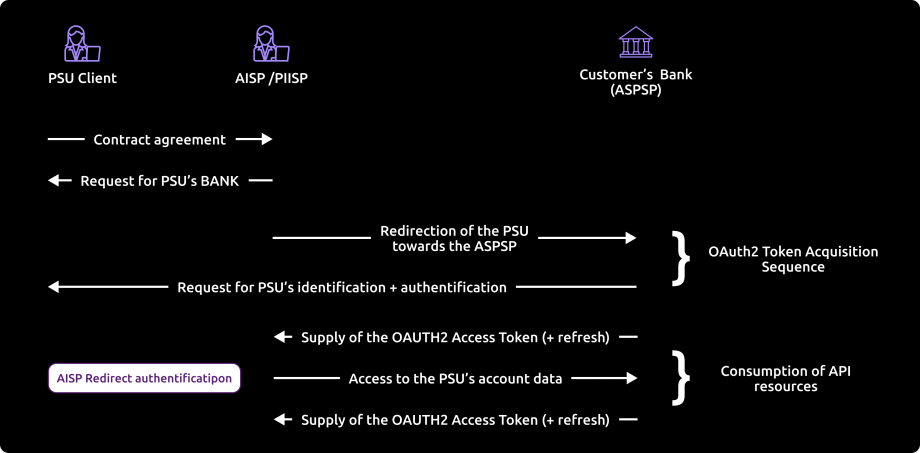
References
- Section 3.4.3.2 of the STET v1.4.0.47 specification: https://www.stet.eu/en/psd2/
- OAuth 2.0 Authorization Framework: https://tools.ietf.org/html/rfc6749#section-4.1
Step by step development
- The customer tells you the identity of his account-holding bank.
- You initiate the OAuth2 access token recovery sequence by redirecting the customer’s Internet browser to the account-holding bank’s authorisation IT infrastructure.
Details of the links and parameters are given below:
See also [STET Framework page 21].
GET /authorize?response_type=code&client_id={clientId}&redirect_uri={redirectUri}&scope={scope}[&state={state}]
| Name | Data | Type | |
|---|---|---|---|
| response_type | [1..1] | Expected type of token | String [10] => must be filled in with the “code” |
| client_id | [1..1] | Your identification as a TPP | String[34] => If the TPP was registered using the “GO Live” process via our 89C3 API portal (old procedure) · Must be equal to the “OrganizationIdentifier” part of the “Distinguished Name” of the eiDAS certificate, in accordance with the ETSI specification. · Approval number issued by your competent authority (PSDXX-YYYYYYY-ZZZZZZZZ) Or if the TPP was registered via PSD2 Registration API (current procedure) · Must be equal to the client_id returned in the POST /register response |
| redirect_uri | [0..1] [1..1] | URL for rerouting to your application | String [140] => mandatory field for Banques Populaires, Banque Palatine and Banque de Savoie |
| scope | [0..1] | Specifies the generic accreditations that both the PSU and the TPP agreed on : For AISP
For CBPII :
| String [140] => spaces delimit the list of roles |
| state | [0..1] | Internal state that you can use to manage the context | Chain [34] |
The account-holding bank (ASPSP) will :
- Identify and authenticate the customer using one of the strong authentication methods it offers and presents to the customer;
- Carry out checks related to your profile as an AISP or CBPII (validity of QWAC and QSealc certificates and your role in the market repository, non-revocation of your profile, etc.).
- Once these checks have been carried out and if they are conclusive, the bank will redirect our customer to your site using the “call-back” URL and the parameters below. Please note that you will need to provide us with this URL when you register as a TPP consumer of our APIs,
- or during the “GO Live” process via our 89c3 API portal (old procedure);
- or via the PSD2 Registration API (current procedure).
See also [STET Framework page 22].
| Name | Description | Type | |
|---|---|---|---|
| code | [1..1] | Short code used to retrieve the access token | Chain [34] |
| state | [0..1] | Internal status if supplied by you | Chain [34] |
- You can now request the OAuth2 access token directly from the bank via a POST call sent with the following parameters:
See also [STET Framework page 22].
| Name | Description | Type | |
|---|---|---|---|
| grant_type | [1..1] | Type of authorisation required | String [34] => must be filled in with the “authorization code”. |
| code | [1..1] | Short code previously supplied by ASPSP | Chain [34] |
| redirect_uri | [1..1] | TPP rerouting URL | String [140] => must be equal to the redirect_uri provided in the GET /token request. |
| client_id | [1..1] | TPP identification | String[34] => If the TPP was registered using the “GO Live” process via our 89C3 API portal (old procedure)
Or if the TPP was registered via the PSD2 Registration API (current procedure)
|
Example
POST /token HTTP/1.1 Host: server.example.com Authorization: Basic czZCaGRSa3F0MzpnWDFmQmF0M2JW Content-Type: application/x-www-form-urlencoded grant_type=authorization_code&code=SplxlOBeZQQYbYS6WxSbIA &redirect_uri=https%3A%2F%2Fclient%2Eexample%2Ecom%2Fcb &client_id={clientId}
The account-holding bank (ASPSP) will:
- Carry out checks related to your profile as an AISP or CBPII (validity of QWAC and QSealc certificates and your role, non-revocation of your profile, etc.).- Identify and authenticate yourself as an AISP or CBPII via your certificate, which you will make available to secure the mutual exchange
- Once these checks have been carried out and if they are conclusive, the bank will send you an HTTP 200 (OK) response containing the following data:
See also [STET Framework page 23].
| Name | Description | Type | |
|---|---|---|---|
| access_token | [1..1] | Access token provided by the ASPSP to the TPP | Chain [140] |
| token_type | [1..1] | Type of access token supplied (“Bearer” or “MAC”) | String [10] => must be filled with “Bearer”. |
| expires_in | [0..1] | Token lifetime, in seconds. The token can be used several times as long as it has not expired. | Digital |
| refresh_token | [0..1] | Refresh token that can be used in the event of a future token renewal request. | Chain [140] |
Example
HTTP/1.1 200 OK Content-Type: application/json;charset=UTF-8 Cache-Control: no-store Pragma: no-cache { “access_token”: “2YotnFZFEjr1zCsicMWpAA”, “token_type”: “example”, “expires_in”:3600, “refresh_token”: “tGzv3JOkF0XG5Qx2TlKWIA” }
- Once you have retrieved the OAuth2 access token issued by the bank (valid for 180 days), you can present it to use the API (see use cases for API methods).
Customer authentication
Customer identification methods
There are three different methods for identifying the customer, which must be relevant to the ASPSP (credit institution holding the account).
These are implemented in different ways:
- or during the authentication process (see section 3.4), for most AISP and CBPII use cases;
- either during consent, for example in the case of a payment request (see § 3.5)
Principle for the REDIRECT method > this method applies to Banques Populaires, Banque Palatine and Banque de Savoie
With this method, customer identification is carried out entirely by the ASPSP.
The AISP will direct the client to the ASPSP authentication service, which means that the client will temporarily leave the AISP interface to identify itself via the ASPSP interface.
If the AISP has already retrieved an identifier from the client that can be securely approved by the ASPSP, then in this case the identifier can be included in the redirection, provided that the redirection protocol allows this.
Once identification is complete, the ASPSP will redirect the customer to the AISP interface.
Exceptions to strong authentication
Exceptions to strong authentication are provided for in the technical regulatory standards (published by the European Banking Agency) relating to strong authentication and in particular to the initiation of payment services.
In this case, the API allows the TPP to provide any useful information to the ASPSP.
Ultimately, it is the ASPSP that is responsible for deciding whether or not to apply this exception.
API version decommissioning policy
The decommissioning policy is based on the API lifecycle, which is aligned with the versions of the STET specifications.
This is illustrated below for version N:

Decommissioning of API Version N
The decommissioning of our API version takes place in several steps:
Day of Deployment of the New API Version (T0):
Version N+1 is deployed to the 89C3 Live gateway.
Three Months Post Deployment (T0 + 3 Months):
Version N of the API is decommissioned from all environments (sandbox and live).
Communication regarding the decommissioning of version N will occur on the deployment date of version N+1.
The preferred communication channel is this Groupe BPCE API Store portal, in the "Roadmap" section of the impacted API.
An additional communication via email to the contacts of the providers registered on the Groupe BPCE API Store portal may complement this process.
Schedule of future functional changes to the API
The "Account Information Services" API undergoes continuous improvement and development throughout the year *.
(*) NB: article 30 (4) of the RTS specifies that significant changes to the API may be made without delay. We apply this clause in the following cases:
- blocking problem with a widespread impact on at least one of the major customer segments (individuals, professionals, businesses),
- safety issues,
- changes requested by the competent national authorities to meet the regulatory trajectory.
See below for our projected roadmap.
| API version | Version of the STET standard | Features | Sandbox Deployment date BPCE API Sandbox | Live Deployment date BPCE Live API Gateway | Live Deprecation date BPCE Live API Gateway |
|---|---|---|---|---|---|
| v1 | v1.4.0.47 |
| 14 March 2019
| 7 October 2019 | April 2023 |
| v1.4.2 | v1.4.2.17 |
| 8 July 2020 | 28 October 2020 | |
| v1.6.2 | v1.6.2.0 |
| 21 October 2022 | 8 February 2023 | |
| v1.6.2 | v1.6.2.0 |
| 29 March 2023 | 29 March 2023 | |
| v1.6.2 | v1.6.2.0 |
| 16 november 2023 | 22 november 2023 | |
| v1.6.2 | v1.6.2.0 | List current accounts and deferred debit cards of a PSU
| 16 november 2023 | 11 december 2023 |
Functional limitations
Limitations of this PSD2 API in version 1.6.2
- Applies to all Banques Populaires :
- BCP bank customers will have access to the payment initiation API in mid-June 2023, following the migration of BCP branches to BPALC bank with their Luxembourg IBAN.
- BCP bank customers will have access to the payment initiation API in mid-June 2023, following the migration of BCP branches to BPALC bank with their Luxembourg IBAN.
- Applies only to euro payment accounts that are active and accessible online (see text of the PSD2 Directive) => only current accounts will be returned
- Uses REDIRECT authentication mode only (Strong PSU authentication requested and managed via the bank)
NB: the TPP cannot provide the ASPSP with the customer’s personalised security data for authentication purposes, and therefore only the ASPSP’s redirection and strong authentication (SCA) screens must be used (encapsulation of these screens by the TPP is prohibited under PSD2 #97.5 and RTS #31).
- Implements the mixed AISP consent mode, but does not implement the full AISP consent mode:
- by default, if no consent has been given, all current accounts are accessible
- but details of current account balances and transactions, as well as card and invoice balances, are only available for current accounts for which consent has been given.
- Limits each method of this API to 4 batch accesses per calendar day (see use case for each method for details), but sets no limit when it is the connected PSU that queries its current accounts
- Does not retrieve transaction details
- Does not allow the list of trusted beneficiaries of a PSU to be retrieved: the notion of trusted beneficiary does not exist for Banques Populaires (<= a beneficiary registered and validated by strong authentication and for whom strong authentication is no longer required to validate a payment).
- The “aisp extended_transaction_history” mode is not supported: the transaction history depth is identical to that of fixed internet banking.
- Only allows access to the account via the IBAN of the payment account
- Only the GET /accounts, PUT /consents, GET /accounts/balances, GET /accounts/transactions, GET /accounts/owners, GET /accounts/overdrafts and GET /end-user-identity methods are available.
- Only active deferred debit cards that have been used (presence of a CB receipt on the card account) at least once in the last two months.
- The workspace parameter, which was introduced with the STET v1.6.2 standard, is ignored if it is filled in for all requests: the concept of workspace does not exist for Banques Populaires.
Limitations linked to customer segments
- The individual (PART) is a natural person categorised as a “capable adult”.
- The “professional” (PRO) and “company” (ENT) categories cover legal entities.
Limitations on the types of accounts accessible
- The accounts accessible via the AISP API are those available on the remote bank, namely :
- of legal age
- Mr and Mrs joint account
- Mr or Mrs joint account
- sole trader
- company
- attached minor
- emancipated minor
- As the following account is not accessible via remote banking, it is not accessible via the AISP API either:
- adult under guardianship
Limitations linked to the strong authentication method depending on the customer segment
- Private customer (PART): equipment with SMS OTP and/or Sécur’pass. Sécur’pass is triggered as a priority where appropriate.
- Professional customer (PRO): equipment with SMS OTP and/or Sécur’pass. Sécur’pass is triggered as a priority where appropriate.
- Corporate client (ENT): equipment with SMS OTP
The table below summarises the limitations by method for this API (field names are given in italics):
| Retrieve the list of current accounts and the deferred debit cards linked to these accounts (“GET /accounts” method) | Retrieval of current account balances and outstandings on deferred debit cards linked to these accounts (“GET /accounts/balances” method) | Retrieval of current account transactions and deferred debit card invoices linked to these accounts (GET /accounts/transactions method) | Recovery of authorised overdrafts on current accounts |
|
|
|
|
Pagination of results displayed
Two parameters are available for customising the pagination of the results displayed on the screen:
- the first concerns the number of accounts/cards per page in a GET /accounts request, with a default value of 100.
- the second concerns the number of transactions per page during a GET /accounts/transactions request. The default value is set to 200.
Access to production data
In accordance with the regulations, the Try-it and Assemble test modes only use fictitious data. This test data is described in the “How to test the API” section.
To access the real data, after testing your app in Try-it and sandbox assembly, you need to register as a TPP consumer of our APIs,
- or during the “GO Live” process via our 89c3 API portal (old procedure);
- or via the PSD2 Registration API (current procedure):

See PSD2/RTS Art. 30 (5). Payment service providers managing accounts shall make available a testing facility, including support and enabling connection and functional testing, so that authorised providers of payment initiation services, account information services and payment services that issue card-linked payment instruments or payment service providers that have applied for the necessary authorisation can test the software and applications they use to offer a payment service to users.
If the TPP was registered using the “GO Live” process via our 89C3 API portal (old procedure)
- A single consuming app can be declared by the TPP (same OID = client_Id), bearing in mind that it is possible to manage :
- white-label and third-party partnership models;
- several certificates per consuming app / TPP client_Id and several redirection URLs.
Or if the TPP was registered via the PSD2 Registration API (current procedure)
- Several consumer apps can be declared by the TPP for itself or its agent(s). For each, several certificates per consuming app / TPP client_Id and several redirection URLs can be managed.
The weekly Monday morning slot from 2am to 6am is used if necessary for backend / gateway maintenance and may generate KO requests until all the servers concerned have been updated for the establishment concerned.
As in test mode, the establishment code (see below) will enable you to address the correct client repository via the endpoint www.<codetab>.oba-bad-me-live-api.89c3.com or www.<codetab>.oba-bad-me-live-api.banquepopulaire.fr aligned to the direct access domain name www.banquepopulaire.fr
(new URL to be taken into account from now on)
(As a reminder, the existing URL www.<codetab>.live.api.89C3.com will no longer be available as of 28/09/2025)
Once chosen, this access point must be retained for all underlying requests.
| Bank code | Bank name | Bank short name | Available for tryIt and sandbox | Available for live operations |
|---|---|---|---|---|
| 10807 | B.P Bourgogne Franche Comté | BPBFC | – | Yes |
| 16807 | B.P AUvergne et Rhône-Alpes | BPAURA | – | Yes |
| 10207 | B.P RIves de Paris + BICS | BPRI | – | Yes |
| 18707 | B.P Val de France | BPVF | – | Yes |
| 13507 | B.P du Nord | BPN | – | Yes |
| 16607 | B.P Sud | BPS | – | Yes |
| 10907 | B.P Aquitaine Centre Atlantique | BPACA | – | Yes |
| 10907 | CMM Littoral du Sud Ouest | CMSOU | – | Yes |
| 14707 | B.P Alsace Lorraine Champagne | BPALC | – | Yes |
| 17807 | B.P OCcitane | BPOC | – | Yes |
| 13807 | B.P Grand Ouest | BPGO | Yes | Yes |
| 13807 | CMM Grand Ouest | CMMGO | Yes | Yes |
| 14607 | B.P Méditerranée | BPMED | – | Yes |
| 10548 | Banque de Savoie | BQSAV | – | Yes |
| 40978 | Banque Palatine | BQPA | – | Yes |
Eligibility
The “Account Information Services” API resources can only be used by Payment Service Providers (PSP) having a Account Information Service Providers (AISP) role. This status is issued by the financial authorities of the country in which the request is made; in France this is the Autorité de Contrôle Prudentiel et de Résolution (ACPR), linked to the Banque de France.
Obtaining and maintaining authorisation is subject to rigorous procedures designed to provide strong guarantees to users of payment services. The forms are available on the ACPR website:
https://acpr.banque-france.fr/autoriser/procedures-secteur-banque/tous-les-formulaires.
Once approval has been given, the format of this identifier (Organisation Identifier = OID) provided by the competent authority is :
PSDXX-YYYYYYY-ZZZZZZZZ:
- XX =>ISO 3166 country code of the competent authority
- hyphen-minus “-” (0x2D (ASCII), U+002D (UTF-8))
- YYYYYYYY => 2-8 character identifier of the competent authority (A-Z, no separator)
- hyphen-minus “-” (0x2D (ASCII), U+002D (UTF-8))
- ZZZZZZZZ => PSP identifier specified by the competent national authority (no restriction on the number – or type – of characters used)
This OID identifier is important for 2 reasons:
- it will be used to identify you in STET API request calls (via the “client_id” parameter)
- it must be included in the eIDAS certificates that you provide to the account holder (see below)
In addition, you must have certificates issued by a recognised certification authority (Qualified Certification Service Providers – QTSP: https://webgate.ec.europa.eu/tl-browser/#/) that comply with the eIDAS regulation (electronic IDentification And trust Services: https://www.ssi.gouv.fr/entreprise/reglementation/confiance-numerique/le-reglement-eidas/) and comply with the ETSI standard (https://www.etsi.org/deliver/etsi_ts/119400_119499/119495/01.02.01_60/ts_119495v010201p.pdf).
In order to use the PSD2 APIs offered on this portal, the TPP must register its app and send us production certificates signed by an approved certification authority via our PSD2 Registration API:
- an initial set of QWAC (for mutual TLS authentication) and QSEALC (to be loaded onto our gateway via the PSD2 Registration API) certificates for the sandbox
- another set of QWAC certificates (for mutual TLS authentication) and QSEALC certificates (to be loaded onto our gateway via the PSD2 Registration API) for production purposes
IMPORTANT NB: in the event of certificate renewal, and if the certification authority (QTSP) is different (or it is the same QTSP company but using different root keys), the TPP must notify the API support available via this site 2 months in advance in order to check that the elements of the new certification authority have been loaded onto our infrastructures.
A keyID identifier must also be provided in a format that complies with the STET specification integrating a SHA256 fingerprint after the “_” char character, see example in the STET Part 3 / Interaction Examples documentation: keyId=https://path.to/myQsealCertificate_612b4c7d103074b29e4c1ece1ef40bc575c0a87e.
Only public keys in .pem format are required. Checks on certificate data will be carried out using the French (REGAFI: https://www.regafi.fr) and European (ABE or EBA: https://euclid.eba.europa.eu/register/pir/disclaimer) registers.
History
Version history
STET Compliance
This REST API complies with the French interbank specification STET (https://www.stet.eu/en/psd2/), version v.1.6.2.0, in order to meet the regulatory requirements of PSD2. It takes into account the functional limitations specific to Banques Populaires described in the “Limitations” section.

As a reminder:
- the texts of Payment Directive number 2 (PSD2, EU reference 2015/2366 of 25/11/2015) came into force on 13 January 2018: http://eur-lex.europa.eu/legal-content/FR/TXT/?uri=CELEX:32015L2366
- They have been supplemented by regulatory technical standards (RTS, EU Delegated Regulation 2018/389) relating to strong customer authentication and common secure open communication standards, which will come into force on 14 September 2019. These standards are the RTS (Rules Technical Standards): https://eur-lex.europa.eu/legal-content/FR/TXT/?toc=OJ%3AL%3A2018%3A069%3ATOC&uri=uriserv%3AOJ.L_.2018.069.01.0023.01.FRA
In France, Order 2017-1252 of 9 August 2017 transposes the PSD2 Directive into the legislative part of the Monetary and Financial Code. The Order is supplemented at regulatory level by Decrees 2017-1313 and 2017-1314 of 31 August 2017 and the five Orders of 31 August 2017.
Description of user support + duration of support
According to Article 30 (5) of the RTS, a support for third-party providers is available.
This support can be joined via the form on this Groupe BPCE API Store.
Responses are sent during office opening hours (09:00 – 18:00 Central European Local Time). However, there is a 24/7 monitoring process for our IT systems.
The general principle of TPP support is outlined below, taking into account delays of Article 30 (4) of the RTS :
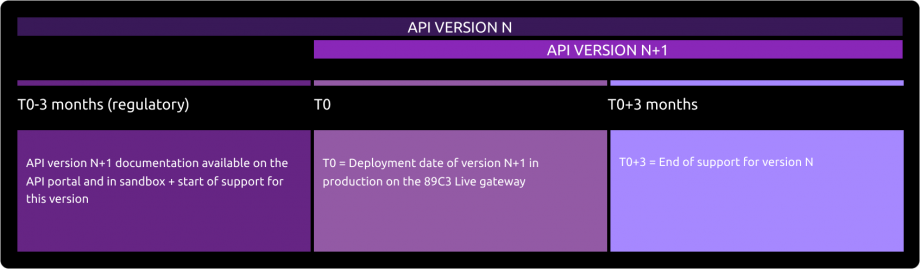
Deployment of API Version N+1
The deployment of the new version of our API takes place in several stages:
Before Deployment (T0 - 3 months):
The documentation for API version N+1 is available on the API Store.
Version N+1 is accessible in the testing environment (sandbox).
Support for the new version is activated.Day of Deployment (T0):
Version N+1 is deployed on the 89C3 Live gateway.
Three Months After Deployment (T0 + 3 months):
Support for API version N is discontinued.
To query an API, the API version includes the version number in the URI called, for example: /stet/psd2/v1.6.2/accounts.
The “Roadmap” section gives the table of correspondence between the API version and the version of the specification used, for example :
- v1 of the API corresponds to version V1.4.0.47 of the STET specifications;
- 4.2 corresponds to version V1.4.2.17 of the STET specifications;
- 6.2 corresponds to version V1.6.2.0 of the STET specifications.
API versioning
| Our API version | STET standard version |
|---|---|
| v1 | v1.4.0.47 |
| v1.4.2 | v1.4.2.17 |
| v1.6.2 | v1.6.2.0 |
Important changes made since the first version delivered
| Use case / Method(s) | Effective date | Description of the evolution |
|---|---|---|
| GET/transactions | 02 May 2019 | Changing the format of the “remittanceInformation” field :
Portal documentation: examples updated. |
| GET/accounts GET/transactions | 02 May 2019 | Changing the name of the “resourceId” field :
Portal documentation: examples updated. |
| GET/accounts GET/transactions GET/balances PUT/consent | 17 May 2019 | Portal documentation: clarification added on the mandatory or optional nature of query parameters and fields. |
| GET/transactions | 17 May 2019 | Refreshment of test data (personas): depth of history over 3 monthsPortal documentation: examples updated. |
| GET/transactions | 29 May 2019 | Correction to the rule for retrieving the list of transactions when the “afterEntryReference” parameter is set: the transaction corresponding to the “afterEntryReference” parameter is not included in the list retrieved, only transactions with a technical identification greater than this value are included in the result. |
| OAuth2 authentication and access token | 21 June 2019 | Portal documentation: correction of links and parameters in the description of the OAuth2 access token recovery sequence. the ‘redirect_url’ parameter has been replaced by ‘redirect_uri’ in the GET request the ‘response_type’ parameter has been replaced by ‘response_type’. |
| All | 31 July 2019 | Portal documentation: description of the target sandbox assembly at the end of August 2019: addition of details (limitations, examples, availability date, etc.) on all API use cases. |
| Sandbox assembly | 18 September 2019 | Portal documentation: description of the sandbox assembly completed. Modified roadmap for sandbox and live. |
| Eligibility | 10 October 2019 | Portal documentation :
|
| All | 18 October 2019 | Portal documentation :
|
| Sandbox assembly / How to recover your OAuth2 access token | 13 November 2019 | Portal documentation :
|
| How to use fallback | 21 November 2019 | Portal documentation :
|
| Test our personas | 23 December 2019 | Portal documentation :
|
| GET /transactions | 24 December 2019 | Portal documentation :
|
| Version history / roadmap | 30 December 2019 | Portal documentation :
|
| Version history / roadmap | 31 March 2020 | Portal documentation :
|
| All | 8 July 2020 | Portal documentation :
|
| GET /transactions | 12 April 2021 | Portal documentation :
|
| GET /transactions | 11 May 2021 | Portal documentation :
|
| All | 19 July 2021 | Portal documentation :
|
Fallback
Access token | 29 September 2021 | Portal documentation :
|
| GET /balances | 6 April 2022 | Portal documentation :
|
| Overview | 28 August 2022 | Editorial changes and addition of the App2App case study |
| All | 26 September 2022 | Portal documentation :
Transverse :
|
| Transactions / Limitations | 29 March 2023 | Portal documentation :
|
| All | 22 May 2023 | Portal documentation :
|
| All | 26 January 2026 | Portal documentation :
|