








Overview
The expected benefits
Together, let’s harness the full potential of the European payment account information opening.

This AISP DSP2 API product allows you to securely access transaction data for customer payment accounts.

Secure Data Access
Access customers' payment account information through a secure and regulatory-compliant device.

Value Creation
Enhance your offerings and products to better serve your clients through innovative use cases.
The connection is made through a secure device compliant with European regulatory requirements. By accessing this account information service, your customers will be able to view their payment account information within your environment: account list, balances, transactions (date, description, and amount), etc.
You will thus be able to enhance the added value of your products/services to serve your clients through innovative use cases: account consolidation, accounting reconciliation, customer knowledge enrichment, budget analysis and forecasting, etc.
The different possible use cases
Together, let's create value for our shared clients.

Consolidation
Allow your clients to aggregate their payment accounts to have a consolidated and real-time view of their transactions.
Accounting Reconciliation
Enable your corporate clients to reconcile their invoices and business expenses with their payment transactions.
Customer Insights
Understand and learn from the payment behavior of your individual or corporate clients.
Business Management
Leverage customer payment data to build high-value management dashboards.
How to access the product ?
To access the Account Information Services API, developers and businesses must follow the steps below.
Contact
Get in touch with the product managers.
Access
Enroll directly through the dedicated process (regulated entities).
Integration & Testing
Integrate our service into your solution and share your use cases with us to help ensure the quality of our offering.
Go Live !
Documentation
Guides
Access to customer authorized data
Description of Services Provided [STET V1.6.2 NORM]
Retrieving the authorization token
The client (PSU) must indicate the identity of their account-holding bank to the AISP.
The AISP then initiates the sequence for retrieving the OAuth2 access token by redirecting the client through their internet browser to the account-holding bank's authorization infrastructure.
The account-holding bank (ASPSP) will:
- Identify and authenticate the PSU client using one of the strong authentication methods previously offered to the client.
- Request consent from the client through information input screens.
Once these checks are completed and if they are successful, the bank will redirect the client to the AISP's site using the previously transmitted "call-back" (redirection) URLs and certain parameters.
The AISP will then be able to directly request the OAuth2 access token from the bank via a POST type call.
The account-holding bank (ASPSP) will then:
- Identify the AISP and authenticate it as a TPP using the X509 certificate provided to secure the mutual exchange.
- Perform checks related to the TPP's profile (validity of eIDAS certificates and the AISP role in the registry, non-revocation of DSP2 authorization, etc.).
Once these checks are completed and if they are successful, the bank will send an HTTP 200 (OK) response to the AISP with a number of data points.
As soon as the OAuth2 access token issued by the bank has been retrieved by the AISP, it can present it to access the API resources.
Note: You can refer to the use case "How to retrieve your OAuth2 access token ?" for more details.
Obtain the list of a client's current accounts
Description
This call allows retrieving the list of current accounts of the PSU for which the AISP is connected.
Each account is returned with links to consult balances or outstanding amounts, as well as the transactions associated with it.
The resource identifier provided for each account will serve as a parameter for the requests to retrieve balances and transactions.
Pagination of the returned list can be implemented if the number of accounts is high; in this case, links to access the first page, the previous page, the next page, and the last page will facilitate the consultation of results.
Access to this method is limited to a maximum of 4 batch accesses per calendar day, for a client or for a TPP, excluding pagination.
Prerequisites
- The TPP is listed in the authorization registry with the role of AISP.
- The TPP and the PSU are linked to the ASPSP by a contract.
- At this stage, an OAuth2 authorization code (or access token) has been issued to the TPP by the ASPSP.
- The TPP and the ASPSP have mutually verified and authenticated each other.
- The TPP has provided its access token so that the ASPSP can identify the PSU and retrieve the associated context.
- The ASPSP has taken into account the access token that establishes the link between the PSU and the AISP.
- The TPP has previously retrieved the list of accounts available for the PSU.
Data Exchange
The TPP sends a request to the ASPSP to retrieve the list of the PSU's accounts. The ASPSP obtains the list of the PSU's accounts and creates a list.
The obtained result can be paginated to distribute the data across multiple pages, making it more readable.
Each account will be detailed with its characteristics.
Refer to the use case "Obtain the list of a client's current accounts" under the "Use cases" section.
Obtain the list of a client's balances
Description
This call allows retrieving the list of balances for a current account of the PSU for which the AISP is connected.
This service follows the retrieval of the list of a client’s accounts and cards: a resource identifier corresponding to an account must be provided to obtain the list of balances.
According to STET specifications, four types of balances can be returned for a given account passed as a parameter:
- Value ("VALU" in STET standard) => not applicable
- Accounting ("CLBD" in STET standard) => accounting balance at the end of the period (week / month / quarter / semester / year)
- Snapshot ("XPCD" in STET standard) => not applicable
- Other ("OTHR" in STET standard) => not applicable
Pagination of the returned list can be implemented if there are many data points to display; in this case, links to access the first page, the previous page, the next page, and the last page will facilitate the consultation of results.
Access to this method is limited to a maximum of 4 batch accesses per calendar day, for a client, for an account, or for a TPP.
Prerequisites
- The TPP is listed in the authorization registry with the role of AISP.
- The TPP and the PSU are linked to the ASPSP by a contract.
- At this stage, an OAuth2 authorization code (or access token) has been issued to the TPP by the ASPSP.
- The TPP and the ASPSP have mutually verified and authenticated each other.
- The TPP has provided its access token so that the ASPSP can identify the PSU and retrieve the associated context.
- The ASPSP has taken into account the access token that establishes the link between the PSU and the AISP.
- The TPP has previously retrieved the list of available current accounts for the PSU.
Data Exchange
The AISP requests the ASPSP for one of the PSU’s current accounts or one of the deferred debit cards.
The ASPSP responds by sending the list of balances for the account.
The ASPSP must provide at least the accounting balance of the account.
The ASPSP may provide other balances if possible.
From a DSP2 perspective, all balances proposed by the ASPSP via its web banking service must come from the Account Information API.
Refer to the use case "Obtain the list of a client's account balances" under the "Use cases" section.
Obtain the list of a client's transactions
Description
This call allows retrieving the list of transactions for a current account of the PSU for which the AISP is connected.
The transactions obtained are from the last 90 days relative to the current date.
Pagination of the returned list can be implemented if there are many data points to display; in this case, links to access the first page, the previous page, the next page, and the last page will facilitate the consultation of results.
This service follows the retrieval of the list of a client’s current accounts: a resource identifier corresponding to an account must be provided to obtain the list of transactions.
Access to this method is limited to a maximum of 4 batch accesses per calendar day, for a client, for an account, or for a TPP, excluding pagination.
Prerequisites
- The TPP is listed in the authorization registry with the role of AISP.
- The TPP and the PSU are linked to the ASPSP by a contract.
- At this stage, an OAuth2 authorization code (or access token) has been issued to the TPP by the ASPSP.
- The TPP and the ASPSP have mutually verified and authenticated each other.
- The TPP has provided its access token so that the ASPSP can identify the PSU and retrieve the associated context.
- The ASPSP has taken into account the access token that establishes the link between the PSU and the AISP.
Data Exchange
The AISP requests the ASPSP for one of the PSU’s current accounts or deferred debit cards. It may provide certain selection criteria.
The ASPSP responds with a list of transactions corresponding to the request.
The obtained result can be paginated to distribute the data across multiple pages, making it more readable.
Refer to the use case "Obtain the list of a client's account transactions" under the "Use cases" section.
Management of a client's consent
Description
This call allows recording the consent of a PSU (Payment Service User) for which the AISP (Payment Service Provider) is connected.
This consent contains the details of the accesses granted by the PSU. Four types of access can be defined:
- Balances: access to the balances of one or more of the PSU's accounts
- Transactions: access to the transactions of one or more of the PSU's accounts
- TrustedBeneficiaries: access to the list of the PSU's trusted beneficiaries
A consent record is thus created for a given PSU, a given AISP, a given operation, and a given account (except for the trustedBeneficiaries access).
Each new call from the AISP to the consent registration service for a given PSU will nullify and replace the previous consent, if applicable.
Furthermore, at the PSU's request, the consent can be modified later by type of operation: for example, consent for access to the transaction history can be revoked while consent for balances remains active.
Consent is verified with each request made.
Prerequisites
- The provider is listed in the TPP registry with the role of AISP.
- The TPP and the PSU are linked to the ASPSP by a contract.
- At this stage, an OAuth2 authorization code (or access token) has been issued to the TPP by the ASPSP.
- The TPP and the ASPSP have mutually verified and authenticated each other.
- The TPP has provided its access token so that the ASPSP can identify the PSU and retrieve the associated context.
- The ASPSP has taken into account the access token that establishes the link between the PSU and the AISP.
Data Exchange
The PSU communicates to the AISP the list of accounts and functionalities for which consent is granted.
The AISP transmits this information to the ASPSP.
The ASPSP responds with an HTTP status code 201.
Using fallback
Principle
In accordance with the regulations, Groupe BPCE institutions have set up a dedicated interface for payment service providers: the published PSD2 REST APIs.
If the exposed PSD2 APIs fail, the payment service provider can use the “fallback” solution, which is based on the following principle:
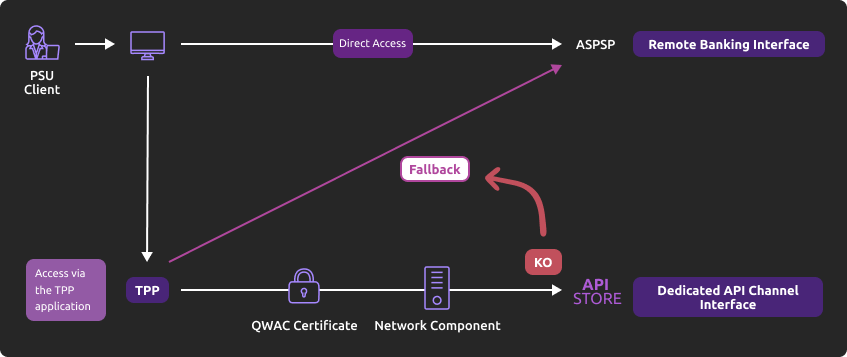
This solution meets the regulatory requirements of PSD2 (article 33 of the RTS). You can use it under the same conditions and prerequisites described in the “Eligibility” section.
Main features
- Use by the TPP (Third Party Provider) of the same endpoint as the dedicated interface.
- A query parameter (header "fallback:1" present or absent) added by the TPP allows distinguishing a "Fallback" request from an API request via the dedicated interface, which must always be used systematically.
- TPP authentication via mutual TLS authentication using an eIDAS certificate (QWAC).
- Security measures identical to those for accessing the online banking of the PSU (Payment Service User) (the same interface used by the PSU for direct access, and the same customer authentication methods)
- In the context of the increased use of the dedicated interface (API), dynamic switching is not implemented: the fallback solution is always active.
- The fallback solution is a backup solution that should not be used as the primary means of access to provide PSD2 services. Its usage is monitored, and any abusive use by one or more TPPs will be automatically reported to the competent national authority.
Example
In the event that the DPS2 APIs are unexpectedly unavailable or the system fails (see criteria in RTS Art. 33), the TPP can send the request :
POST https://www.18919.oba-bad-me-live-api.natixis.com/stet/psd2/oauth/token
with :
- its eIDAS QWAC production certificate
- the header parameter (fallback: “1″)
Image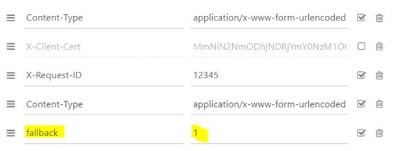
POST /stet/psd2/oauth/token HTTP/1.1
Content-Type: application/x-www-form-urlencoded
X-Request-ID: 1234
fallback: 1
User-Agent: PostmanRuntime/7.16.3
Accept: */*
Cache-Control: no-cache
Host: www.17515.live.api.caisse-epargne.fr
Accept-Encoding: gzip, deflate
Content-Length: 67
Connection: keep-alive
client_id=PSDFR-ACPR-12345&grant_type=client_credentials&scope=aisp
If the checks are positive, we will return a header url of the type to be used as part of the redirection to the online banking environment, and which contains a JWT token (“&fallback=” fields) which must also be used in this context:
HTTP/1.1 302 Found
Date: Tue, 25 May 2021 21:46:59 GMT
Location: https://www.caisse-epargne.fr/se-connecter/sso?service=dei&cdetab=17515&fallback=eyJ0eXAiOiJKV1QiLCJhbGciOiJSUzI1NiIsIng1dCI6ImhF…
Content-Length: 870
Connection: close
Content-Type: text/html; charset=iso-8859-1
</head><body>
<h1>Found</h1>
<p>The document has moved <a >here</a>.</p>
</body></html>
- Once redirected, the TPP must then use the PSU’s identifiers via its proprietary method
For more details on the POST request, see STET V1.6.2.0 / Part I / section 3.4.3
Limits
The constraints of this solution are as follows:
- No reuse of the context of the dedicated interface, nor of the access token (currently valid for 180 days).
- Only the PSD2 features available on online banking (reference: remote banking via fixed internet) are accessible via the fallback. For example, online banking services do not offer e-commerce payment (this PISP functionality is therefore not available in fallback mode).
- The client utilizing the services (PSU) must be connected to the TPP application (no possibility for AISP batch processing to retrieve the customer's consented data). PSD2 also mandates a systematic strengthening of strong authentication methods (AF/SCA) for access to remote/online banking; the authentication methods provided to PSU clients will be used (non-exhaustive list):
- Soft token Sécur’Pass
- OTP SMS
- Physical key (for businesses)
Regulatory publications
How to retrieve your OAuth2 access token ?
1. You send a request directly to the authorization IT infrastructure of the account-holding bank; the details of the links and parameters are provided below
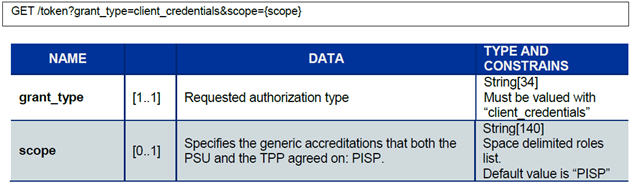
2. The account-holding bank (ASPSP) will perform checks related to your profile as a TPP (validity of certificates and your role in the marketplace registry, non-revocation of your profile, etc.).
3. Once these checks are completed and if they are successful, the bank will respond with an HTTP 200 (OK) code and the following data:
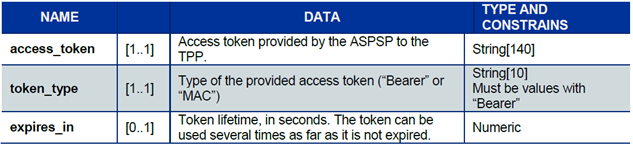
The access token must be used in all requests in the "Authorization" header prefixed by the token type "Bearer."
If the token has expired, the request will be rejected with an HTTP 400 code and data indicating "Invalid Token."
This request can be resent once a new Client Credential type access token has been requested and obtained.
Please note that the maximum lifespan of an access token is currently 180 calendar days.
Obtain the list of a client's current accounts
Use case
This service allows listing all accounts eligible* for PSD2.
Note (*) : active payment accounts accessible online, namely sight accounts for professionals and businesses managed by this account holder.
Prerequisites
This call retrieves the list of payment accounts of the PSU (payment service user) for which the AISP (account information service provider) is connected.
Each account is returned with links to consult the balances or outstanding amounts as well as the transactions associated with it.
Pagination of the returned list can be done if the number of accounts is high; in this case, navigation links providing access to the first page, previous, next, and last pages will facilitate the consultation of results.
A self-link will also be present to return to the page obtained just after executing the request.
Access to this method is limited to a maximum of 4 batch accesses per calendar day for a TPP without customer connection, excluding pagination.
Request
GET /accounts
Parameter
No specific parameter is required when calling this service (other than the OAuth2 token).
Example
GET www.18919.sandbox.api.89c3.com/stet/psd2/v1.6.2/accounts
Obtain the list of a client's account balances
Prerequisites
This call retrieves the balance of a payment account of the PSU (payment service user) for which the AISP (account information service provider) is connected.
This service follows the retrieval of the customer's payment accounts list: a resource identifier corresponding to an account must be provided to obtain the list of balances.
One type of balance is returned for the specified account: the accounting balance (“CLBD” in the STET standard) as of the previous day (D-1).
A self-link will be present to return to the page obtained just after executing the request.
Access to this method is limited to a maximum of 4 batch accesses per calendar day for a client, for an account, or for a TPP.
Request
GET /accounts/{accountRessourceId}/balances
Parameters
Parameter “accountRessourceId”: payment account for which we want to consult the balances; this data corresponds to the “resourceId” section obtained in the results page of the request GET /accounts.
Example
Request
GET www.18919.sandbox.api.89c3.com/stet/psd2/v1.6.2/accounts/EURFR353000799999A40166510B
Obtain the list of a client's account transactions
Prerequisites
This call allows retrieving the list of transactions for a payment account of the PSU (payment service user) for which the AISP (account information service provider) is connected.
The transactions obtained are for a period not exceeding 90 days from the current date.
Pagination of the returned list can be done if there is a large amount of data to display; in this case, navigation links providing access to the first page, previous, next, and last pages will facilitate the consultation of results (see the “Limitations” section for the maximum number of results returned per page).
A self-link will also be present to return to the page obtained just after executing the request.
This service follows the retrieval of the customer's payment accounts list: a resource identifier corresponding to an account must be provided to obtain the list of transactions.
Access to this method is limited to a maximum of 4 batch accesses per calendar day for a client, for an account, or for a TPP, excluding pagination.
Request
GET /accounts/{accountRessourceId}/transactions
Parameters
Parameter accountRessourceId: payment account for which we want to consult the transactions; this data corresponds to the “resourceId” section obtained in the results page of the request GET /accounts.
Optional parameters:
- dateFrom (start date limit for the searched transactions)
- dateTo (end date limit for the searched transactions)
- afterEntryReference (minimum increment reference for the technical identifier)
Example
Request
GET www.18919.sandbox.api.89c3.com/stet/psd2/v1.6.2/accounts/EURFR353000799999A40166510BB25/transactions
Sandbox assembly
Sandbox
The Developer API Sandbox can be used directly via the AISP application by calling the APIs of the developer-API platform (sandbox assembly).
In the sandbox assembly, there are 2 calls:
- The first to retrieve the authorization token
- The second to make the API call
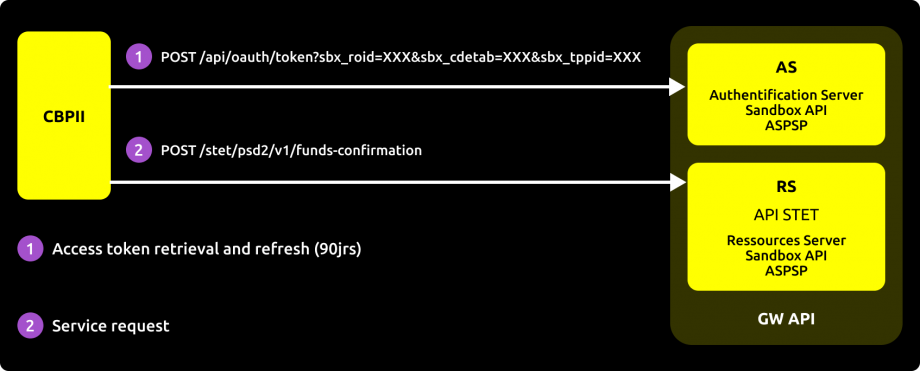
Explanations
The consumer application of the Sandbox APIs will need to retrieve an access token via its authentication key from the AS (Authentication Server).
This way, the application can consume the APIs using its access token.
API calls can be chained: first retrieving a list of sight accounts, and then executing a second request to obtain the balance of one of the accounts from the list by passing the "resourceId" obtained from the result of the first request as a parameter.
The data used for testing will come from personas, allowing the selection of specific profiles according to the tests in order to better understand the results obtained.
If necessary, pagination of results will be implemented to facilitate readability, and navigation links between different pages of results will be provided (see the examples in the use cases for obtaining accounts, balances, and transactions), which implies that the consuming application must be able to handle this pagination correctly.
Manage errors
Here is the list of error code descriptions for each method :
- Obtain the list of accounts: GET /accounts
- Obtain the list of balances: GET /accounts/{accountRessourceId}/balances
- Obtain the list of transactions: GET /accounts/{accountRessourceId}/transactions
| Error Code | Description of the Error |
|---|---|
| AC01 (CFONB) | IncorrectAccountNumber: the account number is incorrect or unknown |
| AC04 (CFONB) | ClosedAccountNumber: the account is closed |
| AC06 (CFONB) | BlockedAccount: the account is blocked / subject to opposition |
| BE05 (CFONB) | UnrecognisedInitiatingParty: the AISP is unknown |
| BADS | BadScope: the service call was made with a PIISP token (AISP expected) |
| INTE | InternalError: there is an internal processing error |
| INTS | InternalServerError: there is an internal communication error with the information system |
| IPGN | InvalidPageNumber: the page number is invalid |
| NGAC | NotGrantedAccount: the account is not consented |
| NIMP | NotImplemented: the wrong verb is called (GET expected) |
| TMRQ | TooManyRequest: the maximum number of requests has been exceeded |
| IPSU | InvalidPSU: subscriber number not referenced or cyber subscription terminated |
Roadmap
The account information API is subject to ongoing improvements and developments throughout the year.
Functional limitations
The limitations of this API are as follows:
- It applies only to cash accounts in euros that are eligible (not blocked or under escrow) and accessible online (see the text of the PSD2 Directive).
- It does not allow retrieving the list of a client's trusted beneficiaries (this concept does not exist), nor the identity of the client using the payment service (first and last name).
- It uses only the redirection authentication method (Strong Customer Authentication required and managed through the client's account-holding bank).
- The transaction history depth is the same as that of the fixed internet online banking, with a maximum of 50 days.
- The mode "aisp extended_transaction_history" is not supported.
- Access to the account is only allowed via the IBAN of the payment account; however, the IBAN is not returned in the response.
- Limited to 4 batch accesses per day for each of the methods of this API (see the text of the PSD2 Directive).
- Transitioning to V1.6.2 will not allow for a coexisting period with the STET V1.4.0 version (v1 of the API).
Access to production data
In accordance with regulations, the data provided via the portal and sandbox assembly are only fictitious data.
These test data are described in the use cases "How to Test the API".
To access production data, using the PDS2 Registration API is a prerequisite.
In order to address the correct backend, the endpoint is https://www.18919.oba-bad-me-live-api.natixis.com (new URL to be taken into account from now on)
As a reminder, the existing URL www.<codetab>.live.api.89C3.com is no longer available.
| Code | Abbreviated Bank Name | Full Bank Name |
|---|---|---|
| 18919 | NWM | Natixis Wealth Management France |
Eligibility
The resources of the "Account Information Services" API can only be consumed by PSPs with the aggregator role (AISP). This status is granted by the financial authorities of the country where the application is made; in France, this is the Prudential Control and Resolution Authority (ACPR), linked to the Bank of France.
Obtaining and retaining accreditation involves rigorous procedures to provide strong guarantees to users of payment services, with the forms available on the ACPR website: https://acpr.banque-france.fr/autoriser/procedures-secteur-banque/tous-les-formulaires.
Once the accreditation is granted, the format of this identifier (Organisation Identifier = OID) provided by the competent authority is:
PSDXX-YYYYYYYY-ZZZZZZZZ:
- XX => ISO 3166 country code of the competent authority
- hyphen-minus "–" (0x2D (ASCII), U+002D (UTF-8))
- YYYYYYYY => 2-8 characters from the competent authority's identifier (A-Z, no separator)
- hyphen-minus "–" (0x2D (ASCII), U+002D (UTF-8))
- ZZZZZZZZ => identifier of the PSP specified by the national competent authority (no restrictions on the number – or type – of characters used)
This OID identifier is important for two reasons:
- It will be used to identify you when making calls in the STET API requests (via the "client_id" parameter).
- It must be present in the eIDAS certificates you provide to the account holder (see below).
Additionally, you must have certificates issued by a recognized certification authority (Qualified Certification Service Providers – QTSP: https://webgate.ec.europa.eu/tl-browser/#/) compliant with the eIDAS regulation (electronic IDentification And trust Services: https://www.ssi.gouv.fr/entreprise/reglementation/confiance-numerique/le-reglement-eidas/) and adhering to the ETSI standard (https://www.etsi.org/deliver/etsi_ts/119400_119499/119495/01.02.01_60/ts_119495v010201p.pdf).
To consume the PSD2 APIs offered on this portal, the TPP must enroll its app and send us via our PSD2 Registration API signed production certificates from an approved certification authority:
- A first set of QWAC certificates (for mutual TLS authentication) and QSEALC (to be uploaded to our gateway via the Register API) for the sandbox.
- Another set of QWAC certificates (for mutual TLS authentication) and QSEALC (to be uploaded to our gateway via the Register API) for production.
IMPORTANT NOTE: In the case of certificate renewal, if the certification authority (QTSP) is different (or if it is the same QTSP company but using different root keys), the TPP must notify the API support available via this site 2 months in advance to verify that the elements of the new certification authority are properly loaded onto our infrastructure.
A keyID identifier must also be provided in a format compliant with the STET specification, incorporating a SHA256 fingerprint after the "_" character, see example in the STET documentation Part 3 / Interaction Examples: keyId=https://path.to/myQsealCertificate_612b4c7d103074b29e4c1ece1ef40bc575c0a87e.
Only public keys in .pem format are required. Checks on the certificate data will be carried out based on French (REGAFI: https://www.regafi.fr) and European (ABE or EBA: https://euclid.eba.europa.eu/register/pir/disclaimer) registers.
History
Version history
This REST API is compliant with the French interbank specification STET (https://www.stet.eu/en/psd2/) in order to meet the regulatory requirements of PSD2. It takes into account the functional limitations described in the "Limitations" section.
As a reminder:
- The texts of the Payment Services Directive number 2 (PSD2, reference EU 2015/2366 of November 25, 2015) came into effect on January 13, 2018: http://eur-lex.europa.eu/legal-content/FR/TXT/?uri=CELEX:32015L2366.
- They were supplemented by the regulatory technical standards (RTS, delegated regulation EU 2018/389) related to strong customer authentication and common secure communication standards, which apply as of September 14, 2019. These standards are the RTS (Regulatory Technical Standards): https://eur-lex.europa.eu/legal-content/FR/TXT/?toc=OJ%3AL%3A2018%3A069%3ATOC&uri=uriserv%3AOJ.L_.2018.069.01.0023.01.FRA.
In France, Ordinance No. 2017-1252 of August 9, 2017, transposes the PSD2 directive into the legislative part of the Monetary and Financial Code. The ordinance is supplemented by regulatory decrees No. 2017-1313 and No. 2017-1314 of August 31, 2017, and by five orders of August 31, 2017.
Changes made since the first version
| Method(s) | Date | Description |
|---|---|---|
| POST /paymentRequest GET /paymentRequest | May 17, 2019 | Documentation: clarification on mandatory and optional parameters |
| Fallback | July 26, 2019 | Documentation: addition of emergency measures (Fallback) |
| All | September 18, 2019 | Documentation:
|
| All | December 21, 2020 | Documentation: addition of access point / section "Limitations" |
| Fallback | September 29, 2021 | Clarification that the accessing terminal identifier (TermId) must be provided in fallback requests |
| App2App | February 3, 2023 | Opening of the redirection service via the mobile app |
| All | January 26, 2026 | Documentation : correction of the URL from www.<cdetab>.oba-bad-me-live.api.89c3.com to www.<cdetab>.oba-bad-me-live-api.89c3.com |
| All | October 22, 2026 | Update of the URL. |