








Overview
The expected benefits
Together, let’s harness the full potential of the European payment account information opening.

This AISP PSD2 API product allows you to securely access transaction data for customer payment accounts from all institutions within the Banques Populaires network.

Secure Data Access
Access customers' payment account information through a secure and regulatory-compliant device.

Value Creation
Enhance your offerings and products to better serve your clients through innovative use cases.
The connection is made through a secure device compliant with European regulatory requirements. By accessing this account information service, your customers will be able to view their payment account information within your environment: account list, balances, transactions (date, description, and amount), etc.
You will thus be able to enhance the added value of your products/services to serve your clients through innovative use cases: account consolidation, accounting reconciliation, customer knowledge enrichment, budget analysis and forecasting, etc.
The different possible use cases
Together, let's create value for our shared clients.

Consolidation
Allow your clients to aggregate their payment accounts to have a consolidated and real-time view of their transactions.
Accounting Reconciliation
Enable your corporate clients to reconcile their invoices and business expenses with their payment transactions.
Customer Insights
Understand and learn from the payment behavior of your individual or corporate clients.
Business Management
Leverage customer payment data to build high-value management dashboards.
How to access the product ?
To access the Account Information Services API, developers and businesses must follow the steps below.
Contact
Get in touch with the product managers.
Access
Enroll directly through the dedicated process (regulated entities).
Integration & Testing
Integrate our service into your solution and share your use cases with us to help ensure the quality of our offering.
Go Live !
Documentation
Guides
How to aggregate data ?
A customer with accounts at various banks wishes to aggregate their data.
Using the “Account Information” API set up by banks (ASPSP), you can request real-time data authorized by the customer without needing their online banking credentials.
Thanks to the “Account Information Services” API provided by Banque Populaire, your institution can retrieve a customer's current accounts at each of the Banques Populaires banks where they hold accounts. For these accounts, depending on the customer consents you obtain and transmit, you can access their balances, transactions, linked delayed debit cards, outstanding amounts, and statements for these delayed debit cards.
You can access this API in batch mode to prepare the data returned to our customer on your application (up to four times a day). Upon the customer's request through their application, you can refresh this data without limitation.
API resources can only be consumed if you have obtained the Account Information Services Provider (“AISP”) status. This prerequisite is described in the section “Eligibility.”
Once that is done, the overall process is as follows :
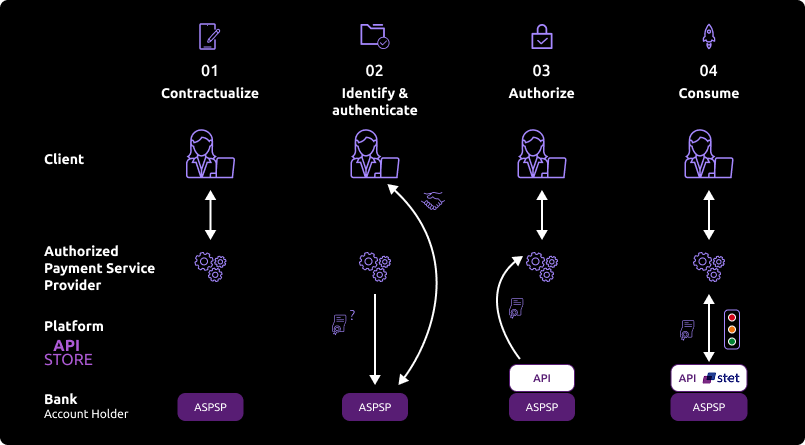
- The customer agrees to use your service and must select their Banque Populaire establishment through your interface.
During the initial data exchange, you will request an authorization token (and a refresh token). For this AISP role, you need these tokens BEFORE consuming API resources. These tokens are issued by Banque Populaire AFTER the identification and authorization process of the bank account holder.
Banque Populaire will:
- Check your certificates and the ongoing agreement provided by the Competent Authority.
- Identify and authorize the customer using the “redirect” mode to issue the tokens.
- If the customer grants access, you can obtain these OAuth2 tokens through secure exchanges (see use case “Retrieve your access token”).
- Whenever you present this token to the BPCE API gateway, you will be able to consume API resources to:
- Request the list of eligible accounts.
- Forward the customer’s consent to the ASPSP.
- Securely access the granted customer’s data (see use case “Consume the API”).
If the regulated 180-day token validity period expires, this process will need to be started again (see use case “Refresh your access token”).
Note: Any ASPSP can refuse access to the customer’s data for any justified reason (e.g., non-compliant API call, blocked account, etc.).
Consume the API
The features are described hereafter only from a functional standpoint. The technical aspects are included in the section "use cases".
You also need to be familiar with PSD2 terminology. You may use the FAQ.
Introduction – AISP mixed consent vs AISP full consent
The STET standard proposes two consent management models : the full-AISP model and the mixed model. The mixed model was the only one implemented.
The following process describes the implementation of this model, and especially the use of the PUT /consents request which allows the AISP to forward the details of the PSU consent.
This process summarizes the sequence of the AISP API requests calls from different methods of AISP API and token retrieval, to the accounts, delayed debit cards and their balances / transactions / outstandings and slips retrieval, as well as the customer identity retrieval.
Prerequisite
As TPP you have to be accredited by a national competent authority for this Account Information Service Provider ("AISP") role.
To access payment initiation API methods, you have to get an OAuth2 access token provided by customer’s banking institution, obtained with your credentials.
You and the customer’s banking institution have successfully processed a mutual check and authentication (exchange of eIDAS QWAC certificates).
Then, you present your OAuth2 access token to consume the account information API’s methods.
Use case : The AISP asks the customer (PSU) which banking institution (ASPSP) their account(s) are located in.

The authentication method supported by the institution is the REDIRECT approach: Authorization access as AISP granted by the connected PSU – retrieval of the initial access token valid for 180 days and the refresh token
The customer is redirected to identification screen proposed by his banking institution and he will enter his online banking identifier.
If the AISP provides client’s online banking identifier directly in this request, this step will be skipped.
The customer is redirected to a an authentication screen proposed by his banking institution to validate its identity.
The process for this step depends on SCA method provided to the customer by his bank (OTP SMS, Secur’pass, etc.).
It also depends on PSU’s device (PC, mobile, smartphone, tablet).
The customer is redirected to AISP’s APP.
The AISP provides a “call-back” URL (redirection) when he asks for an access_token : it we be called by customer’s bank.
First access to get the customer accounts list
To get the customer’s accounts list with a first access to the GET /accounts method by providing your access token for this customer (see use case “Get accounts list”).
You don’t have access to following informations:
- accounts balances;
- URI to
GET /accounts/balancesmethod; - URI to
GET /accounts/transactionsmethod; - URI to
GET /end-user-identitymethod; - URI to
GET /trustedBeneficiariesmethod => this feature is not available.
As long as you don’t transmit accounts consented by the customer by using method PUT /consents:
- You can always retrieve the customer accounts list with
GET /accountsmethod, but you won’t have more information than the first access with this method; - if you try to use the
GET /accounts/transactionsmethod, the request will be rejected; - if you try to use the
GET /accounts/balancesmethod, the request will be rejected; - if you try to use the
GET /end-user-identitymethod, the request will be rejected; - if you try to use the
GET /trustedBeneficiariesmethod, the request will be rejected => This service is not available : HTTP error code 501.
The client selects the accounts for which they consent to give you access through your App.
You ask the client to select the accounts to be accessed and the possible operations on their accounts (retrieval of balances, retrieval of transactions, etc.).
Transmission of consent
You send us the list of accounts that the client has consented to via the PUT /consents method by providing your access token for that client (see use case "Manage consent"). The HTTP code 201: created is returned.
You specify the list of accounts (IBAN) for which the client has consented to share the balances and/or transactions.
You specify whether the client has consented to the retrieval of trusted beneficiaries and to the retrieval of their first and last name.
If you have already submitted the consented accounts via the PUT /consents method, and subsequently the client modifies their consent, you will send the new list of consented accounts via the the PUT /consents method, which will have the effect of canceling and replacing the previous consent.
If you send an empty list of consented accounts for the balances and the transactions, and psuIdentity field and trustedBeneficiaries field with FALSE value, then it means there isn’t any consented account.
You can submit a list of consented viewable accounts without having used thethe GET /accounts method beforehand, for instance, if the client has directly provided you with the IBANs of their accounts.
Second access for a customer accounts list retrieval
You retrieve the client's list of accounts along with their details through a second access to the GET /accounts method by providing your access token for that client (see use case "List accounts").
You retrieve the following information :
- the consented accounts
- the delayed debit cards linked to consented accounts
- the consented accounts balances;
- URI to the
GET /accounts/balancesmethod for the consented accounts - URI to the
GET /accounts/transactionsmethod for the consented accounts - URI to the
GET /user-uder-identitymethod if the flagpsuIdentity= TRUE has been transmitted with thePUT /consentsmethod
You don't retreive the following information :
- URI to the
GET /trustedBeneficiariesmethod => this feature is not available.
Consented accounts balances and transactions retrieval, delayed debit cards outstandings and slips retrieval for the cards linked to consented accounts
For every consented account, you retrieve the accounts balances with an access to the GET /accounts/balances method by providing your access token for this customer (see use case “Get accounting balance”) and by using the URI previously transmitted by the GET /accounts method for the “_links” “balances”.
For every consented account delayed debit card, you retrieve the card outstandings with an access to the GET /accounts/balances method by providing your access token for this customer (see use case “Get accounting balance”) and by using the URI previously transmitted by the GET /accounts method for the “_links” “balances”.
For every consented account, you retrieve the account transactions with an access to the GET /accounts/transactions method by providing your access token for this customer (see use case “Get transactions history”) and by using the URI previously transmitted by the GET /accounts method for the “_links” “transactions”.
For every consented account delayed debit card, you retrieve the accounts slips with an access to the GET /accounts/transactions method by providing your access token for this customer (see use case “Get transactions history”) and by using the URI previously transmitted by the GET /accounts method for the “_links” “transactions”.
If you try to use the GET /accounts/transactions method for a non consented account ou for a non consented account linked delayed debit card, the request will be rejected.
If you try to use the GET /accounts/balances method for a non consented account or for a non consented account linked delayed debit card, the request will be rejected.
Get the customer’s identity
You retrieve the identity of the connected PSU through an access to the GET /end-user-identity method.
Accounts informations refresh in batch mode
For every customer and for every consented account or delayed debit card linked to an account of this customer, you can refresh the customer data (same as step “Second access for a customer accounts list retrieval” and “Consented accounts balances and transactions retrieval“)
The maximum limit of batch calls to GET /accounts method is up to 4 per day for one customer/account per access page.
The maximum limit of batch calls to GET /balances method is up to 4 per day for one customer/account.
The maximum limit of batch calls to GET /transactions method is up to 4 per day for one customer/account per access page.
The maximum limit of batch calls to GET /balances method is up to 4 per day for one customer/card.
The maximum limit of batch calls to GET /transactions method is up to 4 per day for one customer/card per access page.
The maximum limit of batch calls to GET /end-user-identity method is up to 4 per day for one customer per access page.
Accounts informations refresh on customer request from his mobile phone, for the customer and for every customer consented account
For every customer and every consented account or delayed debit card linked to a customer account, our customer can ask to refresh his data from your application (same as step “Second access for a customer accounts list retrieval” and “Consented accounts balances and transactions retrieval“)
No access limit for this case on contrary to the batch accesses.
If the 180-day token has expired, you must request a token refresh for the connected client.
- With the client connected to your application, you submit a token refresh request for this client (see use case "Refresh your token").
- The client is redirected to a login screen provided by their banking institution, where they will enter their online banking ID. If the AISP provides the client's online banking ID in their request, the next step is triggered immediately.
- The client is redirected to a strong authentication screen provided by their banking institution to validate their identity. The process for this step depends on the strong authentication method made available to the client by the banking institution (SMS OTP, secur’pass, etc.). It also depends on the device the client is using to run the PISP APP (PC or mobile/tablet).
- The client is redirected back to the AISP APP. The AISP provides a callback URL during their token retrieval request: this will be called by the banking institution.
You retrieve the refreshed token for this client and will be able to access the client's data again for 180 days using the methods of this API.
How to use the fallback mode
Principle
In order to comply with PSD2 regulation, ASPSPs from Groupe BPCE available on this Groupe BPCE API Store have set up contingency measures in case of unplanned unavailability of the dedicated API interface.
The principle of this "fallback" solution is explained below:
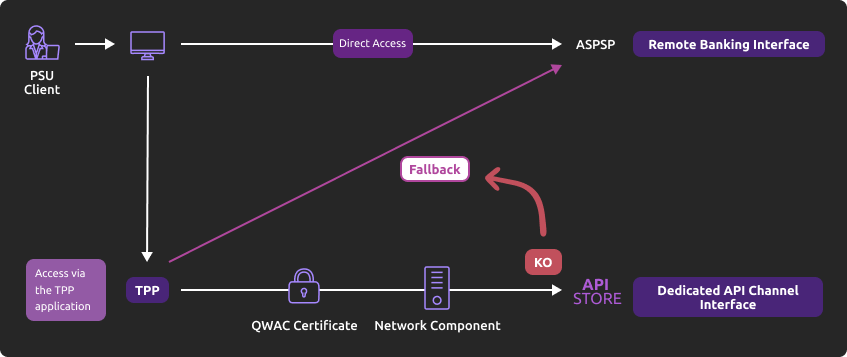
This fallback mechanism meets PSD2 regulatory requirements (article 33/RTS).
It can be used with the same conditions and prerequisites applicable for the dedicated API interface which are specified in the “Eligibility” use case.
Main features
- Use the same API dedicated interface endpoint. The list of our banking institutions and the possible values of <bankcode> are specified in the “Limitations” use case ;
- A parameter (header ‘fallback’ present or absent) managed directly by the TPP allows do differentiate a « Fallback » request from a dedicated interface PSD2 API request ;
- Use of same TPP eIDAS certificate (QWAC) to be presented for mutual TLS authentication ;
- Use the same PSU authentication procedure and means for accessing online banking services ;
- This fallback solution is always active, even so the dedicated interface API must be used systematically in first priority. Its usage is subject to strict conditions as described in Article 33 of RTS, and can’t be used as the main access for PSD2 features. It will be monitored as such and every abuse will be automatically reported to our national competent authority.
Example
If PSD2 API are not available due to unplanned unavailability or due to systems breakdown (see RTS Art. 33), TPP should use the following request (example for bank establishment 13807 [BPGO]) :
POST https://www.<codetab>.live.api.89c3.com/stet/psd2/oauth/tokenwhere <codetab> is the etablishment code
with :
- its live eIDAS QWAC certificate
- fallback:”1″ parameter in the header
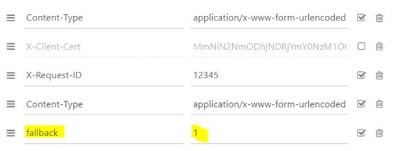
- If all checks are successful, the online banking login web page will be displayed.
TPP can then apply its proprietary login process using PSU credentials.
For more details on the data exchanged, see “How to test the API“ / “Authentification and OAuth2 access token”.
See also STET V1.4.2.17 / Part I / section 3.4.3
Please note the following constraints which apply on this fallback mechanism :
- No re-use of the API dedicated interface context, neither any of 90-day validity access token generated for AISP role ;
- Only online banking features will be accessible thru fallback mode. As an example, online banking doesn’t propose any e-commerce transactions to customers. PISP could NOT propose this feature in fallback mode.
- The user of payment services (PSU) must be connected to PSP app. So no AISP batch process is possible.
- PSD2 also imposes a reinforcement of strong customer authentication (SCA, except exemption use cases) for accessing direct online banking services. Therefore fallback mechanism leverage on reinforced PSU online banking authentication procedures and means such as (non exhaustive list) :
- Soft token ;
- OTP SMS ;
- Physical token (corporate market).
- Soft token ;
Trigger App2App feature
Introduction
This service allows you to activate automatically (without PSU action) the banking app on PSU smartphone for identification and authentification process.
Prerequisites
The PSU has to load and to use at leat once the latest retail banking mobile app (V6.4.0 and higher) available on Android and Apple app stores.
Note : PRO & ENT customer segments are not yet activated
The callback universal link (same principe as url callback) shall be definied in advance by the TPP :
- if this link/url already exists on our BPCE API gateways, there is nothing else to do
- otherwise the TPP shall declare it using our API Register
Our “Universal links” links have been declared on iOS & Android platforms. It is not worthwhile to access to them e. g. using https://www.<codetab>.live.api.caisse-epargne.fr/89C3api/accreditation/v2/.well-known/apple-app-site-association which sends back an error code.
Request
PSU banking app activation can be achieved in live production using a current STET API request (initiated by the TPP app on the same smartphone device) with the following endpoints :
| Brand | App2App endpoint |
|---|---|
| Banque Palatine | www.40978.live.api.palatine.fr/stet/psd2/oauth/authorize |
| Banque Populaire | www.<codetab>.live.api.banquepopulaire.fr/stet/psd2/oauth/authorize (see <codetab> values on Banque Populaire API product data sheet) |
| Banque de Savoie | www.10548.live.api.banque-de-savoie.fr/stet/psd2/oauth/authorize |
| Caisse d'Epargne | www.<codetab>.live.api.caisse-epargne.fr/stet/psd2/oauth/authorize (see <codetab> values on Caisse d’Epargne API product data sheet) |
| Banque BCP | www.12579.live.api.banquebcp.fr/stet/psd2/oauth/authorize |
| Crédit Coopératif | www.42559.live.api.credit-cooperatif.coop/stet/psd2/oauth/authorize |
| BTP Banque | www.30258.live.api.btp-banque.fr/stet/psd2/oauth/authorize |
| Natixis Wealth Management | www.18919.live.api.natixis.com/stet/psd2/oauth/authorize |
Otherwise, a webview will be displayed on PSU smartphone web browser if :
- the banking app is not present on PSU device nor App2App compliant (not the latest version uploaded, see prerequisites)
or
- the other endpoint format is used www.<codetab>.live.api.89c3.com/stet/psd2/oauth/authorize (can be used as a backup in case of App2App problem)
Regulatory publications
Get your access token
Principle
Access to PSD2 API features is granted by the bank with an authorization token (or access token) issued using OAuth2 standardized process.
Retrieval of access token sequence
- Our client (PSU) provides you the identity of their account-holding bank.
- You initiate the OAuth2 access token recovery sequence by redirecting the client through their web browser, to the account-holding bank's (ASPSP) authorization infrastructure using
GET /authorize.
See also STET V1.4.2.17 / Part I / section 3.4
- The account-holding bank (ASPSP) will :
- Identify and authenticate the PSU using one of the strong authentication methods proposed and presented to the client,
- Check your role and validity of your eIDAS certificates and agreement.
Once checks are done and correct, ASPS will redirect the PSU to your site using “call-back” URL given in the
GET /authorizeand to ASPSP for the Go Live process.
Indeed, the AISP must specify for its consuming APP, an URL which will be called by the banking establishment :
- if the client has authorized the recovery of its data by the AISP;
- or in case of refusal of consent;
or if the kinematics of identification and authentication are interrupted at one of its stages (example: timeout on the identification screen or on the strong authentication screen).
You will find in the response of this request a one-time-token with a short life period.
- You can then call the ASPSP in order to request the OAuth2 token
access_token” (and refresh onerefresh_token) usingPOST /tokenwith previously received data (include the one-time-token).
Note : these /token requests for getting the Authorization Code flow shall be sent WITHOUT the « scope » parameter.
See also STET V1.4.2.17 / Part I / section 3.4
- The ASPSP will :
- check your role (AISP or CBPII) and validity of your eIDAS certificates and agreement,
- check the direct or indirect matching between the Authorization Number within the eIDAS certificate and the [client_id] value.
- Once checks are done and correct, the Banque Palatine returns a response
HTTP 200(OK) with data including theaccess_token.
See also see STET V1.4.2.17 / Part I / section 3.4
- As soon as you get the OAuth2
access_token(and a 180-day validrefresh_token) issued by the bank, you can use it for each API request within the “Authorization” header, prefixed by the token type “Bearer”.
The [client_id] that is linked to the access token must directly or indirectly match with the Authorisation Number that is located within the TPP’s eIDAS certificate (QWAC).
If the access token is expired, the request will be rejected withHTTP 401with an error equal to “invalid_token”.
The request can be replayed once the access token has been refreshed using the use case “Refresh your access token”. If your refresh token is about to expire, you will have to perform again all this process “Get your access token” (see point 3 above), meaning also redirect to their banking institution for client’s strong authentication (client SCA).
For more details, see also OAuth 2.0 Authorization Framework : https://tools.ietf.org/html/rfc6749#section-4.1
Example
You can find an example of this request in use case “Sandbox assembly”.
For more details on the exchanged data, see “How to test the API“ / “Authentification and OAuth2 access token”.
Get the list of accounts
Use case
This service allows to retrieve the customer accounts list and delayed debit cards list (*).
Each account or card is returned with the links aiming to ease access to the relevant transactions and balances.
The resource ID provided for each account or card will be a parameter for the balances and transactions retrieval requests.
The result may be subject to pagination in case of having too many results. In this case, to make the results easier to read, there will be navigation links to access to the first, the next, the previous or the last page of results.
Access to this method is limited to a maximum of 4 batch accesses per calendar day for one given customer excluding pagination.
This method allows :
- to list all accounts and delayed debit cards linked to this accounts;
- to get the accounts balances;
- to get the delayed debit cards outstandings (*);
- to get the URI for the
GET /end-user-identity; - to get the URI for the
GET /accounts/balancesandGET /accounts/transactionsmethods.
(*) This API covers active delayed cards which have been used at least once in the past two months.
Prerequisite
In order to process this request it ‘s needed to fill the eligibility and to get the OAuth2 access token (see the use case “Get your access token”).
Request
GET /accounts
See also STET V1.4.2.17 / Part II / section 4.2 / Page 27
Mandatory or facultative body parameters needed for calling the service
Facultative parameter : PSU-IP-ADDRESS => this parameter is mandatory if the customer is connected
Returned result
If you didn’t transmit any customer consented account with the PUT /consents method or that all consented accounts have been revoked since the last call of the PUT /consents method:
- This call allows you
- to retrieve the customer accounts exclusive list without their balances, without the URI for the
GET /accounts/balances,theGET /accounts/transactionsand theGET /end-user-identitymethods
- to retrieve the customer accounts exclusive list without their balances, without the URI for the
If you have transmitted at least one customer consented account with the PUT /consents method and that all consented accounts haven’t been revoked following the last call to the PUT /consents method,
- This call allows
- to retrieve all customer consented accounts with :
- their balances if the account is included in the balances list transmitted with the
PUT /consentsmethod - The URI for the
GET /accounts/balancesmethod if the account is included in the balances list transmitted with thePUT /consentsmethod - The URI for the
GET /accounts/transactionsmethod if the account is included in the transactions list transmitted with thePUT /consentsmethod
- their balances if the account is included in the balances list transmitted with the
- to get the list containing all the delayed debit cards linked to the consented accounts with :
- their outstandings if the delayed debit card (*) is linked to an account included in the balances list transmitted with the
PUT /consentsmethod - The URI for the
GET /accounts/balancesmethod if the delayed debit card is linked to an account included in the balances list transmitted with thePUT /consentsmethod - The URI for the
GET /accounts/transactionsmethod if the delayed debit card is linked to an account included in the transactions list transmitted with thePUT /consentsmethod
- their outstandings if the delayed debit card (*) is linked to an account included in the balances list transmitted with the
- to get the URI for the
GET /end-user-identitymethod if thepsuIdentityfield is at TRUE with thePUT /consentsmethod
- to retrieve all customer consented accounts with :
- This call doesn’t allow you
- to get the accounts and delayed debit cards for the non consented accounts
The result may be subject to pagination in case of having too many accounts or cards in it. In this case, to make the results easier to read, there will be navigation links to access to the first, the next, the previous or the last page of results.
A self link will also be displayed in order to go back to the page obtained right after the request execution.
Access to this method is limited to a maximum of 4 batch accesses per calendar day, for a given customer (pagination not included). On the contrary, when the online customer asks his accounts directly, the accesses number is not limited.
The property psuStatus is given the “Account Co-Holder” value as long as the customer is not the only account’s holder.
For accounts representing a deferred debit card, the data “accountId / other / identification” contains the encrypted identifier of the card. In addition, the “name” object contains at the end of the string the last 4 digits of the card’s PAN preceded by “XX” which allows the PSU to identify its card if it has more than one.
(*) This API covers active delayed cards which have been used at least once in the past two months.
Example without consent registred with PUT /consents
Request
GET /stet/psd2/v1.4.2/accounts/
Result
Status code : 200
Body
{ {
“_links”: { “last”: { “href”: “https://www.rs-sandbox.api.89c3.com/stet/psd2/v1.4.2/accounts?page=last” }, “self”: { “href”: “https://www.rs-sandbox.api.89c3.com/stet/psd2/v1.4.2/accounts” }, “first”: { “href”: “https://www.rs-sandbox.api.89c3.com/stet/psd2/v1.4.2/accounts” }, “endUserIdentity”: { “href”: “https://www.rs-sandbox.api.89c3.com/stet/psd2/v1.4.2/end-user-identity” } }, “accounts”: [ { “cashAccountType”: “CACC”, “accountId”: { “iban”: “FR7613807008043001965409135”, “currency”: “EUR” }, “resourceId”: “038-CPT30019654091”, “product”: “COMPTE COURANT”, “_links”: {}, “usage”: “ORGA”, “psuStatus”: “Account Holder”, “name”: “Tech-N Co”, “bicFi”: “CCBPFRPPNAN”, “details”: “COMPTE COURANT” } ] }
(data set Tech-N Co’s persona – D0999993I0)
Remarks :
- The “currency” field was moved to the “accountId” level
Example with two delayed debit cards et consent registred with PUT /consents
Request
GET /stet/psd2/v1.4.2/accounts/
Result
Status code : 200
Body
{
{
“_links”: {
“last”: { “href”: “https://www.rs-sandbox.api.89c3.com/stet/psd2/v1.4.2/accounts?page=last” }, “self”: { “href”: “https://www.rs-sandbox.api.89c3.com/stet/psd2/v1.4.2/accounts” }, “first”: { “href”: “https://www.rs-sandbox.api.89c3.com/stet/psd2/v1.4.2/accounts” }, “endUserIdentity”: { “href”: “https://www.rs-sandbox.api.89c3.com/stet/psd2/v1.4.2/end-user-identity” } }, “accounts”: [ { “cashAccountType”: “CACC”, “accountId”: { “iban”: “FR7613807008063031966574122”, “currency”: “EUR” }, “resourceId”: “038-CPT30319665741”, “product”: “COMPTE CHEQUE”, “balances”: [ { “balanceType”: “VALU”, “name”: “Solde en Valeur”, “balanceAmount”: { “amount”: “0”, “currency”: “EUR” }, “referenceDate”: “2020-06-05” }, { “balanceType”: “CLBD”, “name”: “Solde Comptable”, “balanceAmount”: { “amount”: “0”, “currency”: “EUR” }, “referenceDate”: “2020-06-04” }, { “balanceType”: “OTHR”, “name”: “Solde TP”, “balanceAmount”: { “amount”: “0”, “currency”: “EUR” } } ], “_links”: { “balances”: { “templated”: false, “href”: “https://www.rs-sandbox.api.89c3.com/stet/psd2/v1.4.2/accounts/038-CPT30319665741/balances” }, “transactions”: { “templated”: false, “href”: “https://www.rs-sandbox.api.89c3.com/stet/psd2/v1.4.2/accounts/038-CPT30319665741/transactions” } }, “usage”: “PRIV”, “psuStatus”: “Account Holder”, “name”: “BARDE ADAM”, “bicFi”: “CCBPFRPPNAN”, “details”: “COMPTE CHEQUE” }, { “cashAccountType”: “CACC”, “accountId”: { “iban”: “FR7613807008063031966574219”, “currency”: “EUR” }, “resourceId”: “038-CPT30319665742”, “product”: “COMPTE COURANT”, “balances”: [ { “balanceType”: “VALU”, “name”: “Solde en Valeur”, “balanceAmount”: { “amount”: “-2894.05”, “currency”: “EUR” }, “referenceDate”: “2020-06-05” }, { “balanceType”: “CLBD”, “name”: “Solde Comptable”, “balanceAmount”: { “amount”: “-2894.05”, “currency”: “EUR” }, “referenceDate”: “2020-06-04” }, { “balanceType”: “OTHR”, “name”: “Solde TP”, “balanceAmount”: { “amount”: “-2894.05”, “currency”: “EUR” } } ], “_links”: { “balances”: { “templated”: false, “href”: “https://www.rs-sandbox.api.89c3.com/stet/psd2/v1.4.2/accounts/038-CPT30319665742/balances” }, “transactions”: { “templated”: false, “href”: “https://www.rs-sandbox.api.89c3.com/stet/psd2/v1.4.2/accounts/038-CPT30319665742/transactions” } }, “usage”: “ORGA”, “psuStatus”: “Account Holder”, “name”: “SARL UNI PICCOLO”, “bicFi”: “CCBPFRPPNAN”, “details”: “COMPTE COURANT” }, { “cashAccountType”: “CARD”, “accountId”: { “other”: { “identification”: “C01WcBfYTK70wJJ5LpsMI3EGQ==”, “schemeName”: “CPAN”, “issuer”: “13807” }, “currency”: “EUR” }, “resourceId”: “038-GFCC01WcBfYTK70wJJ5LpsMI3EGQ”, “product”: “Visa Classic”, “balances”: [ { “balanceType”: “OTHR”, “name”: “Encours”, “balanceAmount”: { “amount”: “0”, “currency”: “EUR” }, “referenceDate”: “2020-06-30” }, { “balanceType”: “OTHR”, “name”: “Dernier encours prélevé”, “balanceAmount”: { “amount”: “78.65”, “currency”: “EUR” }, “referenceDate”: “2020-05-31” } ], “_links”: { “balances”: { “templated”: false, “href”: “https://www.rs-sandbox.api.89c3.com/stet/psd2/v1.4.2/accounts/038-GFCC01WcBfYTK70wJJ5LpsMI3EGQ/balances” }, “transactions”: { “templated”: false, “href”: “https://www.rs-sandbox.api.89c3.com/stet/psd2/v1.4.2/accounts/038-GFCC01WcBfYTK70wJJ5LpsMI3EGQ/transactions” } }, “usage”: “PRIV”, “psuStatus”: “Account Holder”, “name”: “M ADAM BARDE XX9351”, “linkedAccount”: “038-CPT30319665741”, “bicFi”: “CCBPFRPPNAN”, “details”: “CB VISA FACELIA DEBIT DIFFERE” }, { “cashAccountType”: “CARD”, “accountId”: { “other”: { “identification”: “C01mS9kXqK80z5X19/E7WmZjw==”, “schemeName”: “CPAN”, “issuer”: “13807” }, “currency”: “EUR” }, “resourceId”: “038-GFCC01mS9kXqK80z5X19_E7WmZjw”, “product”: “Visa Classic”, “balances”: [ { “balanceType”: “OTHR”, “name”: “Encours”, “balanceAmount”: { “amount”: “0”, “currency”: “EUR” }, “referenceDate”: “2020-06-30” }, { “balanceType”: “OTHR”, “name”: “Dernier encours prélevé”, “balanceAmount”: { “amount”: “156.27”, “currency”: “EUR” }, “referenceDate”: “2020-05-31” } ], “_links”: { “balances”: { “templated”: false, “href”: “https://www.rs-sandbox.api.89c3.com/stet/psd2/v1.4.2/accounts/038-GFCC01mS9kXqK80z5X19_E7WmZjw/balances” }, “transactions”: { “templated”: false, “href”: “https://www.rs-sandbox.api.89c3.com/stet/psd2/v1.4.2/accounts/038-GFCC01mS9kXqK80z5X19_E7WmZjw/transactions” } }, “usage”: “PRIV”, “psuStatus”: “Account Holder”, “name”: “M ADAM BARDE XX4620”, “linkedAccount”: “038-CPT30319665741”, “bicFi”: “CCBPFRPPNAN”, “details”: “VISA INTERNATIONALE DB DIFFERE” } ]}
(data set Adam’s persona – D0999994I0)
Remarks :
- The “connectedPsu” field was deleted and replaced by the “endUserIdentity” link
Example with pagination
Request
GET /stet/psd2/v1.4.2/accounts?page=2
Result
Status code : 200
Body
{
“accounts”: [ { “cashAccountType”: “CACC”,”accountId”: { “iban”: “FR7613807008043099888880699″,”currency”: “EUR” }, “resourceId”: “038-CPT30998888806″,”product”: “COMPTE CHEQUE”,”balances”: [ { “balanceType”: “VALU”,”name”: “Solde en Valeur”,”balanceAmount”: { “amount”: “6.78”, “currency”: “EUR” }, “referenceDate”: “2020-06-05”}, { “balanceType”: “CLBD”,”name”: “Solde Comptable”,”balanceAmount”: { “amount”: “6.78”, “currency”: “EUR” },”referenceDate”: “2020-06-04”}, { “balanceType”: “OTHR”,”name”: “Solde TP”,”balanceAmount”: { “amount”: “6.78”,”currency”: “EUR” } } ], “_links”: { “balances”: { “templated”: false, “href”: “https://www.rs-sandbox.api.89c3.com/stet/psd2/v1.4.2/accounts/038-CPT30998888806/balances” }, “transactions”: { “templated”: false, “href”: “https://www.rs-sandbox.api.89c3.com/stet/psd2/v1.4.2/accounts/038-CPT30998888806/transactions” } }, “usage”: “PRIV”, “psuStatus”: “Nominee”, “name”: “Compte mensualités”, “bicFi”: “CCBPFRPPNAN”, “details”: “COMPTE CHEQUE” }, { “cashAccountType”: “CACC”, “accountId”: { “iban”: “FR7613807008043099888880799”, “currency”: “EUR” }, “resourceId”: “038-CPT30998888807”, “product”: “COMPTE CHEQUE”, “balances”: [ { “balanceType”: “VALU”, “name”: “Solde en Valeur”, “balanceAmount”: { “amount”: “7.6”, “currency”: “EUR” }, “referenceDate”: “2020-06-05” }, { “balanceType”: “CLBD”, “name”: “Solde Comptable”, “balanceAmount”: { “amount”: “7.6”, “currency”: “EUR” },”referenceDate”: “2020-06-04” }, { “balanceType”: “OTHR”, “name”: “Solde TP”, “balanceAmount”: { “amount”: “7.6”, “currency”: “EUR” } } ], “_links”: {“balances”: { “templated”: false, “href”: “https://www.rs-sandbox.api.89c3.com/stet/psd2/v1.4.2/accounts/038-CPT30998888807/balances” },”transactions”: { “templated”: false,”href”: “https://www.rs-sandbox.api.89c3.com/stet/psd2/v1.4.2/accounts/038-CPT30998888807/transactions” } }, “usage”: “PRIV”,”psuStatus”: “Successor On Death”,”name”: “Compte perso”,”bicFi”: “CCBPFRPPNAN”,”details”: “COMPTE CHEQUE” }, { “cashAccountType”: “CACC”,”accountId”: { “iban”: “FR7613807008043099888880899”, “currency”: “EUR” }, “resourceId”: “038-CPT30998888808”, “product”: “COMPTE CHEQUE”, “balances”: [ { “balanceType”: “VALU”, “name”: “Solde en Valeur”,”balanceAmount”: { “amount”: “8.8”, “currency”: “EUR” }, “referenceDate”: “2020-06-05” }, { “balanceType”: “CLBD”,”name”: “Solde Comptable”,”balanceAmount”: {“amount”: “8.8”,”currency”: “EUR”},”referenceDate”: “2020-06-04”},{“balanceType”: “OTHR”,”name”: “Solde TP”,”balanceAmount”: { “amount”: “8.8”,”currency”: “EUR” } } ], “_links”: { “balances”: { “templated”: false, “href”: “https://www.rs-sandbox.api.89c3.com/stet/psd2/v1.4.2/accounts/038-CPT30998888808/balances” }, “transactions”: { “templated”: false, “href”: “https://www.rs-sandbox.api.89c3.com/stet/psd2/v1.4.2/accounts/038-CPT30998888808/transactions” }}, “usage”: “PRIV”, “psuStatus”: “Trustee”, “name”: “Retrait et Cheques”, “bicFi”: “CCBPFRPPNAN”, “details”: “COMPTE CHEQUE 8” }, { “cashAccountType”: “CACC”, “accountId”: { “iban”: “FR7613807008043099888880999”, “currency”: “EUR” }, “resourceId”: “038-CPT30998888809”, “product”: “COMPTE CHEQUE”, “balances”: [ { “balanceType”: “VALU”, “name”: “Solde en Valeur”, “balanceAmount”: { “amount”: “9.9”, “currency”: “EUR” }, “referenceDate”: “2020-06-05” }, { “balanceType”: “CLBD”, “name”: “Solde Comptable”, “balanceAmount”: { “amount”: “9.9”, “currency”: “EUR” },”referenceDate”: “2020-06-04”},{ “balanceType”: “OTHR”,”name”: “Solde TP”,”balanceAmount”: { “amount”: “9.9”,”currency”: “EUR” } } ], “_links”: { “balances”: { “templated”: false, “href”: “https://www.rs-sandbox.api.89c3.com/stet/psd2/v1.4.2/accounts/038-CPT30998888809/balances” }, “transactions”: { “templated”: false, “href”: “https://www.rs-sandbox.api.89c3.com/stet/psd2/v1.4.2/accounts/038-CPT30998888809/transactions” } }, “usage”: “PRIV”, “psuStatus”: “Trustee”,”name”: “Retrait et Cheques”,”bicFi”: “CCBPFRPPNAN”,”details”: “COMPTE CHEQUE 9” }, { “cashAccountType”: “CACC”,”accountId”: {“iban”: “FR7613807008043099888881099″,”currency”: “EUR”}, “resourceId”: “038-CPT30998888810″,”product”: “COMPTE CHEQUE”,”balances”: [ { “balanceType”: “VALU”, “name”: “Solde en Valeur”, “balanceAmount”: { “amount”: “10.10”, “currency”: “EUR” }, “referenceDate”: “2020-06-05” }, { “balanceType”: “CLBD”, “name”: “Solde Comptable”, “balanceAmount”: { “amount”: “10.10”,”currency”: “EUR” },”referenceDate”: “2020-06-04” }, { “balanceType”: “OTHR”, “name”: “Solde TP”, “balanceAmount”: { “amount”: “10.10”, “currency”: “EUR” } } ], “_links”: { “balances”: { “templated”: false, “href”: “https://www.rs-sandbox.api.89c3.com/stet/psd2/v1.4.2/accounts/038-CPT30998888810/balances” }, “transactions”: { “templated”: false, “href”: “https://www.rs-sandbox.api.89c3.com/stet/psd2/v1.4.2/accounts/038-CPT30998888810/transactions” } }, “usage”: “PRIV”, “psuStatus”: “Trustee”, “name”: “Retrait et Cheques”, “bicFi”: “CCBPFRPPNAN”, “details”: “COMPTE CHEQUE 10” } ], “_links”: { “next”: { “href”: “https://www.rs-sandbox.api.89c3.com/stet/psd2/v1.4.2/accounts?page=3” }, “last”: { “href”: “https://www.rs-sandbox.api.89c3.com/stet/psd2/v1.4.2/accounts?page=last” }, “prev”: { “href”: “https://www.rs-sandbox.api.89c3.com/stet/psd2/v1.4.2/accounts” }, “self”: { “href”: “https://www.rs-sandbox.api.89c3.com/stet/psd2/v1.4.2/accounts?page=2” }, “first”: { “href”: “https://www.rs-sandbox.api.89c3.com/stet/psd2/v1.4.2/accounts” }, “endUserIdentity”: { “href”: “https://www.rs-sandbox.api.89c3.com/stet/psd2/v1.4.2/end-user-identity” } } }
A more complex example of request is given in “Sandbox assembly” use case.
Error codes
Here is the list of descriptions for error codes associated with each service.
| Error | Error description |
|---|---|
| AC01 (CFONB) | IncorrectAccountNumber : account number is invalid or missing |
| AC04 (CFONB) | ClosedAccountNumber : account has been closed |
| AC06 (CFONB) | BlockedAccount : account is blocked, prohibiting posting of transactions against it |
| BE05 (CFONB) | UnrecognisedInitiatingParty : the AISP is not recognised |
| BADS | BadScope : request with an access token which is not authorized to access to the resource (incorrect CBPII scope, instead of expected AISP scope) |
| INTE | InternalError : there was an internal processing error |
| INTS | InternalServerError : there was an internal communication error with the information system |
| IPGN | InvalidPageNumber : the page number is invalid |
| NAAC | No avalaible accounts : absence of eligible or granted accounts |
| NGAC | NotGrantedAccount : access to the account has not been granted |
| NIMP | NotImplemented : invalid method used (GET method expected) |
| TMRQ | TooManyRequest : the maximum number of requests has been exceeded |
| IPSU | InvalidPSU : unregistered subscriber number or terminated Cyber subscription |
Acceptation tests
The purpose of these tests is to allow you to practice some tests in order to take charge of the API to access it from your application.
| Test description | Dataset |
|---|---|
Retrieve all the accounts of a customer (at least 2 accounts shall be configured in the ASPSP) => Verification of the mandatory hypermedia links (balances, self and transactions) | Persona : Alix – D0999992I0 Prerequisite : scope OAuth2 = aisp Result : response HTTP 200 => OK Retrieval of three accounts and three delayed debit cards |
Retrieve plenty of accounts linked to a customer and verify that the ASPSP uses correctly the pagination mechanism =>Verification of the optional hypermedia links prev, next, last. | Persona : Marc – D0999990I0 Prerequisite : scope OAuth2 = aisp Result : response HTTP 200 => OK return three accounts all on the same page |
Retrieve plenty of accounts and cards linked to a customer and verify that the ASPSP uses correctly the pagination mechanism =>Verification of the optional hypermedia links first, prev, next, last. | Persona : Adam – D0999994I0 Prerequisite : scope OAuth2 = aisp Result : response HTTP 200 => OK return two accounts and two delayed debit cards |
| HTTP request with an access token which is not authorized to access to this resource (incorrect scope) | Persona : Marc – D0999990I0 Prerequisite : scope OAuth2 <> aisp Result : response HTTP403 => Access to the resource is not allowed error message : BADS |
| HTTP request using POST method | Persona : Marc – D0999990I0 Prerequisite : scope OAuth2 = aisp Result : response HTTP405 => method not allowed |
Forward the customer's consentend accounts list
Use case
This service allows to record the customer consent.
This consent includes the accesses granted by the customer.
Four access types (or operation types) can be forwarded :
- “balances” => access to one or many customer accounts balances report
- “transactions” => access to one or many customer accounts transaction sets
- “psuIdentity” => access to the customer identity (first name and last name)
- “trustedBeneficiaries” => access to the trusted beneficiaries list that have been set by the customer => this feature is not available on direct access neither via API (see “Limitations” heading).
Therefore, a consent record is made for one given customer.
Each new AISP call to the consent service, for one given customer, replaces any prior consent that was previously sent by the AISP.
Furthermore, upon the customer’s request, the consent may be updated subsequently for an operation type : for example, access to transactions can be revoked while access to balances stay active.
The consent is checked for each request send.
In summary, this service allows you to transmit the IBAN of the demand accounts for which the customer has authorized you to consult the details of balances and / or transactions and its identity.
Prerequisite
You can retrieve the customer’s accounts list after a first call to the GET /accounts request : you will find for each account the linked IBAN, that means accountId: {"iban"}.
However if you already know the customer accounts IBANs, you can transmit them directly with the PUT /consents method. In this case, in order to process this request it’s needed to fill eligibility prerequisite and to get the OAuth2 access token (see the use case “Get your access token”).
Request
PUT /consents
Mandatory or facultative body parameters needed for this service
balances : array, mandatory but it can be empty : list of accessible accounts for the “balances” functionality
⇒ iban – mandatory : International Bank Account Number (IBAN)
transactions– array is mandatory but it can be empty : list of accessible accounts for the “transactions ” functionality
⇒ iban – mandatory : International Bank Account Number (IBAN)
trustedBeneficiaries – mandatory : indicator feld indicating whether or not the access to the trusted beneficiaries list was granted to the AISP by the customer (true or false)
psuIdentity – mandatory : indicator field indicating whether or not the access to the customer identity, first name and last name, was granted to the AISP by the customer (true or false)
facultative parameter : PSU-IP-ADDRESS => parameter is mandatory if the customer is connected
Returned result
This call allows to record the consent of the customer (Payment Service User) on behalf of whom the AISP (Account Information Service Providers) is connected.
Four access types (or operation types) can be forwarded :
- “psuIdentity” => access to the customer identity (first name and last name);
- Customer id is available with the
GET /end-user-identitymethod only if the customer has given his consent;
- Customer id is available with the
- “transactions” => access to one or many customer’s accounts transaction and to the linked delayed debit cards slips;
- The accounts transactions sets and the linked delayed debit cards slips are available with the
GET /accountsmethod and theGET /accounts/balancesmethod for the consented accounts only;
- The accounts transactions sets and the linked delayed debit cards slips are available with the
- “balances” => access to one or many customer’s accounts balances report and to the linked delayed debit cards outstandings :
- The accounts balances and the linked delayed debit cards outstandings are available with the
GET /accountsmethod and theGET /accounts/balancesmethod for the consented accounts only;
- The accounts balances and the linked delayed debit cards outstandings are available with the
- “trustedBeneficiaries” => access to the trusted beneficiaries list that have been set by the customer
- this feature is not available on direct access neither via API
It is possible to call several times the PUT /consents method if the customer has changed his consent : every new call of the PUT /consents method cancel and replace the previous consents.
The customer consent is checked for every new request with GET /accounts, GET /accounts/balances and GET /accounts/transactions methods.
When an account is consented for the “balances” access :
- The delayed debit cards are available with the
GET /accountsmethod; - The cards outstandings are available with the
GET /accountsmethod or theGET /accounts/balancesmethod.
When an account is consented for the “transactions” access :
- The delayed debit cards are available with the
GET /accountsmethod; - The cards slips are available with the
GET /accounts/transactionsmethod.
If no account is transmitted with the PUT /consents method and that consent was given for some accounts with a previous call to this method, then it means that the customer is revoking all his accounts.
If no account is consented or if the customer has revoked all this consented accounts, the GET /accounts method allows to get all the accounts list but access to balances and transactions and access to delayed debit cards and to their outstandings and slips isn’t possible anymore.
Example
Request
PUT /stet/psd2/v1.4.2/consents/
A more complete example of request is given in “Sandbox assembly” use case.
See also STET V1.4.2.41 / Part III / section 6.2 / page 7
Result
Status code : 201
The consent service returns a code 201 – Created when the consent is successfully recorded
The consent service returns a code 403 – Forbidden in case of record failure
Body
{
“balances”: [{“iban”: “FR7613807008043001965405158”},{“iban”: “FR7613807008043001965405255”},{“iban”: “FR7613807008043001965405352”}],
“transactions”: [{“iban”: “FR7613807008043001965405158”},{“iban”: “FR7613807008043001965405255”},{“iban”: “FR7613807008043001965405352″}],”trustedBeneficiaries”: true,”psuIdentity”: true}
(data set Marc’s persona – D0999990I0)
Remarks :
- The “currency” field was moved to the “AccountIdentification” section
Error codes
Here is the list of descriptions for error codes associated with each service.
| Error | Error description |
|---|---|
| AC01 (CFONB) | IncorrectAccountNumber : account number is invalid or missing |
| AC04 (CFONB) | ClosedAccountNumber |
| AC06 (CFONB) | BlockedAccount |
| BE05 (CFONB) | UnrecognisedInitiatingParty |
| BADS | BadScope : request with an access token which is not authorized to access to the resource (incorrect CBPII scope, instead of expected AISP scope) |
| ENDE | EntriesDatesError |
| IPGN | InvalidPageNumber |
| INTE | InternalError : there was an internal processing error |
| INTS | InternalServerError : there was an internal communication error with the information system |
| NGAC | NotGrantedAccount |
| NIMP | NotImplemented |
| TMRQ | TooManyRequest |
| RENF | ReferenceNotFound |
| IPSU | InvalidPSU |
| FF01 | Bad Request : Request’s body format incorrect (empty body, missing mandatory data) |
| NAAC | NotAvailableAccounts |
| CDNA | CardNotAvailable |
Acceptation tests
These test cases are intended to allow you to perform a minimum of tests to take in hand this API and access it from your application.
| Test description | Dataset |
|---|---|
| Add / update the consent of a customer | Persona : Marc – D0999990I0 Prerequisite : scope OAuth2 = aisp IBANs : FR7613807008043001965405158 FR7613807008043001965405255 FR7613807008043001965405352 Result : response HTTP 201 => OK, consent recorded |
| Add / upate the consent of a customer | Persona : Adam – D0999994I0 Prerequisite : scope OAuth2 = aisp IBANs : FR7613807008063031966574122 FR7613807008063031966574219 Result : réponse HTTP 201 => OK, consent recorded |
| HTTP request with an access token which is not authorized to access to this resource (incorrect scope) | Persona : Marc – D0999990I0 Prerequisite : scope OAuth2 <> aisp IBANs : FR7613807008043001965405158 FR7613807008043001965405255 FR7613807008043001965405352 Result : response HTTP 403 => Access to the resource is not allowed error message : BADS |
| HTTP request using POST method | Persona : Marc – D0999990I0 Prerequisite : scope OAuth2 = aisp IBANs : FR7613807008043001965405158 FR7613807008043001965405255 FR7613807008043001965405352 Result : response HTTP 405 => method not allowed |
Get the accounting balance
Use case
This service allows to get the account balance report or the outstandings list of the customer delayed debit card.
This service follows the return of the list of current accounts and debit cards for a customer : a resource identifier corresponding to an account or card must be provided to obtain the list of balances / outstandings.
3 balance types will be returned in the case of an account beeing passed as a parameter :
- Value date balance (“VALU” in the STET standard) => value-date balance, displayed balance in relation to a value date
- Accounting balance (“CLBD” in the STET standard) => accounting balance at the end of a period (end of week, end of month, end of quarter, end of year)
- Instant balance (“OTHR” in the STET standard) => instant balance (evolves in real time with each account posting)
3 outstanding types will be returned in the case of a card beeing passed as a parameter :
- Outstandings => card slips amounts reported to the following month
- Undrawn finished outstandings => current month’s card slips amounts that were not already posted
- Drawn finished outstandings => previous month’s card slips amounts
In the case of a lot of data returned a pagination will be done with links giving access to first page, previous one, next one and last one in order to make easier the result consultation.
Access to this method is limited to a maximum of 4 batch accesses per calendar day, for one given TPP.
In summary, this service makes it possible to list the balances of a current account of the customer or to list the outstandings of a deferred debit card backed up by this current account.
Prerequisite
In order to process this request it ‘s needed to fill the eligibility and to get the OAuth2 access token (see the use case “Get your access token”).
Retrieval of a account balances report :
- The IBAN account should have been transmitted in the balances list of
PUT /consentsmethod and shouldn’t be revoked since (<=> no cancel and replace usingPUT /consentsmethod without the IBAN in the transactions list) ; - The “accountResourceId” field as an account parameter of this method, is obtained with the result of the
GET /accountsmethod in theresourceIdfield for the account linked to this IBAN, that means : accountId : {“iban” } ; - URI for this method access is given by the field
_links : {“balances”: {“href”: …}}result of theGET /accountsrequest for theresourceIdfield of the account.
In order to get the outstandings of a delayed debit card linked to an account :
- The IBAN account should have been transmitted in the balances list of
PUT /consentsmethod and shouldn’t be revoked since (<=> no cancel and replace usingPUT /consentsmethod without the IBAN in the transactions list) ; - The
accountResourceIdfield as a delayed debit card parameter of this method, is obtained with the result of theGET /accountsmethod in theresourceIdfield for the delayed debit card, that means :“accountId“: {“other”: {“schemeName”: “CPAN”}}with “linkedAccount” wich corresponds toresourceIdfield of the account withresourceIdfiled of the account obtained withGET /accountsrequest and with“accountId“: {“iban” }; - URI for this method access is given by the field
“_links“: {“balances”: {“href”: …}}result of theGET /accountsrequest for theresourceIdfield of delayed debit card.
Request
GET /accounts/{accountResourceId}/balances
see also STET V1.4.2.17 / Part II / Section 4.3.4 / page 31
Mandatory or facultative body parameters needed for this service
Mandatory parameter accountResourceId : account we want to consult the balances or delayed debit card we want to consult the outstandings, this data matches with the field “resourceId” obtained in the result page of GET /accounts.
facultative parameter : PSU-IP-ADDRESS => parameter is mandatory if the customer is connected
Returned result
This call allows to get :
- balances list for the account passed as a parameter ;
- or the outstandings list of the delayed debit card passed as a parameter.
3 types of balances will be returned in the case of an account passed as a parameter:
| => value-date balance, displayed balance in relation to a value date |
| => accounting balance at the end of a period (end of week, end of month, end of quarter, end of semester, end of year) |
| => instant balance (evolves in real time with each account posting) |
3 types of outstandings will be returned in the case of a card passed as a parameter :
| => card slips amounts reported to the following month |
| => current month’s card slips amounts that were not already posted |
| => previous month’s card slips amounts |
A self link will also be displayed in order to go back to the page obtained right after the request execution.
Access to this method is limited to a maximum of 4 batch accesses per calendar day for an association of one customer and one account or delayed debit card given (pagination not included). On the contrary, when the online customer asks his accounts directly, the accesses number is not limited.
Example
Request
GET /stet/psd2/v1.4.2/accounts/038-CPT30019654051/balances
A more complete example of a query is provided in the use case “Sandbox assembly”.
See also STET V1.4.2.17 / Part III / Section 6.4 / page 9
Result
Status code : 200
Body
{
“balances”: [
{
“balanceType”: “VALU”,
“name”: “Solde en Valeur”,
“balanceAmount”: {
“amount”: “2165.5”,
“currency”: “EUR”
},
“referenceDate”: “2020-06-08”
},
{
“balanceType”: “CLBD”,
“name”: “Solde Comptable”,
“balanceAmount”: {
“amount”: “2165.5”,
“currency”: “EUR”
},
“referenceDate”: “2020-06-07”
},
{
“balanceType”: “OTHR”,
“name”: “Solde TP”,
“balanceAmount”: {
“amount”: “2165.5”,
“currency”: “EUR”
}
}
],
“_links”: {
“self”: {
“href”: “https://www.13807.sandbox.api.89c3.com/stet/psd2/v1.4.2/accounts/038-CPT30019654053/balances”
},
“transactions”: {
“href”: “https://www.13807.sandbox.api.89c3.com/stet/psd2/v1.4.2/accounts/038-CPT30019654053/transactions”
},
“parent-list”: {
“href”: “https://www.13807.sandbox.api.89c3.com/stet/psd2/v1.4.2/accounts”
}
}
}
(data set Marc’s persona – D0999990I0)
Error codes
Here is the list of descriptions for error codes associated with each service.
| Error | Error description |
|---|---|
| AC01 (CFONB) | IncorrectAccountNumber : account number is invalid or missing |
| AC04 (CFONB) | ClosedAccountNumber : account has been closed |
| AC06 (CFONB) | BlockedAccount : account is blocked, prohibiting posting of transactions against it |
| BE05 (CFONB) | UnrecognisedInitiatingParty : the AISP is not recognised |
| BADS | BadScope : request with an access token which is not authorized to access to the resource (incorrect CBPII scope, instead of expected AISP scope) |
| INTE | InternalError : there was an internal processing error |
| INTS | InternalServerError : there was an internal communication error with the information system |
| NGAC | NotGrantedAccount : access to the account has not been granted |
| NIMP | NotImplemented : invalid method used (GET method expected) |
| TMRQ | TooManyRequest : the maximum number of requests has been exceeded |
| IPSU | InvalidPSU : unregistered subscriber number or terminated Cyber subscription |
Acceptation tests
The purpose of these tests is to allow you to practice some tests in order to take charge of the API to access it from your application.
| Test description | Dataset |
|---|---|
Retrieve all the balances linked to a customer’s account => Verification of the hypermedia links (self, balances and transactions) | Persona : Marc – 038-CPT30019654051 Prerequisite : scope OAuth2 = aisp Result : response HTTP 200 => OK Retrieve the three balances of the PSU’s account |
Retrieve all the balances linked to a customer’s account with balances equals to 0 => Verification of the hypermedia links (self, balances and transactions) | Persona : Adam – 038-CPT30319665741 Prerequisite : scope OAuth2 = aisp Result : réponse HTTP 200 => OK Retrieve the three balances of the PSU’s account The balances are equals to 0 |
| Retrieve the balances linked to an unknown account | Persona : Inconnu – 038-CPT30014684067 Prerequisite : scope OAuth2 = aisp Result : response HTTP 404 => unknown account error message : AC01 |
| HTTP request with access token not allowed for the ressource (bad scope) | Persona : Marc – 038-CPT30019654051 Prerequisite : scope OAuth2 <> aisp Result : response HTTP 403 => Access to the resource is not allowed error message : BADS |
| HTTP POST request execution | Persona : Marc – 038-CPT30019654051 Prerequisite : scope OAuth2 = aisp Result : response HTTP 405 => method not allowed |
Get the transactions history
Use case
This service allows to get the account transaction set or delayed debit card slips list of our customer.
The transactions returned are transactions with a date within 90 days from the current date.
The result may be subject to pagination in case of having too many results. In this case, to make the results easier to read, there will be navigation links to access to the first, the next, the previous or the last page of results.
This service follows the return of the list of current accounts and debit cards for a customer : a resource identifier corresponding to an account or card must be provided to obtain the list of transactions / card slips.
Access to this method is limited to a maximum of 4 batch accesses per calendar day for one given TPP, pagination not included.
In summary, this service makes it possible to list the transactions of a customer’s current account or to list the slips of a deferred debit card backed up by this current account.
Prerequisite
In order to process this request it is needed to fill the eligibility and to get the OAuth2 access token (see the use case “Get your access token”).
Retrieval of an account transaction set :
- The IBAN account should have been transmitted in the transactions list of the
PUT /consentsmethod and shouldn’t be revoked since (<=> no cancel and replace usingPUT /consentsmethod without the IBAN in the transactions list) - The
accountResourceIdfield as an account parameter of this method, is obtained with the result of theGET /accountsmethod in theresourceIdfield for the account linked to this IBAN, that means :“accountId“: {“iban” }; - URI for this method access is given by the field
“_links“: {“transactions”: {“href”: …}}result of theGET /accountsrequest for theresourceIdfield of the account ;
In order to get the slips of a delayed debit card linked to an account :
- The IBAN account whose delayed debit card is linked to should have been transmitted in the transactions list of the
PUT /consentsmethod and shouldn’t be revoked since (<=> no cancel and replace usingPUT /consentsmethod without the IBAN in the transactions list) - The
accountResourceIdfield as an account parameter of this method, is obtained with the result of theGET /accountsmethod in theresourceIdfield for the delayed debit card, that means :“accountId“: {“other”: {“schemeName”: “CPAN”}}withlinkedAccountwich corresponds toresourceIdfield of the account ;- with
resourceIdfield of the account obtained withGET /accountsrequest and with :“accountId“: {“iban” };
- URI for this method access is given by the field
“_links“: {“transactions”: {“href”: …}}result of theGET /accountsrequest for theresourceIdfield of delayed debit card
Request
GET /account/{accountResourceId}/transactions
See also STET V1.4.0.47 / Part II / section 4.3 / page 12
Mandatory or facultative body parameters needed for this service
Mandatory parameter accountResourceId : account we want to consult the transactions or delayed debit card we want to consult the slips.
Facultative parameters :
dateFrom=> start date for the sought transactionsdateTo=> end date for the sought transactionsEntryReferenceFrom=> minimum value for the incremental technical identification. Only transactions with an entryReference strictly higher than entryReferenceFrom are returnedEntryReferenceTo=> maximum value for the incremental technical identification. Only transactions with an entryReference less than or equal to entryReferenceTo are returnedPSU-IP-ADDRESS=> parameter is mandatory if the customer is connected
Returned result
This call allows to get :
- The transactions list for the account passed as a parameter
- Or the slips list of the delayed debit card passed as a parameter
The transactions returned are transactions with a date within 90 days from the current date.
The result may be subject to pagination in case of having too many results. In this case, to make the results easier to read, there will be navigation links to access to the first, the next, the previous or the last page of results.
A self link will also be displayed in order to go back to the page obtained right after the request execution.
Access to this method is limited to a maximum of 4 batch accesses per calendar day for an association of one customer and one account or delayed debit card given (pagination not included). On the contrary, when the online customer asks his accounts directly, the accesses number is not limited.
BookingDate is reported in expectedBookingDate when the movement is not counted (status = “PDNG”)
The remittance information contains a new intermediate object “unstructured” (no use of the “structured” object).
Absence of the “entryReference” field for the transactions being processed (status = “PDNG”)
Filling in the “bankTransactionCode” field to categorize transactions.
Filling in the “transactionDate” field with the transaction date (date on which the customer made his transfer or payment).
Filling in the “valueDate” field with the value date (effective debit or credit date).
Filling in the “bookingDate” field with the date on which the transaction entered the accounts
On the account backed by a deferred debit card, the amounts of the card receipts are debited from the account on a day of the month decided by the establishment. Depending on the bank’s configuration, the amounts of the receipts are accumulated in a single debit on the account or, on the contrary, each invoice is debited individually. The invoices not debited on the account are in the status = PDNG state. Once debited, a deferred debit card receipt goes to status = BOOK.
Details on the types of operation
| Types of operations reported |
|---|
| Transfer issued |
| Transfer received |
| Direct debit issued |
| Direct debit received |
| Interests |
| Fees and commissions |
| Reversal and retrocession |
| Effects |
| Financial securities and instruments |
| Cheques |
| Cards |
| Incidents and unpaid bills |
| Loans |
| International |
| Cash, withdrawals and deposits |
| Others |
This is available in the sandbox, in 73 different operation code labels for the 4,500 transactions of the “SARL UNIPERSONNELLE 2640” persona:
| Operation code label | Type of associated operation |
|---|---|
| ACHAT PARTS BP | Titres et instruments financiers |
| ANN VIR SEPA | Virement émis |
| ANNU EUROVIR | Virement émis |
| ANNUL FRAIS CB | Extourne et rétrocession |
| ANNULATION | — |
| ANNULATION PRLV | — |
| ARRETE DE CPTE | Intérêts |
| CASH POOLING | — |
| CHEQUE BANQUE | Chèques |
| CHEQUE | Chèques |
| CHEQUE BANQUE | — |
| COM.GESTION DEB | — |
| DEBIT DIFFERE | Cartes |
| DEPLACE | Chèques |
| DEPOT ESPECES | Espèces retrait et versement |
| ECH PRET IMPAYE | — |
| ECHEANCE PRET | Prêts |
| ENVOI EXTRAITS | — |
| EUROPRELEVEMENT | Prélèvement reçu |
| EUROVIR OCCAS | Virement émis |
| EUROVIR PERM | Virement émis |
| EUROVIR SEPA | Virement émis |
| EUROVIR SEPA | Virement reçu |
| EUROVIR SEPA RJ | Autres |
| FACT. CB | — |
| FACTURE CB | Cartes |
| FACTURETTES CB | — |
| FRAIS ANNUL EVI | Virement reçu |
| FRAIS OU COTIS | Frais et commissions |
| FRAIS OU COTIS | — |
| FRAIS VIREMENT | Virement émis |
| IMP.CARTE BLEUE | Incidents et impayés |
| IMPAYE EUROPRLV | Virement reçu |
| INTERETS RETARD | International |
| LCR DOMICILIEE | Effets |
| PRELEVEMENT | Prélèvement reçu |
| RAP COMMERCIAL | International |
| REGUL.INT.CPTE | — |
| REM.CARTE BLEUE | Cartes |
| REM.ENCAISSEMEN | Effets |
| REMBT EUROPREL | — |
| REMBT EUROPREL | Virement reçu |
| REMISE EUROPRL | Prélèvement émis |
| REMISE EUROPRLV | Prélèvement émis |
| REMISES CHEQUES | Chèques |
| RETOUR EUROPREL | — |
| RETRAIT CAISSE | Espèces retrait et versement |
| RETRAIT DISTRIB | Cartes |
| RETRAIT UNIQUE | Espèces retrait et versement |
| RETRO FR.CHEQUE | — |
| REVERSEMEN DCC | — |
| REVRST EUROPREL | Virement reçu |
| REVRST EUROPRLV | — |
| REVRST EUROPRV | — |
| TRANSFERT SOLDE | Espèces retrait et versement |
| VERST DEPLACE | Espèces retrait et versement |
| VERST RAPIDE | Espèces retrait et versement |
| VI TRESORERIE | Virement émis |
| VI TRESORERIE | Virement reçu |
| VIR ADMCP CYBER | Virement émis |
| VIR EURO SIMPLE | Virement reçu |
| VIR INSTAN EMIS | Virement émis |
| VIR INSTAN RECU | Virement émis |
| VIR INTERNAT | Prêts |
| VIR TRESO CYBER | Virement émis |
| VIR.AUTOMATIQUE | Virement émis |
| VIREMENT | Virement émis |
| VIREMENT | Virement reçu |
| VIREMENT CREDIT | Virement reçu |
| VIREMENT DEBIT | Virement émis |
| VIREMENT EMIS | Virement émis |
| VIRT PERMANENT | Virement émis |
STET v1.4.2.17 is applied: the remittanceInformation field is unstructured => when switching to v1.4.2.17 it is planned to switch to the “structured” format described in this version of the standard.
Examples
Request 1
GET /stet/psd2/v1.4.2/accounts/038-CPT30019654051/transactions?dateFrom=2019-05-01&dateTo=2019-05-16
A more complete example of a query is provided in the use case “Sandbox assembly”.
See also STET V1.4.2.17 / Part III / Section 6.5 / page 10
Result
Status code : 200
Body
{
“_links”: {
“balances”: {
“href”: “https://www.13807.sandbox.api.89c3.com/stet/psd2/v1.4.2/accounts/038-CPT30019654051/balances”
},
“last”: {
“href”: “https://www.13807.sandbox.api.89c3.com/stet/psd2/v1.4.2/accounts/038-CPT30019654051/transactions?page=last&dateFrom=2020-06-03&dateTo=2020-06-09”
},
“self”: {
“href”: “https://www.13807.sandbox.api.89c3.com/stet/psd2/v1.4.2/accounts/038-CPT30019654051/transactions?dateFrom=2020-06-03&dateTo=2020-06-09”
},
“first”: {
“href”: “https://www.13807.sandbox.api.89c3.com/stet/psd2/v1.4.2/accounts/038-CPT30019654051/transactions?dateFrom=2020-06-03&dateTo=2020-06-09”
},
“parent-list”: {
“href”: “https://www.13807.sandbox.api.89c3.com/stet/psd2/v1.4.2/accounts”
}
},
“transactions”: [
{
“resourceId”: “201902000003BD27-4772834”,
“remittanceInformation”: {
“unstructured”: [
“VIR MALLOW MARC”,
“remittance info 2 : libelle perso – CRDT – BOOK”
]
},
“transactionAmount”: {
“amount”: “145”,
“currency”: “EUR”
},
“bankTransactionCode”: {
“subFamily”: “DMCT”,
“code”: “078”,
“domain”: “PMNT”,
“family”: “RCDT”,
“issuer”: “SI EQUINOXE”
},
“bookingDate”: “2020-06-08”,
“valueDate”: “2020-06-09”,
“transactionDate”: “2020-06-07”,
“creditDebitIndicator”: “CRDT”,
“entryReference”: “201902000003BD27-4772834”,
“status”: “BOOK”
},
{
“resourceId”: “201902000003BD27-4772833”,
“remittanceInformation”: {
“unstructured”: [
“VIR M OMAR JAFFRA”,
“remittance info 2 : libelle perso – CRDT – BOOK”
]
},
“transactionAmount”: {
“amount”: “125”,
“currency”: “EUR”
},
“bankTransactionCode”: {
“subFamily”: “DMCT”,
“code”: “078”,
“domain”: “PMNT”,
“family”: “RCDT”,
“issuer”: “SI EQUINOXE”
},
“bookingDate”: “2020-06-08”,
“valueDate”: “2020-06-09”,
“transactionDate”: “2020-06-07”,
“creditDebitIndicator”: “CRDT”,
“entryReference”: “201902000003BD27-4772833”,
“status”: “BOOK”
},
{
“resourceId”: “201902000003BD27-4772832”,
“remittanceInformation”: {
“unstructured”: [
“PRLV SEPA AIDES”,
“remittance info 2 : libelle perso – DBIT – BOOK”
]
},
“transactionAmount”: {
“amount”: “12.23”,
“currency”: “EUR”
},
“bankTransactionCode”: {
“subFamily”: “OTHR”,
“code”: “029”,
“domain”: “PMNT”,
“family”: “RDDT”,
“issuer”: “SI EQUINOXE”
},
“bookingDate”: “2020-06-06”,
“valueDate”: “2020-06-07”,
“transactionDate”: “2020-06-05”,
“creditDebitIndicator”: “DBIT”,
“entryReference”: “201902000003BD27-4772832”,
“status”: “BOOK”
}
]
}
(data set Marc’s persona – D0999990I0)
Request 2
GET /stet/psd2/v1.4.2/accounts/038-CPT30921523550/transactions
Result 2 with pagination
Status code : 200
Body
{
“_links”: {
“next”: {
“href”: “https://www.13807.sandbox.api.89c3.com/stet/psd2/v1.4.2/accounts/038-CPT30921523550/transactions?page=2”
},
“balances”: {
“href”: “https://www.13807.sandbox.api.89c3.com/stet/psd2/v1.4.2/accounts/038-CPT30921523550/balances”
},
“last”: {
“href”: “https://www.13807.sandbox.api.89c3.com/stet/psd2/v1.4.2/accounts/038-CPT30921523550/transactions?page=last”
},
“self”: {
“href”: “https://www.13807.sandbox.api.89c3.com/stet/psd2/v1.4.2/accounts/038-CPT30921523550/transactions”
},
“first”: {
“href”: “https://www.13807.sandbox.api.89c3.com/stet/psd2/v1.4.2/accounts/038-CPT30921523550/transactions”
},
“parent-list”: {
“href”: “https://www.13807.sandbox.api.89c3.com/stet/psd2/v1.4.2/accounts”
}
},
“transactions”: [
{
“expectedBookingDate”: “2020-06-08”,
“resourceId”: “00008BD2B-0000032”,
“remittanceInformation”: {
“unstructured”: [
“COTIS VISA CLASSIC DI”,
“remittance info 2 : libelle perso – DBIT – PDNG”
]
},
“transactionAmount”: {
“amount”: “17”,
“currency”: “EUR”
},
“bankTransactionCode”: {
“subFamily”: “COMM”,
“code”: “358”,
“domain”: “ACMT”,
“family”: “MDOP”,
“issuer”: “SI EQUINOXE”
},
“valueDate”: “2020-06-08”,
“transactionDate”: “2020-06-09”,
“creditDebitIndicator”: “DBIT”,
“entryReference”: “”,
“status”: “PDNG”
},
{
“resourceId”: “050414320765BD2N-0070232”,
“remittanceInformation”: {
“unstructured”: [
“ECHEANCE PRET”,
“remittance info 2 : libelle perso – CRDT – BOOK”
]
},
“transactionAmount”: {
“amount”: “0”,
“currency”: “EUR”
},
“bookingDate”: “2020-06-05”,
“valueDate”: “2020-06-05”,
“transactionDate”: “2020-06-04”,
“creditDebitIndicator”: “CRDT”,
“entryReference”: “050414320765BD2N-0070232”,
“status”: “BOOK”
},
{
“resourceId”: “050414320766BD2N-8242499”,
“remittanceInformation”: {
“unstructured”: [
“VIR Farago”,
“remittance info 2 : libelle perso – CRDT – BOOK”
]
},
“transactionAmount”: {
“amount”: “265.67”,
“currency”: “EUR”
},
“bankTransactionCode”: {
“subFamily”: “DMCT”,
“code”: “078”,
“domain”: “PMNT”,
“family”: “RCDT”,
“issuer”: “SI EQUINOXE”
},
“bookingDate”: “2020-06-05”,
“valueDate”: “2020-06-05”,
“transactionDate”: “2020-06-04”,
“creditDebitIndicator”: “CRDT”,
“entryReference”: “050414320766BD2N-8242499”,
“status”: “BOOK”
},
{
“resourceId”: “201900100001BD27-0000067”,
“remittanceInformation”: {
“unstructured”: [
“COTIS VISA CLASSIC DI”,
“remittance info 2 : libelle perso – DBIT – BOOK”
]
},
“transactionAmount”: {
“amount”: “17”,
“currency”: “EUR”
},
“bankTransactionCode”: {
“subFamily”: “COMM”,
“code”: “358”,
“domain”: “ACMT”,
“family”: “MDOP”,
“issuer”: “SI EQUINOXE”
},
“bookingDate”: “2020-06-05”,
“valueDate”: “2020-06-05”,
“transactionDate”: “2020-06-04”,
“creditDebitIndicator”: “DBIT”,
“entryReference”: “201900100001BD27-0000067”,
“status”: “BOOK”
},
{
“resourceId”: “201900100001BD27-INTSCR”,
“remittanceInformation”: {
“unstructured”: [
“INTS CASH POOL SEP 2019”,
“remittance info 2 : libelle perso – CRDT – BOOK”
]
},
“transactionAmount”: {
“amount”: “763.96”,
“currency”: “EUR”
},
“bookingDate”: “2020-06-05”,
“valueDate”: “2020-06-05”,
“transactionDate”: “2020-06-04”,
“creditDebitIndicator”: “CRDT”,
“entryReference”: “201900100001BD27-INTSCR”,
“status”: “BOOK”
},
{
“resourceId”: “201900100001BD27-LAIZXKL”,
“remittanceInformation”: {
“unstructured”: [
“VIR REJET JOBE SPORTS IN”,
“remittance info 2 : libelle perso – CRDT – BOOK”
]
},
“transactionAmount”: {
“amount”: “336.25”,
“currency”: “EUR”
},
“bankTransactionCode”: {
“subFamily”: “ADJT”,
“code”: “051”,
“domain”: “ACMT”,
“family”: “MCOP”,
“issuer”: “SI EQUINOXE”
},
“bookingDate”: “2020-06-05”,
“valueDate”: “2020-06-05”,
“transactionDate”: “2020-06-04”,
“creditDebitIndicator”: “CRDT”,
“entryReference”: “201900100001BD27-LAIZXKL”,
“status”: “BOOK”
},
{
“resourceId”: “201900100001BD27-WHMAT36”,
“remittanceInformation”: {
“unstructured”: [
“VIR INST ROUSSEAU”,
“remittance info 2 : libelle perso – CRDT – BOOK”
]
},
“transactionAmount”: {
“amount”: “1.00”,
“currency”: “EUR”
},
“bankTransactionCode”: {
“subFamily”: “DMCT”,
“code”: “078”,
“domain”: “PMNT”,
“family”: “RCDT”,
“issuer”: “SI EQUINOXE”
},
“bookingDate”: “2020-06-05”,
“valueDate”: “2020-06-05”,
“transactionDate”: “2020-06-04”,
“creditDebitIndicator”: “CRDT”,
“entryReference”: “201900100001BD27-WHMAT36”,
“status”: “BOOK”
},
{
“resourceId”: “201900100002BD27-0000068”,
“remittanceInformation”: {
“unstructured”: [
“COTIS VISA CLASSIC DI”,
“remittance info 2 : libelle perso – DBIT – BOOK”
]
},
“transactionAmount”: {
“amount”: “17”,
“currency”: “EUR”
},
“bankTransactionCode”: {
“subFamily”: “COMM”,
“code”: “358”,
“domain”: “ACMT”,
“family”: “MDOP”,
“issuer”: “SI EQUINOXE”
},
“bookingDate”: “2020-06-05”,
“valueDate”: “2020-06-05”,
“transactionDate”: “2020-06-04”,
“creditDebitIndicator”: “DBIT”,
“entryReference”: “201900100002BD27-0000068”,
“status”: “BOOK”
},
{
“resourceId”: “201900100002BD27-INTSDE”,
“remittanceInformation”: {
“unstructured”: [
“INTS CASH POOL SEP 2019”,
“remittance info 2 : libelle perso – DBIT – BOOK”
]
},
“transactionAmount”: {
“amount”: “25.51”,
“currency”: “EUR”
},
“bankTransactionCode”: {
“subFamily”: “COMM”,
“code”: “740”,
“domain”: “ACMT”,
“family”: “MDOP”,
“issuer”: “SI EQUINOXE”
},
“bookingDate”: “2020-06-05”,
“valueDate”: “2020-06-05”,
“transactionDate”: “2020-06-04”,
“creditDebitIndicator”: “DBIT”,
“entryReference”: “201900100002BD27-INTSDE”,
“status”: “BOOK”
},
{
“resourceId”: “201900100003BD27-0000069”,
“remittanceInformation”: {
“unstructured”: [
“COTIS VISA CLASSIC DI”,
“remittance info 2 : libelle perso – DBIT – BOOK”
]
},
“transactionAmount”: {
“amount”: “17”,
“currency”: “EUR”
},
“bankTransactionCode”: {
“subFamily”: “COMM”,
“code”: “358”,
“domain”: “ACMT”,
“family”: “MDOP”,
“issuer”: “SI EQUINOXE”
},
“bookingDate”: “2020-06-05”,
“valueDate”: “2020-06-05”,
“transactionDate”: “2020-06-04”,
“creditDebitIndicator”: “DBIT”,
“entryReference”: “201900100003BD27-0000069”,
“status”: “BOOK”
},
{
“resourceId”: “201900100003BD27-INTSDE”,
“remittanceInformation”: {
“unstructured”: [
“INTS CASH POOL SEP 2019”,
“remittance info 2 : libelle perso – DBIT – BOOK”
]
},
“transactionAmount”: {
“amount”: “14.95”,
“currency”: “EUR”
},
“bankTransactionCode”: {
“subFamily”: “COMM”,
“code”: “740”,
“domain”: “ACMT”,
“family”: “MDOP”,
“issuer”: “SI EQUINOXE”
},
“bookingDate”: “2020-06-05”,
“valueDate”: “2020-06-05”,
“transactionDate”: “2020-06-04”,
“creditDebitIndicator”: “DBIT”,
“entryReference”: “201900100003BD27-INTSDE”,
“status”: “BOOK”
},
{
“resourceId”: “201900100004BD27-0000070”,
“remittanceInformation”: {
“unstructured”: [
“COTIS VISA CLASSIC DI”,
“remittance info 2 : libelle perso – DBIT – BOOK”
]
},
“transactionAmount”: {
“amount”: “17”,
“currency”: “EUR”
},
“bankTransactionCode”: {
“subFamily”: “COMM”,
“code”: “358”,
“domain”: “ACMT”,
“family”: “MDOP”,
“issuer”: “SI EQUINOXE”
},
“bookingDate”: “2020-06-05”,
“valueDate”: “2020-06-05”,
“transactionDate”: “2020-06-04”,
“creditDebitIndicator”: “DBIT”,
“entryReference”: “201900100004BD27-0000070”,
“status”: “BOOK”
},
{
“resourceId”: “201900100004BD27-INTSDE”,
“remittanceInformation”: {
“unstructured”: [
“INTS CASH POOL SEP 2019”,
“remittance info 2 : libelle perso – DBIT – BOOK”
]
},
“transactionAmount”: {
“amount”: “51.6”,
“currency”: “EUR”
},
“bankTransactionCode”: {
“subFamily”: “COMM”,
“code”: “740”,
“domain”: “ACMT”,
“family”: “MDOP”,
“issuer”: “SI EQUINOXE”
},
“bookingDate”: “2020-06-05”,
“valueDate”: “2020-06-05”,
“transactionDate”: “2020-06-04”,
“creditDebitIndicator”: “DBIT”,
“entryReference”: “201900100004BD27-INTSDE”,
“status”: “BOOK”
},
{
“resourceId”: “201900100005BD27-0000083”,
“remittanceInformation”: {
“unstructured”: [
“COTIS VISA CLASSIC DI”,
“remittance info 2 : libelle perso – DBIT – BOOK”
]
},
“transactionAmount”: {
“amount”: “17”,
“currency”: “EUR”
},
“bankTransactionCode”: {
“subFamily”: “COMM”,
“code”: “358”,
“domain”: “ACMT”,
“family”: “MDOP”,
“issuer”: “SI EQUINOXE”
},
“bookingDate”: “2020-06-05”,
“valueDate”: “2020-06-05”,
“transactionDate”: “2020-06-04”,
“creditDebitIndicator”: “DBIT”,
“entryReference”: “201900100005BD27-0000083”,
“status”: “BOOK”
},
{
“resourceId”: “201900100005BD27-INTSDE”,
“remittanceInformation”: {
“unstructured”: [
“INTS CASH POOL SEP 2019”,
“remittance info 2 : libelle perso – DBIT – BOOK”
]
},
“transactionAmount”: {
“amount”: “121.55”,
“currency”: “EUR”
},
“bankTransactionCode”: {
“subFamily”: “COMM”,
“code”: “740”,
“domain”: “ACMT”,
“family”: “MDOP”,
“issuer”: “SI EQUINOXE”
},
“bookingDate”: “2020-06-05”,
“valueDate”: “2020-06-05”,
“transactionDate”: “2020-06-04”,
“creditDebitIndicator”: “DBIT”,
“entryReference”: “201900100005BD27-INTSDE”,
“status”: “BOOK”
},
{
“resourceId”: “201900100006BD27-0000084”,
“remittanceInformation”: {
“unstructured”: [
“COTIS VISA CLASSIC DI”,
“remittance info 2 : libelle perso – DBIT – BOOK”
]
},
“transactionAmount”: {
“amount”: “17”,
“currency”: “EUR”
},
“bankTransactionCode”: {
“subFamily”: “COMM”,
“code”: “358”,
“domain”: “ACMT”,
“family”: “MDOP”,
“issuer”: “SI EQUINOXE”
},
“bookingDate”: “2020-06-05”,
“valueDate”: “2020-06-05”,
“transactionDate”: “2020-06-04”,
“creditDebitIndicator”: “DBIT”,
“entryReference”: “201900100006BD27-0000084”,
“status”: “BOOK”
},
{
“resourceId”: “201900100006BD27-INTSDE”,
“remittanceInformation”: {
“unstructured”: [
“INTS CASH POOL SEP 2019”,
“remittance info 2 : libelle perso – DBIT – BOOK”
]
},
“transactionAmount”: {
“amount”: “1.5”,
“currency”: “EUR”
},
“bankTransactionCode”: {
“subFamily”: “COMM”,
“code”: “740”,
“domain”: “ACMT”,
“family”: “MDOP”,
“issuer”: “SI EQUINOXE”
},
“bookingDate”: “2020-06-05”,
“valueDate”: “2020-06-05”,
“transactionDate”: “2020-06-04”,
“creditDebitIndicator”: “DBIT”,
“entryReference”: “201900100006BD27-INTSDE”,
“status”: “BOOK”
},
{
“resourceId”: “201900100007BD27-INTSDE”,
“remittanceInformation”: {
“unstructured”: [
“INTS CASH POOL SEP 2019”,
“remittance info 2 : libelle perso – DBIT – BOOK”
]
},
“transactionAmount”: {
“amount”: “23.63”,
“currency”: “EUR”
},
“bankTransactionCode”: {
“subFamily”: “COMM”,
“code”: “740”,
“domain”: “ACMT”,
“family”: “MDOP”,
“issuer”: “SI EQUINOXE”
},
“bookingDate”: “2020-06-05”,
“valueDate”: “2020-06-05”,
“transactionDate”: “2020-06-04”,
“creditDebitIndicator”: “DBIT”,
“entryReference”: “201900100007BD27-INTSDE”,
“status”: “BOOK”
},
{
“resourceId”: “201900100008BD27-INTSDE”,
“remittanceInformation”: {
“unstructured”: [
“INTS CASH POOL SEP 2019”,
“remittance info 2 : libelle perso – DBIT – BOOK”
]
},
“transactionAmount”: {
“amount”: “49.96”,
“currency”: “EUR”
},
“bankTransactionCode”: {
“subFamily”: “COMM”,
“code”: “740”,
“domain”: “ACMT”,
“family”: “MDOP”,
“issuer”: “SI EQUINOXE”
},
“bookingDate”: “2020-06-05”,
“valueDate”: “2020-06-05”,
“transactionDate”: “2020-06-04”,
“creditDebitIndicator”: “DBIT”,
“entryReference”: “201900100008BD27-INTSDE”,
“status”: “BOOK”
},
{
“resourceId”: “201900100009BD27-INTSDE”,
“remittanceInformation”: {
“unstructured”: [
“INTS CASH POOL SEP 2019”,
“remittance info 2 : libelle perso – DBIT – BOOK”
]
},
“transactionAmount”: {
“amount”: “72.14”,
“currency”: “EUR”
},
“bankTransactionCode”: {
“subFamily”: “COMM”,
“code”: “740”,
“domain”: “ACMT”,
“family”: “MDOP”,
“issuer”: “SI EQUINOXE”
},
“bookingDate”: “2020-06-05”,
“valueDate”: “2020-06-05”,
“transactionDate”: “2020-06-04”,
“creditDebitIndicator”: “DBIT”,
“entryReference”: “201900100009BD27-INTSDE”,
“status”: “BOOK”
}
]
}
(data set SARL Unipersonnelle’s persona – D0999995I0)
Request 3
GET /stet/psd2/v1.4.2/accounts/accounts/038-GFCC01w_pPEk8N32abYfHO0xRDlA/transactions
Result 3
Status code : 200
Body
{
“transactions”: [
{
“resourceId”: “20190311-18040026653”,
“remittanceInformation”: {
“unstructured”: [
“VADE AUTOMOBILE 49SAUMUR”,
“remittance info 2 : libelle perso – DBIT – PDNG”
]
},
“transactionAmount”: {
“amount”: “373.86”,
“currency”: “EUR”
},
“bankTransactionCode”: {
“subFamily”: “POSD”,
“code”: “213”,
“domain”: “PMNT”,
“family”: “CCRD”,
“issuer”: “SI EQUINOXE”
},
“bookingDate”: “2020-06-30”,
“valueDate”: “2020-06-30”,
“transactionDate”: “2020-06-25”,
“creditDebitIndicator”: “DBIT”,
“entryReference”: “”,
“status”: “PDNG”
},
{
“resourceId”: “20190215-17740020330”,
“remittanceInformation”: {
“unstructured”: [
“INFOGREFFE CB 94VINCENNES CED”,
“remittance info 2 : libelle perso – DBIT – BOOK”
]
},
“transactionAmount”: {
“amount”: “3.53”,
“currency”: “EUR”
},
“bankTransactionCode”: {
“subFamily”: “POSD”,
“code”: “213”,
“domain”: “PMNT”,
“family”: “CCRD”,
“issuer”: “SI EQUINOXE”
},
“bookingDate”: “2020-05-31”,
“valueDate”: “2020-05-31”,
“transactionDate”: “2020-06-24”,
“creditDebitIndicator”: “DBIT”,
“entryReference”: “20190215-17740020330”,
“status”: “BOOK”
},
{
“resourceId”: “20190106-17740020329”,
“remittanceInformation”: {
“unstructured”: [
“BRICO DEPOT 49SAUMUR 1952”,
“remittance info 2 : libelle perso – DBIT – BOOK”
]
},
“transactionAmount”: {
“amount”: “66.2”,
“currency”: “EUR”
},
“bankTransactionCode”: {
“subFamily”: “POSD”,
“code”: “213”,
“domain”: “PMNT”,
“family”: “CCRD”,
“issuer”: “SI EQUINOXE”
},
“bookingDate”: “2020-05-31”,
“valueDate”: “2020-05-31”,
“transactionDate”: “2020-06-24”,
“creditDebitIndicator”: “DBIT”,
“entryReference”: “20190106-17740020329”,
“status”: “BOOK”
}
],
“_links”: {
“last”: {
“href”: ” https://www.13807.sandbox.api.89c3.com/stet/psd2/v1.4.2/accounts/038-GFCC01w_pPEk8N32abYfHO0xRDlA/transactions?page=last”
},
“self”: {
“href”: ” https://www.13807.sandbox.api.89c3.com/stet/psd2/v1.4.2/accounts/038-GFCC01w_pPEk8N32abYfHO0xRDlA/transactions”
},
“first”: {
“href”: ” https://www.13807.sandbox.api.89c3.com/stet/psd2/v1.4.2/accounts/038-GFCC01w_pPEk8N32abYfHO0xRDlA/transactions”
},
“parent-list”: {
“href”: ” https://www.13807.sandbox.api.89c3.com/stet/psd2/v1.4.2/accounts”
}
}
}
(data set Alix’s persona – D0999992I0)
Error codes
Here is the list of descriptions for error codes associated with each service.
| Error | Error description |
|---|---|
| AC01 (CFONB) | IncorrectAccountNumber : account number is invalid or missing |
| AC04 (CFONB) | ClosedAccountNumber : account has been closed |
| AC06 (CFONB) | BlockedAccount : account is blocked, prohibiting posting of transactions against it |
| BE05 (CFONB) | UnrecognisedInitiatingParty : the AISP is not recognised |
| BADS | BadScope : request with an access token which is not authorized to access to the resource (incorrect CBPII scope, instead of expected AISP scope) |
| ENDE | EntriesDatesError : one or some of the dates are not correct |
| INTE | InternalError : there was an internal processing error |
| INTS | InternalServerError : there was an internal communication error with the information system |
| IPGN | InvalidPageNumber : the page number is invalid |
| NGAC | NotGrantedAccount : access to the account has not been granted |
| NIMP | NotImplemented : invalid method used (GET method expected) |
| TMRQ | TooManyRequest : the maximum number of requests has been exceeded |
| RENF | ReferenceNotFound : the transaction reference doesnt exist |
| IPSU | InvalidPSU : unregistered subscriber number or terminated Cyber subscription |
Acceptation tests
The purpose of these tests is to allow you to practice some tests in order to take charge of the API to access it from your application.
| Test description | Dataset |
|---|---|
Retrieve of all transactions linked to a customer’s account (under 90 days) => Verification of the mandatory hypermedia links (balances, self, transactions, beneficiaries if any) | Persona : Alix – 038-CPT30019654081 Prerequisite : scope OAuth2 = aisp Result : response HTTP 200 => OK return of the current account transaction set and the delayed debit card slips list |
Retrieve of transactions and verify that the ASPSP uses correctly pagination mechanism => Verification of the optional hypermedia links prev, next, last… | Persona : Alix – 038-CPT30019654081 Prerequisite : scope OAuth2 = aisp Result : response HTTP 200 => OK return of a paginated list of the current account transaction set and the delayed debit card slips, with 3 items per page |
| Retrieve the transactions linked to an unknown account | Persona : Inconnu – CPT310197919611 Prerequisite : scope OAuth2 = aisp Result : response HTTP 404 => {accountId} is invalid error message : AC01 |
| HTTP request with an access token which is not authorized to access to this resource (incorrect scope) | Persona : Marc – 038-CPT30019654051 Prerequisite : scope OAuth2 <> aisp Result : response HTTP 403 => Access to the resource is not allowed error message : BADS |
| HTTP request using POST method | Persona : Marc – 038-CPT30019654051 Prerequisite : scope OAuth2 = aisp Result : response HTTP 405 => method not allowed |
Retrieve transactions list by passing a dateFrom parameter => Check that the filter is well applied | Persona : Alix – 038-CPT30019654081 dateFrom : enter “current date – 8 days” Prerequisite : scope OAuth2 = aisp Result : response HTTP 200 => OK return of a list of transactions after the dateFrom passed as a parameter |
Retrieve transactions list by passing a dateTo parameter => Check that the filter is well applied | Persona : Alix – 038-CPT30019654081 dateTo : enter “current date – 1 day” Prerequisite : scope OAuth2 = aisp Result : response HTTP 200 => OK return of a list of transactions before the dateTo passed as a parameter up to the limt of 90 days |
Retrieve transactions list by passing an afterEntryReference parameter => Check that the filter is well applied | Persona : Alix – 038-CPT30019654081 afterEntryReference : 3 Prerequisite : scope OAuth2 = aisp Result : response HTTP 200 => OK return of a list of transactions with an incremental technical identification greater than the afterEntryReference |
Retrieve transactions list by passing a dateFrom and a dateTo parameters => Check that the filter is well applied | Persona : Alix – 038-CPT30019654081 dateFrom : enter “current date – 8 days” dateTo : enter “current date – 2 days” Prerequisite : scope OAuth2 = aisp Result : response HTTP 200 => OK return of a list of transactions within the dateFrom and dateTo passed as parameters |
Retrieve transactions list by passing a dateFrom and a afterEntryReference parameters => Check that the filter is well applied | Persona : Alix – 038-CPT30019654081 dateFrom : enter “current date – 8 days” afterEntryReference : 2 Prerequisite : scope OAuth2 = aisp Result : response HTTP 200 => OK return of a list of transactions with an incremental technical identification greater than the afterEntryReference passed as a parameter and after the dateFrom passed as a parameter |
Retrieve transactions list by passing a dateTo and a afterEntryReference parameters => Check that the filter is well applied | Persona : Alix – 038-CPT30019654081 dateTo : enter “current date – 2 days” afterEntryReference : 2 Prerequisite : scope OAuth2 = aisp Result : response HTTP 200 => OK return of a list of transactions with an incremental technical identification greater than the afterEntryReference passed as a parameter and before the dateTo passed as a parameter, up to the limt of 90 days |
Retrieve transactions list by passing a dateFrom and a dateTo and a afterEntryReference parameters => Check that the filter is well applied | Persona : Alix – 038-CPT30019654081 dateFrom : enter “current date – 8 days” dateTo : enter “current date – 2 days” afterEntryReference : 2 Prerequisite : scope OAuth2 = aisp Result : response HTTP 200 => OK return of a list of transactions with an incremental technical identification greater than the afterEntryReference passed as a parameter and within the dateFrom and dateTo passed as parameters |
| Request by passing a dateFrom older than 180 days with an “aisp” access token scopes | Persona : Alix – 038-CPT30019654081 dateFrom : enter “current date – 92 days” Prerequisite : scope OAuth2 = aisp Result : response HTTP 400 =>Period out of bound expected error message : ENDE |
| Request by passing an invalid dateFrom or dateTo | Persona : Alix – 038-CPT30019654081 dateFrom : enter a date with incorrect format Prerequisite : scope OAuth2 = aisp Result : response HTTP 400 => bad request error message : ENDE |
Retrieve of transactions with more than 200 transactions in result => Check that 200 transactions are on the first page(pagination) | Persona : Adam – 038-CPT30319665742 Prerequisite : scope OAuth2 = aisp Result : response HTTP 200 => OK 245 transactions are returned in two pages with an historical depth of three months |
Retrieve of transactions with 4500 transactions for the 5 accounts and 1 delayed debit card 73 different typologies / operation codes are returned => Check that 200 transactions are on the first page(pagination) when more than 200 transactions are returned | Persona : SARL UNIPERSONNELLE 2640
Prerequisite : scope OAuth2 = aisp Result : response HTTP 200 => OK |
Get the trusted beneficiaries list
Use case
This method allows the AISP to retrieve customer”s trusted beneficiaries list through a GET /trustedBeneficiaries request, when the customer has given his consent.
This method is not available because the concept of trusted beneficiaries is not supported by our Information System. A call to this request will return a 405 HTTP code.
Get the client's identity
Use case
This service allows you to retrieve the customer’s identity who has given you their consent to do so.
Access to this method are limited to a maximum of 4 batch accesses per calendar day, for a given PSU.
To sum up, this service allows you to recover the identity of the PSU.
Prerequisite
To proceed with this request, it is necessary to fulfill the eligibility prerequisites and to have obtained the OAuth2 access token (see the section “Get your access token“).
To get the PSU’s identity, you need :
- The authorization to transmit this identity information to the TPP must have been transmitted to us via the setting to true of the
psuIdentityattribute of thePUT /consentsmethod and must not have since been revoked (i.e. not cancel and replace viaPUT /consentswith apsuIdentityattribute set to false); - The URI to access this method is given through the
“_links“: {“endUserIdentity”: {“href”: …}}item as a result to theGET /accountsrequest.
Request
GET /end-user-identity
See also specification STET V1.4.2.17 / Part II / section 4.6.4 / page 43
Mandatory or optional settings of the body required to call this service
Mandatory settings : PSU-IP-ADDRESS => to inform if the PSU is connected.
Returned result
This call allows you to get the identity of the end customer
A self link will also be available to return to the page obtained after execution of the request.
Your access to this method are limited to a maximum of 4 batch accesses per calendar day, for a customer. However, when it is the connected customer who directly interrogates his current accounts, the number of accesses is not limited.
Example
Request
GET /stet/psd2/v1.4.2/end-user-identity
A more complete example of a a query is provided in the “Sandbox assembly” use case.
See also specification STET V1.4.2.17 / Part III / Section 6.3 / page 8
Result
Status code : 200
Body
{
“connectedPsuNamePrefix”: “MIST”,
“connectedPsu”: “MALLOW MARC”,
“connectedPsuFirstName”: “Marc”,
“connectedPsuLastName”: “MALLOW”,
“_links”: {
“self”: {
“href”: “https://www.<cdetab>.sandbox.api.89C3.com/stet/psd2/v1.4.2/end-user-identity”
},
“parent-list”: {
“href”: “https://www.<cdetab>.sandbox.api.89C3.com/stet/psd2/v1.4.2/accounts”
}
}
}
(data set Marc’s persona – D0999990I0)
Error codes
Here is the list of descriptions for error codes associated with each service.
| Error | Description of the error |
|---|---|
| BE05 (CFONB) | UnrecognisedInitiatingParty : AISP is recognised |
| BADS | BadScope : the service call was made with a CBPII token (expected AISP) |
| INTE | InternalError : there is an internet treatment error |
| INTS | InternalServerError : there is an internet communication error with the IS |
| NIMP | NotImplemented : the wrong verb is called (GET expected) |
| IPSU | InvalidPSU : Subscirber number nos listed or remote banking subscription terminated |
Acceptance tests
These test cases are intended to allow you to perform a minimum of tests to get started with this API and access it from your application.
| Description of the test | Data |
|---|---|
| User identity recovery | Persona : Marc – D0999990I0 Prerequisites : scope OAuth2 = aisp Results : HTTP answer 200 => OK |
| Recovery of the identity of the user who has not given their consent for this | Persona : Tech’n Co – D0999993I0 Prerequisites : scope OAuth2 = aisp Results : HTTP answer 403 => access to the ressource denied |
Refresh your access token
Principle
Since the access token has a short validity, it is necessary for the TPP to request its refresh before it expires.
Basic rules
The account servicing payment service provider (ASPSP) has at most one valid access token and one valid refresh token per customer (PSU)/TPP/Role AISP or CBPII triplet
- The access token has a short validity period (of about one hour) on an isolated device or a client application of our customer.
- The refresh token is valid up to 180 days ;
- The refresh token and the access token must be able to be revoked at any time ;
- If the Authorization token is revoked, then the refresh one is automatically revoked (and the other way round) ;If the Authorization token is revoked, then the refresh one is automatically revoked (and the other way round) ;
This is the sequence of the access token refreshing
- You request the renewal of the access token from the bank.
- The bank initiates the renewal of the access token.
- It retrieves the TPP certificate from the registration authority.
- It checks the validity and non-revocation of the presented certificate.
- It verifies the date of the last authentication (< 180 days).
- It sends you the new access token and the old refresh token.
- You securely store the access token and the old refresh token.
- The bank invalidates the old authorization token.
Example
You can find an example of this request in use case “Sandbox assembly”.
For more details on the exchanged data, see the use case “Get your access token”.
Sandbox assembly
Introduction – detailed features of the sandbox
You can use the BPCE API sandbox directly through your application : this mode is described hereafter.
In sandbox assembly, there are two types of requests:
- A first request to identify/authentifie the customer, then to retrieve the authorization token (see “Get your access token”) or to refresh this token (see “Refresh your access token” use case);
- A second request to call “Information sur compte” API (see “Get the list of accounts“, “Forward the customer's consentend accounts list“, “ Get the accounting balance“, “Get the transactions history“, “Get the trusted beneficiaries list” and “Get the client’s identity“).
In the sandbox assembly, your APP consuming the “Account Information” API will need to retrieve an access token via its authentication key from AS (Authentication Server).
Thus your application will be able to consume the methods GET /accounts, PUT /consents, GET /accounts/transactions, GET /accounts/balances, GET /trustedBeneficiaries and GET /endUserIdentity thanks to its access token.
API method calls can be chained:
- By executing the
GET /accountsrequest you retrieve the account list at first; - Then, executing the
PUT /consentsrequest, you transmit customer’s consents ; - Then, by executing the
GET /accounts/{accountResourceId}/balancesrequest,you recover accounting balance, passing in parameterresourceIdof one of the accounts recovered from the result of the first request. - You can also recover transactions history by executing
GET /accounts/{accountResourceId}/transactionsrequest; - Then, by executing the
GET /trustedbeneficiariesrequest, you retrieve the list of customer’s trusted beneficiaries => This method consistently returns an error because the concept of beneficiaries is not supported by our Information System. - Finally, by executing the
GET /endUserIdentityrequest, you recovery the customer’s identity.
The data used in the tests are based on persona (see the use case “Test data”). This will enable you to choose specific profiles according to the tests so as to better understand the results.
If necessary, a pagination of results will be made to facilitate readability and navigation links between different pages of results will be present (see the examples in the use cases “Forward customer’s consent” and “Get the transactions history”), which implies that the consuming application can handle this pagination correctly.
Prerequisites
You must declare your APP on BPCE API portal (see “My apps” menu) and send us :
- Your organizationId ;
- QWAC and QSEALC test certificates public key ;
- Callback URI that will be called by ASPSP ;
- If the customer has authorized the recovery of its data by the AISP;
- In case of refusal of consent by customer ;
- If the kinematics below is interrupted (for example: timeout on the screens)
Please note that as a TPP, you must be accredited (or in the on-going accreditation process) by any european competent authority (ACPR in France) for this Account Information Service Provider role (“AISP”).
Sequence steps to test access to the AISP API from your APP
First step : Ask for an access token through the redirection
This call allows you to initiate the customer's identification at the institution that holds their accounts, a prerequisite for obtaining an access token for that institution.
It involves asking the connected customer to provide their consent to access their data for a period of 180 days.
The description of the feature is given in the use case “Get your access token”.
Note: Since the customer can have accounts domiciled in multiple banks of the BPCE Group, you will need a different token to access each of our banks if the customer wishes to aggregate their accounts from each of them.
Therefore, this call and the subsequent calls will need to be repeated for each relevant institution.
To be able to query the correct backend, it is necessary in the customer journey that you ask the customer in advance about their associated institution(s).
For access to the sandbox assembly, the entry point depends on the institution code: www.<bankcode>.sandbox.api.89C3.com
The only banking institutions usable in the sandbox assembly for this API are the following (bank code <bankcode> used in the URLs):
| Bank code | Bank name | Bank short name |
|---|---|---|
| 13807 | B.P Grand Ouest | BPGO |
| 13807 | CMM Grand Ouest | CMMGO |
Redirection request to the login page:
GET https://www.13807.sandbox.api.89C3.com/stet/psd2/oauth/authorize
Headers :
Content-Type:application/x-www-form-urlencoded; charset=utf-8
Params :
redirect_uri:https://myAPP.fr/Home/OAuth2Callback
client_id:PSDFR-ACPR-13807
response_type:code
scope:AISP
Notes on parameters :
client_id : your agreement number as defined by your national competent authority. (PSDXX-YYYY-ZZZZZ)
redirect_uri : callback URL as declared in your APP
AND
to be forwarded to ASPSP for each sandbox and Go Live requests to be forwarded to ASPSP for each sandbox and Go Live requests
Second step : Redirection to screens
Nominal kinematics of the sequences of identification and strong authentication screens:

Sequence of identification and strong authentication screens:
1) The customer is redirected to an identification screen offered by his bank and in which he will enter his remote banking identifier.

The remote banking identifier of the customer is to be entered (see the “Test data” use case for the data sets of the banking institution), example for the persona “Marc” :

NB: If the AISP provides the remote banking identifier of the customer in its request (setting : “login hint”), the following step is directly triggered. For example :
GET /stet/psd2/oauth/authorize?client_id ={{_CLIENT_ID}}&response_type=code&scope=aisp offline_access&redirect_uri={{_REDIRECT_URI_AISP}}&login_hint=D0999990I0
2) The customer is redirected to a first authentication screen proposed by its banking institution to validate its identity.

The SMS code for authentication is to be entered (see the “Test data” use case for the data sets of the banking institution), example for the persona “Marc” :

The cinematic of this step depends on the strong authentication method made available to the customer by the bank (SMS OTP, secur’pass, etc.).
It also depends on the equipment connected to the AISP APP used by the customer (PC or mobile / smartphone / tablet).
In some cases, a notification may be sent to the customer to activate its strong authentication means, and to complete this step.
Sequence of the identification and strong authentication screens when the remote bank identifier of the customer is transmitted in the request:
When the access identifier for the remote bank for the customer (field “login hint”) is filled in, the call to the identification screen of the customer is not performed, cf. drawing below. For example :
GET /stet/psd2/oauth/authorize?client_id ={{_CLIENT_ID}}&response_type=code&scope=aisp offline_access&redirect_uri={{_REDIRECT_URI_AISP}}&login_hint=D0999990I0
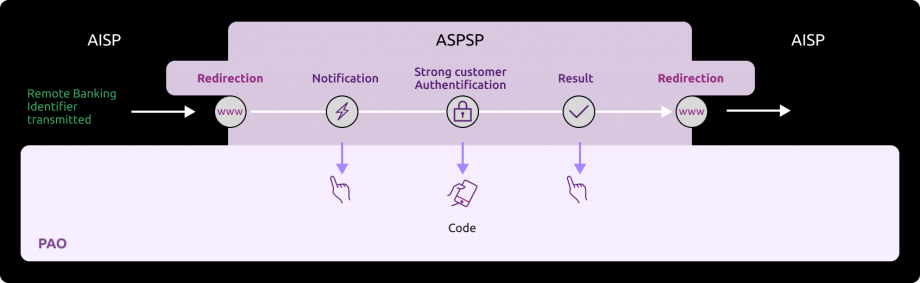
Third step : Get an access_token
This call allows AISP to recover the token to access data from the AISP registered callback URL in its consuming application.
If the customer has allowed you to retrieve data for an institution, you will find in the response to the previous call, the one-time code that retrieves an access_token.
This access_token is valid for 1 hour and is a prerequisite for each access to one of the methods of the account information API. The description of the functionality and the fields of the request is described in the use case “Get your access token”.
This token is accompanied by a refresh_token valid for 180 days that you must keep. When your access_token expires, you can request a new one by following the kinematics “Refresh your access_token” below.
After 180 days your refresh_token expires. To recover a new one, you need to follow again the kinematics “Get your access token” and go through a new step of strong authentication of the customer with the bank.
Request:
POST https://www.13807.sandbox.api.89C3.com/stet/psd2/oauth/token
Headers :
Content-Type:application/x-www-form-urlencoded; charset=utf-8
Params :
redirect_uri:https://myAPP.fr/Home/OAuth2Callback
client_id:PSDFR-ACPR-13807
grant_type:authorization_code
code:NnZx1hqHY2CLkCFjiTwhJeflgNnCrB
Notes on parameters :
client_id : your agreement number as defined by your national competent authority. (PSDXX-YYYY-ZZZZZ)
Code : recovered in the callback URL.
redirect_uri : callback URL as declared in your APP
AND
to be forwarded to ASPSP for each sandbox and Go Live requests to be forwarded to ASPSP for each sandbox and Go Live requests
It is necessary that the redirect_uri is the same as for the GET / authorize request
Response :
{
“access_token”: “KXZyspFBZ1R6NqWQdmsZhfdo1nbjK7MoI0Kr2rSi1mSCFNehAs6iLw”,
“token_type”: “Bearer”,
“expires_in”: 3600,
“scope”: “aisp offline_access”,
“refresh_token”: “KUZyspFBZ1R6NqWQdmsZhfdo1nbjK7MoD0Kr2rSi1mSCFNehAs6iLa”
}
Fourth step : Consume the methods of the API
- Get the list of the customer current accounts and delayed debit cards
This call allows you to list the accounts of the customer connected or not.
The description of the functionality and fields of the request are described in the use case “Get accounts list”.
Example of a request to retrieve the list of accounts in sandbox assembly:
Request :
GET https://www.13807.sandbox.api.89C3.com/stet/psd2/v1.4.2/accounts
Headers :
Authorization:Bearer KXZyspFBZ1R6NqWQdmsZhfdo1nbjK7MoI0Kr2rSi1mSCFNehAs6iLw
Signature : keyId=\”MZGfMA0GCSqGSIb3DQEBAQUAA4GNADCBiQKBgQDCFENGw33yGihy92pDjZQhl0C36rPJj+CvfSC8+q28hxA161QFNUd13wuCTUcq0Qd2qsBe/2hFyc2DCJJg0h1L78+6Z4UMR7EOcpfdUE9Hf3m/hs+FUR45uBJeDK1HSFHD8bHKD6kv8FPGfJTotc+2xjJwoYi+1hqp1fIekaxsyQIDAQAB\”,algorithm=\”rsa-sha256\”,headers=\”(request-target) psu-ip-address psu-ip-port psu-http-method psu-date psu-user-agent psu-referer psu-accept psu-accept-charset psu-accept-encoding psu-accept-language digest\”,signature=\”LbkxgICM48J6KdWNaF9qT7OWEorNlAwWNo6R+KkP7cP4TIGkk8wxcsGQXJ9ZnC+ZiA8mjL5S8WQyL41M7iPt+vJX4xh679gdGwmlKzn7E+ZtZ1I4qalRxcdLp4gBL7fll+C2lVBNJrViMJBezFK7AYVjnSWH7t1QxiMVg3CmoRM=\
X-request-id:id-1234567890111121 1
Psu-Ip-Address:192.168.0.1
Notes on parameters :
Authorization:Bearer => access_token
Psu-Ip-Address => allows to distinguish between the batch calls and the calls with the connected customer : this field is to feed for a connected customer.
Response : 200 OK
Headers :
X-request-id:id-1234567890111121 1
Notes on parameters :
X-request-id: transmitted as input
Body :
{
“_links”: {
“last”: {
“href”: “https://www.<cdetab>.sandbox.api.89C3.com/stet/psd2/v1.4.2/accounts?page=last”
},
“self”: {
“href”: “https://www.<cdetab>.sandbox.api.89C3.com/stet/psd2/v1.4.2/accounts”
},
“first”: {
“href”: “https://www.<cdetab>.sandbox.api.89C3.com/stet/psd2/v1.4.2/accounts”
}
},
“accounts”: [
{
“cashAccountType”: “CACC”,
“accountId”: {
“iban”: “FR7613807008043001965409135”,
“currency”: “EUR”
},
“resourceId”: “038-CPT30019654091”,
“product”: “COMPTE COURANT”,
“_links”: {},
“usage”: “ORGA”,
“psuStatus”: “Account Holder”,
“name”: “Tech-N Co”,
“bicFi”: “CCBPFRPPNAN”,
“details”: “COMPTE COURANT”
}
]
}
(case of persona Tech-N Co – D0999993I0 for which no consent was given via the method PUT /consents)
{
“_links”: {
“last”: {
“href”: “https://www.<cdetab>.sandbox.api.89C3.com/stet/psd2/v1.4.2/accounts?page=last”
},
“self”: {
“href”: “https://www.<cdetab>.sandbox.api.89C3.com/stet/psd2/v1.4.2/accounts”
},
“first”: {
“href”: “https://www.<cdetab>.sandbox.api.89C3.com/stet/psd2/v1.4.2/accounts”
},
“endUserIdentity”: {
“href”: “https://www.<cdetab>.sandbox.api.89C3.com/stet/psd2/v1.4.2/end-user-identity”
}
},
“accounts”: [
{
“cashAccountType”: “CACC”,
“accountId”: {
“iban”: “FR7613807008043001965405158”,
“currency”: “EUR”
},
“resourceId”: “038-CPT30019654051”,
“product”: “COMPTE CHEQUE”,
“balances”: [
{
“balanceType”: “VALU”,
“name”: “Solde en Valeur”,
“balanceAmount”: {
“amount”: “4321.95”,
“currency”: “EUR”
},
“referenceDate”: “2020-06-12”
},
{
“balanceType”: “CLBD”,
“name”: “Solde Comptable”,
“balanceAmount”: {
“amount”: “4179.95”,
“currency”: “EUR”
},
“referenceDate”: “2020-06-11”
},
{
“balanceType”: “OTHR”,
“name”: “Solde TP”,
“balanceAmount”: {
“amount”: “4348.95”,
“currency”: “EUR”
}
}
],
“_links”: {
“balances”: {
“templated”: false,
“href”: “https://www.<cdetab>.sandbox.api.89C3.com/stet/psd2/v1.4.2/accounts/038-CPT30019654051/balances”
},
“transactions”: {
“templated”: false,
“href”: “https://www.<cdetab>.sandbox.api.89C3.com/stet/psd2/v1.4.2/accounts/038-CPT30019654051/transactions”
}
},
“usage”: “PRIV”,
“psuStatus”: “Account Holder”,
“name”: “Compte perso”,
“bicFi”: “CCBPFRPPNAN”,
“details”: “COMPTE CHEQUE”
},
{
“cashAccountType”: “CACC”,
“accountId”: {
“iban”: “FR7613807008043001965405255”,
“currency”: “EUR”
},
“resourceId”: “038-CPT30019654052”,
“product”: “COMPTE CHEQUE”,
“balances”: [
{
“balanceType”: “VALU”,
“name”: “Solde en Valeur”,
“balanceAmount”: {
“amount”: “459.56”,
“currency”: “EUR”
},
“referenceDate”: “2020-06-12”
},
{
“balanceType”: “CLBD”,
“name”: “Solde Comptable”,
“balanceAmount”: {
“amount”: “459.56”,
“currency”: “EUR”
},
“referenceDate”: “2020-06-11”
},
{
“balanceType”: “OTHR”,
“name”: “Solde TP”,
“balanceAmount”: {
“amount”: “459.56”,
“currency”: “EUR”
}
}
],
“_links”: {
“balances”: {
“templated”: false,
“href”: “https://www.<cdetab>.sandbox.api.89C3.com/stet/psd2/v1.4.2/accounts/038-CPT30019654052/balances”
},
“transactions”: {
“templated”: false,
“href”: “https://www.<cdetab>.sandbox.api.89C3.com/stet/psd2/v1.4.2/accounts/038-CPT30019654052/transactions”
}
},
“usage”: “PRIV”,
“psuStatus”: “Account Holder”,
“name”: “Retrait et Cheques”,
“bicFi”: “CCBPFRPPNAN”,
“details”: “COMPTE CHEQUE”
},
{
“cashAccountType”: “CACC”,
“accountId”: {
“iban”: “FR7613807008043001965405352”,
“currency”: “EUR”
},
“resourceId”: “038-CPT30019654053”,
“product”: “COMPTE CHEQUE”,
“balances”: [
{
“balanceType”: “VALU”,
“name”: “Solde en Valeur”,
“balanceAmount”: {
“amount”: “2165.5”,
“currency”: “EUR”
},
“referenceDate”: “2020-06-12”
},
{
“balanceType”: “CLBD”,
“name”: “Solde Comptable”,
“balanceAmount”: {
“amount”: “2165.5”,
“currency”: “EUR”
},
“referenceDate”: “2020-06-11”
},
{
“balanceType”: “OTHR”,
“name”: “Solde TP”,
“balanceAmount”: {
“amount”: “2165.5”,
“currency”: “EUR”
}
}
],
“_links”: {
“balances”: {
“templated”: false,
“href”: “https://www.<cdetab>.sandbox.api.89C3.com/stet/psd2/v1.4.2/accounts/038-CPT30019654053/balances”
},
“transactions”: {
“templated”: false,
“href”: “https://www.<cdetab>.sandbox.api.89C3.com/stet/psd2/v1.4.2/accounts/038-CPT30019654053/transactions”
}
},
“usage”: “PRIV”,
“psuStatus”: “Account Holder”,
“name”: “Compte mensualités”,
“bicFi”: “CCBPFRPPNAN”,
“details”: “COMPTE CHEQUE”
}
]
}
(case of persona Marc – D0999990I0 for which a consent was already transmitted via the method PUT /consents)
- Forward customer’s consented accounts list for the balances consultation and/or transactions
Same principle of passage of the access token as in the paragraph above “Get the list of the customer current accounts and delayed debit cards“.
The description of the functionality and fields of the request are described in the use case “Forward customer’s consent“.
Request :
PUT https://www.13807.sandbox.api.89C3.com/stet/psd2/v1.4.2/consents
Headers :
Authorization : Bearer KXZyspFBZ1R6NqWQdmsZhfdo1nbjK7MoI0Kr2rSi1mSCFNehAs6iLw
Signature : keyId=\”MZGfMA0GCSqGSIb3DQEBAQUAA4GNADCBiQKBgQDCFENGw33yGihy92pDjZQhl0C36rPJj+CvfSC8+q28hxA161QFNUd13wuCTUcq0Qd2qsBe/2hFyc2DCJJg0h1L78+6Z4UMR7EOcpfdUE9Hf3m/hs+FUR45uBJeDK1HSFHD8bHKD6kv8FPGfJTotc+2xjJwoYi+1hqp1fIekaxsyQIDAQAB\”,algorithm=\”rsa-sha256\”,headers=\”(request-target) psu-ip-address psu-ip-port psu-http-method psu-date psu-user-agent psu-referer psu-accept psu-accept-charset psu-accept-encoding psu-accept-language digest\”,signature=\”LbkxgICM48J6KdWNaF9qT7OWEorNlAwWNo6R+KkP7cP4TIGkk8wxcsGQXJ9ZnC+ZiA8mjL5S8WQyL41M7iPt+vJX4xh679gdGwmlKzn7E+ZtZ1I4qalRxcdLp4gBL7fll+C2lVBNJrViMJBezFK7AYVjnSWH7t1QxiMVg3CmoRM=\
X-request-id:id-1234567890111121 2
Psu-Ip-Address : 192.168.0.1
Notes on parameters :
Authorization:Bearer => access_token
Psu-Ip-Address => allows to distinguish between the batch calls and the calls with the connected customer : this field is to feed for a connected customer.
Body (with an IBAN of the customer) :
{
“balances”: [
{
“iban”: “FR7613807008043001965405158”
}
],
“transactions”: [
{
“iban”: “FR7613807008043001965405158”
}
],
“trustedBeneficiaries”: true,
“psuIdentity”: true
}
Response :
Headers :
X-request-id:id-1234567890111121 2
Notes on parameters :
X-request-id: transmitted as input
No body but a response code « 201 – Created »
- Get customer’s account balances report or outstandings list of the linked delayed debit card
Same principle of passage of the access token as in the paragraph above “Get the list of the customer current accounts and delayed debit cards“.
The description of the functionality, an example and fields of the request are described in the use case “Get the accounting balance“.
- Get current account transactions or deferred debit card receipts backed by it
Same principle of passage of the access token as in the paragraph above “Get the list of the customer current accounts and delayed debit cards“.
The description of the functionality, an example and fields of the request are described in the use case “Get the transactions history“.
- Get the list of trusted beneficiaries of a PSU
Same principle of passage of the access token as in the paragraph above “Get the list of the customer current accounts and delayed debit cards“.
The description of the functionality, an example and fields of the request are described in the use case “Get the trusted beneficiaries list” => this service is not implemented.
- Get PSU’s identity
Same principle of passage of the access token as in the paragraph above “Get the list of the customer current accounts and delayed debit cards“.
The description of the functionality, an example and fields of the request are described in the use case “Get the client's identity”
- Refresh access_token with refresh_token
Request :
POST https://www.13807.sandbox.api.89C3.com/stet/psd2/oauth/token
Content-Type:application/x-www-form-urlencoded; charset=utf-8
Params :
client_id:PSDFR-ACPR-13807
grant_type:refresh_token
refresh_token:KUZyspFBZ1R6NqWQdmsZhfdo1nbjK7MoD0Kr2rSi1mSCFNehAs6iLa
Notes on parameters :
client_id : your agreement number as defined by your national competent authority. (PSDXX-YYYY-ZZZZZ)
Response:
{
“access_token”: “4s2Bt3MRL7nlPUZcRTPe5Tjs0v8p7ZOXOyEKs1juYesj9pPaU7hXFA”,
“token_type”: “Bearer”,
“expires_in”: 3600,
“scope”: “aisp offline_access”,
“refresh_token”: “KUZyspFBZ1R6NqWQdmsZhfdo1nbjK7MoD0Kr2rSi1mSCFNehAs6iLa”
}
Test data
As required by PSD2 regulation (see RTS Art. -30 (5)), we deliver a testing facility, including support, for connection and functional testing using non-real test data.
This page presents the datasets for testing the API :
Fictional customers, by customer segment (student, executive, business etc.) with either individual or professionial accounts that represent the population of our customers (retail ; business ; corporate).
The individual is a natural person categorized as “capable adult”. The individual can also have activities within the framework of a sole proprietorship = a company directed by only one person, and which does not have a legal personality, although it is registered in the trades directory or in the Commercial Register and of Companies (RCS). Examples: craftsman or liberal profession. In this case, the IE is considered an individual.
- The categories “professional” and “business” cover legal persons.
Their accounts and deferred debit cards characteristics are described (single-account, multi-accounts, multi-bank accounts, presence of a debit card, account balance).
- Useful data expected in input by the API are enumerated (remote banking identifier, SMS code for authentication, IBAN)
THESE PSU ID & TEST DATA CANNOT BE USED IN PRODUCTION LIVE ENVIRONMENT !
| Persona | Segment | Remote banking identifier | SMS code for authentication | Institution Code | IBAN | Account number- accountId | Current account | Balance | Currency | Consent given for transaction history? | Consent given for accounting balance? |
|---|---|---|---|---|---|---|---|---|---|---|---|
| Marc | Senior executive (individual) | D0999990I0 | 12345678 | 13807 | FR7613807008043001965405158 | 038-CPT30019654051 | Current | 4 179.00 | EUR | OK | OK |
| FR7613807008043001965405255 | 038-CPT30019654052 | Current | 459.56 | EUR | OK | OK | |||||
| FR7613807008043001965405352 | 038-CPT30019654053 | Current | 2 165.50 | EUR | OK | OK | |||||
| Marie | Retiree (individual) | D0999991I0 | 12345678 | 13807 | FR7613807008043001965406128 | 038-CPT30019654061 | Current | 1 754.03 | EUR | OK | OK |
| FR7613807008043001965406225 | 038-CPT30019654062 | Current | 11 429.00 | EUR | OK | OK | |||||
| Thomas | Student (individuel) | D0999980 | 12345678 | 13807 | FR7613807008043001965407195 | 038-CPT30019654071 | Current | 749.27 | EUR | OK | OK |
| FR7613807008043001965407292 | 038-CPT30019654072 | Current | -20 000.00 | EUR | KO | OK | |||||
| Alix | Executive (individual) | D0999992I0 | 12345678 | 13807 | FR7613807008043001965408165 | 038-CPT30019654081 | Current | 52.00 | EUR | OK | KO |
| FR7613807008043001965408262 | 038-CPT30019654082 | Current | 395.45 | EUR | KO | OK | |||||
| FR7613807008043001965408359 | 038-CPT30019654083 | Current | 298.19 | EUR | OK | OK | |||||
| Tech’n Co | Company (professional) | D0999993I0 | 12345678 | 13807 | FR7613807008043001965409135 | 038-CPT30019654091 | Current | 63 917.00 | EUR | KO | KO |
| Adam | Entrepreneur (individual and professional) | D0999994I0 | 12345678 | 13807 | FR7613807008063031966574122 | 038-CPT30319665741 | Current | 0.00 | EUR | OK | OK |
| FR7613807008063031966574219 | 038-CPT30319665742 | Current | -2 894.05 | EUR | OK | OK | |||||
| Lea | Executive (individual) | 755238649 | 12345678 | 13807 | FR7617515000920400430518020 | 038-CPT04004305180 | Current | -150.00 | EUR | OK | OK |
| SARL UNIPERSONNELLE 2640 | Merchant (business) | D0999995I0 | 12345678 | 13807 | FR7613807008063042100847972 | 038-CPT30421008479 | Current | 0.00 | EUR | OK | OK |
| FR7613807008060602191786661 | 038-CPT06021917866 | Current | 139 613 054.35 | EUR | OK | OK | |||||
| FR7613807002353032165639297 | 038-CPT30321656392 | Current | 701 246 591.14 | EUR | OK | OK | |||||
| FR7613807002353092101653050 | 038-CPT30921016530 | Current | 99 792.13 | EUR | OK | OK | |||||
| FR7613807002353092152355047 | 038-CPT30921523550 | Current | 1 015 745.35 | EUR | OK | OK |
Marc 42 years old – Nantes Single – Executive in the public Service – 18 years experience 3 current accounts Life / History / Work
Goals
|
Use practices
Brakes and potential frustrations
What might influence
The good surprise
| |
Marie 73 years old – Nantes Married – Retired from the private sector 2 current accounts Life / History / Work
Goals
|
Use practices
Brakes and potential frustrations
What might influence
The good surprise
| |
Thomas 21 years old – Nantes Student – Ecole d’ingénieur informatique privée 2 current accounts Life / History / Work
Goals
|
Use practices
Brakes and potential frustrations/span>
What might influence
The good surprise
| |
Alix 32 ans – Nantes Married – 3 children Executive – Private sector employee 3 current accounts 3 delayed debit cards Life / History / Work
Goals
|
Use practices
Brakes and potential frustrations
What might influence
The good surprise
| |
Tech’n Co Created by Dominique – Nantes 37 years old – Married – 2 children 1 current account 1 delayed debit card Life / History / Work
Goals
|
Use practices
Brakes and potential frustrations
What might influence
The good surprise
| |
Adam 29 years old– Montpellier Single – Contractor – 4 years experience 2 current accounts 2 delayed debit cards Life / History / Work
Goals
|
se practices
Brakes and potential frustrations
What might influence
The good surprise
| |
Léa 35 ans – Lyon Married – Executive in an insurance company- 10 years experience 1 current account Life / History / Work
Goals
|
Use practices
Brakes and potential frustrations
What might influence
The good surprise
| |
SARL UNIPERSONNELLE 2640 Dijon 5 current accounts 1 delayed debit card Life / History / Work
Goals
|
Use practices
Brakes and potential frustrations
What might influence
The good surprise
|
Authentification and OAuth2 access token
Diagram of the OAuth2 access token retrieval principle
As a developer of an application wishing to use this API resources, you need to get an OAuth2 access token following the steps below :
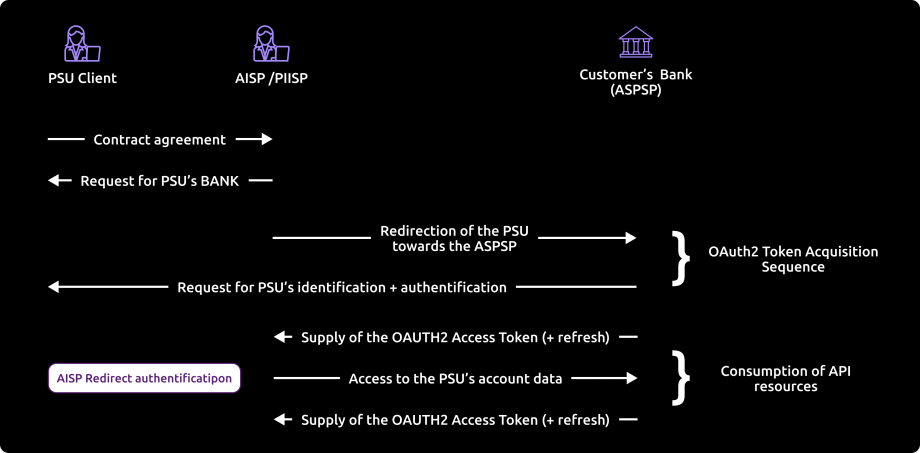
Note: the acronym “PIISP” used by STET v1.4.0 whose image above is taken from the documentation becomes “CBPII” from version STET DSP2 v1.4.2. This role provides access to the account coverage service.
References
- Section 3.4.3 of STET standard v1.4.2.17 – Part 1 Framework: https://www.stet.eu/en/psd2/
- OAuth 2.0 Authorization Framework : https://tools.ietf.org/html/rfc6749#section-4.1
Step by step development
1. Our customer specifies to you the identity of their bank.
2. You initiate the OAuth2 access token recovery sequence by redirecting our customer to the bank’s authorization infrastructure, through the following URL pattern and parameters :
See also [STET Framework page 21]
GET /authorize?response_type=code&client_id={clientId}&redirect_uri={redirectUri}&scope={scope}[&state={state}]
| Name | Data | Type | |
|---|---|---|---|
| response_type | [1..1] | Expected type of token | String[10] Must be valued with “code” |
| client_id | [1..1] | TPP identification | String[36] Must be equal or linked to the OrganizationIdentifier part of the Distinguished Name of the eIDAS certificate, according to ETSI specification |
| redirect_uri | [0..1] [1..1] | Call-back URL of the TPP | String [140] => mandatory field for the Banques Populaires, Banque Palatine and Banque de Savoie. |
| scope | [0..1] | Specifies the generic accreditations that both the PSU and the TPP agreed on : For AISP
For CBPII :
| String [140] => Space delimited roles list |
| state | [0..1] | Internal state that you can used for context management | String [1024] |
3. The bank account holder (ASPSP) will :
- Identify and authenticate the customer using one of the strong authentication methods proposed and presented to the customer;
- Perform checks about your AISP or CBPII function (QWAC and QSealc certificates validity and your role validity, non-revocation of your profile etc.).
4. Afterwards, the ASPSP will redirect the customer to your website, using the previously given call-back URL and the following parameters.
Please note that you will need to communicate this URL when you will fill the subscription form for the live on API BPCE dev portal.
See also [STET Framework page 25]
| Name | Data | Type | |
|---|---|---|---|
| code | [1..1] | Short-time code to use in order to get the access token | String [36] |
| state | [0..1] | Internal state if you provided it | String [1024] |
5. You will then be able to call, through a POST request, the bank’s authorization infrastructure with the following :
See also [STET Framework page 25]
| Name | Data | Type | |
|---|---|---|---|
| grant_type | [1..1] | Requested authorization type | String [36] => Must be valued with “authorization_code” |
| code | [1..1] | Short-time code previously provided by the ASPSP | String [36] |
| redirect_uri | [1..1] | Call-back URL of the TPP | String [140] => must be equal to the redirect_uri provided in the GET / token request. |
| client_id | [1..1] | TPP identification | String [36] => Must be equal or linked to the OrganizationIdentifier part of the Distinguished Name of the eIDAS certificate, according to ETSI specification |
Example
POST /token HTTP/1.1 Host: server.example.com Authorization: Basic czZCaGRSa3F0MzpnWDFmQmF0M2JW Content-Type: application/x-www-form-urlencoded grant_type=authorization_code&code=SplxlOBeZQQYbYS6WxSbIA &redirect_uri=https%3A%2F%2Fclient%2Eexample%2Ecom%2Fcb &client_id={clientId}
6. The ASPSP will :
- Perform checks about your AISP or CBPII function (QWAC and QSealc certificates validity and your role validity, non-revocation of your profile etc.
- Identify and authenticate your AISP or CBPII role through the X509 certificate that you present for safety of the mutual authentication
7. Once these verifications done and if they are conclusive, the bank will answer through a HTTP200 (OK) response that embeds the following data :
See also [STET Framework page 23]
| Name | Data | Type | |
|---|---|---|---|
| access_token | [1..1] | Access token provided by the ASPSP to the TPP | String [140] |
| token_type | [1..1] | Type of the provided access token (“Bearer” or “MAC”) | String [10] => Must be values with “Bearer” |
| expires_in | [0..1] | Token lifetime, in seconds. The token can be used several times as far as it is not expired. | Numéric |
| refresh_token | [0..1] | Refresh token that can be used for a future token renewal request. | String [140] |
Example
HTTP/1.1 200 OK Content-Type: application/json;charset=UTF-8 Cache-Control: no-store Pragma: no-cache { “access_token”:”2YotnFZFEjr1zCsicMWpAA”, “token_type”:”example”, “expires_in”:3600, “refresh_token”:”tGzv3JOkF0XG5Qx2TlKWIA” }
8. As soon as the OAuth2 access token has been provided by the bank (valid for 180 days), you will be able to present it to consume the resources of the API (see the use cases for the API methods).
Authentication of our customer
Identification methods of our customer
There are three different methods for customer identification wich should be relevant for the l’ASPSP (bank).
These three approaches are implemented in different ways, depending on the relevant use case :
- either during the authorisation process, mostly for AISP and CBPII use cases (cf. § 3.4;
- either during the consent management process, for instance in case of Payment Request (cf. § 3.5)
Principle for the REDIRECT method > this method applies to the Banques Populaires, Banque Palatine and Banque de Savoie
Through the Redirect approach, the customer authentication process is fully processed by the ASPSP.
In order to allow this, the TPP has to redirect the customer to the ASPSP authentication service, meaning the customer will leave temporarily the TPP interface for authenticating towards the ASPSP interface.
The TPP might have already captured a customer identifier that can be handled by the ASPSP for unambiguously recognizing the customer. In this case this identifier might be forwarded through the redirection, when the redirect protocol allows the forwarding of this identifier.
After finalisation of the authentication, the ASPSP redirects the PSU back to the TPP interface.
Exemptions to the strong customer authentication
Exemptions to the strong customer authentication are specified by the EBA (European Banking Authority) RTS on SCA, especially for Payment Initiation Services portant.
In this context, the API allows the TPP to forward to the ASPSP any useful information.
Eventually, the ASPSP keeps the final decision to apply or not this exemption.
API deprecation process
The decommissioning policy is based on the API lifecycle, which is aligned with the versions of the STET specifications.
This is illustrated below for version N:

Decommissioning of API Version N
The decommissioning of our API version takes place in several steps:
Day of Deployment of the New API Version (T0):
Version N+1 is deployed to the 89C3 Live gateway.
Three Months Post Deployment (T0 + 3 Months):
Version N of the API is decommissioned from all environments (sandbox and live).
Communication regarding the decommissioning of version N will occur on the deployment date of version N+1.
The preferred communication channel is this Groupe BPCE API Store portal, in the "Roadmap" section of the impacted API.
An additional communication via email to the contacts of the providers registered on the Groupe BPCE API Store portal may complement this process.
Roadmap
This API can evolve. Please note that API modifications can occur out of the three-month regulatory notice period (art. 30 des RTS / paragraphe 4). We apply this in case of :
- urgent functional issue to solve impacting all PSU of at least one major customers segment
- security issue
- evolutions requested by the national competent authority
Please do find below our forecast roadmap :
| Our API versions | STET Standard versions | Features | Sandbox Deployment date BPCE API Sandbox | Live Deployment date BPCE Live API Gateway | Live Deprecation date BPCE Live API Gateway |
|---|---|---|---|---|---|
| v1 | v1.4.0.47 |
| March 14, 2019 (first version) | October 7, 2019 | 2022 |
| v1.4.2 | v1.4.2.17 |
| June, 2020 | October, 2020 | To be announced |
Operational limitations
These are the operational limitations of this PSD2 API in the version 1.4.2 :
- Only apply to active payment accounts that are accessible online (cf. PSD2 Directive texts) => only current accounts will be returned.
- Use the REDIRECT authentication approach only (Strong Customer Authentication required and handled by the bank), which IS NOT an obstacle according to French national competent authority
Note : TPP are not allowed to send to ASPSP the PSU credentials, and only ASPSP SCA redirect screens can be used (no embeding process as clarified by European Banking Authority based on articles PSD2 #95.5 & RTS #31)
- Implement the mixed AISP consent mode, but not the full AISP consent mode :
- By default, when no consent has been transmitted, all accounts are available.
- But the accounts balances and transactions detail either the cards outstandings and slips are available only for the accounts the consent was given.
- The limit is up to 4 batch accesses per calendar day for every method of this API(see use cases of every method for more details), but there is no limit when the customer asks directly his accounts online
- Access to the list of trusted beneficiaries is NOT available (feature not implemented in Banques Populaires online banking service : a recorded beneficiary using SCA require also a SCA validation for payment as of the first euro for this beneficiary).
- “aisp extended_transaction_history” mode is NOT supported.
- Only the
GET /accounts,PUT /consents,GET /balances,GET /transactionsandGET /endUserIdentitymethods are available.
- Return data only for active delayed cards which have been used at least once in the past two months.
Limitations related to customer segments:
- The individual (IND) is a natural person categorized as a “capable adult”. The IND can also have activities within the framework of a sole proprietorship (SP) = a company managed by a single person, and which has no legal personality, although it is registered in the directory of trades or in the Register of Commerce and Companies (RCC). Examples: craftsman or liberal profession. In this case, the SP is considered a IND.
- The categories “professional” (PRO) and “company” (COMP) cover legal persons.
Limitations related to the types of accounts accessible:
- The accounts accessible via the AISP API are those available on remote banking, namely:
- capable major
- joint account Mr and Mrs
- joint account Mrs and Mr
- freelance
- enrtreprise
- attached minor
- emancipated minor
- As the following account is not accessible on remote banking, it is not via the AISP API either
- adult under guardianship
- adult under guardianship
Limitations related to strong authentication means depending on the customer segment :
- Classic customer (CLA): equipment with SMS OTP and / or Sécur’pass. Secur’pass is triggered as a priority if necessary
- Professional customer (PRO): equipment with SMS OTP and / or Sécur’pass. Secur’pass is triggered as a priority if necessary
- Business customer (BUS): equipment with OTP SMS
The table below summarizes the limitations by method for this API (the field names are given in italics):
| Retrieval of the list of accounts and delayed debit cards (“GET /accounts” method): | Retrieval of an account balances report and a delayed debit card outstandings report ( “GET /accounts/balances” method) : | Retrieval of an account transactions set and a delayed debit card slips set(“GET /accounts/transactions” method) : |
|---|---|---|
|
|
|
Pagination of the displayed results : Two parameters are proposed to customize the pagination of the displayed results :
| ||
From test to live data
According to PDS2 regulation, the data set available thru this dev portal, Try-it mode and sandbox are based on fictive data (or non-real ones).These data are described in the use case “How to test our API“.
In order to access to live data, you will need to request for a GO Live thru the BPCE API portal after testing your app using Try-it and Sandbox environments as described below :

Refer to Art. 30 (5). Account servicing payment service providers shall make available a testing facility, including support, for connection and functional testing to enable authorised payment initiation service providers, payment service providers issuing card-based payment instruments and account information service providers, or payment service providers that have applied for the relevant authorisation, to test their software and applications used for offering a payment service to users.
Only one TPP app can be declared so far per OID (= client_Id) knowing that it is possible to :
- apply white-labelled partnerships as well as third parties models
- declare many sets of certificats (and redirect URL)
Please note that a weekly slot is reserved for a programmed maintenance (all IT infrastructure incl’d backends and API gateways) Sunday morning from 02:00 to 06:00 am, and could generate some perturbations during this period.
As in test mode, the institution code (see the list of accessible banking institutions below) will allow you to address the correct customer repository via an “endpoint” in the format : www.<bankcode>.live.api.89c3.com or
- www.<bankcode>.live.api.banquepopulaire.fr aligned on direct access domain name www.banquepopulaire.fr
- www.10548.live.api.banque-de-savoie.fr aligned on direct access domain name www.banque-de-savoie.fr
- www.40978.live.api.palatine.fr aligned on direct access domain name www.palatine.fr
Once chosen, this entry point shall also be used for all subsequent requests.
| Bank code | Bank name | Bank short name | Available for tryIt and sandbox | Available for live operations |
|---|---|---|---|---|
| 10807 | B.P Bourgogne Franche Comté | BPBFC | – | Yes |
| 16807 | B.P AUvergne et Rhône-Alpes | BPAURA | – | Yes |
| 10207 | B.P RIves de Paris + BICS | BPRI | – | Yes |
| 18707 | B.P Val de France | BPVF | – | Yes |
| 13507 | B.P du Nord | BPN | – | Yes |
| 16607 | B.P Sud | BPS | – | Yes |
| 10907 | B.P Aquitaine Centre Atlantique | BPACA | – | Yes |
| 10907 | CMM Littoral du Sud Ouest | CMSOU | – | Yes |
| 14707 | B.P Alsace Lorraine Champagne | BPALC | – | Yes |
| 17807 | B.P OCcitane | BPOC | – | Yes |
| 13807 | B.P Grand Ouest | BPGO | Yes | Yes |
| 13807 | CMM Grand Ouest | CMMGO | Yes | Yes |
| 14607 | B.P Méditerranée | BPMED | – | Yes |
| 10548 | Banque de Savoie | BQSAV | – | Yes |
| 40978 | Banque Palatine | BQPA | – | No |
Eligibility
The “Account Information” API resources can only be used by Payment Service Providers (PSP) having a Account Information Service Providers (AISP) role.
In order to provide a service to users of payment informations services under PSD2 directive, you must be a licenced PSP such as credit institution, electronic money institution, and payment institution. This status is delivered by the financial authorities of the country where the request is made ; in France it is the “Autorité de Contrôle Prudentiel et de Résolution (ACPR), under the supervision of the Banque de France regulatory body :
Obtaining and maintaining such agreement requires rigorous procedures in order to give strong guarantees to the account informations services users. The forms are provided on the ACPR website : https://acpr.banque-france.fr/en/authorisation/banking-industry-procedures/all-forms
Once the agrement is granted, the Organisation Identifier (OID) given by the national authority has the following format :
PSDXX-YYYYYYYY-ZZZZZZZZ
- “PSD” as 3 character legal person identity type reference;
- 2 character ISO 3166 country code representing the NCA country;
- hyphen-minus “-” (0x2D (ASCII), U+002D (UTF-8));
- 2-8 character NCA identifier (A-Z uppercase only, no separator);
- hyphen-minus “-” (0x2D (ASCII), U+002D (UTF-8));
- PSP identifier (authorization number as specified by NCA).
This OID is very important to identify yourself as a TPP :
- using STET API requests as OID is included in the parameter “client_ID”
- using mutual authentication (TLS) as OID is included in eIDAS certificates to be delivered to the bank (see below).
Please note that if you are using our “PSD2 Registration” API , an internal OID will be generated & shall be used for subsequent API requests.
You also need eIDAS (electronic IDentification And trust Services) compliant certificates delivered by a Qualified Certification Service Provider (QTSP, see list available on https://webgate.ec.europa.eu/tl-browser/#/).
In order to be able to consume PSD2 API published on our Groupe BPCE API Store, the TPP has to enroll its app and to use live certificates signed by a QTSP while sending PSD2 Registration API requests :
- a set of QWAC (for securing the TLS) and QSEALC (to be stored in our gateway) certificates for the sandbox
- another set of (for securing the TLS) and QSEALC (to be stored in our gateway) certificates for the live environment
A keyID shall also be provided with a correct STET format integrating the SHA256 certificate fingerprint after “_” char, see example STET V1.4.2 / Documentation Part 3: Interaction Examples / section 6. AISP Use cases / Signature : keyId=https://path.to/myQsealCertificate_612b4c7d103074b29e4c1ece1ef40bc575c0a87e
Please embed only public keys. Controls on other data will be based on European Banking Association TPP register (https://euclid.eba.europa.eu/register/pir/disclaimer).
You can also refer to the FAQ section for any further question.
History
STET Compliance
This REST-based API is compliant with the STET specifications developed by the French market initiative (https://www.stet.eu/en/psd2/), version V1.4.2.17, in order to comply with PSD2 regulatory requirements. It takes into account functional limitations specific to this retail bank network (see use case “Limitations“).

As a reminder :
- payment services directive (PSD2, (UE) 2015/2366 of 25/11/2015) went into force on january 13, 2018:
- it is supplemented by regulatory technical standards for strong customer authentication (RTS, Commission Delegated Regulation (EU) No 2018/389) and common and secure open standards of communication that will apply on september14, 2019. These standards are called RTS (Rules Technical Standards) :
In France, the ordinance n° 2017-1252 of August 9, 2017 implements the PSD2 directive into the regulatory section of the monetary and financial code. This ordinance has been supplemented by two decrees (n° 2017-1313 and n° 2017-1314 on August 31, 2017), and five orders that were published on August 31, 2017.
Description of user support + duration of support
According to Article 30 (5) of the RTS, a support for third-party providers is available.
This support can be joined via the form on this Groupe BPCE API Store.
Responses are sent during office opening hours (09:00 – 18:00 Central European Local Time). However, there is a 24/7 monitoring process for our IT systems.
The general principle of TPP support is outlined below, taking into account delays of Article 30 (4) of the RTS :
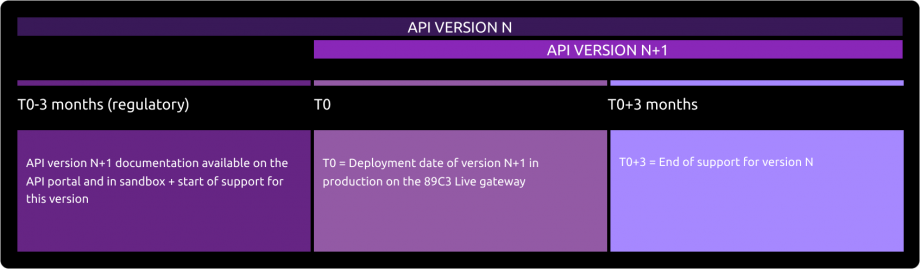
Deployment of API Version N+1
The deployment of the new version of our API takes place in several stages:
Before Deployment (T0 - 3 months):
The documentation for API version N+1 is available on the API Store.
Version N+1 is accessible in the testing environment (sandbox).
Support for the new version is activated.Day of Deployment (T0):
Version N+1 is deployed on the 89C3 Live gateway.
Three Months After Deployment (T0 + 3 months):
Support for API version N is discontinued.
API versioning
| Our API version | STET standard version |
|---|---|
| v1 | v1.4.0.47 |
| v1.4.2 | v1.4.2.17 |
Important changes made since the first version delivered
| Use case(s) / Method(s) | Effective date | Description of the evolution |
|---|---|---|
| All | December 30, 2019 | Creation of the portal documentation |
| Limits / Roadmap | March 31, 2020 | Modification of the versioning of the API following the postponement of the migration for the Palatine bank. |
| All the documentation of the STET Account Information API | July 8, 2020 | Portal documentation :
|
| Overview | August 28,2022 | Editorial issues and App2App updates |