








Overview
The expected benefits
Together, let’s harness the full potential of the European payment account information opening.

This AISP DSP2 API product allows you to securely access transaction data for customer payment accounts from the Caisses d’Epargne network.

Secure Data Access
Access customers' payment account information through a secure and regulatory-compliant device.

Value Creation
Enhance your offerings and products to better serve your clients through innovative use cases.
The connection is made through a secure device compliant with European regulatory requirements. By accessing this account information service, your customers will be able to view their payment account information within your environment: account list, balances, transactions (date, description, and amount), etc.
You will thus be able to enhance the added value of your products/services to serve your clients through innovative use cases: account consolidation, accounting reconciliation, customer knowledge enrichment, budget analysis and forecasting, etc.
The different possible use cases
Together, let's create value for our shared clients.

Consolidation
Allow your clients to aggregate their payment accounts to have a consolidated and real-time view of their transactions.
Accounting Reconciliation
Enable your corporate clients to reconcile their invoices and business expenses with their payment transactions.
Customer Insights
Understand and learn from the payment behavior of your individual or corporate clients.
Business Management
Leverage customer payment data to build high-value management dashboards.
How to access the product ?
To access the Account Information Services API, developers and businesses must follow the steps below.
Contact
Get in touch with the product managers.
Access
Enroll directly through the dedicated process (regulated entities).
Integration & Testing
Integrate our service into your solution and share your use cases with us to help ensure the quality of our offering.
Go Live !
Documentation
Guides
How to aggregate data ?
A customer having different accounts in various banks is willing to aggregate his data.
Using this API “Account information” setup by banks (ASPSP), you can ask for real-time data authorized by the customer without asking for online banking credentials.
The API resources can only be consumed if you have obtained the Account Information Services Provider (“AISP”) role status. This prerequisite is described in section “Eligibility“.
Once done, the overall process is as follows:
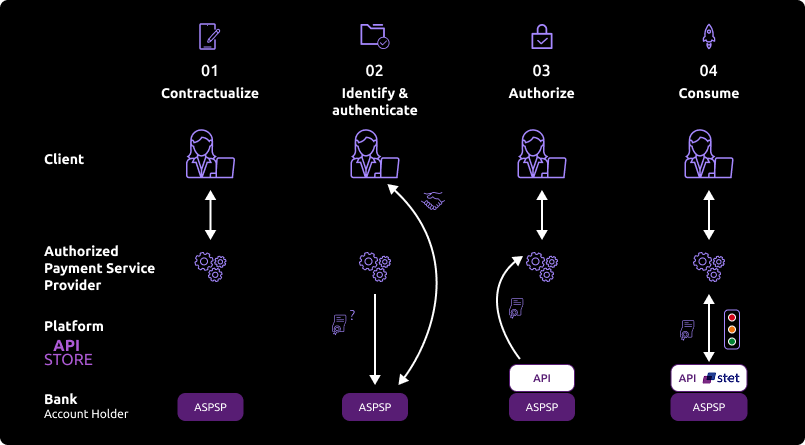
The customer agreed to use your service. He needs to select his ASPSP through your interface.
During the first set of data exchanges, you will request for an authorization token (and a refresh one). For this AISP role, you need these tokens BEFORE consuming API resources. These tokens are issued by the ASPSP AFTER an identification and authorization process of the bank account holder.
The ASPSP will:
- Check your certificates and ongoing agreement delivered by the Competent Authority.
- Identify and authorize the customer using the “redirect” mode in order to issue the tokens.
If the above access is granted by the customer, you can then get these OAUTH2 tokens thru secure exchanges (see use case “Get your token“).
Whenever you present this token to the BPCE API gateway, you will be able to consume this API resources in order to:
- Request for the list of eligible accounts (see use case “List accounts“)
- Forward customer’s consent to the ASPSP (see use case “Forward customer’s consent“)
- Securely access granted customer’s data (see use case “Access to data“)
If the regulated 180-day token validity period expires, this process needs to be started again (see use case “Refresh your token“)
NB: any ASPSP can refuse the access to customer’s data for any justified reason (non-compliant API call, blocked account, …).
Access to data
In order to query an API, the API version is included in the URI such as: /stet/psd2/v1.4.2/accounts.
The features are described hereafter only from a functional standpoint. The technical aspects are included in the section « Technical use cases ». You also need to be familiar with PSD2 terminology. You may also use the Frequently Asked Questions (FAQ).
As a reminder, this API is designed to give access to payment accounts (and to a predefined set of data) authorised by the customer:
- balance
- and/or transactions history
- and/or customer (name and first name)
Some of these services may have some constraints or may not be available if not present in the online banking environment.
In sandbox assembly mode, access to test data can be done through the endpoint www.<codetab>.sandbox.api.89C3.com (see use case « Test our API »).
In production, access to live data can be done through the endpoint www.<codetab>.live.api.89C3.com (see use case « Limits »).
Get the list of eligible payment accounts
Description
This first call allows to get the list of eligible payment accounts when the user of payment services (PSU) is using services from a third party provider (TPP AISP) connected to the bank account holder (ASPSP).
Prerequisites
- TPP has an agreement for the AISP role from any European competent authority;
- TPP and PSU have a service contract;
- An OAUTH2 access token has been delivered to the TPP by the ASPSP;
- TPP and ASPSP have performed mutual authentication;
- TPP has delivered his OAUTH2 access token to be able to consume the API resources.
Transaction flow
TPP is interacting with the customer through its interfaces. TPP sends a GET request to ASPSP infrastructure to get this list of accounts, which returns the eligible payment accounts.
Customer consent
Description
This second request is mandated by the ASPSP: TPP has requested the customer to give his consent on the accounts he wants to use (and which data).
This information (list of authorized accounts and data) needs to be sent back by the TPP to the bank (ASPSP) for recording this customer consent. This “consent” record is linked only to a given PSU + given TPP AISP + given authorized payment account(s) + given authorized data for each account. The ASPSP will verify each TPP access request to the accounts vs. this record.
This consent can be modified at any time by calling again this service.
Prerequisites
TPP has requested the list of accounts for the first time.
PSU gives his consent to AISP.
Transaction flow
AISP requests the ASPSP to send back the balance of one of the authorized accounts.
Get transactions history
Description
This call allows to get the 90-day transactions history.
Prerequisites
TPP has requested the list of accounts and sent PSU consent to ASPSP.
Transaction flow
AISP requests the ASPSP to send the transaction history with some criteria.
Get PSU identity
You can get account holder identity using GET /end-user-identity (please refer to the technical use case).
How to use the fallback mode ?
Principe
In order to comply with PSD2 regulations, banks available on this BPCE API developer portal have setup contingency measures in case of unplanned unavailability of the dedicated API interface.
The principle of this « fallback » solution is explained below:
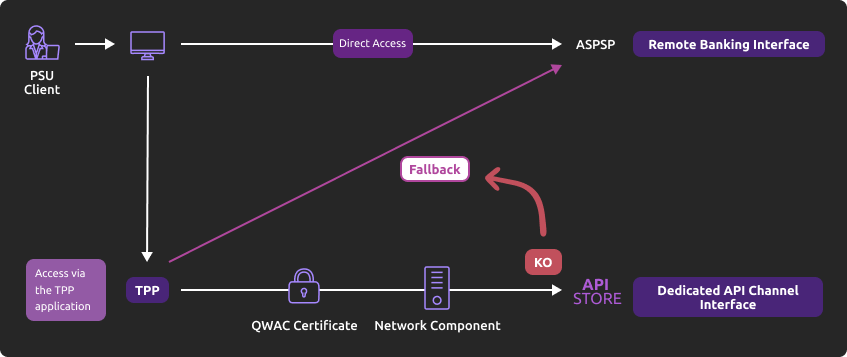
This fallback mechanism meets PSD2 regulatory requirements (article 33/RTS). It can be used with the same conditions and prerequisites applicable for the dedicated API interface which are specified in the “Eligibility” use case.
Roadmap
Please do find below our estimated roadmap:
| Version | Fonctionnalités | Sandbox Deployment BPCE API Dev Portal & Sandbox | Live Deployment BPCE Live API Gateway |
|---|---|---|---|
| v1.0 | Fallback (*) | Not applicable | September 2019 |
(*) Main features:
- Use the same API dedicated interface endpoint. The list of our banking institutions and the possible values of <bkcode> are specified in the “Limitations” use case.
- A parameter (header ‘fallback:1’ present or absent) managed directly by the TPP allows to differentiate any « Fallback » request from dedicated interface PSD2 API requests.
- Use of same TPP eIDAS certificate (QWAC) to be presented for mutual TLS authentication.
- Use the same PSU authentication procedure and means for accessing online banking services.
- This fallback solution is always active, even so the dedicated interface API must be used systematically in first priority. Its usage is subject to strict conditions as described in Article 33 of RTS, and can’t be used as the main access for PSD2 features. It will be monitored as such and every abuse will be automatically reported to our national competent authority.
Example
If PSD2 API are not available due to unplanned unavailability or systems breakdown (see RTS Art. 33), TPP should use the following request with <codetab>=17515 as an example:
POST https://www.17515.live.api.89c3.com/stet/psd2/oauth/token
with:
- its live eIDAS QWAC certificate.
- fallback:”1″ parameter in the header.
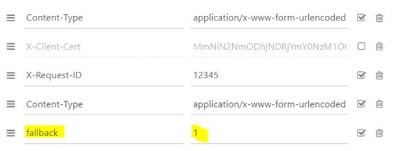
POST /stet/psd2/oauth/token HTTP/1.1
Content-Type: application/x-www-form-urlencoded
X-Request-ID: 1234
fallback: 1
User-Agent: PostmanRuntime/7.16.3
Accept: */*
Cache-Control: no-cache
Host: www.17515.live.api.caisse-epargne.fr
Accept-Encoding: gzip, deflate
Content-Length: 67
Connection: keep-alive
Content-Type: text/html; charset=iso-8859-1
</head><body>
<h1>Found</h1>
<p>The document has moved <a href=”/www.17515.live.api.caisse-epargne.fr&fallback=eyJ0eXAiOiJKV1QiLCJhbGciOiJSUzI1NiIsIng1dCI6ImhF…”>here</a>.</p>
</body></html>
Une fois redirigé, le TPP doit utiliser ensuite les identifiants du PSU via sa méthode propriétaire.
For more details about POST request, see STET specifications
Please note the following constraints which apply on this fallback mechanism:
- No re-use of the API dedicated interface context, neither any of 180-day validity access token generated for AISP role.
- Only online internet banking features are used as a reference (excl’d mobile banking features) and are accessible thru the fallback mode. As an example, online banking doesn’t propose any e-commerce transactions to customers. PISP could NOT propose this feature in fallback mode.
- The user of payment services (PSU) must be connected to PSP app. So no AISP batch process is possible.
- PSD2 also imposes a reinforcement of strong customer authentication (SCA) for accessing direct online banking services. Therefore fallback mechanism leverages on reinforced PSU online banking authentication procedures and means such as (non-exhaustive list):
- Soft token Secur’Pass on smartphone.
- Password + OTP SMS.
- Physical token (corporate market).
Trigger App2App feature
Introduction
This service allows you to activate automatically (without PSU action) the banking app on PSU smartphone for identification and authentification process.
Prerequisites
The PSU has to load and to use at least once the latest retail banking mobile app (V6.4.0 and higher) available on Android and Apple app stores.
Note: PRO & ENT customer segments are not yet activated
The callback universal link (same principle as URL callback) shall be defined in advance by the TPP:
- if this link/URL already exists on our BPCE API gateways, there is nothing else to do.
- otherwise the TPP shall declare it using our “PSD2 Registration” API.
Our “Universal links” links have been declared on iOS & Android platforms. It is not worthwhile to access to them e.g. using https://www.<codetab>.live.api.caisse-epargne.fr/89C3api/accreditation/v2/.well-known/apple-app-site-association which sends back an error code.
Request
PSU banking app activation can be achieved in live production using a current STET API request (initiated by the TPP app on the same smartphone device) with the following endpoints:
| Brand | App2App endpoint |
|---|---|
| Banque Palatine | www.40978.live.api.palatine.fr/stet/psd2/oauth/authorize |
| Banque Populaire | www.<codetab>.live.api.banquepopulaire.fr/stet/psd2/oauth/authorize (see <codetab> values on Banque Populaire API product data sheet) |
| Banque de Savoie | www.10548.live.api.banque-de-savoie.fr/stet/psd2/oauth/authorize |
| Caisse d'Epargne | www.<codetab>.live.api.caisse-epargne.fr/stet/psd2/oauth/authorize (see <codetab> values on Caisse d’Epargne API product data sheet) |
| Banque BCP | www.12579.live.api.banquebcp.fr/stet/psd2/oauth/authorize |
| Crédit Coopératif | www.42559.live.api.credit-cooperatif.coop/stet/psd2/oauth/authorize |
| BTP Banque | www.30258.live.api.btp-banque.fr/stet/psd2/oauth/authorize |
| Natixis Wealth Management | www.18919.live.api.natixis.com/stet/psd2/oauth/authorize |
Otherwise, a webview will be displayed on PSU smartphone web browser if:
- the banking app is not present on PSU device nor App2App compliant (not the latest version uploaded, see prerequisites).
or
- the other endpoint format is used www.<codetab>.live.api.89c3.com/stet/psd2/oauth/authorize (can be used as a backup in case of App2App problem).
Regulatory publications
Get your token
Principle
Access to PSD2 API features is granted by the bank with an authorization token (or access token) issued using OAUTH2 standardized process.
How it works
See also STET / Part I

1- The customer (PSU) provides the identity of the bank which holds his accounts (ASPSP) to the TPP.
2- The TPP initiates an OAuth2 access token request sequence by redirecting the customer to the ASPSP’s authorization infrastructure using GET /authorize.
3- ASPSP will:
- Identify and authenticate the PSU.
- Check your role and validity of your eIDAS certificates and agreement.
4- Once checks are done and correct, ASPS will redirect the PSU to your site using “call-back” URL given in the GET /authorize and to ASPSP for the Go Live process.
You will find in the response of this request a one-time-token with a short life period.
5- You can then call the ASPSP in order to request the OAuth2 token (and refresh one) using POST /token with previously received data (including the one-time-token).
Note: these /token requests for getting the Authorization Code flow shall be sent WITHOUT the « scope » parameter.
6- ASPSP will:
- Check your role and validity of your eIDAS certificates and agreement.
- Check the direct or indirect matching between the Authorization Number within the eIDAS certificate and the [client_id] value.
7- Once checks are done and correct, ASPSP returns a response HTTP 200 (OK) with data including the access token.
8- As soon as you get the OAuth2 access token (and a 180-day valid refresh token) issued by the bank, you can use it for each API request within the “Authorization” header, prefixed by the token type “Bearer”.
The [client_id] that is linked to the access token must directly or indirectly match with the Authorisation Number that is located within the TPP’s eIDAS certificate (QWAC).
If the access token is expired, the request will be rejected with HTTP 401 with an error equal to “invalid_token”.
The request can be replayed once the access token has been refreshed using the use case “Refresh your token“.
If your refresh token is about to expire, you will have to perform again all this process, meaning also redirect to ASPSP for customer’s strong authentication (PSU SCA).
For more details, see also OAuth 2.0 Authorization Framework: https://tools.ietf.org/html/rfc6749#section-4.1
Example
You can find an example of this request in section “Test our API” and then “Sandbox”.
Get accounts list
Principle
Using this service, you can get access to various data from a payment account authorized by the customer:
- list all eligible online accessible payment accounts
- retrieve accounting balance
- get URI for the GET /end-user-identity method
- get URI for GET /balances, GET /transactions, GET /details & GET /overdrafts methods
Access to this method is limited to a maximum of 4 batches per day for a given TPP + ASPSP + account + PSU (except if the PSU is connected and has requested this operation).
Prerequisites
In order to proceed, TPP needs to fulfill all eligibility criteria and to present a valid OAUTH2 Authorization token (see use case “Get your token“).
Request
Method “GET /accounts”
See also STET specifications
Returned result
IF YOU USE THIS METHOD FOR THE FIRST TIME
(therefore if you didn’t send previously any information using PUT /consents, OR if all granted accounts have not been revoked using PUT /consents – see use case “Forward customer’s consent“):
This call allows you to list all eligible online accessible authorized payment accounts (including new ones) from our customer (without balances, URI, or resourceID) for the following methods:
- GET /balances
- GET /transactions & GET /details
- GET /overdrafts
IF YOU HAVE ALREADY FORWARDED AT LEAST ONE CONSENT FROM THE CUSTOMER USING PUT /CONSENTS
(therefore if you have used previously PUT /consents request, OR if all granted accounts have not been revoked using PUT /consents – see use case “Forward customer’s consent“): this call allows you to retrieve all eligible online accessible authorized payment accounts with the following additional data:
- Accounting balance if this account is flagged in the “balances” parameter in PUT /consents method
- URI for the GET /balances method if this account is flagged in the “balances” parameter in PUT /consents
- URI for the GET /transactions & GET /details (if available) methods if this account is flagged in the “transactions” parameter in PUT /consents
- URI for the GET /overdrafts method if this account is flagged in the “overdrafts” parameter in PUT /consents
Note: The « currency » parameter is now inserted in « accountId » field.
Example
You can find an example of this request in the section “Test our API” and then “Use our sandbox”.
Acceptance tests
The purpose of these tests is to ensure that the API complies with the STET standard.
They should be validated before any application deployment.
| Description | Test data |
|---|---|
Get all PSU payment accounts
| PSU Persona: CLAIRE
PSU context = BY-AISP scope OAuth2 = aisp
Result: message HTTP 200 => OK with 2 accounts returned |
HTTP request with non-authorized access token for this resource (wrong scope)
=> check if HTTP 403 is returned (access refused)
| PSU Persona: LEA
PSU context = BY-AISP scope OAuth2 <> aisp
Result: Error message HTTP 403 returned |
Use a non-authorized request (POST)
=> check if HTTP 405 is returned
| PSU Persona: LEA
PSU context = BY-AISP scope OAuth2 = aisp
Result: Error message HTTP 405 returned |
Forward customer's consent
Introduction
This service is mandatory as required by Caisse d’Epargne ASPSP as part of the “Mixed” model.
Prerequisites
It is necessary to fulfill the eligibility prerequisites and to have retrieved the OAUTH2 access token (see the “Overview” > “Recover your token” section).
You can retrieve the list of the customer’s eligible payment accounts after calling the GET /accounts request for the first time: you will find the IBAN associated with each account, i.e., “accountId”: {“iban”: ” ”}.
However, if you already know the IBAN(s) for the customer’s payment accounts, you can send them to us directly via the PUT /consents method.
Request
Method “PUT /consents”
See also STET specification
The PSU specifies to the AISP which of his/her accounts will be granted and which data should be available: it gives his consent and includes four access types (or operation types):
- balances: access to one or many PSU accounts balance report
- transactions: access to one or many PSU accounts transactions history and details (if available)
- psuIdentity: access to connected PSU identity (name & surname for retail customer, or corporate ID for a company)
- overdrafts: access to PSU accounts overdraft
Note: the following methods are NOT supported
- GET /trustedBeneficiaries: whatever value is used (True/False), it won’t be taken into account
- GET /owners: whatever value is used, it won’t be taken into account
The AISP forwards details of PSU consent to the ASPSP through this call.
Each new API request calls the ASPSP consent service, for one given PSU, replaces any prior consent that was previously sent by the AISP.
Furthermore, upon the PSU’s request, the consent may be updated subsequently for an operation type: for example, access to transactions can be revoked while access to balances stays active:
- If no accounts are transmitted with PUT /consents method, and if a consent was given previously for some accounts using this method, then it means that the customer is revoking all his accounts.
- If no accounts are granted, or if the customer has revoked all his consented accounts, the GET /accounts method allows getting the list of all the accounts (including new ones) but access to related data (balances, transactions) is NOT anymore possible.
- In order to get any new account, a PUT /consents with no data is necessary.
Example
You can find an example of this request in the section “Test our API” and then “Use our sandbox”. The test data sets are described in the section “Test our API” and then “Test with persona”.
See also STET specification
Acceptance tests
The purpose of these tests is to ensure that the API complies with the STET standard.
They should be validated before any application deployment.
| Test description | Nature of the test | Data set |
|---|---|---|
| Add/update the consent of a customer => HTTP code 201 is returned | Mandatory | Persona:
LEA
IBANs: FRxxx FRxxx
Result: HTTP code 201 is returned |
HTTP request with an access token which is not authorized to access this resource (incorrect scope)
=> Access to the resource is not allowed (HTTP code 403) | Mandatory | Persona:
LEA
Result: HTTP code 403 is returned |
HTTP request using POST method
=> HTTP code 405 is returned | Mandatory | Persona:
LEA
Result: HTTP code 403 is returned |
Get account balance
Introduction
Using this service, you can get the accounting balance data (“CLBD” in STET) on a payment account granted by the customer.
It follows the return of the list of current accounts for a customer: a resource identifier corresponding to an account must be provided to obtain the corresponding accounting balance.
Access to this method is limited to a maximum of 4 batches per day for one given TPP + ASPSP + account + PSU (except if the PSU is connected and has requested it).
Prerequisites
The TPP has previously retrieved the list of available accounts for the PSU:
- Customer’s IBAN should have been forwarded to ASPSP in the “transactions” list of the PUT /consents method (see use case “Forward customer’s consent“)
- The “accountResourceId” is sent in the GET /accounts response / field “resourceId” for this IBAN
- URI for accessing this method is given using the field “_links”: {“transactions”: {“href”: …}} as a response of the GET /accounts using the above “accountResourceId”
Request
Method “GET /accounts/{accountResourceId}/balances”
See also STET specification
Mandated parameter
“accountResourceId”: current account for which you want to retrieve transactions history.
This field corresponds to the field “resourceId” obtained in the GET /accounts request result page.
Example
You can find an example of this request in section “Test our API” and then “Use our sandbox”.
See also STET specification
Acceptance tests
The purpose of these tests is to ensure that the API complies with the STET standard. They should be validated before any application deployment.
| Description | Test data |
|---|---|
Get accounting balance
=> Check negative balance | PSU Persona: LEA
PSU context = BY-AISP scope OAuth2 = aisp
Result: message HTTP 200 => OK negative balance returned |
Get accounting balance from an unknown account
=> check if HTTP 404 is returned | PSU Persona: unknown – CPT30014684067
PSU context = BY-AISP scope OAuth2 = aisp
Result: Error message HTTP 404 returned |
HTTP request with non-authorized access token for this resource (wrong scope)
=> check if HTTP 403 is returned (access refused) | PSU Persona: LEA
PSU context = BY-AISP scope OAuth2 < > aisp
Result: Error message HTTP 403 returned |
Use a non-authorized request (POST)
=> check if HTTP 405 is returned | Persona: LEA
PSU context = BY-AISP scope OAuth2 = aisp
Result: Error message HTTP 405 returned |
Get accounting balance
=> check null balance
| PSU Persona: CLAIRE
FR7617515900000400358074026 PSU context = BY-AISP scope OAuth2 = aisp
Result: message HTTP 200 => OK null balance returned |
Get accounting balance
=> check positive balance
| Persona: CLAIRE
FR7617515900000800358074006 PSU context = BY-AISP scope OAuth2 = aisp
Result: message HTTP 200 => OK positive balance returned |
Get transactions history
Introduction
Using this service, you can get the transactions history data (& details if available) on a payment account granted by the customer.
The type of account is an eligible PDS2 payment account (either a deposit account for individuals, or a current account for professionals and legal entities).
Prerequisites
The TPP has previously retrieved the list of available accounts for the PSU:
- Customer’s IBAN should have been forwarded to ASPSP in the “transactions” list of the PUT /consents method (see use case “Forward customer’s consent”)
- The “accountResourceId” is sent in the GET /accounts response / field “resourceId” for this IBAN
- URI for accessing this method is given using the field “_links”: {“transactions”: {“href”: …}} as a response of the GET /accounts using above “AccountresourceId”
Request
GET /accounts/{accountResourceId}/transactions
GET /accounts/{accountResourceId}/transactions/{transactionResourceId}/details (method to call for each transaction details if they are available)
See also STET specifications
Mandated parameters
“accountResourceId”: current account for which you want to retrieve transactions history.
This field corresponds to the field “resourceId” obtained in the GET /accounts request result page.
Optional parameters
- dateFrom: start date to search for transactions (date included)
- dateTo: end date to search for transactions (date NOT included)
- PSU-IP-ADDRESS => to be inserted in the header if the PSU is connected to AISP services
- entryReferenceFrom => NOT used by this API
- entryReferenceTo => NOT used by this API
- dateType => NOT used by this API
The date format for “dateFrom” & “dateTo” is based on ISO 8601 standards with the three following allowed formats:
- YYYY-MM-DDTHH:MM:SS.SSS or YYYY-MM-DDTHH:MM:SS.SSSZ
- YYYY-MM-DDTHH:MM:SS.SSS+HHMM
- YYYY-MM-DDTHH:MM:SS.SSS+HH:MM
Data Returned
As a reminder:
- BOOK means the transaction was booked and affects the closing booked balance (status used by this API)
- PDNG means the transaction is about to be booked and does not affect the closing booked balance (status NOT used by this API)
- OTHR means the transaction is not booked and does not affect the closing booked balance or the instant balance (status used by this API)
In addition to mandatory data returned, the optional STET data “entryReference” has been added for all transactions knowing that it is:
- unique value in differed debit transaction life cycle (*)
- identical value before & after transaction settlement (from status “OTHR” to “BOOK”)
(*) Note 1: except for all schedules of a standing order (considered as one transaction overall)
Note 2: other types of operations (e.g. Paylib) have this data only for “BOOK” status, except for those rejected.
The “entryReference” format is different depending on the type of operations:
| type | length | example |
|---|---|---|
| differed fund transfer | 25 char | 1310400000123480007081059 |
| direct debit | 30 char | 131040000012342014185G10004997 |
| differed debit card | 40 char | 1310400000123420140720170000234978987654 |
| other operations | 40 char | 131040000012342021-02-08-09.33.46.621234 |
The optional STET data “Bank Transaction Code” (BTC) has been added ONLY for professional & corporate segment clients (CE Net subscribers or equivalent), e.g. for a SEPA SCT Core:
“bankTransactionCode”: {
“domain”: “PMNT”,
“family”: “RCDT”,
“subFamily”: “ESCT”,
“code”: “05”,
“issuer”: “SI MYSYS – Caisse d’Epargne”
}
Example
You can find an example of this request in section “Test our API” and then “Use our sandbox“.
See also STET specifications
Acceptance tests
The purpose of these tests is to ensure that the API complies with the STET standard. They should be validated before any application deployment.
Expected Scope = aisp otherwise specified.
| Test description | Nature of the test | Data set and Expected Result |
|---|---|---|
Retrieve all the transactions linked to a PSU’s account
=> Check the presence of transactions | Mandatory | Persona: GEORGES
Result: return of the current account transaction history |
Retrieve transactions linked to an unknown account
=> HTTP code 404 is returned: {accountId} is invalid | Mandatory | Persona: LEA
Result: HTTP code 404 is returned |
HTTP request with an access token which is not authorized to access to this resource (incorrect scope = pisp)
=> Check that HTTP code 403 is returned – access to resource not allowed | Mandatory | Persona: LEA
Result: HTTP code 403 is returned |
HTTP request using POST method
=> Check that HTTP code 405 is returned | Mandatory | Persona: LEA
Result: HTTP code 405 is returned |
Get transactions list with “dateFrom” parameter
=> Check that the filter is well applied | Mandatory | Persona: GEORGES
Result: return of a list of transactions after the date given as input parameter |
Get transactions list with “dateTo” parameter
=> Check that the filter is well applied | Mandatory | Persona: GEORGES
Result: return of a list of transactions before the date given as input parameter, up to the limit of 62 days |
Get transactions list with optional field “entryReference” empty
=> Check that response field “entryReference” is empty | Mandatory | Persona: GEORGES
Result: return a list of transactions with field “entryReference” empty |
Get transactions list with “dateFrom” and “dateTo” parameters
=> Check that the filter is well applied | Mandatory | Persona: GEORGES
Result: return of a list of transactions within the dateFrom and dateTo given as input parameters |
Request with “dateFrom” parameter older than 62 days
=> Check that HTTP code 400 is returned – Period out of bound expected | Mandatory | Persona: LEA
Result: HTTP code 400 is returned |
Request with an invalid “dateFrom” or “dateTo” parameter
=> Check that HTTP code 400 is returned | Mandatory | Persona: GEORGES
Result: HTTP code 400 is returned |
Get no transactions present in the list
=> Check that HTTP code 204 is returned | Mandatory | Persona: CLAIRE / account FR7617515900000400358074026
Result: HTTP code 204 is returned |
Get PSU's identity
Introduction
This service allows you to retrieve the connected PSU’s identity who has given you their consent to do so (who is not necessarily the customer having the account).
Prerequisites
To proceed with this request, it is necessary to fulfill the eligibility prerequisites and to have retrieved the OAUTH2 access token (see in the section “Overview” > “Get your access token“).
To get the PSU’s identity, you need:
- The authorization to transmit this identity information to the TPP must have been transmitted to us via the setting to true of the “psuIdentity” attribute of the PUT /consents method and must not have since been revoked (i.e. not cancel and replace via PUT /consents with a “psuIdentity” attribute set to false);
- The URI to access this method is given through the “_links“: {“endUserIdentity”: {“href”: …}} item as a result to the GET /accounts request.
Request
Method GET /end-user-identity
See also STET specifications
Mandatory or optional settings of the body required to call this service
Mandatory settings : PSU-IP-ADDRESS => to inform if the PSU is connected.
Returned result
This call allows you to get the identity of the end customer.
A self link will also be available to return to the page obtained after execution of the request.
This method is limited to a maximum of 4 batch calls per calendar day per TPP + ASPSP + account + PSU. However, when the customer is connected to TPP app and requests access to his current accounts, the number of accesses is not limited.
Example
You can find an example of this request in section “Test our API” and then “Use our sandbox“.
See also STET specifications
Acceptance tests
These test cases are intended to allow you to perform a minimum of tests to get started with this API and access it from your application.
| DESCRIPTION OF THE TEST | DATA |
|---|---|
| User identity recovery | Persona : Marc – D0999990I0 Prerequisites : scope OAuth2 = aisp Results : HTTP answer 200 => OK |
| Recovery of the identity of the user who has not given their consent for this | Persona : Tech’n Co – D0999993I0 Prerequisites : scope OAuth2 = aisp Results : HTTP answer 403 => access to the resource denied |
Get account overdraft
Introduction
Using this service, you can get the authorized overdraft on a payment account granted by the customer.
The type of account is an eligible PDS2 payment account (either a deposit account for individuals, or a current account for professionals or corporate entities).
Prerequisites
The TPP has previously retrieved the list of available accounts for the PSU:
- Customer’s IBAN should have been forwarded to ASPSP in the “overdrafts” list of the PUT /consents method (see use case “Forward customer’s consent“)
- The “accountResourceId” is sent in the GET /accounts response / field “resourceId” for this IBAN
- URI for accessing this method is given using the field “_links”: {“transactions”: {“href”: …}} as a response of the GET /accounts using above “AccountresourceId”
Request
GET /accounts/{accountResourceId}/overdrafts
See also STET specifications
Mandated parameters
“accountResourceId” : current account for which you want to retrieve transactions history.
This field corresponds to the field “resourceId” obtained in the get/accounts request result page.
This method can be called in batch mode up to 4 times per day (per TPP per ASPSP per IBAN per PSU). If the PSU is connected to the TPP, no limits apply.
Example
You can find an example of this request in section “Test our API” and then “Use our sandbox“.
See also STET specifications
Refresh your token
Principle
The refresh token issued by the bank ASPSP is valid up to 180 days and needs to be renewed before it expires. Please also note that:
- Authorization and refresh tokens can be revoked at any moment;
- If the Authorization token is revoked, then the refresh one is automatically revoked (and the other way round);
- The access token has a shorter life cycle (10 to 15 min) on standalone device.
How it works ?
1. You request for a refresh token using POST /token.
2. ASPSP:
- Identifies and authenticates the TPP through the presented eIDAS certificate (QWAC).
- Checks the direct or indirect matching between the Authorization Number within the eIDAS certificate and the [client_id] value.
- Controls last PSU SCA date (< 180 jours).
3. If correct, ASPSP then answers through a HTTP200 (OK) that embeds a new authorization token and refresh token that can replace the previous one. You need to store safely these tokens.
4. ASPSP de facto revokes the previous refresh token:
- After timeout of the by-law specified delay between two SCAs;
- After timeout of the ASPSP specified delay based on internal rules if any;
- After reject of a request for insufficient scope in order to allow the AISP to request another token with the desired scope;
- On request of a PSU wanting to revoke the TPP access on his/her account data.
Please also note that, as a TPP, you are able to ask for the revocation of the refresh token through a POST /revoke request.
Revoke the token
A revoke process of the refresh access token (before its expiration @180 days) is possible, see STET specification V1.4.2 / part 1 “Framework” / paragraph 3.4.2.8 “Refresh token revocation”.
Example
You can find an example of this request in the section “Test our API” and then “Sandbox”.
Sandbox
Introduction
This test environment can be used in 2 ways :
- Try-it mode on BPCE API portal (see use case “Try-it mode“) ;
- either directly via your app : this mode is described hereafter.
Fictive data are used in this context (see use case “Test with persona“).
Prerequisites
You have to declare your APP on our portal (menu “My applications“) and to send us :
- your organisation agreement identifier (OID) as defined by your national competent authority ;
- the public keys of tour test QWAC & QSEALC eiDAS compliant certificates ;
- your callback uri (redirect_uri).
Reminder : you have to get your “AISP” agrement.
Step-by-step approach
1st step : request the access token
This token is mandatory to consume API resources.
This call triggers the PSU redirection towards his ASPSP. See the use case “Get your token“.
Note : if the PSU has accounts in different ASPSP, you need one access token per ASPSP, and therefore, this request has to be used for each ASPSP.
Our entry point depends on ASPSP code : www.<cdetab>.sandbox.api.89C3.com , and for this environment, Banque BCP is available with <codetab> = 12579.
Example :
GET https://www.12579.sandbox.api.89C3.com/stet/psd2/oauth/authorize
Headers :
Content-Type : application/x-www-form-urlencoded; charset=utf-8
Params:
response_type:code
client_id:PSDFR-ACPR-13807
redirect_uri:https://www.mycallback.com/
scope:aisp
Remark :
client_id : your organisation agreement identifier as defined by your national competent authority (PSDXX-YYYY-ZZZZZ).
redirect_uri : callback URL as declared in your APP AND to be forwarded to ASPSP for each sandbox and Go Live requests
2nd step : redirection to PSU screens
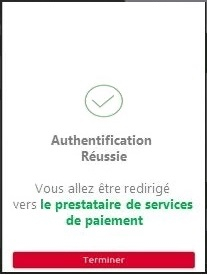
Once the redirection is activated, the ASPSP displays to PSU identification and authentification screens.
The UX is shown below :

1) PSU can enter his online banking ID thru the identification screen displayed by the ASPSP.

Note : if PSU is a professional or a corporate, another screen requesting the usage number can be displayed.
2) PSU needs to enter his SCA credentials in the authentication screen.
Different SCA means can be used by the PSU (SMS OTP – see below-, soft token, etc.).

or for the sandbox

In some cases, a notification can be sent to the PSU on his/her mobile phone to activate his PSU means, or to finish this step.
3rd step : get the access token
You can get your access token to be able to consume API resources.
Please note that the QWAC certificate needs to be sent for TLS mutual authentication. This certificate has to be the same as the one declared :
- during the Go Live process on the BPCE API portal
- or during the self-enrolment process using the “PSD2 Registration” API
If the PSU has authorized the TPP to access to his payment account (successful SCA), a 1-hour validity unique code will be genereted. It will be used for requesting the access_token useful to consumme API methods (see use case “Get your token“).
Example
POST https://www.12579.sandbox.api.89C3.com/stet/psd2/oauth/token
Header :
Content-Type:application/x-www-form-urlencoded; charset=utf-8
Params :
client_id:PSDFR-ACPR-13807
grant_type:authorization_code
code:NnZx1hqHY2CLkCFjiTwhJeflgFedCBa
redirect_uri:https://www.mycallback.com/
Remarks :
client_id : your agreement number as defined by your national competent authority (PSDXX-YYYY-ZZZZZ).
code : data in callback url
redirect_uri : this data needs to be strictly identical to the “redirect_uri” one used in the GET /authorize request !!!
The QWAC eiDAS certificate has to be sent with this request.
Response :
200 OK
Headers : X-Request-ID:id-1234567890111121 1
Body :
{
“access_token” : “KXZyspFBZ1R6NqWQdmsZhfdo1nbjK7MoI0Kr2rSi1mSCFNehAbCdEf”,
“token_type” : “Bearer”,
“expires_in” : 3600,
“scope” : “aisp offline_access”,
“refresh_token” : “KUZyspFBZ1R6NqWQdmsZhfdo1nbjK7MoD0Kr2rSi1mSCFNehAbCdEf”
}
Test with persona
Introduction
As required by PSD2 regulation (see RTS Art. -30 (5)), we deliver a testing facility, including support, for connection and functional testing using non-real test data. These personna are gathered using banking segments (retail, corporate) and customer segmentation (student, young active, professionnal, retired, etc…).
Expected API input data are listed (PSU id, IBAN). PSU consent has already been recorded. These data included the accounting balance are static (no changes).
Please note that this test dataset will evolve overtime with additional profiles and data history (volume, depth). So stay informed and visit this dev portal regularly!
PSU ID & TEST DATA AS DESCRIBED BELOW CANNOT BE USED IN PRODUCTION LIVE ENVIRONMENT.
Persona
Image

| Image

|
LEA SANDBOXA
| CLAIRE RECETTEB
|
Image

| Image

|
GEORGES PERSONAC
| GILLES TESTUNID
|
Please note that in the assembly mode, you’ll have to enter OTP SMS = « 12345678 » for all persona whenever the authentication screen is proposed.
WARNING : NEW ID NUMBER
| Persona | Segment | New Id | Bank code | IBAN | Payment account holder | PSU consent : balance/ Transactions / Identity | Balance | Currency |
|---|---|---|---|---|---|---|---|---|
| LEA SANDBOXA | Particulier | 9999999901 | 17515 | FR7617515000920400430518020 | LEA SANDBOXA | TRUE TRUE FALSE | -150.00 | EUR |
| CLAIRE RECETTEB | Particulier | 9999999902 | 17515 | FR7617515900000400358074026 | CLAIRE RECETTEB | TRUE TRUE FALSE | 0.00 | EUR |
| CLAIRE RECETTEB | Entrepreneur individuel | 9999999902 | 17515 | FR7617515900000800358074006 | CLAIRE RECETTEB | TRUE TRUE FALSE | +23766.98 | EUR |
| GEORGES PERSONAC | Particulier | 9999999903 | 17515 | FR7617515000920400085945890 | Mr et Mme GEORGES PERSONAC | TRUE TRUE FALSE | +10.00 | EUR |
| GILLES TESTUNID | Particulier | 9999999904 | 17515 | FR7617515000920440878790811 | Mr GILLES TESTUNID | TRUE TRUE FALSE | +11880.30 | EUR |
| GILLES TESTUNID | Particulier | 9999999904 | 17515 | FR7617515000920402428687756 | Mr OU Mme GILLES TESTUNID | TRUE TRUE FALSE | 0.00 | EUR |
| GILLES TESTUNID | Particulier | 9999999905 | 17515 | FR7617515000920402428748381 | Mr ET Mme GILLES TESTUNID | TRUE TRUE FALSE | +5879.22 | EUR |
API deprecation process
The decommissioning policy is based on the API lifecycle, which is aligned with the versions of the STET specifications.
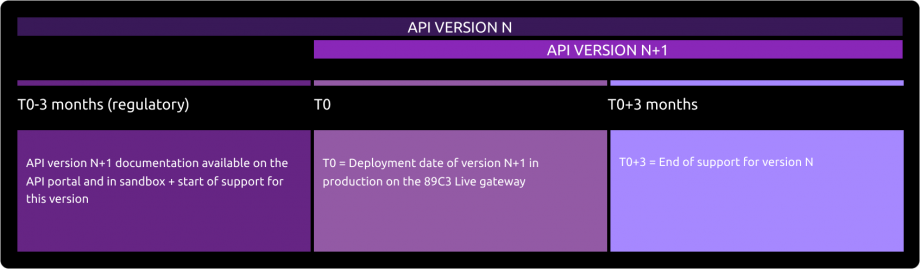
This is illustrated below for version N:

Decommissioning of API Version N
The decommissioning of our API version takes place in several steps:
Day of Deployment of the New API Version (T0):
Version N+1 is deployed to the 89C3 Live gateway.
Three Months Post Deployment (T0 + 3 Months):
Version N of the API is decommissioned from all environments (sandbox and live).
Communication regarding the decommissioning of version N will occur on the deployment date of version N+1.
The preferred communication channel is this Groupe BPCE API Store portal, in the "Roadmap" section of the impacted API.
An additional communication via email to the contacts of the providers registered on the Groupe BPCE API Store portal may complement this process.
Roadmap
This API can evolve. Please note that API modifications can occur out of the three-month regulatory notice period (art. 30 des RTS / paragraphe 4). We apply this in case of :
- urgent functional issue to solve impacting all PSU of at least one major customers segment
- security issue
- evolutions requested by the national competent authority
Functional Limits
Limits of this API version
- Apply only to active and eligible online accessible payment accounts in euro currency (the determining criterion for the purposes of that categorisation lies in the ability to perform daily payment transactions from such an account managed by the central backend IT system, source of data sent back thru APIs)
- Use AISP-mix model (PUT /consents method is mandatory for sending customer consent to ASPSP)
- Use only authentication with redirect mode (Strong Customer Authentication required and handled by the bank which IS NOT an obstacle according to French national competent authority)
Note : TPP are not allowed to send to ASPSP the PSU credentials, and only ASPSP SCA redirect screens can be used (no embeding process as clarified by European Banking Authority based on articles PSD2 #95.5 & RTS #31)
- Access to the list of trusted beneficiaries using GET /trustedBeneficiaries is NOT available (feature not implemented in Caisse d’Epargne online banking service interfaces)
- Access to customer account holder identity (first name and last name) is NOT available
- Transaction history data depth is aligned on online banking services (62-day period max for retail customers & small professionals/entrepreneurs segments, 90-day period max for large professionals & corporates, limited to 500 operations, no paginations managed by the API in both cases)
- “aisp extended_transaction_history” mode is NOT supported
- Access to payment account is done only using IBAN as main parameter
- There are no rate limits if the PSU-IP-ADDRESS is supplied, otherwise limited to 4 calls (see PSD2 regulations):
- per calendar day (00h00 – 23h59:59:999)
- per TPP OID
- per ASPSP end point
- per PSU ID
- per IBAN
- per API AIS method (/!\ /transactions method with or without dateFrom / dateTo parameters is considered as one method)
- The optional STET data “entryReference” applies only to PART & PRO/EI customer segments (see the functional perimeter in use case “Get transactions history”)
Note : as this data is issued on the spot via API, the search using “entryReferenceFrom” and/or “entryReferenceto” parameters is NOT supported
Limits related to eligible payment accounts
- Retail customer who subscribed direct access “DEI PART” online banking. In this case, the payment account starting with 04 is called a “deposit account”, and includes joint account, as well as attached minor to the account family.
Note 1 : the legal guardian or representative using Web Protexion solution (for managing persons under tutorship / curatorship) is not supported
Note 2 : a retail customer is a “physical individual” having the legal status of “capable adult”. He/she may have small professionals activities using the legal status “individual entrepreneur”, and is considered as a retail customer
- Large professional & corporate using direct access “CE Net” online banking (having a subscription “CE Net Compte” and an account starting with 08 with electronic funds transfers and electronic debits activated) have the status of “legal entity”. In this case, the payment account is called “current account”.
Limits related to SCA means compliant with this API
- Retail PSU equipped with password + SMS OTP and/or CAP reader and/or Secur’pass
- Small professional / individual entrepreneur PSU equipped with password + SMS OTP and/or CAP reader and/or Secur’pass
- Large professional & corporate & association PSU equipped with password + SMS OTP and/or CAP reader and/or physical token TurboSign
Note : if the PSU is only equipped with a physical token, this SCA mean can’t be used on his/her mobile/smartphone
From test to live data
According to PDS2 regulation, the data set available thru this dev portal, Try-it mode and sandbox are based on fictive data (or non-real ones).These data are described in the use case “Test our API“.
In order to access to live data, please use first our “PSD2 Registration” API.
Note : a weekly slot is reserved for a programmed maintenance (all IT infrastructure incl’d backends and API gateways) Monday morning from midnight to 06:00 am, and could generate some perturbations during this period (same for some banking batch processes initiated at the beginning or at the end of the day/month/quarter/year).
For live operations, the parameter “bankcode” allows to send API requests to the right ASPSP backend thru a dedicated « endpoint » www.<bkcode>.live.api.89c3.com(or www.<bkcode>.live.api.caisse-epargne.fr aligned on direct access domain name www.caisse-epargne.fr). Once chosen, this entry point shall also be used for all subsequent requests.
| Bank code | Bank name | Bank short name | Available in Try-it and Sandbox | Available in production |
|---|---|---|---|---|
| 11315 | Caisse d’Epargne Provence Alpes Corse | CEPAC | – | Yes |
| 11425 | Caisse d’Epargne Normandie | CEN | – | Yes |
| 12135 | Caisse d’Epargne Bourgogne Franche-Comté | CEBFC | – | Yes |
| 14445 | Caisse d’Epargne Bretagne-Pays de Loire | CEBPL | – | Yes |
| 13135 | Caisse d’Epargne Midi-Pyrénées | CEMP | – | Yes |
| 13335 | Caisse d’Epargne Aquitaine Poitou-Charentes | CEAPC | – | Yes |
| 13485 | Caisse d’Epargne Languedoc-Roussillon | CELR | – | Yes |
| 13825 | Caisse d’Epargne Rhône Alpes | CERA | – | Yes |
| 14265 | Caisse d’Epargne Loire Drôme Ardèche | CELDA | – | Yes |
| 14505 | Caisse d’Epargne Loire-Centre | CELC | – | Yes |
| 17515 | Caisse d’Epargne Ile De France | CEIDF | Yes | Yes |
| 18315 | Caisse d’Epargne Côte d’Azur | CECAZ | – | Yes |
| 18715 | Caisse d’Epargne Auvergne et Limousin | CEPAL | – | Yes |
| 15135 | Caisse d’Epargne Grand Est Europe | CEGEE | – | Yes |
| 16275 | Caisse d’Epargne Hauts de France | CEHDF | – | Yes |
| 12579 | Banque BCP | BBCP | – | Yes |
| 30258 | BTP Banque | BTPB | – | Yes |
| 42559 | Crédit Coopératif | CCO | – | Yes |
Eligibility
The API resources can only be used by Payment Service Providers (PSP) having a Account Information Service Providers (AISP) role.
In order to provide a service to users of account informations services under PSD2 directive, you must be a licenced PSP such as credit institution, electronic money institution, and payment institution. This status is delivered by the financial authorities of the country where the request is made ; in France it is the “Autorité de Contrôle Prudentiel et de Résolution (ACPR), under the supervision of the Banque de France regulatory body :
Obtaining and maintaining such agreement requires rigorous procedures in order to give strong guarantees to the account informations services users. The forms are provided on the ACPR website : https://acpr.banque-france.fr/en/authorisation/banking-industry-procedures/all-forms
Once the agrement is granted, the Organisation Identifier (OID) given by the national authority has the following format (UPPER case):
PSDXX-YYYYYYYY-ZZZZZZZZ
- “PSD” as 3 character legal person identity type reference
- 2 character ISO 3166 country code representing the NCA country
- hyphen-minus “-” (0x2D (ASCII), U+002D (UTF-8));
- 2-8 character NCA identifier (A-Z uppercase only, no separator)
- hyphen-minus “-” (0x2D (ASCII), U+002D (UTF-8));
- PSP identifier (authorization number as specified by NCA)
This OID is very important to identify yourself as a TPP :
- using STET API requests as OID is included in the parameter “client_ID”
- using mutual authentication (TLS) as OID is included in eIDAS certificates to be delivered to the bank (see below)
Please note that if you are using our “PSD2 Registration” API, an internal OID will be generated & shall be used for subsequent API requests.
You also need eIDAS (electronic IDentification And trust Services) compliant certificates delivered by a Qualified Certification Service Provider (QTSP, see list available on https://webgate.ec.europa.eu/tl-browser/#/).
In order to be able to consume PSD2 API published on our BPCE Portal, the TPP has to enroll its app and to use live certificates signed by a QTSP while sending “PSD2 Registration” API requests :
- a set of QWAC (for securing the TLS) and QSEALC (to be stored in our gateway) certificates for the sandbox
- another set of (for securing the TLS) and QSEALC (to be stored in our gateway) certificates for the live environment
Note : in case of certificate renewal, and if the QTSP is different (or the same but using different root key elements), the TPP must advise our API support at least 2 months prior the change in order to be able to double check if the new certification authority is loaded on our infrastructure.
A keyID shall also be provided with a correct STET format integrating the SHA256 certificate fingerprint after “_” char, see example STET / Documentation Part 3: Interaction Examples / section 6. AISP Use cases / Signature : keyId=https://path.to/myQsealCertificate_612b4c7d103074b29e4c1ece1ef40bc575c0a87e.
Please embed only public keys. Controls on other data will be based on European Banking Association TPP register (https://euclid.eba.europa.eu/register/pir/disclaimer).
You can also refer to the FAQ section.
History
STET Compliance
This REST-based API is compliant with the STET specifications developed by the French market initiative (https://www.stet.eu/en/psd2/), version V1.4.2.17, in order to comply with PSD2 regulatory requirements. It takes into account functional limitations specific to this retail bank network (see use case “Limitations“).
As a reminder :
- payment services directive (PSD2, (UE) 2015/2366 of 25/11/2015) went into force on january 13, 2018:
- it is supplemented by regulatory technical standards for strong customer authentication (RTS, Commission Delegated Regulation (EU) No 2018/389) and common and secure open standards of communication that will apply on september14, 2019. These standards are called RTS (Rules Technical Standards) :
In France, the ordinance n° 2017-1252 of August 9, 2017 implements the PSD2 directive into the regulatory section of the monetary and financial code. This ordinance has been supplemented by two decrees (n° 2017-1313 and n° 2017-1314 on August 31, 2017), and five orders that were published on August 31, 2017
Description of user support + duration of support
According to Article 30 (5) of the RTS, a support for third-party providers is available.
This support can be joined via the form on this Groupe BPCE API Store.
Responses are sent during office opening hours (09:00 – 18:00 Central European Local Time). However, there is a 24/7 monitoring process for our IT systems.
The general principle of TPP support is outlined below, taking into account delays of Article 30 (4) of the RTS :
Deployment of API Version N+1
The deployment of the new version of our API takes place in several stages:
Before Deployment (T0 - 3 months):
The documentation for API version N+1 is available on the API Store.
Version N+1 is accessible in the testing environment (sandbox).
Support for the new version is activated.Day of Deployment (T0):
Version N+1 is deployed on the 89C3 Live gateway.
Three Months After Deployment (T0 + 3 months):
Support for API version N is discontinued.
Release Notes
Important changes made since the first version of this documentation was published :
| METHOD(S) | Effective date | Description of the evolution |
|---|---|---|
| All | October 30, 2020 | See all previous evolutions on Version V1 API |
All
GET /accounts/../transactions | December 21, 2020 | Add a new entry point / “limitations” section
Status change from “PDNG” to “OTHR” |
| All | January 28, 2021 | Add new customer segments / “limitations” section |
| GET /accounts/../transactions | February 03, 2021 | Add optional STET data “entryReference” / “limitations” section & “get transactions history” use case |
| GET /accounts/../transactions | September 14, 2021 | Add optional STET data “BankTranscationCode” / “get transactions history” use case |
GET /accounts/../transactions
Fallback Refresh the access Token | September 29, 2021 | Add optional STET data “bankTransactionCode” (for ENT & CORP)
Add impacts of the new online banking solution Add a note on revocation process |
| Roadmap | October 30th, 2021 | Note on urgent changes out of regulatory notice period |
| All | January 3rd, 2022 | Editorial issues and SCA updates |
| Overview | August 28, 2022 | Editorial issues and App2App updates |